Resource Group Utilization Detail with Forecast report
Resource Group Utilization Detail with Forecast report overview
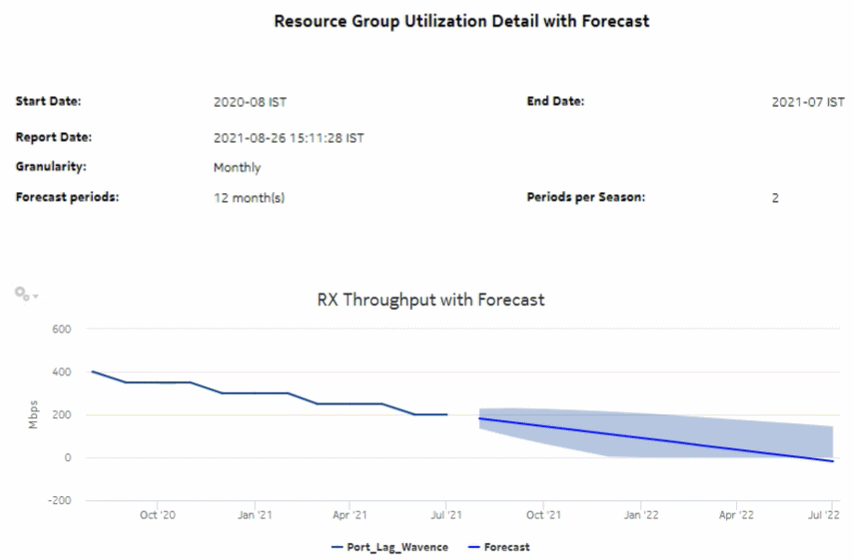
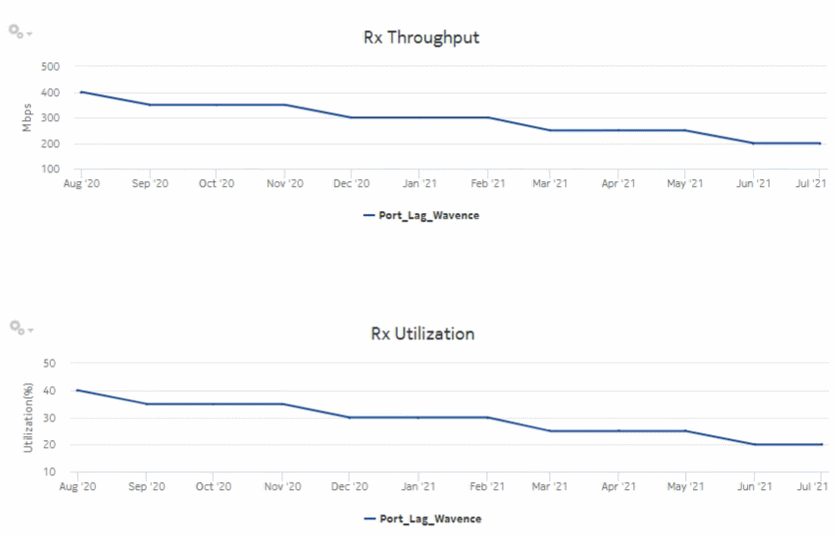
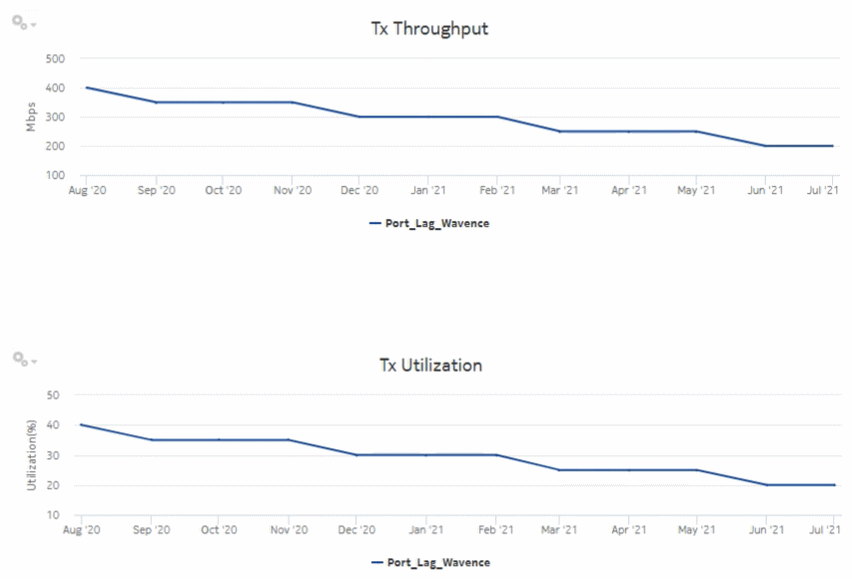
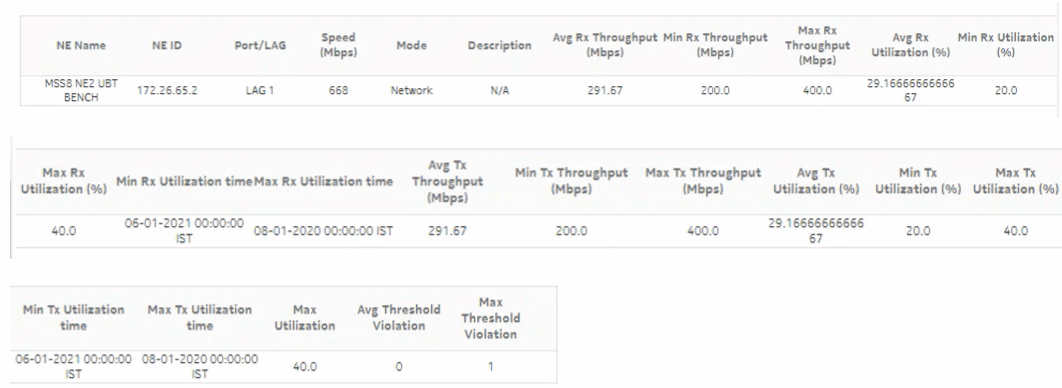
The Resource Group Utilization Detail with Forecast report includes utilization data for NEs managed by the NFM-P only, by the MDM (model-driven Nokia) only, or NFM-P+MDM-mediated NEs. The report shows forecast support for utilization and throughput. Forecasts are available for daily or monthly granularities. The report displays a set of time series graphs or tables for Rx and Tx throughput, Rx and Tx utilization, Rx and Tx throughput with forecast, and Rx and Tx utilization with forecast.
There must be data in the data dictionary tables in order to generate the Resource Group Utilization Detail with Forecast report. Otherwise, an error occurs when executing the SQL statement for the report; see /opt/nsp/analytics/log/analytics.server.log for more information.
Use cases
Capacity planning—Use the report to examine resource group utilization patterns to plan for capacity requirements.
Limitations
Report limitations include:
-
Minimum and maximum throughput aggregation cannot be compared with the minimum and maximum throughput values generated from raw granularity.
-
Some table columns cannot be sorted and filtered; see Which report table columns cannot be sorted and filtered?.
-
When the report is exported to the CSV or DOCX file type, some data may not display or the table may not align properly.
-
When the report is exported to the RTF file type, some table columns may not display.
Prerequisites
The following table describes the aggregation rules that must be enabled and telemetry subscriptions that must be configured for the NEs on which statistics are to be collected. The aggregation rules must be enabled to view the report for granularities other than raw data; see How do I configure analytics aggregation?. Enable aggregation and configure telemetry subscriptions; see the Telemetry information on the Network Developer Portal and the NSP Data Collection and Analysis Guide.
See information in the NSP NFM-P Statistics Management Guide about creating or modifying a specific MIB statistics policy using a bottom-up method.
Table 19-19: Resource Group Utilization Detail with Forecast report prerequisites
|
Aggregator name |
Monitored object class |
Statistics class |
Statistics collection |
NE types |
|---|---|---|---|---|
|
md-aggr:/md-aggr-base-interfaces-interface |
Telemetry Base Interface |
telemetry:/base/interfaces/interface |
Telemetry statistics |
7220 IXR D3 (SRL) 7250 IXR-6 (SRL) 7250 IXR-6e (SRL) 7750 MD SR Classic NE with gRPC telemetry collection enabled Cisco IOS-XR (NCS 7.6.2) (LAG only) Cisco XRV 7.6.2 (port and LAG) Huawei NetEngine 8000 (huawei-vrp-NE8K-M8) (port and LAG) Juniper vMX Junos 21.4R1.12 (port and LAG) |
Table 19-20: Resource Group Utilization Detail with Forecast report prerequisites for NFM-P-managed NEs
|
Aggregator name |
Monitored object class |
Statistics class |
Statistics collection |
MIB name |
NE types |
|---|---|---|---|---|---|
|
Interface Utilization Statistics Aggregator |
equipment.PhysicalPort lag.Interface |
equipment.InterfaceAdditionalStats |
Performance statistics |
ifXEntry |
7210 SAS 7250 IXR 7705 SAR 7750 SR 9500 MPR-A Chassis 1 9500 MPR-A Chassis 4 9500 MPR-A Chassis 8 9500 MPR-E Chassis 1 9500 MPR-E Chassis 4 9500 MPR-E Chassis 8 9500 MSS-1c 9500 MSS-O ANSI 9500 MSS-O ETSI 9500 SA Wavence UBT-SA Wavence UBT-I Wavence MSS-1 Wavence MSS-1c Wavence MSS-4 Wavence MSS-8 Wavence MSS-E Wavence MSS-HE Wavence MSS-XE Wavence MSS-O Wavence SA |
Report characteristics
The following table lists the principal report characteristics.
Table 19-21: Resource Group Utilization Detail with Forecast report characteristics
|
Characteristic |
Value | ||||
|---|---|---|---|---|---|
|
Data type |
Statistics | ||||
|
Source database |
Auxiliary database | ||||
|
Report inputs |
Prompt |
Notes | |||
|
Start date End date |
Calendar date or relative date (for example, two days ago) and time For the Start Date, enter the start date, which is before the End Date For the End Date, enter the end date, which is after the Start Date | ||||
|
Report range |
Length of time to be reported, in minutes (minutes, min), hours (hours, h), days (days, d), weeks (w), or months (months, m) | ||||
|
Granularity |
Aggregation types: | ||||
|
Resource Groups |
Port and LAG resource groups as created in the Maps Layouts and Groups, Map Layout view. | ||||
|
Average utilization threshold |
— | ||||
|
Maximum utilization threshold |
— | ||||
|
Forecast periods |
The range for the forecast to work. The value is based on the granularity selected. For example, a period of 30 would mean 30 days if the granularity is daily, and 30 months if the granularity is monthly. | ||||
|
Periods per Season |
The frequency at which there is a similarity in data. For example, the frequency at which a plot has similar values. The behavior is the same as the forecast period. For example, a period of 7 would mean 7 days if the granularity is daily, and 7 months if the granularity is monthly. | ||||
|
KPI |
Rx Throughput Tx Throughput Rx Utilization Tx Utilization | ||||
|
Logo Resource ID |
The logo to add to the report. Enter the Resource ID of the logo image in the Images folder. The default is the Nokia logo. To create the report without a logo, leave the Logo Resource ID field blank. | ||||
|
Logo Position |
Choose Left, Middle, or Right. The logo appears on the left on the first page of the report if you choose Left or Middle. | ||||
|
Show report output on one page |
Select the check box to enable pagination. Note: Using the Show report output on one page option when creating reports as drill-downs may impact report rendering time. Nokia recommends disabling the Show report output on one page option when creating reports. | ||||
|
Drill-down support |
Yes—Drills down to the Resource Group Utilization Summary report. | ||||