PCTL
PCTL function overview
The PCTL function is a limited availability feature and is supported only in specific visualization and appearance type configurations. The PCTL function calculates the percentile value of a metric across rows in a domain view. It operates at the row level and is supported only within specific visualization and appearance-type configurations.
Limitations
Report limitations include:
-
The PCTL function operates at row level only; group-level percentile calculations across multiple ports are not supported.
-
Views using non-table formats (such as Crosstab or Chart) are not supported.
-
Details and Total appearance type are not supported when a group is present in the columns with no group in the measures
-
When an unsupported configuration is applied, the following error is displayed: "There was an error generating the report. Please check the logs for detailed error message." However, in some cases, no corresponding details appear in the logs.
Prerequisites
Examples
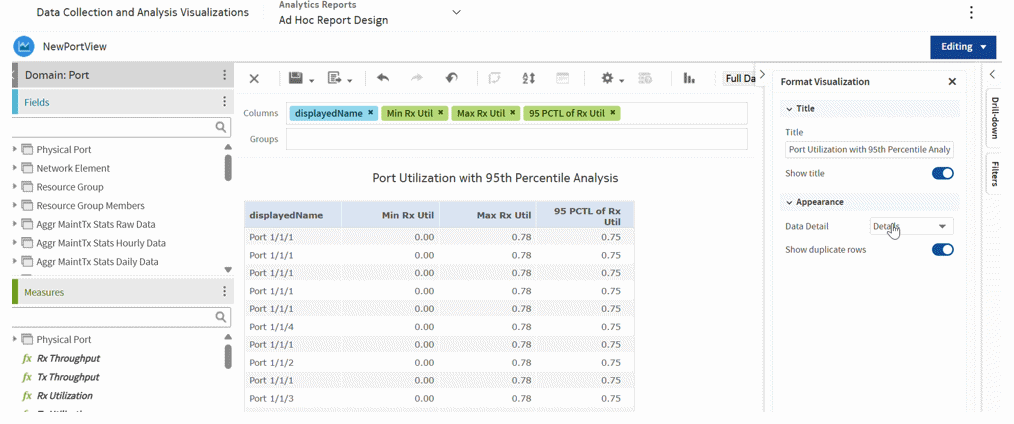
The following example is a row-level case.
Figure 13-1: Row-level case
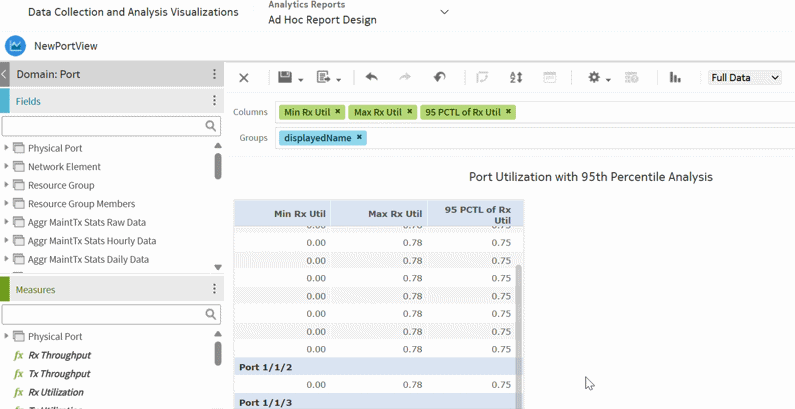
The following example shows an object grouped in the view.
Figure 13-2: Object grouped in the view
Appearance type support (Group/No Group combinations)
-
Column Group—A group applied in the view layout, where you can group a column (for example, displayedName) directly in the domain view.
-
Measure Group—A group defined within the calculated measure formula (for example, PercentileOf), where you can specify a rowgroup or columngroup argument to scope the calculation.
See the following table for more information.
Table 13-1: Column Group and Measure Group
|
Column Group |
Measure Group | ||
|---|---|---|---|
|
Description |
Field grouped in the view layout |
Group argument inside the measure formula | |
|
Example |
displayedName in the Groups section |
Min('NumberFieldName', 'RowGroup') | |
Table 13-2: Column Group and Measure Group—Supported Rows
|
Row Number |
Column Group |
Measure Group |
Appearance Type |
Status |
|---|---|---|---|---|
|
1 |
No Group |
No Group |
Details Details and Totals |
Supported |
|
2 |
Group No Group |
Group No Group |
Total |
Not Supported |
|
3 |
No Group |
Group |
Details Details and Totals Total |
Not Supported |
|
4 |
Group |
No Group |
Details |
Supported |
|
5 |
Group |
Group |
Details |
Supported |
|
6 |
Group |
No Group |
Details Total |
Not Supported |