Ping Network Site Summary report
Overview
A Ping Network Site Summary report can be run by itself or as a drill-down from a Ping Network Summary report. The report shows the aggregate view of the set of tests for a selected source NE and target NE, aggregated by forwarding class.
The report includes the following test types:
Use cases
QoS analysis—Identify potential service impacting issues based on thresholds for latency, jitter and packet loss between specific NEs.
Limitations
When the report is exported to the PPT file type, some data may not display or the table may not align properly.
Sorting and filtering are not available for this report.
Report inputs
The following table shows the report inputs.
Table 5-7: Ping Network Site Summary report inputs
|
Prompt |
Notes |
|---|---|
|
Test Type |
ETH-CFM Two-Way Delay, ICMP Ping, VCCV Ping, LSP Ping, Tunnel Ping |
|
End Date |
Calendar date or relative date (for example, two days ago) and time |
|
Granularity |
Aggregation types: |
|
Report range |
Length of time to be reported, in minutes (minutes, min), hours (hours, h), days (days, d), or months (months, m) |
|
Forwarding Class |
The list of forwarding classes configured in NSP Classic management. Search using partial or full names. |
|
Source Node |
Search using partial or full names. Select an item. Both the NE name and IP address display. |
|
Target Node | |
|
Result set limit |
Number of results to report |
|
Show report output on one page |
Select the check box to enable pagination. Note: Using the Show report output on one page option when creating reports as drill-downs may impact report rendering time. Nokia recommends disabling the Show report output on one page option when creating reports. |
Report characteristics
The following table lists the principal report characteristics.
Table 5-8: Ping Network Site Summary report characteristics
|
Characteristic |
Value |
|---|---|
|
Data type |
OAM testing |
|
Source database |
Auxiliary database |
|
NE types supported |
7210 SAS-M, 7210 SAS-X, 7210 SAS-Mxp, 7210 SAS-R12, 7210 SAS-R6, 7210 SAS-T, 7210 SAS-S, 7210 SAS-Sx, 7210 SAS-K12, 7210 SAS-K30, 7210 SAS-S/SX 1/10GE VC 7250 IXR-6, 7250 IXR-R6, 7250 IXR-s, 7250 IXR-10, 7250 IXR-e all 7450 ESS variants all 7705 SAR variants all 7750 SR and VSR variants all 7950 XRS variants OS 6860, OS 6450, OS 6900 OS 6860, OS 6450, and OS 6900 support ETH-CFM Two-Way Delay and ICMP Ping tests only. 7705 SAR-Hm and 7705 SAR-Hmc support ICMP Ping tests only. Contact Nokia for information about compatibility with specific NE releases. |
|
Drill-down support |
Yes:
|
Example
The following figures show report examples.
Figure 5-8: ETH-CFM Two Way Delay Network Site Summary report
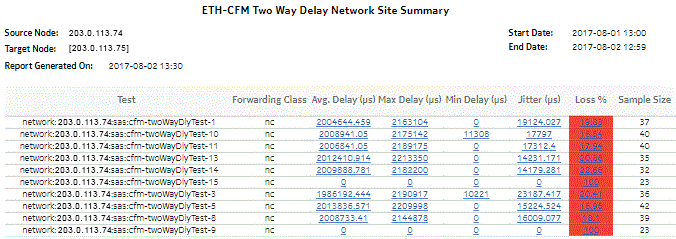
Figure 5-9: ICMP Ping Network Site Summary report
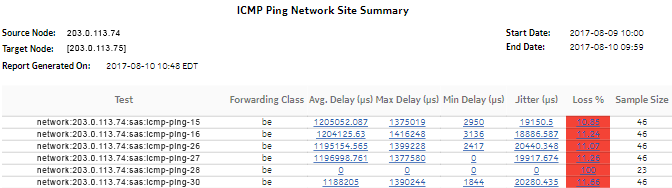
Figure 5-10: VCCV Ping Network Site Summary report
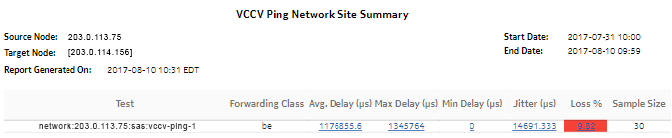
Figure 5-11: LSP Ping Network Site Summary report
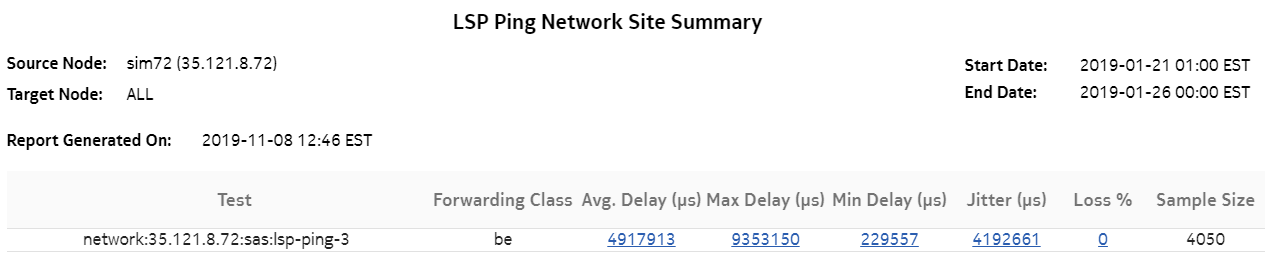
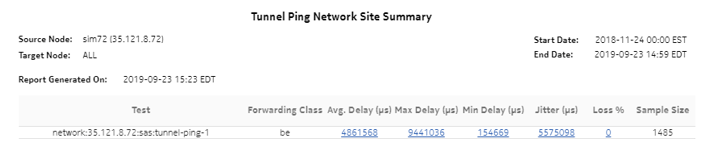
Figure 5-12: Tunnel Ping Network Site Summary report