Temperature, CPU, Memory Utilization Summary report
Temperature, CPU, Memory Utilization Summary report overview
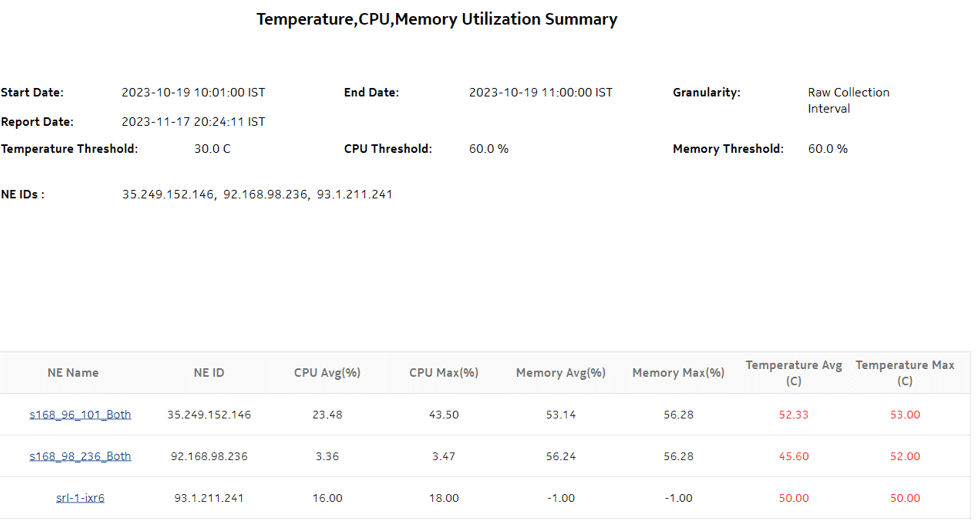
The Temperature, CPU, Memory Utilization Summary report shows the maximum and average temperature and memory and CPU usage for selected NEs. The default display is a table displaying details. By default, the table is sorted according to the NE Name column. Table sorting is enabled for the CPU Memory Average and Maximum columns. The report includes throughput data for NEs managed by the NFM-P only, MDM (model-driven Nokia) only, or NFM-P+MDM-mediated NEs.
The temperature in the report is at the NE level, since the temperature readings from all of the card sensors are averaged at the NE level as the NE temperature.
To generate meaningful average temperature data, Nokia recommends using raw or hourly interval statistics.
Memory Usage is computed in the report using the following formula: [memory in use / (allocated memory + available memory) * 100]. The calculation is displayed at the footnote section of the reports.
If no telemetry subscriptions are enabled for CPU, Memory, and Temperature, the report shows -1 values for CPU and Memory and N/A for Temperature.
Utilization results are colored red when utilization reaches or exceeds user-defined thresholds. Thresholds are defined separately. The default value for the temperature threshold is 30°C. The default value for the memory and CPU thresholds is 60%.
The following temperatures can be reported by the NE when no temperature sensor is available. These temperatures are invalid and will not be displayed in the report.
Limitations
Report limitations include:
-
Minimum and maximum throughput aggregation cannot be compared with the minimum and maximum throughput values generated from raw granularity.
-
Some table columns cannot be sorted and filtered; see Which report table columns cannot be sorted and filtered?.
-
There is a limitation in the length of string which is passed when you choose Select All for the display name for some report inputs; in particular, when you multiselect a report input, you cannot exceed a string length of 65,000 octets.
-
When the report is exported to the RTF file type, some table columns may not display.
-
When the report is exported to the ODS or ODT file type, some data may not display.
-
When the report is exported to the CSV file type, some data may not display or the table may not align properly.
Prerequisites
The following table describes the aggregation rules that must be enabled and telemetry subscriptions that must be configured for the NEs on which statistics are to be collected. The aggregation rules must be enabled to view the report for granularities other than raw data; see How do I configure analytics aggregation?. Enable aggregation and configure telemetry subscriptions; see the Telemetry information on the Network Developer Portal and the NSP Data Collection and Analysis Guide.
See information in the NSP NFM-P Statistics Management Guide about creating or modifying a specific MIB statistics policy using a bottom-up method.
Table 11-31: Temperature, CPU, Memory Utilization Summary report prerequisites
|
Aggregator name |
Monitored object class |
Statistics class |
Statistics collection |
NE types |
|---|---|---|---|---|
|
md-aggr:/md-aggr-base/telemetry-system-info/system |
Card Memory pool Shelf |
telemetry:/base/system-info/system |
Telemetry statistics |
7220 IXR D3 (SRL) 7250 IXR-6 (SRL) 7250 IXR-6e (SRL) 7750 MD SR Classic NE with gRPC telemetry collection enabled Cisco IOS-XR (NCS 7.6.2) Cisco XRV 7.6.2 Juniper vMX Junos 21.4R1.12 |
|
md-aggr:/md-aggr-base/telemetry-hardware/temperature |
Card Port Shelf |
telemetry:/base/hardware/temperature |
Telemetry statistics |
7220 IXR D3 (SRL) 7250 IXR-6 (SRL) 7250 IXR-6e (SRL) 7750 MD SR Classic NE with gRPC telemetry collection enabled Cisco NCS 7.6.2 Cisco XRV 7.6.2 Juniper vMX Junos 21.4R1.12 |
Table 11-32: Temperature, CPU, Memory Utilization Summary report prerequisites for NFMP-managed NEs
|
Aggregator name |
Monitored object class |
Statistics class |
Statistics collection |
Details (MIB name) |
NE types |
|---|---|---|---|---|---|
|
System CPU Usage Stats Aggregator |
equipment. SystemStatsHolder |
equipment. SystemCpuStats |
Performance statistics |
TIMETRA- SYSTEM-MIB. sgiCpuUsage |
7210 SAS 7250 IXR 7705 SAR 7705 SAR-H 7705 SAR Hm 7750 SR 7950 XRS |
|
System Memory Stats Aggregator |
equipment. SystemStatsHolder |
equipment. SystemMemoryS- tats |
Performance statistics |
TIMETRA- SYSTEM-MIB. sgiMemoryUsed |
7210 SAS 7250 IXR 7705 SAR 7705 SAR-H 7705 SAR Hm 7750 SR 7950 XRS |
|
Allocated Memory Stats Aggregator |
equipment. SystemStatsHolder |
equipment. AllocatedMemoryS tats |
Performance statistics |
TIMETRA- SYSTEM-MIB. sgiMemoryPoolAl- locate |
7210 SAS 7250 IXR 7705 SAR 7705 SAR-H 7705 SAR Hm 7750 SR 7950 XRS |
|
Available Memory Stats Aggregator |
equipment. SystemStatsHolder |
equipment. AvailableMemoryStats |
Performance statistics |
TIMETRA- SYSTEM-MIB. sgiMemoryAvail- able |
7210 SAS 7250 IXR 7705 SAR 7705 SAR-H 7705 SAR Hm 7750 SR 7950 XRS Note: 7705 SAR-H is not supported. Memory Usage is as follows: Memory Usage =(systemMemory UsageInKb/ (allocatedMemory InKb+available MemoryInKb)*100 For SAR-H NEs, the available memory statistics are not supported; the calculation is as follows: Memory Usage =(systemMemory UsageInKb/ (allocatedMemory- InKb)*100 |
|
Hardware Temperature Stats Aggregator |
equipment. BaseCard equipment. CardSlot equipment.CCM equipment.FanTray equipment. ControlProcessor equipment. DaughterCard equipment. MCMCard equipment. PowerSupplyTray equipment.Shelf equipment. SwitchFabricPro- cessor equipment. XiomCard |
equipment. Hardware Temperature |
Performance statistics |
TIMETRA- CHASSIS-MIB. tmnxHwEntry |
7210 SAS 7250 IXR 7705 SAR 7705 SAR-H 7705 SAR Hm 7750 SR 7950 XRS Omnisystem NEs |
|
Card Health Stats Aggregator |
equipment. CardSlot |
equipment. CardHealth Stats |
Performance statistics |
ALCATEL-IND1- HEALTH-MIB. healthModuleEntry |
7705 SAR-H Omnisystem NEs and their variants |
Report characteristics
The following table lists the principal report characteristics.
Table 11-33: Temperature, CPU, Memory Utilization Summary report characteristics
|
Characteristic |
Value | |||||
|---|---|---|---|---|---|---|
|
Data type |
Statistics NE configuration information | |||||
|
Source database |
Auxiliary database | |||||
|
Report inputs |
Prompt |
Notes | ||||
|
End date |
Calendar date or relative date (for example, two days ago) and time | |||||
|
Granularity |
Aggregation types: | |||||
|
Report range |
Length of time to be reported, in minutes (minutes, min), hours (hours, h), days (days, d), or months (months, m) | |||||
|
NE Type |
Select individual items or click Select All. Search using partial names or wildcard (%). | |||||
|
Name or name pattern for NE | ||||||
|
NE | ||||||
|
Temperature unit (C/F) |
Celsius or Fahrenheit. Default is Celsius. | |||||
|
Temperature threshold |
Data at or above thresholds will display in red. | |||||
|
CPU threshold | ||||||
|
Memory threshold | ||||||
|
Logo Resource ID |
The logo to add to the report. Enter the resource ID for the logo image uploaded to the Images folder, if any. If no logo ID is provided, the logo area will be blank. | |||||
|
Logo Position |
Choose Left, Middle or Right. The logo will be placed on the left of the first page of the report for both the left and middle options. | |||||
|
Show report output on one page |
Select the check box to enable pagination. Note: Using the Show report output on one page option when creating reports as drill-downs may impact report rendering time. Nokia recommends disabling the Show report output on one page option when creating reports. | |||||
|
Drill-down support |
Yes—Open the Temperature, CPU, Memory Utilization Details report for the selected NE. | |||||
Note: If there is no data for the input date and range, the report displays -1.00 in the table columns.