Sample procedure: using mass deployment discovery with blueprints
Purpose
This sample procedure describes the general steps of discovering logical configurations from NFM-P into NSP, and managing them using blueprints.
A recommended practice is to select a reference NE: an NE that reflect the desired configuration according to the network plan. The use of a reference NE will ensure that the desired configuration is discovered when defining the blueprint templates, which in turn will be used for centralized policy management.
In this example, the NE with NE ID 92.168.97.35 is used as the reference NE. This sample procedure uses the Premium QoS ingress policy as an example. The same high-level steps for other policy types need to be performed to obtain complete centralized policy management.
Setup
Before this sample procedure begins, the following is done:
-
Several classic NEs have been discovered in NSP, including a designated reference NE.
-
The reference NE has the following QoS policies: Gold, Silver, Premium, default, and test.
-
The relevant intent type, qos-sap-ingress-csros-23-10-1_24-4 has been imported to Device Management, Configuration Intent Types. See How do I import a configuration intent type?.
-
A flexible template, Generic_QoS_Ingress, has been configured based on the intent type; see How do I create a configuration template?
Steps
1 |
Associate the generic template to the network to discover the QoS policies from NFM-P:
|
2 |
Choose the Generic_QoS_Ingress template and click 
Creating blueprints allows the policy to be applied and managed on a group of NEs. Proceed to Step 3. |
3 |
Choose the deployment of the Premium QoS policy, that is, the deployment with Premium in the Identifier, and create a blueprint from it: See How do I convert a logical configuration deployment to a blueprint?.

The new Premium blueprint includes all the configuration values of the Premium policy created for the reference NE. |
4 |
To apply the blueprint to NEs, perform a mass deployment discovery:
|
5 |
Double-click on the Premium blueprint template to view the deployments. The list shows the NEs with the Premium QoS policy definition. The blueprint distribution status is Global Definition, meaning the NE configurations are in sync with the blueprint values. 
You can edit any of these deployments individually and apply changes to the NE, similar to making local changes in NFM-P; see How do I edit a deployment?. If a local change has been made, the deployment remains affiliated with the blueprint, but the blueprint distribution status is updated to Local Definition to show that it is out of sync. 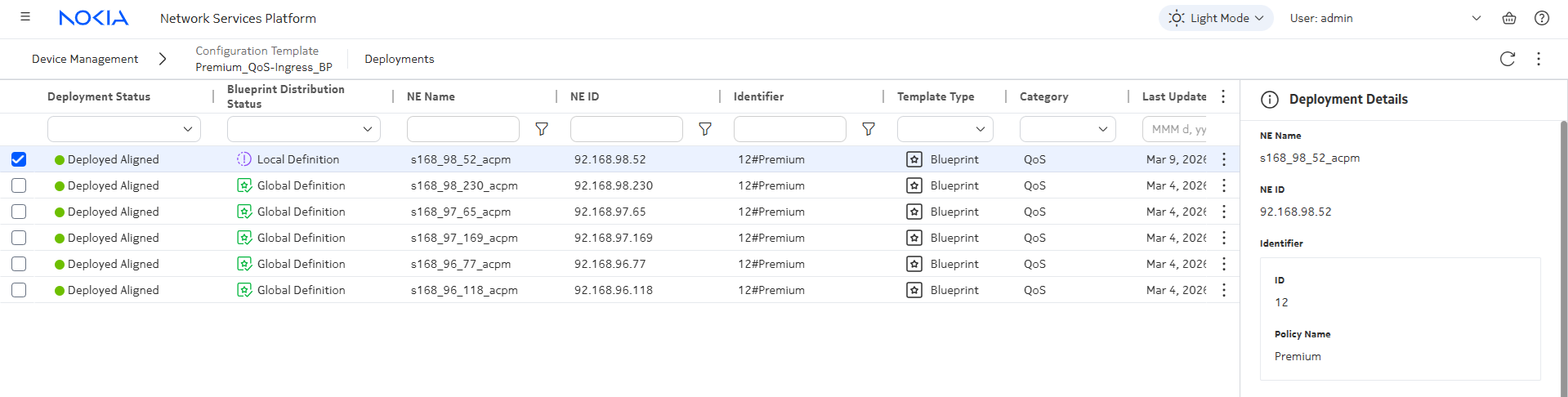
|
6 |
Updates to the blueprint template are automatically applied to all deployments in global status. See How do I edit a template? To update the blueprint:
The local deployment shown in Step 5 is not changed when the blueprint definition is updated. |
7 |
To align the local deployment with the blueprint, globalize it; see How do I verify or globalize a deployment?.
End of steps |
 (Table row actions), Associate to Network, Associate selected classic instances. See
 Target and choose Select targets from the drop-down list.