Pathway for troubleshooting Cloud Native telemetry alarms
Purpose
This pathway provides a flow of tasks you can perform to investigate a CN telemetry alarm. In this scenario, the subscription is created but expected output of the telemetry data is not found. Telemetry alarms are supported for the following.
-
RP alarms are raised per subscription, not per NE.
Alarm characteristics
Alarms are generated automatically based on specific failure conditions.
Most alarms do not clear implicitly once the issue is resolved. After fixing the root cause, you must manually clear the alarm from the Current Alarms view.
Alarm troubleshooting flow
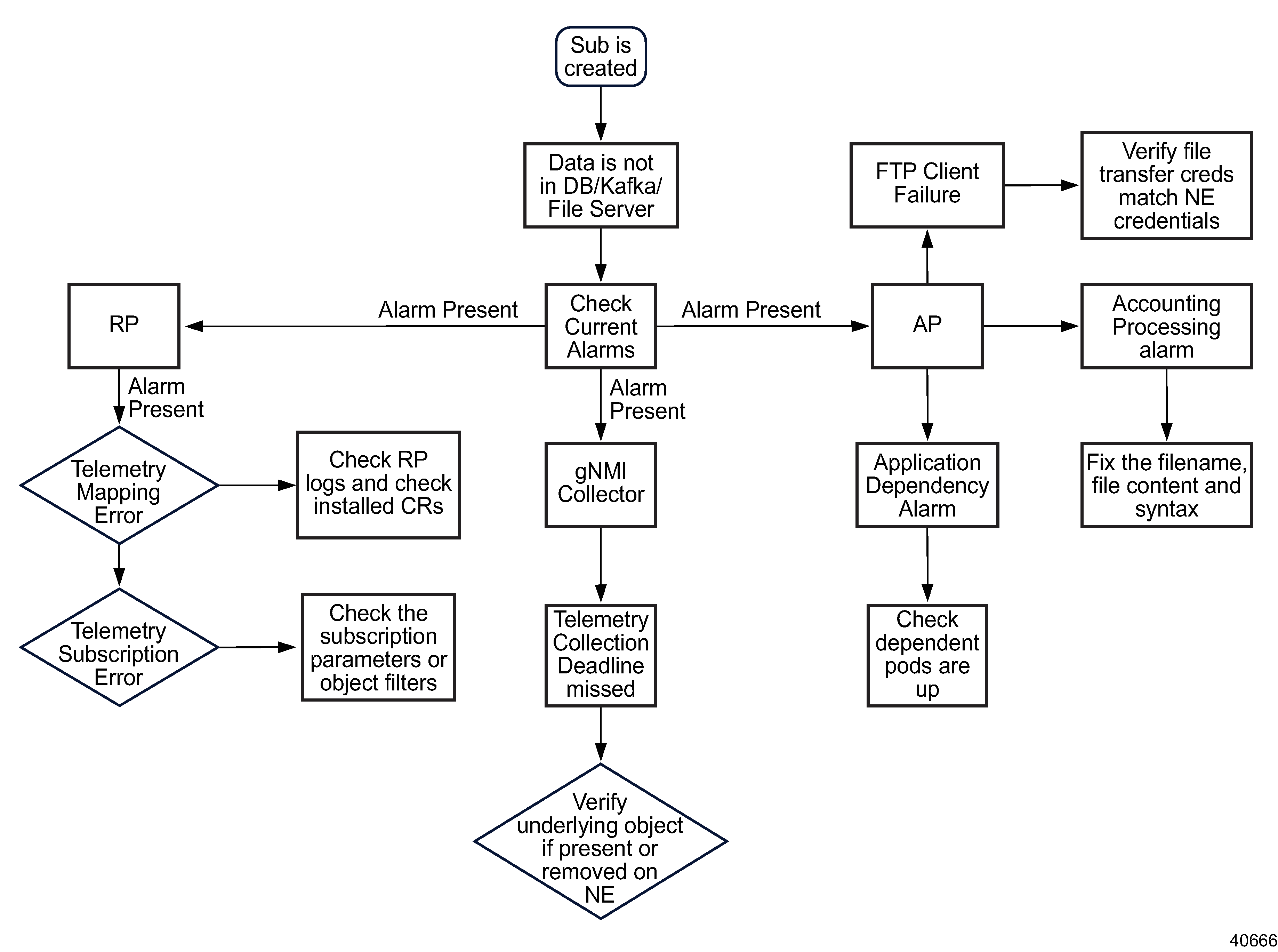
Figure 5-4: Telemetry alarm troubleshooting flow
Stages
Determine the impacted component | |||||||||||||||||||
1 |
Open Current Alarms. Alarms are listed with details such as alarm name, severity, alarmed object type, probable cause, subscription (for RP alarms), and timestamp. | ||||||||||||||||||
2 |
The alarm name provides the impacted component, as shown in the following table.
| ||||||||||||||||||
Request processor alarms | |||||||||||||||||||
3 |
From the System Health dashboard, open Log Viewer and click Discover. Search tlm-request-processor to open the logs.
| ||||||||||||||||||
4 |
A telemetry subscription error occurs when File Output is selected in a gNMI subscription. File output is supported for accounting only.
| ||||||||||||||||||
gNMI collector alarms | |||||||||||||||||||
5 |
A TelemetryCollectionDeadlineMissed alarm occurs when collection is attempted on a missing or deleted object. The alarm clears automatically when the missing object is restored and collection resumes. | ||||||||||||||||||
Accounting processor alarms | |||||||||||||||||||
6 |
If FTP or SFTP is failing:
| ||||||||||||||||||
7 |
If accounting processing is failing, the accounting files are not configured correctly. On the NE, verify and correct the accounting file format, syntax, quotes, and supported keywords. | ||||||||||||||||||
8 |
If an accounting dependency is failing, a dependent pod is experiencing a problem. Determine the dependent pod (Kafka, postgres, Vertica, file pods) and scale up as needed. | ||||||||||||||||||
 (Table row actions) View Artifacts.
 (Mediation Policies) in the Summary panel. Click a file transfer policy name to view the details.