
Lawful intercept
The lawful intercept (LI) solution provides legally sanctioned, official access to private communications and is implemented on the cMAG-c and on the MAG-u.
LI overview
LI is a legally sanctioned, official access to private communications. To provide intercepted private communications to law enforcement officials, a service provider or network operator collects communication of a private subscriber or organization using an LI security process.
LI typically consists of the following interfaces, irrespective of the access technology:
- administrative interface – supports LI target provisioning
- information-related interface (IRI) – provides event information related to subscribers
- contents-of-communications interface (CC) – sends mirrored packets to the LI gateway (LIG)
The Nokia CUPS architecture supports administrative and IRI interfaces on the cMAG-c and the CC interface on each MAG-u.
The cMAG-c provides a centralized location to provision all LI targets, and instructs the MAG-u to perform LI for specific target subscribers by sending encrypted LI PFCP IEs through the Sx interface. The cMAG-c and the MAG-u share a private key to allow decryption of LI PFCP IEs.
To allow the LI target to remain anonymous, every subscriber PFCP session includes encrypted LI PFCP IEs.
LI strict licensing
To activate the LI functionality, the cMAG-c requires an LI license. The cMAG-c uses a single license for all features, including LI. The cMAG-c license is installed on the main management pod, not on the LI session management pod. After installing a cMAG-c license including LI, the LI session management POD becomes available.
info from state system licenseSee the cMAG-c CLI and Data Model Explorer for information about this CLI including its parameters.
cMAG-c license including the LI license
# info from state system license cmagc_0_0
    admin-state enable
    preferred true
    data "..."
    issued-date "YYYY-MM-DD time"
    expiration-date "YYYY-MM-DD time"
    rtuLawfulIntercept: true
    expired false
    valid true
    in-use true
When the cMAG-c license includes LI and is successfully installed, the wireline LI functionality becomes available. See LI solution for wireline application for information about the wireline LI.
If the cMAG-c license expires, the cMAG-c remains functional during a grace period except for the restricted features. LI is a restricted feature, so when the cMAG-c license expires, the cMAG-c disables the LI functionality and removes the LI targets from both the cMAG-c and the MAG-u nodes. The LI configuration is removed completely from the system.
Installing a new valid license after license expiration results in factory defaults and all the configuration must be reprovisioned.
To avoid having to obtain a new license and reprovision, it is important to upgrade the license before performing a software upgrade.
Nokia recommends to always back up the current configuration, so you can reapply it to the cMAG-c after an upgrade.
See the cMAG-c Installation Guide for more information about cMAG-c licensing.
LI architecture
The following figure provides a high-level overview of the cMAG-c LI functional architecture.
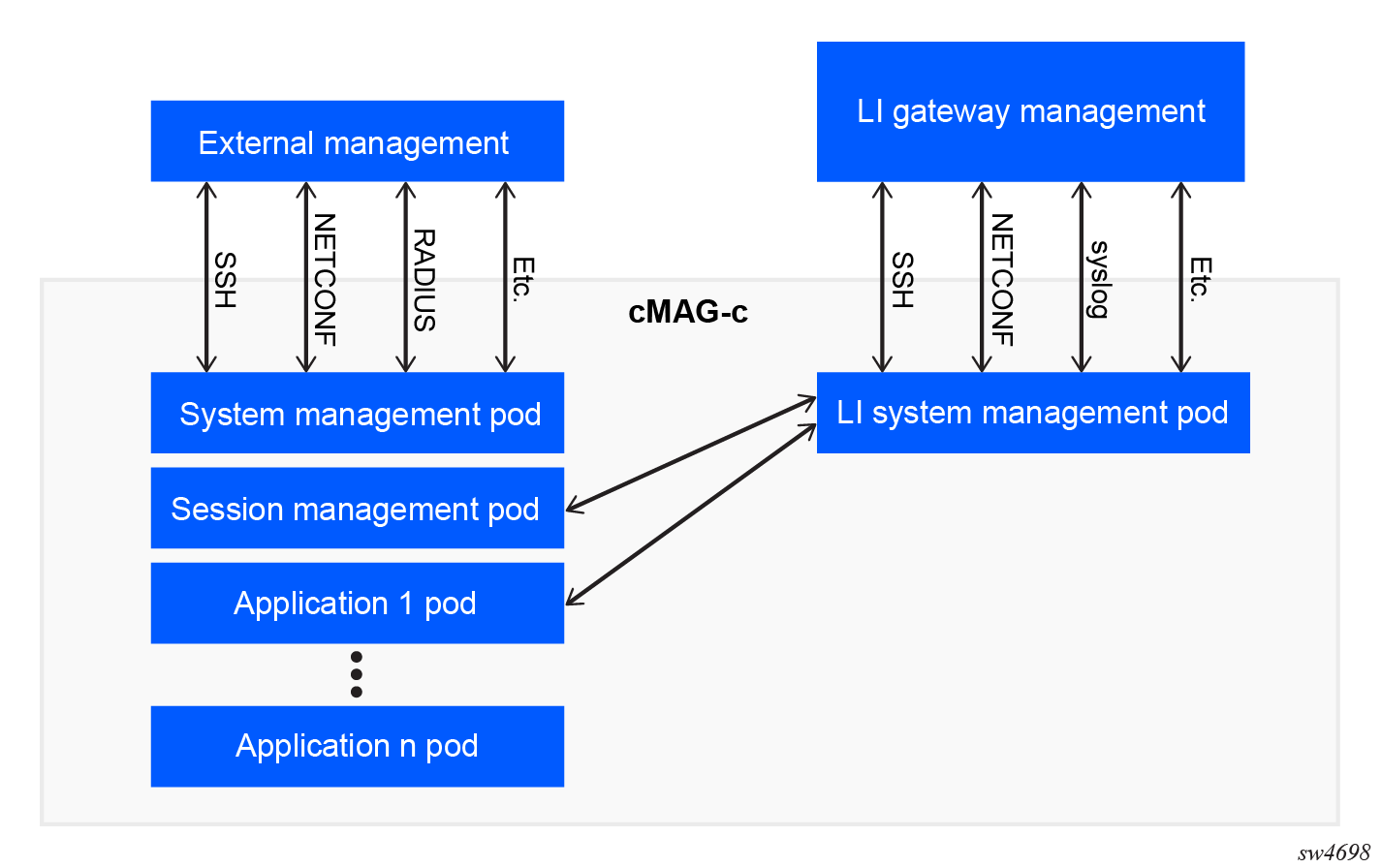
The cMAG-c installs and manages the LI function on its own instance of the system management pod, separate from the rest of the system. The LI system management pod or LI pod has a separate user, Authentication, Authorization, and Accounting (AAA) functionality, management IP address, and ports.
To perform LI, the cMAG-c informs the LI pod of every new subscriber session created on the system. The LI pod compares the provisioned LI targets with the newly created subscribers. If a new subscriber matches a provisioned LI target, the cMAG-c activates LI for the new subscriber session. When a user provisions an LI target in real time, the LI pod queries the session management pod to check whether the target is online. If the subscriber is online, the cMAG-c activates LI for the subscriber session.
- LI information exchanged between pods
- PFCP LI instructions, which can only be decrypted by the MAG-u using a shared secret
- technical support files and crash dumps
LI administrative interface
LI management interfaces
LI supports the following management interfaces:
- SSH
- NETCONF
- syslog
The LI management is limited to local authorization and authentication of users, that is, remote authentication and authorization such as RADIUS and TACACS+ are not supported.
Mandatory configuration for LI
When the cMAG-c license including LI is installed and the LI session management pod becomes available for the first time, the LI admin user must reconfigure the password for both the admin and linuxadmin users; see Configuring passwords and seeds.
Following this, the LI admin user can set up the infrastructure for LI; see Setting up the LI infrastructure
Configuring passwords and seeds
The passwords and the seeds must be configured when the LI session management pod comes up for the first time after installing a cMAG-c license including LI.
- The cMAG-c contains a valid license including LI.
- Log in to the LI management function.
-
Change the default password for the admin and the linuxadmin users.
system aaa authentication admin-user password
system aaa authentication linuxadmin-user password
system aaa authentication admin-user password ditaup=8h6t system aaa authentication linuxadmin-user password 6g7g=pultid -
Set up the root seed, a private encryption key for technical support file
encryption. Use the following kubectl command on the admin
host server to set up the root seed.
kubectl create secret generic secure-seed-secret -n cmag-c --from-file=seed=<(openssl rand 32) -
Add the following line with the secret seeds to the cMAG-c custom resource (CR) YAML file.
secrets:
   secureSeed: secure-seed-secret
Setting up the LI infrastructure
Configure a PFCP secret to allow LI on the cMAG-c and the MAG-u nodes.
- Passwords and seeds are configured; see Configuring passwords and seeds.
- Optional:
Configure a system name for the LI management function.
Note: Although this is an optional step, Nokia recommends to configure a system name for the LI management function
lawful-intercept system name# lawful-intercept system name li-management -
Configure a PFCP shared secret on both the cMAG-c and the MAG-u
nodes, to allow LI on the MAG-u
nodes.
Note: Nokia recommends to configure the same shared secret on all MAG-u nodes.See the SR OS documentation for information about how to configure the secret on the MAG-u nodes. Use the following command to configure the secret on the cMAG-c.
lawful-intercept pfcp shared-secret# lawful-intercept pfcp shared-secret mySecret
LI solution for wireline application
Understand the tools to use and guidelines to follow when configuring cMAG-c LI for wireline applications.
Setting up LI targets
Setting up LI targets uses the X1 interface (LI_H1 is another common industry term). The cMAG-c X1 interface supports LI provisioning via SSH CLI and NETCONF.
- Configure the LI infrastructure such as the PFCP shared secret; see Setting up the LI infrastructure.
Configure the name of the subscriber being mirrored, the direction of the mirror, and the intercept and session ID when using Layer 3 IP UDP shim headers on the MAG-u nodes.
lawful-intercept targets subscriberLI target configuration
info from running /lawful-intercept targets
    subscriber subscr1 {
        intercept-id 1
        session-id 2
        direction ingress-egress
        mirror-instance-name mirror501
    }
LI information related interface
LI contents of communication
The MAG-u provides the CC interface (X3, LI_H3 are other common industry terms).
To support cMAG-c LI, the MAG-u requires a minimal set of LI configurations including the following:
- Within the main MAG-u
configuration region, provision a designated mirror destination service for LI.
Note: The mirror destination ID is a key parameter that the cMAG-c sends to the MAG-u. The mirror destination IDs on the MAG-u and the cMAG-c must match.
- Within the MAG-u LI configuration region, provision the LI source referencing the mirror destination.
- Within the MAG-u LI configuration region, provision the PFCP shared secret that matches the provisioning on the cMAG-c.
See the 7450 ESS, 7750 SR, 7950 XRS, and VSR OAM and Diagnostics Guide for more information and configuration guidelines.