Procedure 3-27: Create LAG

- Purpose

The system supports the Link Aggregation (LAG) at the Ethernet side, as specified in IEEE Std. 802.3ad-2000; it is a technique to aggregate many data streams into a single logical link. The resulting aggregate link will be treated by the system (with regard to instances about STP, IGMP, network protections, etc.), as a single link. It permits to overcome the bandwidth limitation of the single Ethernet interfaces, or to protect the traffic.

Permitted port rates to be aggregated are 100 Mbps and 1 Gbps (10 Mbps and 10 Gbps are for future release). The max number of ports (LAG-size) to be aggregated is 8; (LAG stands for Link Aggregation Group). Links may be anytime added or removed to/from the bundle. Ports to be aggregated can be either located on the same board and also on different boards.

- General

Its management in the network is based upon the communication, between the aggregate partner pieces of equipment, of LACP messages (Link Aggregation Control Protocol). The LACP packets transport information about set-up, aggregation capability, links failures, automatic reconfiguration after failure, etc. The benefits of Link Aggregation feature are:

  • Bandwidth limitation overcoming.

  • Load balancing (the traffic is distributed over the constituting links).

  • Reliability increasing (in case that a link of the aggregate fails, its traffic will be automatically distributed over the other links of the aggregate).

The conditions for Link Aggregation option are the followings:

  • All involved ports must work at the same rate.

  • All involved ports must have the same configurations, regarding AutoNegotiation and Flow Control.

  • All aggregated links must be point-to-point (Multicast is not allowed).

  • All involved interfaces must work in full-duplex modality.

  • All involved ports must be Local (Remote ports are not allowed).

  • Actor and Partner ports (local and far sides) must be of the same type.

Link Aggregation Management

Use the following procedure to creating a Link Aggregator:

 
1

Click LAG Group (Link Aggregation Management Group) icon from the tree area as shown in Figure 3-44, Aggregation management tree expand. The Link Aggregation Mng screen is displayed in the right hand side frame as shown in .

Figure 3-44: Aggregation management tree
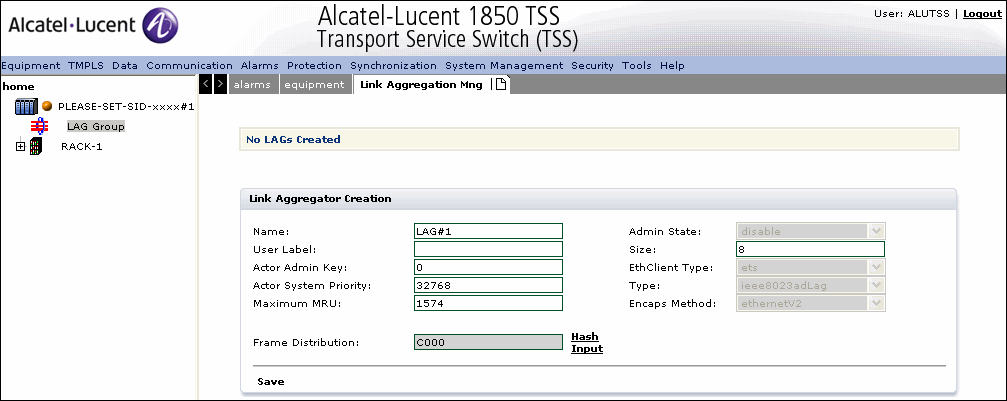
Aggregation management tree+
2

Select one of the LAG-x (Link Aggregation Group) icon and the client area displays.

Table 3-13, Link aggregation parameters provides description of link aggregation parameters.

Table 3-13: Link aggregation parameters

Parameter

Description

Name

Allows to set the name of the LAG; the only suffix after "#" can be set by the user, with an integer in the 1 to 16 range

Admin State

This item can be set only after creation, in “Configure Aggregator” option,. The values are:

  • enable the LAG is in-service

  • disable the LAG is out-of-service

User Label

Allows to indicate the LAG by means of a name defined by the user.

Size

Allows to set the size of the LAG, i.e. number of Aggregated Ports; possible values are integers in the 1 to 8 range

Actor Admin Key

Allows to indicate the LAG “Key”, the parameter identifying this LAG; integer in the 1 to 65535 range

Type

Refers about the type of port (read only field, fixed by the system to ieee8023adLag)

EthClient Type (read only field)

Indicates the transported layer. The values are:

  • ets: for Ethernet Transparent System

  • etb: for Ethernet Bridge System

Actor System Priority

Allows to indicate the LAG Priority. This parameter, together with the LAG Mac-Address, forms the “System Identifier”. The lowest System Identifier value will be elected as the “Master” of the link, i.e. the one that will drive the actions in case of events such as failures, switches, etc. The valid range is 0-65535

Maximum MRU

Specifies the maximum receiving unit that allows to adjust the of packet transfer in control channel in octets. The value ranges from 1574 to 9242 (R1.0) or from 1574 to 10240 (From R4.0).

Encaps Method

Refers about the method of MAC packets encapsulation inside the underlying physical layer. The options are:

  • ethernetV2: default mode, set by the system

  • IEEE8023: not yet operative

Frame Distribution

The default value is C000


3

Enter the LAG Name in the field provided for name.


4

Enter the User name for the LAG in the field provided for User Label.


5

Specify the Actor Admin Key.


6

Specify the Actor System Priority.


7

Specify the Maximum MRU.


8

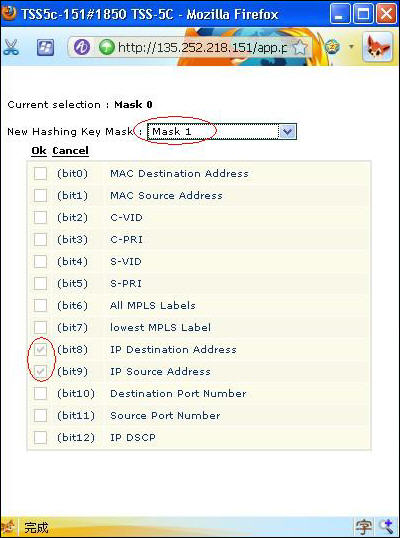
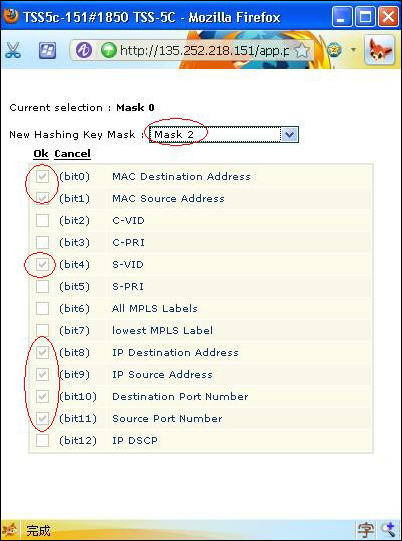
Click Hash Input to select the New Hashing Key Mask as shown in Figure 3-45, Hash Input

Figure 3-45: Hash Input
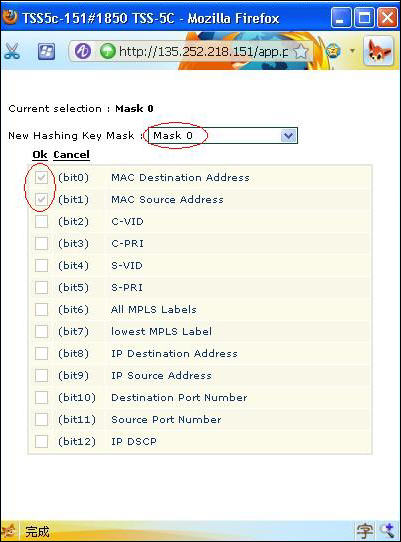
Hash Input
Figure 3-46: Mask 1
Mask 1
Figure 3-47: Mask 2
Mask 2
9

Click Save to save the LAG configuration.


End of steps

Modify a Link Aggregation Configuration
 
1

Click LAG Group (Link Aggregation Management Group) icon from the tree area and expand. Select the LAG Group.


2

In the Link Aggregation Mng screen select the LAG to modify and click Configuration. Click LAG in the Link Aggregator configuration screen

Table 3-14, Modify LAG parameters provides description of modify lag parameters.

Table 3-14: Modify LAG parameters

Parameter

Description

Link Aggregation Configuration

Name

Allows to set the name of the LAG. The only suffix after "#" can be set by the user, with an integer in the range 1-16.

Note:This is a non-editable field

Type

Indicates the type of port (read only field, fixed by the system to "ieee8023adLag")

Note:This is a non-editable field.

User Label

Indicates the LAG by means of a name defined by the user

Actor Admin Key

Indicates the LAG "Key", the parameter identifying this LAG; integer in the range 1 -65535

Actor System Priority

Indicates the LAG Priority. This parameter, together with the LAG Mac Address, forms the "System Identifier". The lowest System Identifier value will be elected as the "Master" of the link, i.e. the one that will drive the actions in case of events such as failures, switches, etc. Possible values are integers in the range 0-65535

Actor System ID

A read-only field fixed by the system indicates the "System Identifier", composed of the LAG Mac Address and the above Actor System Priority. The LAG having the lowest LAG-System Identifier value will be elected as the "Master" of the LAG link, i.e. the one that will drive the actions in case of events such as failures, switches, etc.

Actor Op. key

A read-only field fixed by the system indicates the actual operational value of LAG-key for this LAG.

Maximum MRU

Allows to set the Maximum Recieve Unit (MRU) size of the largest packet which can be sent on this LAG interface, specified in octets. The value ranges from 1574 to 9242 (R1.0) or from 1574 to 10240 (From R4.0).

Protocol Profile

The entry field indicates the name of the 2-bytes provider (S-VLAN-Prototypal) contained into the S-Vlan ethernet frames afferent to the current Port.

Asap Name

An entry field displays the name of alarms profile to be associated to the current Port. The Select hyperlink allows to start the selection procedure. After the selection procedure, the chosen value will be reported.

Frame Distribution

Hashing key facilitates handling of traffic distribution from a generic NNI port (MPLS or Bridge port) toward UNI access with a better granularity criteria. The default value is C000.

Admin State

Allows to set the Administration status. Possible values are: enable (the LAG is in-service) or disable (the LAG is out-of-service)

Oper. State

The read-only field indicates the current operational status of the Port, information about the actual state of the Aggregation Port regarding the traffic; possible values: up (the traffic on Aggregation Port is active) or down (the traffic on Aggregation Port is inactive).

Bandwidth

Indicates the actually used Bandwidth of the LAG, after that Aggregated Ports have been associated to this LAG. It is the sum of Aggregated Ports rate

Available Band

Indicates the available Bandwidth of the LAG

LACP type

Indicates if the Link Aggregation Control Protocol is ON (i.e. lacpOn is active on this aggregator) or OFF (IacpOff inactive); read only field, fixed by the system.

LACP Enabled

Specifies if the LACP is enabled or disabled.

Size

Allows to set the size of the LAG, i.e. number of Aggregated Ports. The values are integers in the range 1 to 8

Encaps Method

The entry field indicates the method of MAC packets encapsulation inside the underlying physical layer. Possible options are: ethernetV2 (default mode, set by the system) or IEEE8023 (not yet operative).


3

Click Save and Continue to apply the previous settings and restart with new configuration.


4

Click Save and Exit to save the modification and return to the previous screen.


5

Click Cancelto exit the screen without saving.


6

To delete a LAG: Delete all LAG related traffic, unbind all ports and change ADMIN state to disable. Navigate back to the LAG Group (Link Aggregation Management Group) icon from the tree area and expand. Click to select the LAG Group. In the Link Aggregation Mng tab, select the LAG configuration to be deleted and click Delete.


End of steps

Alcatel-Lucent – Proprietary

Use pursuant to applicable agreements