| |
|
1 |
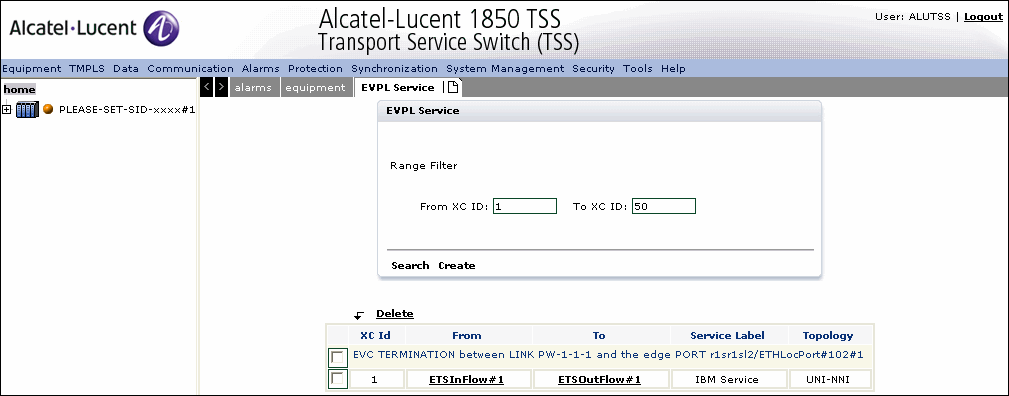
Select (T)MPLS -> Ethernet Services XC -> EVPL from the menu bar as shown in
Figure 3-145, EVPL service.
|
2 |
Click Search to view the EVPL Service list.
|
3 |
The ETS Flow involved is listed.
|
4 |
Click on the linkETSInflow#1 as shown in the figure.
|
5 |
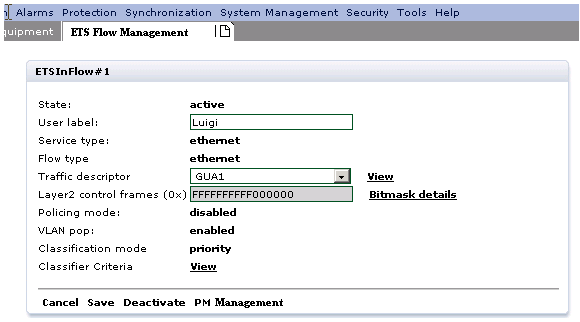
The ETS Flow Management tab is displayed as shown below:
|
6 |
The ETS Flow Management panel parameters are described in the following table: Table 3-66: ETS Flow Management
|
Parameter |
Description |
|
State |
Specifies the state. The values are active or inactive. |
|
User Label |
Specifies the associated User label. |
|
Service Type |
Specifies the service type. The value is Ethernet. |
|
Flow type |
Specifies the flow type. The value is Unicast |
|
Traffic descriptor |
Specifies the operation mode. |
|
Layer 2 control frames |
Specifies the protocol frames that can accede the port. |
|
Policing mode |
Refers to the policing of the incoming ETS tarffic. The values are disabled, or color blind. |
|
VLAN Pop |
Select Enabled or disabled from the drop-down. |
|
Classification mode |
Specifies the classification mode |
|
Classifier Criteria |
Specifies the Classifier criteria. The values are outer VLAN id, outer PRI, and untagged |
|
7 |
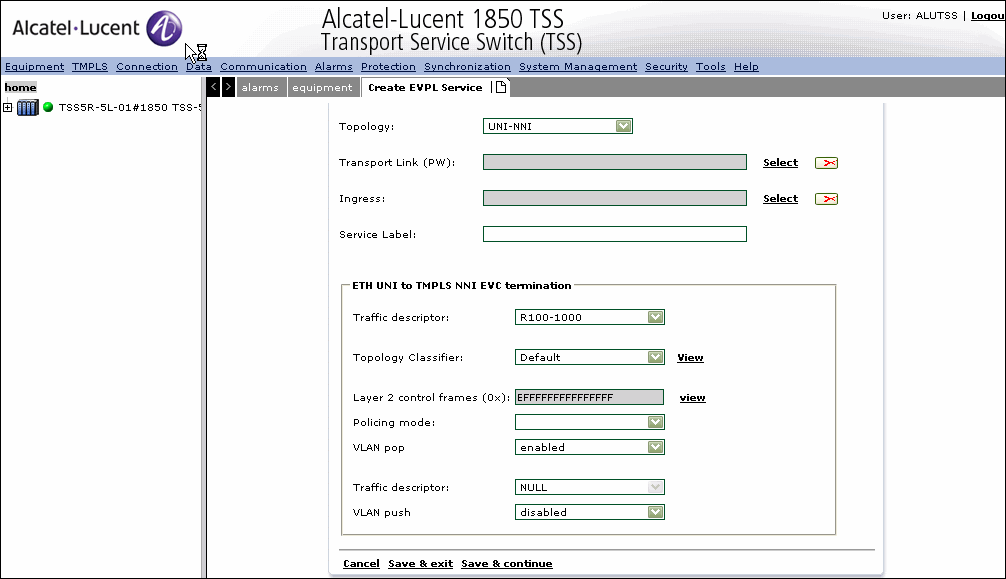
Click Create to configure a new EVPL Service as shown in
Figure 3-147, Create an EVPL service.
Note:
-
While creating an EVPL service, a cross-connection between the tunnel and Pseudowire results in configuration of In Band Management via an ETS inflow and ETSoutflow.
-
The association between Ethernet classifier , ETS flow and PW shall be one Ethernet classifier <-> one ETS Flow <-> one PW.
|
8 |
Table 3-67, EVPL service parameters provides the description of Create EVPL service parameters. Table 3-67: EVPL service parameters
|
Parameter |
Description |
|
Topology |
Specifies the topology to establish the service. The values are: UNI-NNI and NNI-UNI |
|
Transport link (PW) |
|
Ingress |
Specifies the input port |
|
Service Label |
Specifies the name or label for the new service |
|
ETH UNI to TMPLS NNI EVC termination |
|
Traffic descriptor |
Specifies the operation mode. The supported values are:
-
CIR (MPLS Committed Information Rate): it is the max rate (Kbyte/sec) with high priority guaranteed for the Tunnel/pseudowire packets delivery.
-
CBS (MPLS Committed Burst Size): it is the max burst size (byte) with high priority guaranteed for the Tunnel/pseudowire packets delivery
-
PIR (MPLS Peak information rate): it is the max peak rate allowed (Kbyte/sec) for the Tunnel/pseudowire
-
PBS (MPLS Peak Burst Size): it is the max burst rate allowed (byte) for the Tunnel/pseudowire |
|
Topology classifier |
Specifies the classifier for the selected topology |
|
Layer 2 control frames (0x) |
Specifies the protocol frames that can accede the port |
|
Policing mode |
Refers to the policing of the incoming ETS tarffic. The values are disabled, or color blind |
|
VLAN Pop |
Select Enabled or disabled from the drop-down. |
|
TMPLS NNI termination |
|
Traffic Descriptor |
Specifies the operation mode. The supported values are:
|
|
VLAN Push |
If enabled, it pushes in the EVPL fields of the Ethernet frame. The supported values are:
|
|
VLAN Id |
Specifies the VLAN Id.
Note:This field is populated only when VLAN Push is enabled. |
|
Priority mode |
Specifies the Priority mode. The supported values are:
Note:This field is populated only when VLAN Push is enabled. |
|
All frames priority |
Specifies the Frame Priority. The supported values are:
-
pri000(0)
-
pri001(1)
-
pri002(2)
-
pri003(3)
-
pri004(4)
-
pri005(5)
-
pri006(6)
-
pri007(7)
Note:This field is populated only when VLAN Push is enabled. |
|
9 |
Click Cancel to return to the previous window without saving the changes.
|
10 |
Click Save & exit to save the changes and return to the previous window.
|
11 |
Click Save & continue to save the changes and create a new service.
End of steps |