Communication menu
Purpose
The communication menu allows the operator to configure and set the external communication for NE management interfaces. The menu options are:
-
NE General Configuration - Allows to specify the Site Header information.
-
DCN Physical Interface - Allows to specify the supported Layer 3 (network layer) of the OSI Data Communication Network (DCN).
-
Network Domain - Allows the operator to enter (add) a new static IP route in the IP routing table, to instruct the NE to provide routing database information that is supported by network layer of the OSI DCN, to retrieve a list of all immediate OSC neighbors to the local network element and retrieve the parameters of a configured OSIAREA that the NE is part of.
DCN physical interface
This menu option contains the following sub-menus:
-
IP Address - Retrieves TCP/IP stack parameters. The IP address allows to modify the various interface parameters associated with the in-band management IP.
-
LAN manag. - Allows to modify the various network interface parameters associated with the customer LAN.
IP address
Allows to modify the various network interface parameters associated with the in band management IP. Select Communication -> DCN Phys. If -> IP Address option as shown in Figure 2-33, DCN physical interface IP address.
Figure 2-33: DCN physical interface IP address
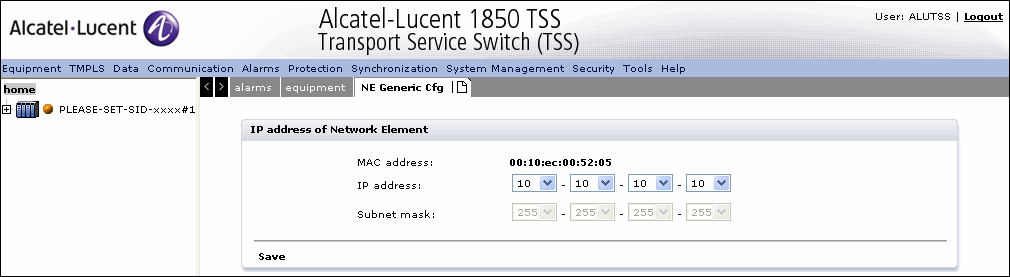

The NE Generic Configuration tab displays the IP Address Management panel that contains the following parameters:
-
MAC ADDRESS (Medium Access Control address) - This is the MAC address assigned to the card. Note that this parameter can only be read and cannot be modified.
-
IP Address (Internet Protocol address) - This is the IP address of the NE. The entry box allows to digit the IP address of the NE (value range [1-99, 101-126,128-223] - [0- 255] - [0-255] - [0-254]).
-
Subnet Mask - This is the entry box for subnet mask of the network the NE is connected to (value range [128-255] - [0-255] - [0-255] - [0-255]). The mask, in binary representation, must contain a contiguous string of 1s (the network portion) and a contiguous string of 0s (the host portion).
The Save hyperlink saves the configuration, closes the page and returns to the previous page.
LAN Management
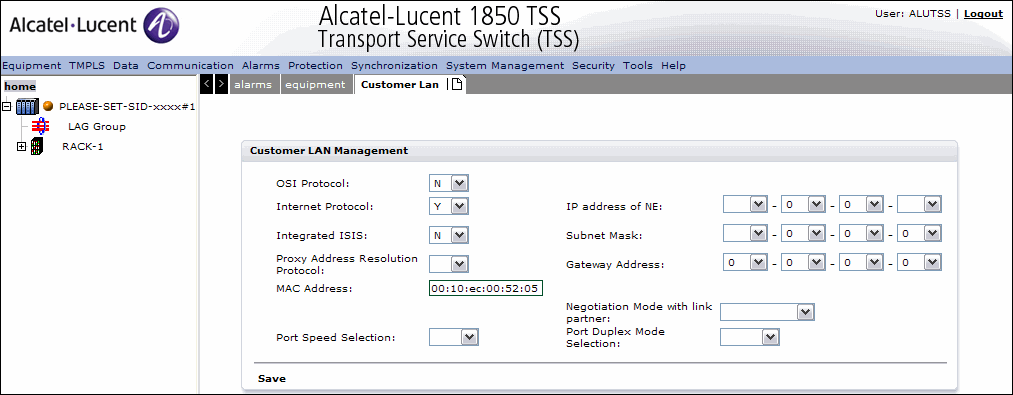
Allows to modify the various customer LAN management parameters.
Select Communication -> DCN Phys. If -> LAN Mang option as shown in
Figure 2-34: LAN Management
Network domain
This menu option contains the following choices:
-
IP Route - Allows the operator to enter (add) a new static IP route in the IP routing table, by CP.
-
NSAP Report - Enables the operator to lookup Network Service Access Point type.
-
OSI Management - Enables users to look up OSI NE Area, OSI OS Address, OSI ULC Report.
IP route
This option allows the operator to enter (add) a new static IP route in the IP routing table, by CP. If the AID specifies a STMn then the NEXTHOP parameter should not be specified. If the AID specifies the LAN, then the NEXTHOP parameter must be specified.
Select Communication -> Network Domain -> IP Route option.
The IP Routing Configuration tab displays the following:
-
Access Identifier - Specifies the Access Identifier for the IP route
-
Destination Address - Specifies the destination IP address for the IP route
Click Create hyperlink to configure a new IP Route.
The Save hyperlink saves the configuration.
The Save & Exit hyperlink saves the configuration, closes the page and returns to the previous page.
Alcatel-Lucent – Proprietary
Use pursuant to applicable agreements