Procedure 3-44: Administer Proactive Synthetic Loss Measurement
To configure synthetic loss management:
1 |
Select Data -> OAM Management -> Proactive Tool -> Synthetic Loss Measurement, the synthetic loss measurement screen is displayed as shown in Figure 3-96, Proactive Synthetic Loss Measurement. Figure 3-96: Proactive Synthetic Loss Measurement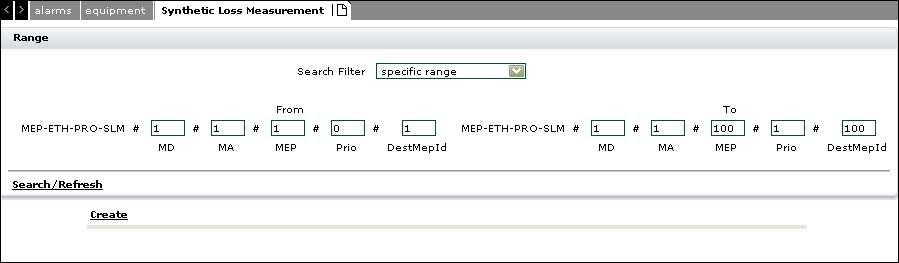  |
2 |
Click Create to create the proactive synthetic LM as shown in Figure 3-97, Create Proactive Synthetic Loss Measurement Figure 3-97: Create Proactive Synthetic Loss Measurement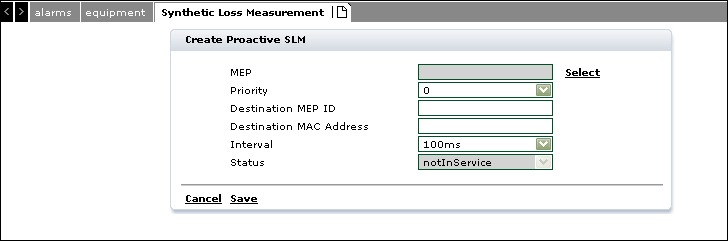 |
3 |
Click Select to select the MEP Id. |
4 |
Enter the Priority between 0 and 7. |
5 |
Enter the Destination MEP ID. |
6 |
Enter the Destination MAC Address. |
7 |
Select the Interval from the drop down. The values are: |
8 |
Select the LM Status as notInService or InService. |
9 |
Click Save to save the Synthetic LM configuration or click Cancel to return to the previous screen without saving. End of steps |
Modify Proactive Synthetic LM
1 |
Navigate to the Loss Measurement screen, select the Search Filter. Specify the MEP-ETH-PRO-SLM To and From values and click Search/Refresh to display the configured Proactive LM's in this range as shown in Figure 3-98, Modify Proactive Synthetic LM Figure 3-98: Modify Proactive Synthetic LM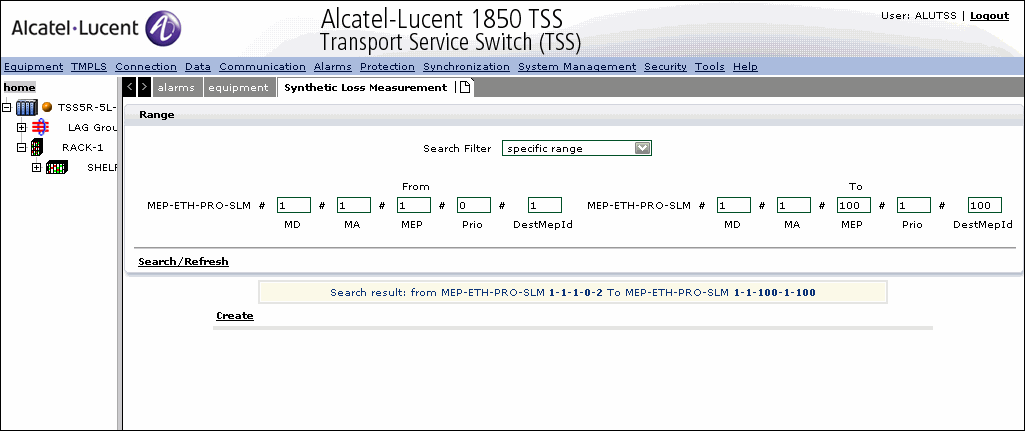 |
2 |
Select the Synthetic LM to modify and update the parameters as explained in Create Proactive Synthetic LM. |
3 |
Click Save to save the Synthetic LM modification or click Cancel to return to the previous screen without saving. |
4 |
To Delete a Proactive Synthetic LM, click Search/Refresh to locate the available configured Synthetic LM's, select and Delete. End of steps |
Alcatel-Lucent – Proprietary
Use pursuant to applicable agreements