Node Power and Voltage Summary report
Node Power and Voltage Summary report overview
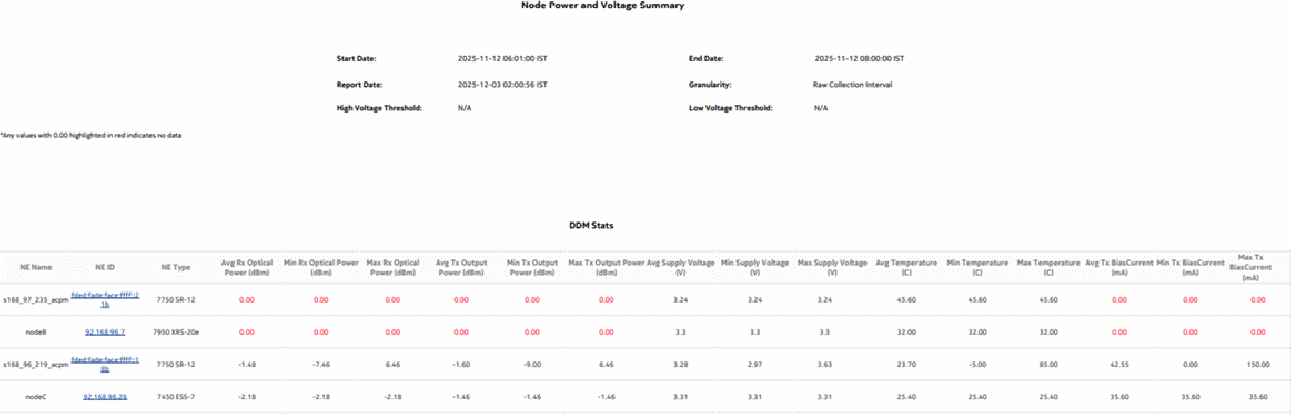
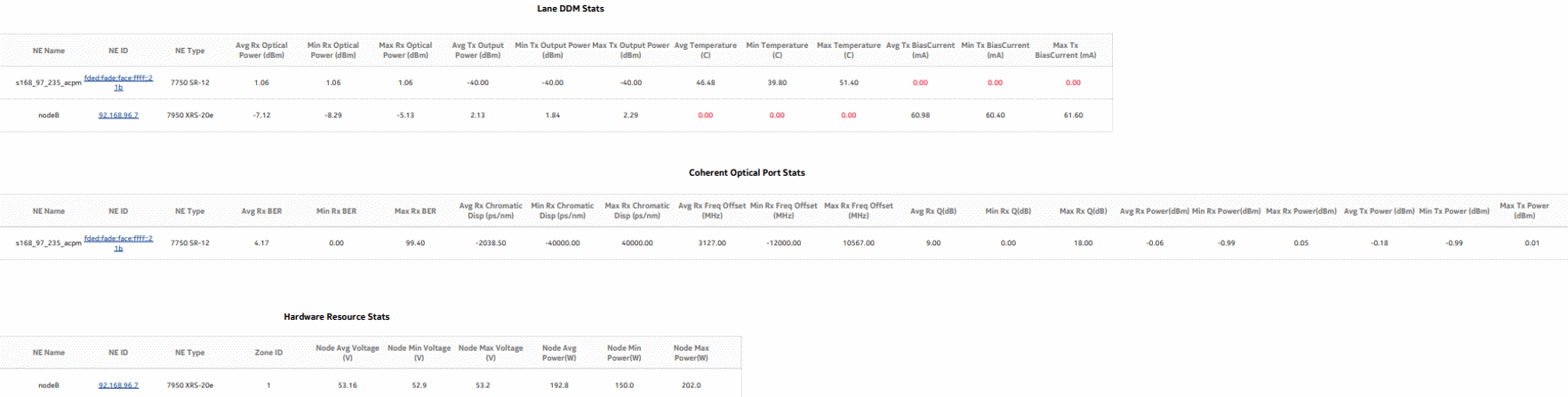
The Node Power and Voltage Summary report shows detailed information about NE power and voltage. The report provides tables showing DDM, lane DDM, coherent optical port, and hardware resource statistics, and can drill down to the Optical Power and Voltage Summary report for more information.
Use cases
Troubleshooting—Confirm that NE power is in the optimum operating range to determine if it is a cause of network impairment.
Limitations
Report limitations include:
-
Low voltage threshold and high voltage threshold report inputs are applicable only to DDM statistics and hardware resource statistics.
-
Periodic counters are used for hardware resource statistics if non-periodic counters are not present in aggregation tables.
-
When the report is exported to the CSV file type, table data does not display properly.
-
When the report is exported to the DOCX file type, the table borders do not display properly, and some data may not display or the table may not align properly.
-
When the report is exported to the RTF file type, some table columns may not display.
-
Minimum and maximum throughput aggregation cannot be compared with the minimum and maximum throughput values generated from raw granularity.
Prerequisites
Perform the prerequisites in section Common prerequisites for node power and optical power reports, in addition to the prerequisites described here.
The following table describes the aggregation rules that must be enabled and the statistics to be collected. To view the report for granularities other than raw data, the aggregation rules must be enabled; see How do I configure analytics aggregation?.
Table 16-7: Node Power and Voltage Summary report prerequisites
|
Aggregator name |
Monitored object class |
Statistics class |
Statistics collection |
NE types |
|---|---|---|---|---|
|
DDM stats aggregator |
equipment.Digital DiagnosticMonitoring equipment.equipment equipment.portdetails |
equipment.DDMStats telemetry_4572106t_transceiver_ digital_diagnostic_monitoring |
MIB-based for NFM-P-managed NEs GRPC /Telemetry collection for NSP-managed NEs |
7210 SAS-D 7210 SAS-MXP 7210 SAS-R 7250 IXR 7705 SAR 7750 MD SR 7750 SR |
|
Lane DDM stats aggregator |
equipment.LaneDDM equipment.equipment equipment.portdetails |
equipment, LaneDDMStats telemetry_4572106t_transceiver_ digital_diagnostic_monitoring |
MIB-based for NFM-P-managed NEs GRPC /Telemetry collection for NSP-managed NEs |
7210 SAS-R 7210 SAS-S/Sx 7250 IXR 7450 ESS 7705 SAR-Hm 7750 MD SR 7750 SR 7950 XRS |
|
Coherent optical port stats aggregator |
equipment.Connector equipment.PhysicalPort equipment.equipment equipment.portdetails |
ethernetequipment CohOptPortStats telemetry_base_sros_port_port_ dwdm_coherent_statistics |
MIB-based for NFM-P-managed NEs GRPC /Telemetry collection for NSP-managed NEs |
7250 IXR 7450 ESS 7705 SAR-Hm 7750 MD SR 7750 SR 7950 XRS |
|
Hardware resource stats aggregator |
equipment.HwEnvironment equipment.equipment equipment.portdetails |
equipment HardwareResourceStats telemetry_base_sros_card_card_hardware_resource telemetry_base_sros_card_card_mda_hardware_resource telemetry_base_sros_card_card_xiom_hardware_resource telemetry_base_sros_card_card_xiom_mda_hardware_resource telemetry_base_sros_chassis_chassis_fan_hardware_resource telemetry_base_sros_cpm_cpm_hardware_resource telemetry_base_sros_sfm_sfm_hardware_resource telemetry_base_sros_system_system_power_management |
MIB-based for NFM-P-managed NEs GRPC /Telemetry collection for NSP-managed NEs |
7250 IXR 7750 MD SR 7750 SR 7950 XRS |
Report characteristics
The following table lists the principal report characteristics.
Note: Not selecting an input in a non-mandatory report input is considered as selecting all available inputs.
Table 16-8: Node Power and Voltage Summary report characteristics
Example
The following figures show a report example.
Figure 16-3: Node Power and Voltage Summary report