Interface Utilization Details report
Interface Utilization Details report overview
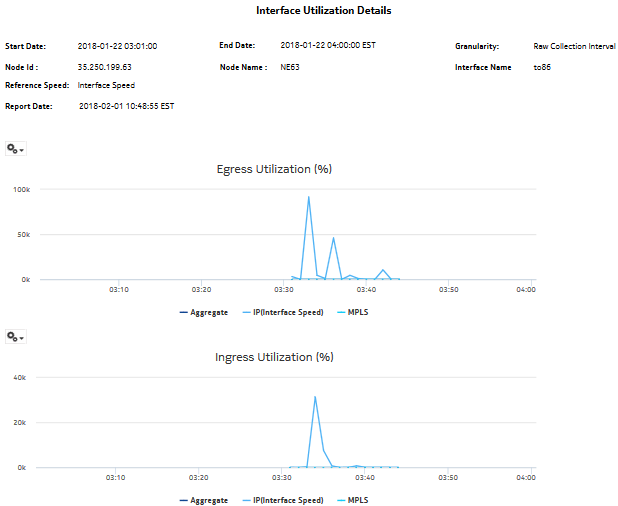
The Interface Utilization Details report shows utilization details for a selected IGP interface. The report can be run on its own or as a drill-down from a Link Utilization report.
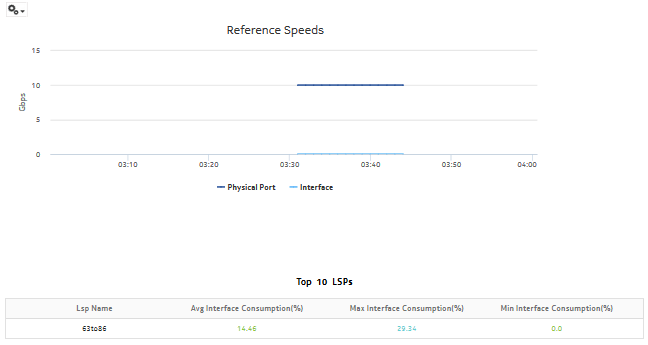
The default display is a set of graphs and a table showing ingress, egress utilization, reference speeds, and percentage interface consumption. By default the table is sorted by average egress interface consumption in decreasing value order (worst first).
Percentage interface consumption is based on average MPLS interface throughput divided by average LSP throughput.
The results in the table are colored based on interface consumption percentage ranges:
In the graph, all legends will be visible if any of the statistical data is available.
Use cases
Capacity planning—Use the report to examine interface utilization patterns for planning future capacity requirements.
Limitations
Minimum and maximum throughput aggregation cannot be compared with the minimum and maximum throughput values generated from raw granularity.
Prerequisites
For an Interface Utilization Details Report to be created for an interface, the Prerequisites for a Link Utilization report must be performed.
To view the report for granularities other than raw data, the aggregation rules must be enabled; see How do I configure analytics aggregation?. The following table describes the aggregation rules and the accounting policies that must be configured for the NEs on which statistics are to be collected; see the NSP NFM-P Statistics Management Guide for information about configuring an accounting policy.
Table 14-21: Interface Utilization Details report prerequisites
Report characteristics
The following table lists the principal report characteristics.
Table 14-22: Interface Utilization Details report characteristics
|
Characteristic |
Value | ||||
|---|---|---|---|---|---|
|
Data type |
Statistics | ||||
|
Source database |
Auxiliary database | ||||
|
Interface types supported |
IP (IS-IS, OSPF, RIP), MPLS | ||||
|
Report inputs |
Prompt |
Notes | |||
|
End date |
Calendar date or relative date (for example, two days ago) and time | ||||
|
Granularity |
Aggregation types: | ||||
|
Report Range |
Length of time to be reported, in minutes (minutes, min), hours (hours, h), days (days, d), or months (months, m) | ||||
|
Node Type |
Search using partial names or wildcard (%). Select individual items or click Select All. | ||||
|
Node Name (or Node Name Pattern) | |||||
|
Nodes | |||||
|
Interface Name (or Interface Name Pattern) | |||||
|
Interfaces | |||||
|
Rank |
Value to use for the Top-N LSPs. Max is 1000, default is 10. | ||||
|
Reference Speed |
Interface Speed or Physical Port Speed Notes: | ||||
|
Logo Resource ID |
The logo to add to the report. Enter the Resource ID of the logo image in the Images folder. The default is the Nokia logo. To create the report without a logo, leave the Logo Resource ID field blank. | ||||
|
Logo Position |
Choose Left, Middle, or Right. The logo appears on the left on the first page of the report if you choose Left or Middle. | ||||
|
Show report output on one page |
Select the check box to enable pagination. Note: Using the Show report output on one page option when creating reports as drill-downs may impact report rendering time. Nokia recommends disabling the Show report output on one page option when creating reports. | ||||
|
Drill-down support |
Yes—Click on a Name to launch a Service Utilization per LSP report. | ||||