
Raw socket IP transport service
Serial data transport using raw sockets over IP transport services is a method of transporting serial data, in character form, over an IP network using Layer 3-based services. This feature can help transport Supervisory control and data acquisition (SCADA) data from remote terminal units (RTUs) to front-end processors (FEPs) or SCADA masters.
The functionality provided by the IP transport service feature for serial raw sockets is summarized as follows:
-
IP transport local host (server) function, to listen to and open raw socket sessions from remote hosts
-
IP transport remote host (client) function, to initiate and open new raw socket sessions to remote hosts
-
both local host and remote host functions support for either TCP or UDP IP transport services
-
IP transport over an IES or VPRN service
-
enhanced QoS and queuing of sessions to ensure that collisions between sessions do not cause serial data to impact RTUs and end-user equipment
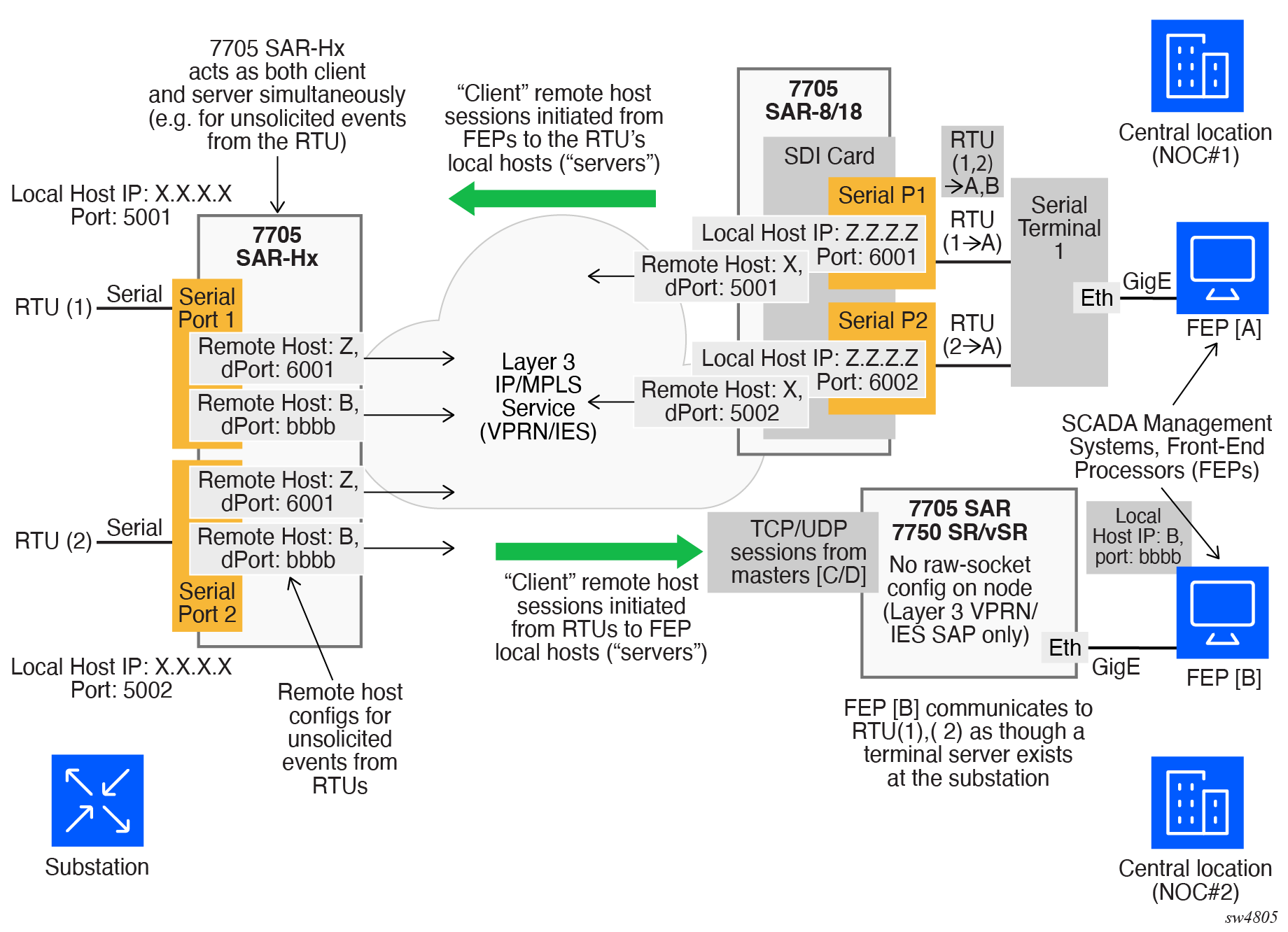
IP transport service shows a detailed view of the local host (server) and remote host (client) functionality that enables multiple communication streams to and from a serial port using raw socket IP transport.
The figure shows a three-node network: a 7705 SAR-Hx (left), a 7705 SAR-8 Shelf V2 or 7705 SAR-18 (top right) and a 7705 SAR-Hx node, 7705 SAR-8 Shelf V2/7705 SAR-18 node, or 7750 SR/VSR node (bottom right). There are two devices, RTU (1) and RTU (2) connected to the serial ports on the 7705 SAR-Hx. FEP server [A] can reach the RTUs via the socket sessions that originate from the 12-port Serial Data Interface card on the 7705 SAR-8 Shelf V2/7705 SAR-18 node. The bottom-right 7705 SAR or 7750 SR/VSR node is connected to the FEP server [B] directly using Ethernet. This FEP server reaches the RTUs via a Layer 3 IP/MPLS service, where raw socket sessions are processed directly on the FEP servers.
Through local host and remote host configurations on the 7705 SAR-Hx or 7705 SAR-8 Shelf V2/7705 SAR-18, serial raw socket IP transport sessions are established to carry serial data over a wireless IP/MPLS network. The source and destination IP addresses and port numbers for these sessions are derived directly from the local and remote host configurations associated with each serial port or master head-end server.
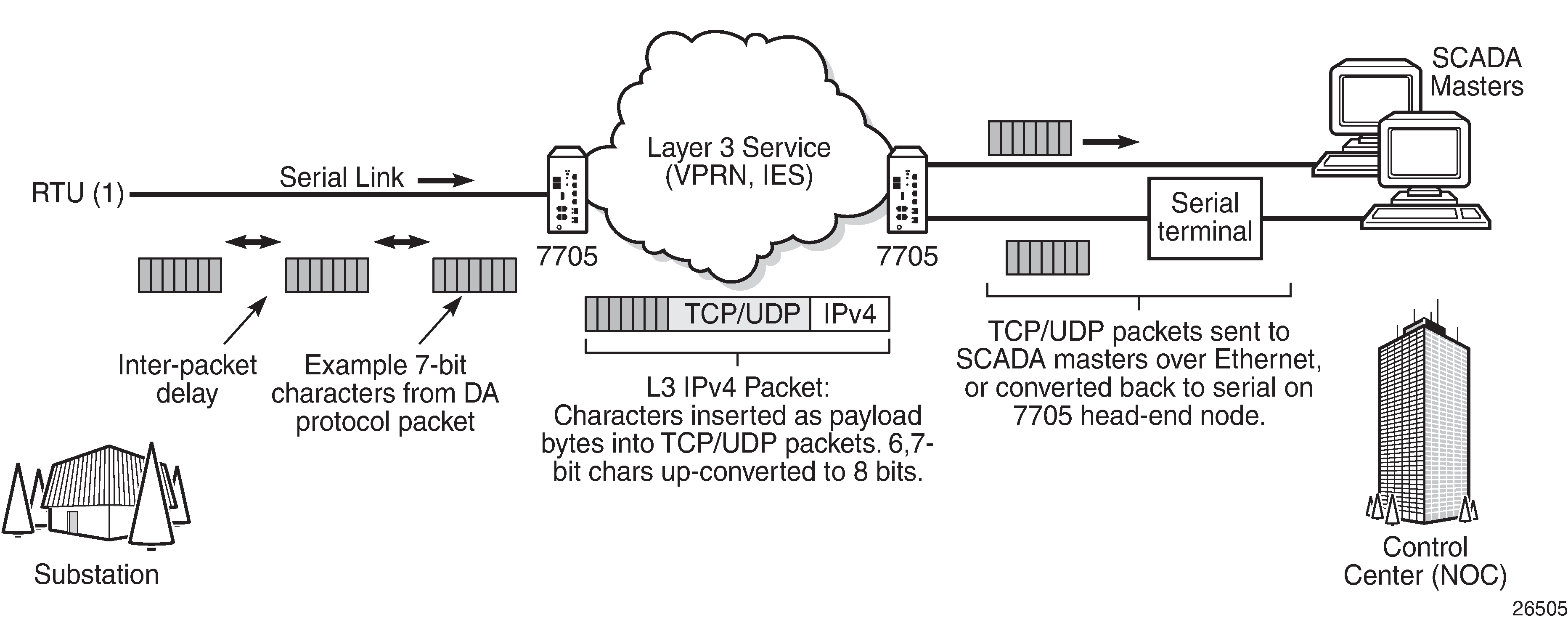
The 7705 SAR-Hx supports the ability to configure a raw socket IP transport interface for each serial port. This allows the raw socket IP transport to receive TCP or UDP session packets from multiple remote hosts when operating as a local host (server), or to create new multiple sessions to remote hosts to send and receive serial data when operating as a client.
There are two main configurations required for a serial raw socket IP transport service to be operational and to support the sending and receiving of serial data:
-
port-level configuration
This includes configuring rudimentary serial link parameters such as baud rate, start/stop values, and bits. Socket-level configuration is also required, such as configuring end-of-packet checking parameters (idle-time, length, special character) and the inter-sessions delay for transmitting session data over the serial link. For information about the required port-level configuration, see the 7705 SAR Gen 2 Classic CLI Command Reference Guide and 7705 SAR Gen 2 MD-CLI Command Reference Guide.
-
IP transport service-level configuration
This includes creating an IP transport subservice to associate the serial port within a Layer 3 IES/VPRN service, so that TCP/UDP encapsulated serial data can be routed within the corresponding Layer 3 service. The IP transport subservice ID is modeled and created in the same way that the SAP IDs are created under the same service types. IP transport configuration includes configuring IP transport local host items and remote host items, such as setting TCP timers and sessions controls. See the 7705 SAR Gen 2 Classic CLI Command Reference Guide, 7705 SAR Gen 2 Clear, Monitor, Show, Tools CLI Command Reference Guide, and 7705 SAR Gen 2 MD-CLI Command Reference Guide for the required commands.
The 7705 SAR-Hx supports the configuration of a raw socket IP transport service for each serial port. This allows each serial port’s local host to listen to and open raw socket sessions from remote hosts that need to communicate over the serial port, and for each serial port’s local host to initiate and open raw socket sessions to remote hosts when serial data needs to be sent to those remote hosts. The local and remote host functions support TCP or UDP sessions (but not both concurrently) over the IES/VPRN service.
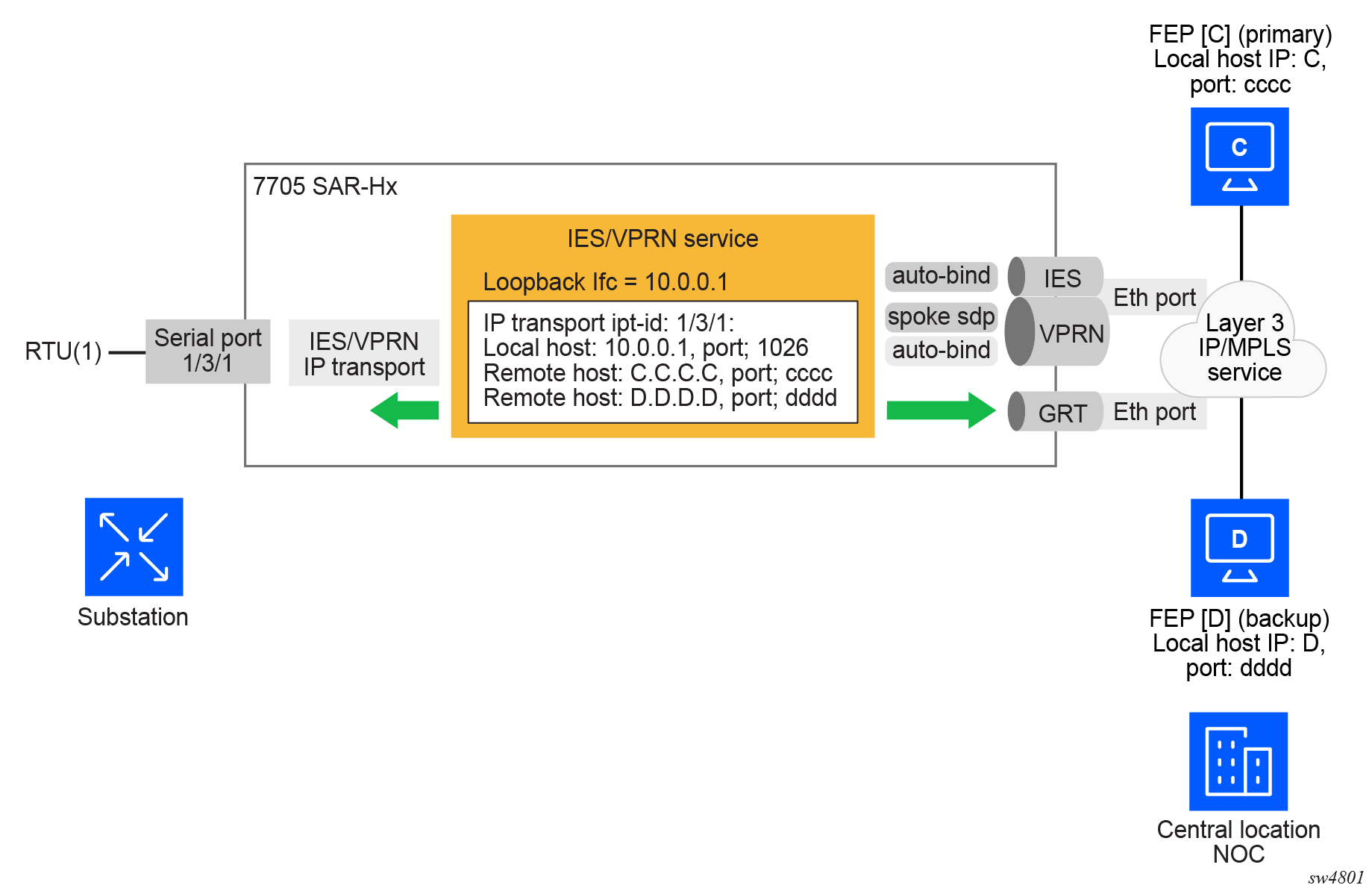
To create an IP transport subservice, the following classic CLI command is used with the corresponding serial port as the IP transport ID to bind the serial port SAP to the IP transport subservice.
configure service vprn ip-transport ipt-id
configure service vprn ip-transport ipt-id
After the IP transport service is created, local host and remote host configurations can proceed. A local host must be configured before remote hosts can be configured.
Each local host uses a local address (from a loopback or local interface configured under the IES/VPRN service context) as the local host IP address of the IP transport subservice associated with the serial port. The local host IP address is the source IP address in the raw socket packets leaving the node within the IES/VPRN service. The local host is used to terminate TCP/UDP sessions from remote hosts. The local host can select either the TCP or UDP protocol for raw socket sessions, but not both concurrently.
Multiple remote hosts can be configured under the IP transport subservice associated with the serial port, so that each remote host receives the serial data received on the serial port. Each remote host has its own remote destination IP address and port value for establishing sessions. The configured remote hosts use the TCP or UDP protocol configured for the IP transport subservice.
IP transport processing of TCP/UDP packets occurs on the CPM of the 7705 SAR-Hx. Filters configured for protecting the CPM must account for raw socket IP transport packets and ensure that the filter is not blocking associated IP transport sessions. For example, operators must ensure that interface IP addresses and ports configured on the node are not blocked and that remote host IP/port combinations are not blocked.
For IES/VPRN IP transport services, all tunnel types supported by the IES/VPRN service are also supported for the IP transport service. This includes all types of MPLS tunnels (such as RSVP-TE, LDP, autobind, and static LSP) and GRE tunnels.
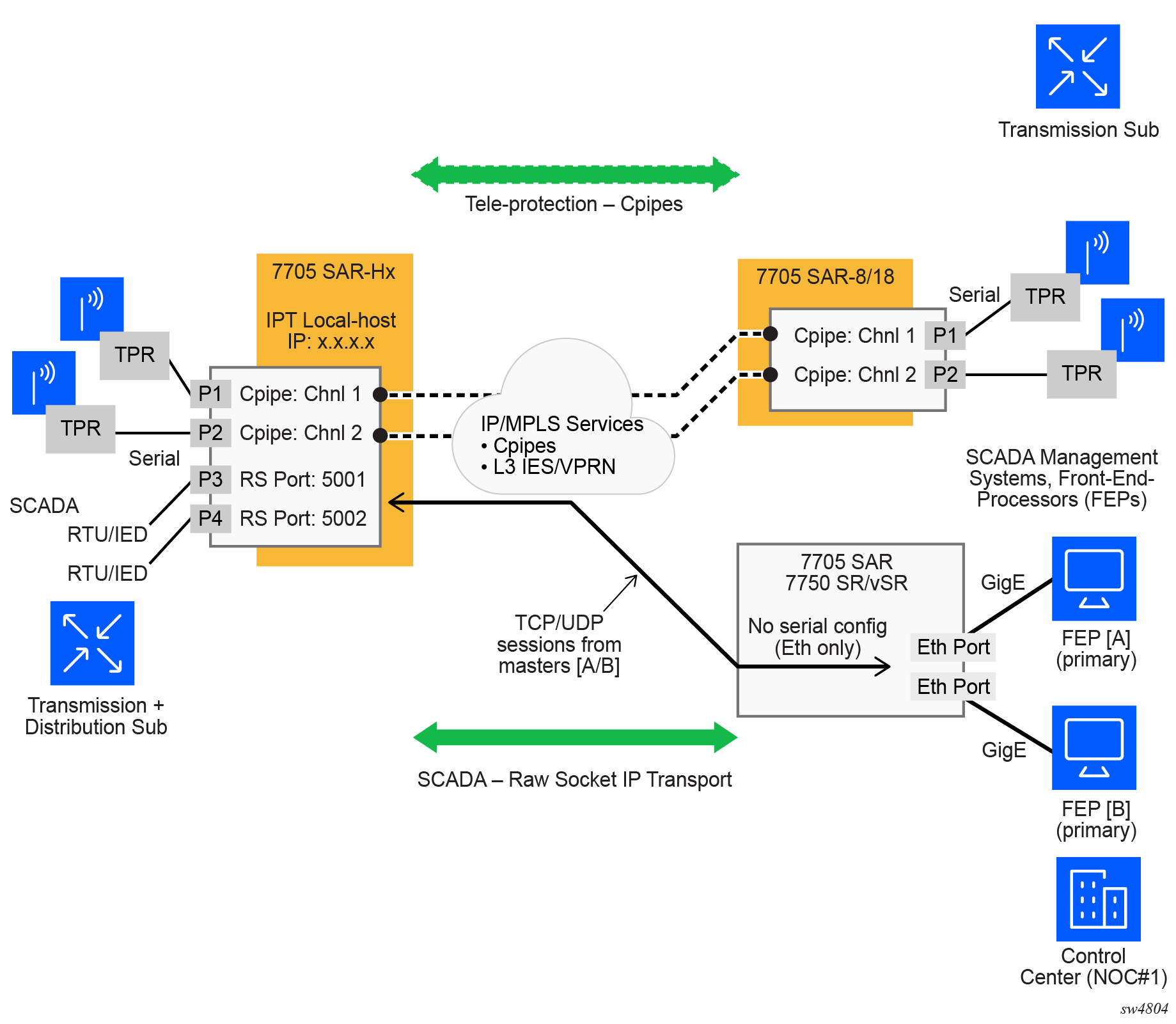
The 7705 SAR Gen 2 supports the concurrent operation of raw sockets and Cpipes, as shown in the following figure.
Remote host manual TCP connection check
A manual TCP connection check can be performed for each remote host configured for a raw socket IP transport subservice. When executed by an operator, the TCP connection check attempts to establish a TCP session toward the configured remote host. Only one TCP connection check is attempted, with a fixed timeout of five seconds. If the attempt is successful, the session is torn down immediately, without sending any data.
The TCP connection check is initiated in the classic CLI using the following command.
tools perform service id ip-transport remote-host check-tcpThe result is displayed using the following classic CLI command.
tools dump service id ip-transport remote-hostEquivalent management is available using SNMP.
If a TCP connection to a remote host already exists because of serial traffic being transmitted, the check returns ‟successful” without impacting the existing TCP connection.
QoS requirements for IP transport
Serial raw socket data that is transported using an IP transport service can be DSCP marked at the source node. This allows the source node (local host) of the traffic to mark packets correctly so that downstream nodes prioritize them as needed, and to queue local traffic in the right egress queue based on the classification assigned to the IP transport service.
Additionally, the DSCP setting is assigned per IP transport subservice for all traffic from the local host and all traffic destined for each remote host. The DCSP setting is not set per remote host.
See the following DSCP commands in the 7705 SAR Gen 2 Classic CLI Command Reference Guide for more information about configuring the QoS settings for an IES or VPRN IP transport subservice.
configure service ies ip-transport dscp
configure service vprn ip-transport dscp
Configuring serial raw socket transport within IES
Configure an IP transport subservice within an IES service to enable the transport of serial data using raw sockets.
IP transport subservice within an IES service
A:node-2>config>service>ies>ipt$ info detail
----------------------------------------------
                shutdown
                no description
                dscp "ef"
                no filter-unknown-host
                local-host ip-addr 1.2.1.1 port-num 1026 protocol tcp
                remote-host 1 create ip-addr 1.1.1.1 port-num 1
                    no description
                    no name
                exit
                tcp
                    inactivity-timeout 30
                    max-retries 5
                    retry-interval 5
                exit
----------------------------------------------
The following example displays an IP transport subservice configuration output.
IP transport subservice configuration
A:node-2>config>service>ies# info
----------------------------------------------
        configure
            service ies 20 create
                ip-transport 1/2/4.1 create
                description ‟ip-transport one”
                filter-unknown-host
                local-host ip-address 192.168.1.1 port-number 4000 protocol udp
                    exit
                remote-host 1 ip-address 192.168.1.7 port-number 4001 create
                    exit
                exit
                no-shutdown
----------------------------------------------
A:ALU-B>config>service>ies#
Configuring serial raw socket transport within a VPRN
Configure an IP transport subservice within a VPRN service to enable the transport of serial data using raw sockets.
IP transport subservice within a VPRN service
A:node-2>config>service>vprn>ipt$ info detail
----------------------------------------------
                shutdown
                no description
                dscp "ef"
                no filter-unknown-host
                local-host ip-addr 1.2.1.1 port-num 1026 protocol tcp
                remote-host 1 create ip-addr 1.1.1.1 port-num 1
                    no description
                    no name
                exit
                tcp
                    inactivity-timeout 30
                    max-retries 5
                    retry-interval 5
                exit
----------------------------------------------
The following example displays an IP transport subservice configuration output.
IP transport subservice configuration
A:node-2>config>service>vprn# info
----------------------------------------------
        configure
            service vprn 100 create
                ip-transport 1/2/4.1 create
                description ‟ip-transport vprn”
                filter-unknown-host
                local-host ip-address 192.168.0.0 port-number 4000 protocol udp
                    exit
                remote-host 1 ip-address 192.168.0.1 port-number 4001 create
                    exit
                exit
                no-shutdown
----------------------------------------------
A:ALU-B>config>service>vprn