
Multiservice Integrated Service Adapter and Extended Services Appliance
The 7705 SAR-Hm series of routers supports the Multiservice Integrated Adapter (MS-ISA) as covered in the following topics:
IP tunnels
This section describes IPSec secured interface over cellular functionality:
For general information about IP tunnel support, see the following topics in the 7450 ESS, 7750 SR, and VSR Multiservice ISA and ESA Guide, "IP tunnels":
IP tunnels overview
Tunnel ISAs
-
IPsec tunnel types
Operational conditions
-
QoS interactions
-
OAM interactions
Statistics collection
Security
IKEv2
SHA2 support
IPSec client lockout
IPSec tunnel CHILD_SA rekey
Multiple IKE/ESP transform support
-
Reverse routes for dynamic LAN-to-LAN IPsec tunnels
Using certificates for IPSec tunnel authentication
Trust-anchor profile
Cert-profile
IPSec deployment requirements
IKEv2 remote-access tunnel
Secured interface
-
IPsec client database
-
IPsec transport mode protected IP tunnel
Configuring IPSec with CLI
To configure and enable IP tunnels, the virtualized tunnel ISA MDA (isa-tunnel-v) must be configured in slot 5 or 6 on the router. See the 7705 SAR-Hm and SAR-Hmc Interface Configuration Guide for information.
IPSec secured interface over cellular
The 7705 SAR-Hm series of routers supports IPSec secured interfaces over cellular interfaces.
IPSec secured interface over a cellular interface shows an example of an IPSec secured interface deployment over a cellular interface in a dual SIM environment.
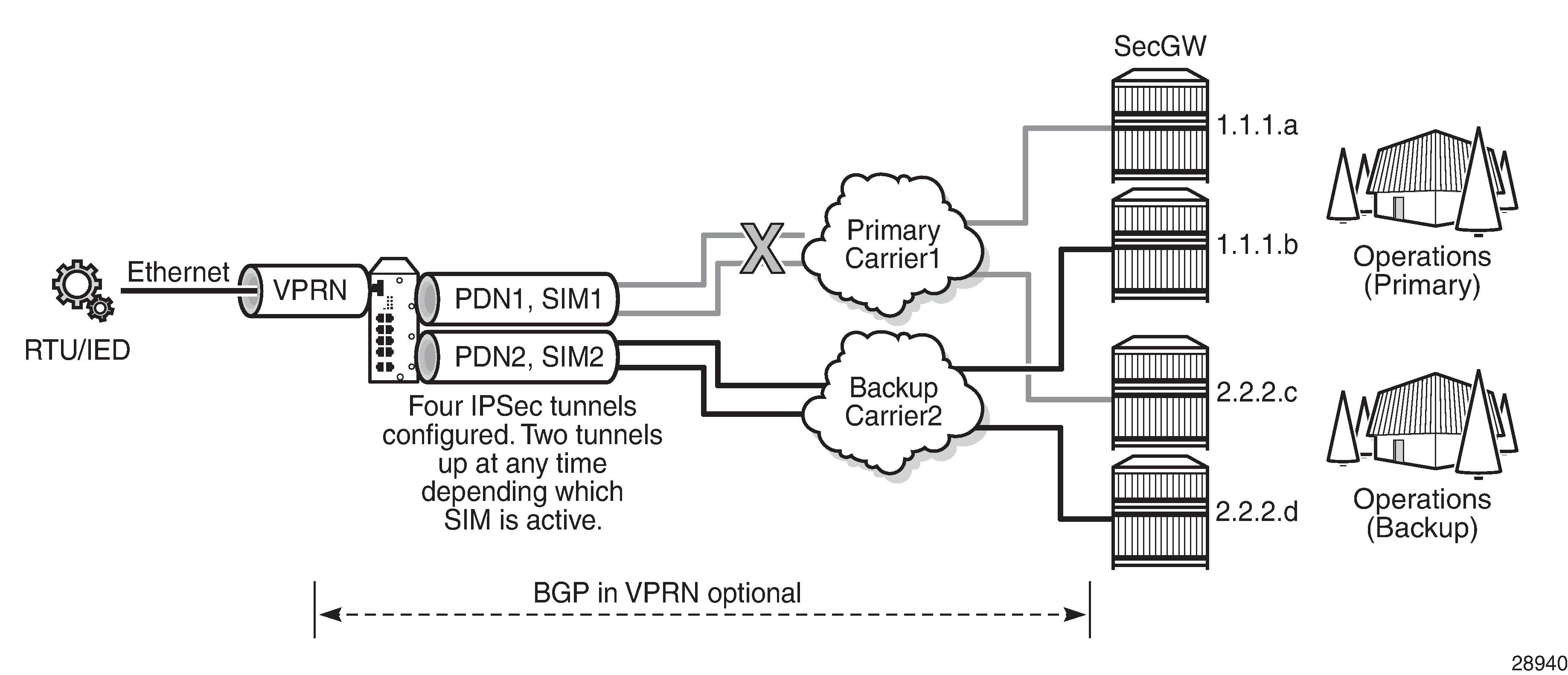
With IPSec secured interfaces, static IPSec tunnels can be created under the PDN router interface associated for each SIM. When the SIM is active and the node attaches to the cellular network, the PDN router interface becomes operational. At that time, IPSec secured interface tunnels configured on the interface also begin to establish toward the security gateway they are configured to connect to. When the tunnel is established, data traffic traverses the IPSec secured interface. In IPSec secured interface over a cellular interface, only the pair of tunnels associated with the active SIM is operational.
The tunnel pair on the second PDN router interface is kept down and becomes operational when the second SIM becomes active.
Each IPSec secured interface tunnel is associated with one service. The supported service types are IES and VPRN.
Each service that needs to be secured over the PDN router interface must be configured with its own IPSec secured interface tunnel. For example if VPRN1, VPRN2, and VPRN3 all need to be secured, then three different IPSec secured interfaces are required, one for each service.
IPSec secured interface is supported on IPv4 and IPv6 PDN router interfaces.
The following CLI output shows an example of IPSec secured interface configured on an IPv6 PDN router interface:
#--------------------------------------------------
echo "ISA Configuration"
#--------------------------------------------------
    isa
        tunnel-group 1 isa-scale-mode tunnel-limit-32 create
            reassembly 2000
            multi-active
            mda 1/5
            no shutdown
        exit
    exit
#--------------------------------------------------
echo "Router (Network Side) Configuration"
#--------------------------------------------------
    router Base
        interface "lte-interface1" pdn
            port 1/1/1
            ip-mtu 1500
            ipv6
            exit
            no shutdown
        exit
#--------------------------------------------------
echo "IPsec Configuration"
#--------------------------------------------------
    ipsec
        ike-transform 1 create
            dh-group 21
            ike-auth-algorithm sha384
            ike-encryption-algorithm des
        exit
        ike-policy 1 create
            ike-version 2
            dpd interval 10
            ike-transform 1
        exit
        ipsec-transform 1 create
            esp-auth-algorithm auth-encryption
            esp-encryption-algorithm aes256-gcm8
        exit
    exit
#--------------------------------------------------
echo "Service Configuration"
#--------------------------------------------------
    service
        vprn 1 name "vprn1" customer 1 create
            ipsec
                security-policy 1 create
                    entry 1 create
                        local-v6-ip 463c:f068:d815:e0ee:7ecf:5660::/96
                        remote-v6-ip c97e:a8fa:1785:52d7:9bb8:9b3b::/96
                    exit
                    entry 2 create
                        local-v6-ip 463c:f068:d815:e0ee:7ecf:5661::/96
                        remote-v6-ip c97e:a8fa:1785:52d7:9bb8:9b3c::/96
                    exit
                exit
            exit
            route-distinguisher 1.1.1.1:52
            static-route-entry c97e:a8fa:1785:52d7:9bb8::/80
                ipsec-tunnel "tunnel1-vprn1"
                    no shutdown
                exit
            exit
            no shutdown
        exit
    exit
#--------------------------------------------------
echo "Router (Service Side) Configuration"
#--------------------------------------------------
    router Base
        interface "lte-interface1" pdn
            ipsec tunnel-group 1 public-sap 1
                ipsec-tunnel "tunnel1-vprn1" private-sap 1 private-service-
name "vprn1" create
                    encapsulated-ip-mtu 1300
                    remote-gateway-address 2001:90:10:3::2
                    security-policy 1
                    dynamic-keying
                        ike-policy 1
                        pre-shared-key "2KMbfx1sfSVdLxLEJsuVhs/
hfa42V3XyCZMLyubX" hash2
                        transform 1
                    exit
                    no shutdown
                exit
                no shutdown
            exit
        exit
    exit
Network Address Translation
This section describes the following Network Address Translation (NAT) functionality supported on the 7705 SAR-Hm series of routers:
NAT runs on a single virtual ISA configured on the node. For general information about NAT support, see the topics listed below in the 7450 ESS, 7750 SR, and VSR Multiservice ISA and ESA Guide, "Network Address Translation":
-
Terminology
-
Network Address Translation (NAT) overview
-
Large scale NAT
-
NAT pool addresses and ICMP Echo Request/Reply (ping)
-
One-to-one (1:1) NAT
-
NAT logging
-
Syslog, SNMP, local-file logging
-
SNMP trap logging
-
NAT syslog
-
-
ISA feature interactions
-
MS-ISA use with service mirrors
-
-
Configuring NAT
NAT with static port forwarding
With NAT, the source IP address and the port of the host on the private side (inside) of the network are translated to an external IP address and port on the public side (outside) of the network. The IP address on the inside can be assigned to a raw socket IP host connected to an RS-232 serial interface or assigned to an IP interface associated with an Ethernet port.
Static port forwarding is configured on the CLI using the following parameters:
inside IP address
inside port
outside IP address
outside port
protocol
NAT with static port forwarding shows an example of a network with a 7705 SAR-Hm series node configured to use NAT with static port forwarding.
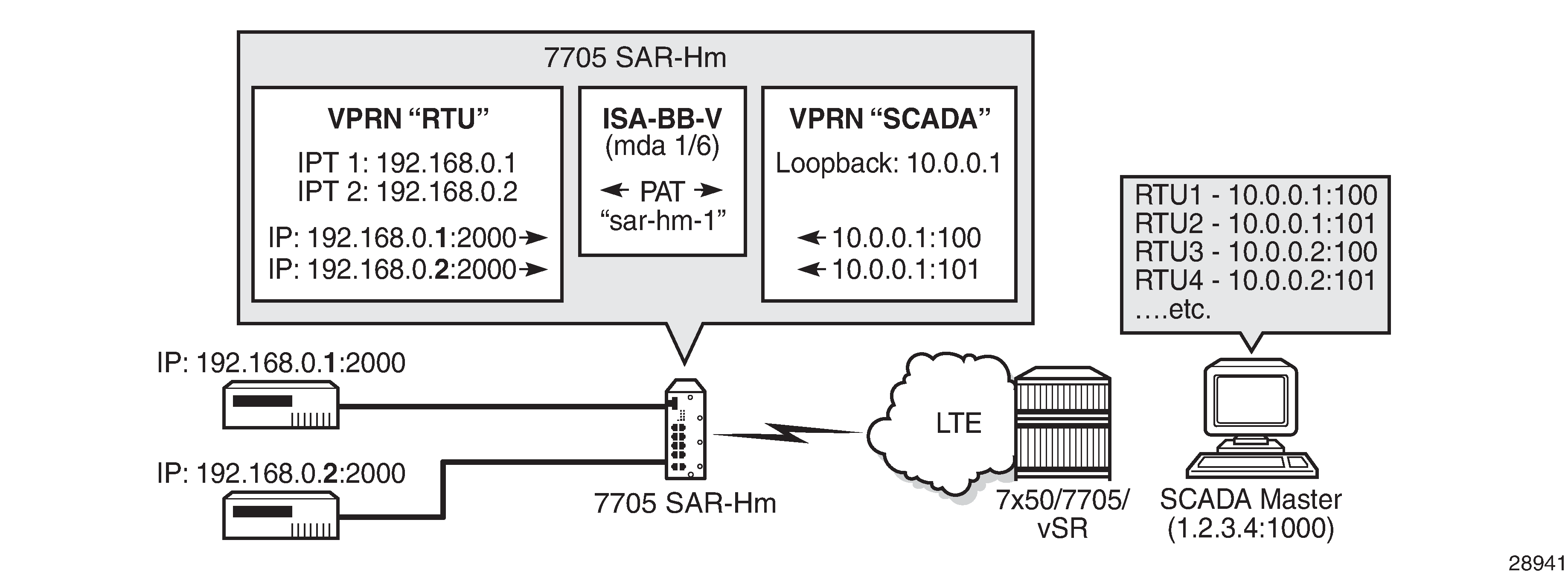
In the scenario shown above, the "RTU" VPRN service is inside and the "SCADA" VPRN service is outside. The "RTU" VPRN contains two IP transport services, one for each connected device. For information about IP transport services, see IP transport services and also see "Serial Transport over Raw Sockets" in the 7705 SAR-Hm and SAR-Hmc Interface Configuration Guide.
NAT with static port forwarding shows specific values for the inside IP address and port and outside IP address and port. The cellular interface of the node is used as the network-facing interface to transport the outside VPRN traffic.
When the SCADA master sends a packet to the node over the cellular network, it is carried within the outside "SCADA" VPRN service toward the node. The node sends the packet to the BB-ISA MDA to perform the required NAT function based on the configured NAT policy. NAT is applied to the packet as needed. The packet is then processed by the inside "RTU" VPRN service, destined for the corresponding IP transport service.
When a packet is sent from the RTU toward the SCADA master, the inside "RTU" VPRN service sends the packet to the BB-ISA MDA where the NAT policy translates the IP address and port to the outside IP address and port, The BB-ISA MDA then sends the packet to the outside "SCADA" VPRN service where it is routed over the cellular interface using the "SCADA" VPRN service.
The following steps and CLI outputs show the configuration of NAT with static port forwarding based on NAT with static port forwarding.
Configure NAT on the BB-ISA MDA:
config
     isa
        nat-group 1
              mda 1/6
Configure the inside "RTU" VPRN (1) service for the inside static port forwarding NAT function:
config
     service
          vprn 1
             interface 'rtu1'
                 address 192.168.0.1/32
                 loopback
             interface 'rtu2'
                 address 192.168.0.2/32
                 loopback
             ip-transport 1/3/1
                 local-host ip-addr 192.168.0.1 port-num 2000 protocol udp
                 remote-host ip-addr 1.2.3.4 port-num 1000 protocol udp
             ip-transport 1/3/2
                 local-host ip-addr 192.168.0.2 port-num 2000 protocol udp
                 remote-host ip-addr 1.2.3.4 port-num 1000 protocol udp


config
     service
          vprn 1
             nat
                 inside
                     destination-prefix 1.2.3.4/24   .
                     nat-policy 'sar-hm-1'


config
     service
           nat
                nat-policy 'sar-hm-1
                     pool 'pool-name-1'  router 2
                port-forwarding
                    lsn router 1 ip 192.168.0.1 protocol udp port 2000 outside-
                                  ip 10.0.0.1 outside-port 100 nat-policy "sar-hm-1"
                    lsn router 1 ip 192.168.0.2 protocol udp port 2000 outside-
                                  ip 10.0.0.1 outside-port 101 nat-policy "sar-hm-1"
Configure the outside "SCADA" VPRN (2) service for the outside static port forwarding NAT function:
service vprn 2
     interface 'Outside_RTU'
        address 10.0.0.1/32
        loopback
     nat
        outside
               pool 'pool-name-1'nat-group 1 type large-scale
                         address-range 10.0.0.1 10.0.0.1 create
                         port-forwarding-range 30000
                         port-reservations ports 1000
NAT on IPv4 interface
This section provides information about NAT on IPv4 interfaces.
IPv4 interface as public NAT address
In addition to using dedicated IP address ranges in a NAT pool, which are completely disjoint from any local IPv4 interface, the 7705 SAR-Hm series of routers supports using the IPv4 address of an interface as the public IP address. The NAT pool adopts the interface IPv4 address as its public address. The interface address is either statically configured or learned dynamically from the cellular interface or from a DHCP server when a DHCP client is enabled on an Ethernet interface.
One NAT’d public interface is supported per routing context.
If an application on the public side initiates communication with a service expected to run on the public IP address (for example, SSH), a port-forward must be configured. This is necessary to allow a node on the public side to initiate an SSH connection to the 7705 SAR-Hm series of router over the NAT'd interface.
In this chapter, traffic that originates from or terminates on the public IPv4 address in the outside routing context, and traverses NAT toward the public side, is referred to as CPM traffic.
Access on the private side
NAT subscribers on the private side attach to the 7705 SAR-Hm series of router via the following:
-
a network Layer 3 interface in the Base routing context or a service interface (IES or VPRN)
-
an access Layer 3 interface tied to a spoke SDP
-
R-VPLS
Public IPv4 address
The public IPv4 address used for NAT is one of the following:
-
Obtained statically or dynamically on a cellular interface in Base (single SIM only)
-
Statically configured on an interface in the Base routing context or on a SAP interface in an IES or VPRN service
- Dynamically obtained from a DHCP server when a DHCP client is configured on an interface in the Base routing context or on a SAP interface in an IES or VPRN service
When the public IPv4 address is obtained via DHCP on an IES SAP interface, the IES service requires an additional SAP interface with a statically configured IPv4 address for the DHCP client to learn its IP address and transition to an operationally UP state. The address configured on the additional interface does not need to be routable or used in the network.
The following CLI output shows NAT configuration on a cellular interface:
A:node-2>config>router# info
----------------------------------------------
...
        interface "pdn1-loopback"
            loopback
            no shutdown
        exit
        interface "pdn1-sim1" pdn
            port 1/1/1
            unnumbered "pdn1-loopback"
            nat
                cpm-nat-policy <name>
                cpm-spf-nat-policy <name>
            exit
            no shutdown
        exit
----------------------------------------------
The following CLI output shows NAT configuration with DHCP client enabled on an IES SAP interface:
A:node-2>config>service# info
----------------------------------------------
...
        ies 1 name "demo" customer 1 create
            interface "public_interface_1" create
                autoconfigure
                    dhcp-client
                    no shutdown
                    client-id interface
                exit
            exit
            mac 00:10:01:00:00:01
            sap 1/2/1:1001 create
            exit
            nat
                cpm-nat-policy "cpm_policy_1"
            exit
        exit
        interface "any" create
            address 192.0.2.1/24
            sap 1/2/1:123 create
            exit
        exit
        no shutdown
    exit
----------------------------------------------
Source port allocation on NAT'd public interfaces
On a NAT'd public interface IP address, source ports are dynamically allocated individually, starting from the well-known range (greater than 1023) up to the end of the port range (65535). In other words, the NAT'd interface IPv4 address does not rely on port blocks.
Static port forwards can be allocated from the entire port range, including the well-known ports.
Excluding ports from the public interface address
Certain UDP ports are reserved and excluded from allocation on the NAT'd public interface IPv4 address.
-
68 – used by the DHCP client
-
500, 4500 – used by secure IPsec interfaces
- 3784, 3785, 4784 – used by BFD
Inbound access to local services over a NAT'd public interface
To enable external CPM traffic to reach the CPM over a NAT'd public interface, a CPM NAT policy must be associated with the public interface. Use the following commands to associate a CPM NAT policy:
configure router interface nat cpm-nat-policy
configure service ies interface nat cpm-nat-policy
configure service vprn interface nat cpm-nat-policy
Optionally, use the following commands to apply a CPM static port-forward NAT policy:
configure router interface nat cpm-spf-nat-policy
configure service ies interface nat cpm-spf-nat-policy
configure service vprn interface nat cpm-spf-nat-policy
Additionally, the listening port of the application must be explicitly opened by configuring a static port forward. This ensures that incoming traffic is correctly routed to the internal service behind NAT.
The following are examples of applications that require a static port-forward configuration:
-
SSH, SCP, SFTP – TCP port 22
-
BGP – TCP port 179
-
NETCONF – TCP port 830 (over SSH) or TCP 22 (standard SSH)
-
gNMI over TLS – TCP port 9339
Routing protocols over NAT'd interfaces
The public NAT interface can establish BGP and IGP peering, or neighbor relationships with external routing nodes.
Echo protocols over NAT'd interfaces
The public IPv4 address on the NAT'd interface responds to ICMP Echo Requests initiated from the public side. Conversely, it can also initiate ICMP Echo Requests toward nodes on the public side.
However, the NAT'd public interface IPv4 address does not respond to ICMP Echo Requests originating from the private side. Instead, users on the private side must direct Echo Requests to the IPv4 address configured on the private-facing interface.
Use the configure router nat outside pool icmp-echo-reply command to allow ICMP Echo Replies (ping responses) from a public IP interface:
Traceroute
The 7705 SAR-Hm series of routers supports traceroute initiated from the public side to a NAT'd public IPv4 address.
For ICMP-based traceroute, ICMP Echo Replies must be enabled (as noted in Echo protocols over NAT'd interfaces).
For UDP-based or TCP-based traceroute, port 33434 must be explicitly opened via static port forwards.
NAT policies using NAT'd interface address
A NAT policy defines the NAT pool selection for NAT subscribers on the private side and specifies applicable NAT behaviors, such as:
-
Application Layer Gateway (ALG) support
-
UDP/TCP session timeouts
-
per-NAT subscriber session limits
-
limits on the number of static port forwards allowed per-NAT subscriber
When a network interface is used as the public IP address, two distinct traffic paths, the transit path and local path, exist through the node.
The transit path is the traditional NAT path where subscriber traffic flows from the private side to the public side. The NAT policy is applied inside routing context, as shown in the following configuration example:
The NAT policy can also be associated with a destination-profile configuration or the nat IP filter action.
A:node-2>config>router>nat# info
----------------------------------------------
    inside
        nat-policy "demo-nat-policy"
    exit
----------------------------------------------
The local path handles CPM traffic that originates from or terminates on the node itself, such as SSH or FTP traffic. Because this traffic traverses the NAT'd interface, it also undergoes NAT processing. For such locally NAT'd traffic, a separate NAT policy is required, and the policy is applied directly under the public IP interface.
In this case, the source IP address for locally originated traffic may be one of the following:
-
the interface public IPv4 address (that is, the NAT'd interface itself)
-
a private IPv4 address behind NAT that is reachable in the outside routing context (via a directly configured interface or route leaking)
The NAT policy for this local path is configured using the cpm-nat-policy and cpm-spf-nat-policy commands under the interface, as shown in the following configuration example:
A:node-2>config>router>if# info
----------------------------------------------
    address 192.0.2.1/31
    port 1/2/1
    nat
        cpm-nat-policy "demo-cpm-nat-policy"
        cpm-spf-nat-policy "demo-cpm-spf-nat-policy"
    exit
    no shutdown
----------------------------------------------
The cpm-nat-policy is mandatory in cases where that traffic is locally originated or terminated on the NAT'd interface.
The cpm-spf-nat-policy is optional and is used to apply different NAT policy parameters specifically for static port-forwarded traffic. For example, a user can limit the number of sessions that an external host (from the public side) can establish on an open port via static port forwarding.
Neither of these two NAT policies is required if locally terminated traffic through NAT is not required. This includes scenarios such as ICMP ping requests sent to the NAT'd interface IP address from the public side. However, NAT must still enabled on the node for it to take effect on the public interface, as shown in the following configuration example:
The 7705 SAR-Hm series of routers supports traceroute initiated from the public side to a NAT'd public IPv4 address.
A:node-2>config>router>if# info
----------------------------------------------
    address 192.0.2.1/31
    port 1/1/c1/1
    nat
    exit
    no shutdown
----------------------------------------------
Both NAT'd transit traffic and local CPM traffic mapped to the same outside routing context share common NAT resources. Because local CPM traffic (originating from or destined for the node itself) is significantly smaller in scale than transit traffic, it is critical to protect NAT resources for local use, ensuring access to essential node functions such as SSH, FTP, or management protocols.
To guarantee availability for local traffic, the following NAT resources are afeguarded by the system:
-
flows
-
ports
-
NAT subscribers
Excluding ports from the public interface address
The following measures are implemented to prevent local NAT traffic from being starved when the system reaches its flow capacity:
-
100 additional flows are reserved exclusively for local traffic once the node hits its maximum flow limit
-
When the maximum flow scale is reached:
-
Only local flows are allowed to use the 100 reserved flows
-
The system removes the oldest transit flows to stay within the flow limit
-
Local traffic is also limited by the per-subscriber session limit defined in the NAT policy
-
-
configure session limits in the NAT policy to cap the number of inbound flows per subscriber
-
enable address and port-dependent filtering in the NAT policy to tighten access control
-
use a dedicated NAT policy for static port forwards (cpm-spf-nat-policy) alongside the general cpmnat-policy. This allows the user to apply stricter parameters (such as session limits) specifically for port-forwarded traffic from the public side.
Local port protection
A configurable number of UDP/TCP ports are reserved exclusively for local traffic. Use the following commands to configure the number of reserved ports:
configure router nat outside pool cpm-reserved-ports
configure service vprn nat outside pool cpm-reserved-ports
The key behaviors for reserved and non-reserved ports include the following:
-
Reserved ports are randomly selected from the available port range
-
Non-reserved ports are shared between transit and local CPM traffic
-
Reserved ports are only used when all shared ports are exhausted, ensuring that local applications always have access to a usable port range
-
The number of reserved ports is configurable within the NAT pool
NAT subscriber protection
In the context of the NAT'd interface IP address, a NAT subscriber can be transit or local (private IPv4 address locally terminated on the 7705 SAR-Hm series router). The number of NAT subscriber resources is finite.
The following protections support local subscribers even when the system approaches its maximum NATsubscriber scale:
-
An additional 8 NAT subscriber slots are reserved for local traffic
-
When the maximum NAT subscriber count is reached, the system begins removing the oldest transit subscribers to ensure the total remains within system limits
NAT and IPsec secured interfaces
NAT and secure IP interfaces are supported on the same physical interface. See IPSec secured interface over cellular for information about configuring a secure IP interface.
NAT and IP configuration example
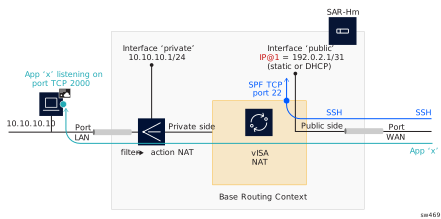
To configure NAT with a public IPv4 address:
-
Configure the vISA in ‘broadband’ (bb) mode to enable NAT functionality with
the configure card mda mda-type command.
A:node-2>config>card# info ---------------------------------------------- ... mda 6 mda-type isa-bb-v no shutdown exit no shutdown ---------------------------------------------- -
Configure a NAT group that includes the broadband vISA with the
configure isa nat-group command.
A:node-2>config>isa# info ---------------------------------------------- nat-group 1 create active-mda-limit 1 mda 1/3 no shutdown exit ---------------------------------------------- -
Configure NAT policies.
-
Associate the public NAT interface with CPM NAT policies to handle locally
originated and terminated NAT traffic with the configure router
interface command. A CPM NAT policy is mandatory if NAT traffic is
initiated by, or destined for the local node. It is not required for transit
traffic (that is, traffic passing through the node). Use the optional CPM SPF
NAT policy if sessions initiated from the outside (for example, via static port
forwards) require different NAT policy settings than locally originated
traffic.
A:node-2>config>router# info ---------------------------------------------- … interface "pdn1-loopback" loopback no shutdown exit interface "pdn1-sim1" pdn port 1/1/1 unnumbered "pdn1-loopback" nat cpm-nat-policy "demo-cpm-nat-policy" cpm-spf-nat-policy "demo-cpm-spf-nat-policy" exit no shutdown exit … ---------------------------------------------- -
Configure the NAT pool associated with the public (outside) interface with the
configure router nat outside pool command.
A:node-2>config>router>nat>outside# info ---------------------------------------------- pool "demo-pool" nat-group 1 type large-scale applications useinterface-ip create port-reservation ports 1 port-forwarding-range 65535 cpm-reserved-ports 20 mode napt no shutdown exit ---------------------------------------------- -
Configure a filter and apply it to the IPv4 interface to redirect traffic to
NAT on the private side.
-
Associate the default NAT policy on the private (inside) interface to handle
transit traffic with the configure router nat inside
nat-policy command.
A:node-2>config>router>nat# info ---------------------------------------------- inside nat-policy "demo-nat-policy" exit ---------------------------------------------- - Configure port forwards for local SSH access through NAT (CPM port forwards) with the configure service nat port-forwarding lsn command. The CPM SPF NAT policy is optionally associated with a NAT public interface. If it is not configured, the user must explicitly reference the mandatory CPM NAT policy (in this case, "demo-cpm-nat-policy") in the static port-forward configuration.
-
Enable persistence for the port forwards configured in step 8 using the
configure system persistence nat-port-forwarding location
command.
A:node-2>config>system>persistence>nat-fwd# info
----------------------------------------------
location cf2:
----------------------------------------------
NAT command reference
The 7705 SAR-Hm series of routers supports the NAT commands listed in this section. For command descriptions, see the 7450 ESS, 7750 SR, 7950 XRS, and VSR Classic CLI Command Reference Guide.
ISA configuration commands
config
    - isa
        - nat-group	 nat-group-id [create]
        - no nat-group nat-group-id
            - active-mda-limit number
            - no active-mda-limit
            - description description-string
            - no description
            - [no] mda mda-id
            - [no] shutdown
            - [no] suppress-lsn-events
            - [no] suppress-lsn-sub-blks-free
NAT service configuration commands
configure
    - service
        - nat
            - nat-policy nat-policy-name [create]
            - no nat-policy nat-policy-name
                - block-limit [1..40]
                - no block-limit [
                - description description-string
                - no description
                - filtering filtering-mode
                - no filtering
                - pool nat-pool-name service-name service-name
                - pool nat-pool-name router router-instance
                - no pool
                - port-limits
                    - forwarding limit
                    - no forwarding
                    - watermarks high percentage-high low percentage-low
                    - no watermarks
                - session-limits
                    - max num-sessions
                    - no max
                    - watermarks high percentage-high low percentage-low
                    - no watermarks
                - tcp-mss-adjust segment-size
                - no tcp-mss-adjust
                - [no] timeouts
                    - icmp-query [min minutes] [sec seconds]
                    - no icmp-query
                    - tcp-established [hrs hours] [min minutes] [sec seconds]
                    - no tcp-established
                    - tcp-rst [min minutes] [sec sec]
                    - no tcp-rst
                    - tcp-syn [hrs hours] [min minutes] [sec seconds]
                    - no tcp-syn
                    - tcp-time-wait [min minutes] [sec seconds]
                    - no tcp-time-wait
                    - tcp-transitory [hrs hours] [min minutes] [sec seconds]
                    - no tcp-transitory
                    - udp [hrs hours] [min minutes] [sec seconds]
                    - no udp
                    - udp-dns [hrs hours] [min minutes] [sec seconds]
                    - no udp-dns
                    - udp-inital [min minutes] [sec seconds]
                    - no udp-inital
                - [no] udp-inbound-refresh
            - port-forwarding
                - lsn router router-instance [b4 ipv6-address] [aftr ipv6-address] ip ip-address protocol {tcp | udp} [port port] [outside-ip ipv4-address] [outside-port port] [nat-policy nat-policy-name]
                - no lsn router router-instance [b4 ipv6-address] ip ip-address protocol {tcp | udp} port port [nat-policy nat-policy-name]
NAT VPRN commands
config
    - service
        - vprn service-id customer cust-id create
            - [no] nat
                - inside
                    - classic-lsn-max-subscriber-limit max
                    - no classic-lsn-max-subscriber-limit
                    - destination-prefix ip-prefix/length [nat-policy nat-policy-name]
                    - no destination-prefix ip-prefix/length
                    - deterministic
                        - prefix ip-prefix/length subscriber-type nat-sub-type nat-policy nat-policy-name [create]
                        - prefix ip-prefix/length subscriber-type nat-sub-type
                        - no prefix ip-prefix/length subscriber-type nat-sub-type
                            - map start lsn-sub-address end lsn-sub-address to outside-ip-address
                            - no map  start lsn-sub-address end lsn-sub-address
                            - [no] shutdown
                    - nat-policy nat-policy-name
                    - no nat-policy
                - outside
                    - mtu value
                    - no mtu
                    - poolnat-pool-name nat-group nat-group-id type pool-type [applications applications] [create]
                    - no pool nat-pool-name
                        - address-range start-ip-address end-ip-address [create]
                        - no address-range start-ip-address end-ip-address
                            - description description-string
                            - no description
                            - [no] drain
                        - description description-string
                        - no description
                        - mode {auto | napt | one-to-one}
                        - no mode
                        - port-forwarding-range range-end
                        - no port-forwarding-range
                        - port-reservation blocks num-blocks
                        - port-reservation ports num-ports
                        - no port-reservation
                        - subscriber-limit limit
                        - no subscriber-limit
                        - watermarks high percentage-high low percentage-low
                        - no watermarks
NAT persistence commands
The 7705 SAR-Hm series of routers supports the persistence commands listed in this section. For command descriptions, see the 7450 ESS, 7750 SR, 7950 XRS, and VSR Classic CLI Command Reference Guide.
config
    - system
        - persistence
            - nat-port-forwarding
                - description description-string
                - no description
                - location cflash-id
                - no location
NAT IPv4 filter policy commands
The 7705 SAR-Hm series of routers supports the NAT IPv4 filter policy commands listed in this section. For command descriptions, see the 7450 ESS, 7750 SR, 7950 XRS, and VSR Classic CLI Command Reference Guide.
config
    - filter
        - ip-filter filter-id [name filter-name] [create]
        - no ip-filter {filter-id | filter-name}
            - entry entry-id [create]
            - no entry entry-id
                - [no] action [secondary]
                    - nat [nat-policy nat-policy-name]
NAT routing protocol commands
The 7705 SAR-Hm series of routers supports the NAT routing protocol commands listed in this section. For command descriptions, see the 7450 ESS, 7750 SR, 7950 XRS, and VSR Classic CLI Command Reference Guide.
config
    - router
        - [no] policy-options]
            - [no] policy-statement name
                - entry entry-id [create]
                - no entry entry-id
                    - [no] from
                        - protocol protocol [all | instance instance]
                        - no protocol
NAT on IPv4 interface commands
The 7705 SAR-Hm series of routers supports the NAT on IPv4 commands listed in this section. For command descriptions, see the 7705 SAR Gen 2 Classic CLI Command Reference Guide.
config
    - router
        - interface if-name [create] [pdn]
            - [no] nat
                - [no] cpm-nat-policy policy-name
                - [no] cpm-spf-nat-policy policy-name
config
- service
- ies/vprn service-id [customer] cust-id [create]
- interface if-name [create]
- [no] nat
- [no] cpm-nat-policy policy-name
- [no] cpm-spf-nat-policy policy-nameApplication Assurance firewall
The 7705 SAR-Hm series of routers supports Application Assurance (AA) firewall (FW). The AA FW feature extends AA ISA Layer 3 and Layer 4 packet analysis to provide an in-line integrated stateful FW for additional security from malicious attacks. The AA stateful packet filtering feature empowers operators with per-session tracking features to monitor the security of each session. The AA FW runs on the AA ISA.
In a stateful inspection, the AA FW not only inspects Layers 3 and 4, but also monitors and keeps track of each connection’s state. If the operator configures a “deny” action within a session filter, the packets that match the session filter match conditions are dropped and no flow session state or context is created.
The AA FW feature is supported on the following SAP types
- VLLs (Epipes)
- VPLS
- IES/VPRN interfaces
For general information about configuring an AA FW on the 7705 SAR-Hm series of routers, see the following topics in the 7450 ESS, 7750 SR, and VSR Multiservice ISA and ESA Guide, “Application Assurance":
-
AA overview
-
AA inline policy enforcement
-
Stateful firewall service
-
-
AA system architecture
-
AA ISA resource configuration
-
AA ISA groups
-
-
AA packet processing
- Divert of traffic and subscribers
- Traffic identification
- Statistics and accounting
- AQP
- AA firewall
- Service monitoring and debugging (firewall stastistics)
- CLI batch: begin, commit and abort commands
-
-
Configuring AA with CLI
-
Configuring an AA ISA group
-
Configuring a group policy
- Beginning, committing, and aborting a policy configuration
- Configuring AA session filters
- Configuring an application group
- Configuring a policer
- Configuring an application QoS policy
-
An AA FW is enabled by assigning an application profile to a SAP that requires flows to be inspected. The assignment enables the AA FW functionality for all traffic that is deemed of interest to and from the SAP. An application profile can be assigned to a VLL (Epipe) via the config>service>epipe>sap>app-profile command, to a VPLS via the config>service>vpls>sap>app-profile command, and to an IES or VPRN via the config>service>ies | vprn>interface>sap>app-profile commands.
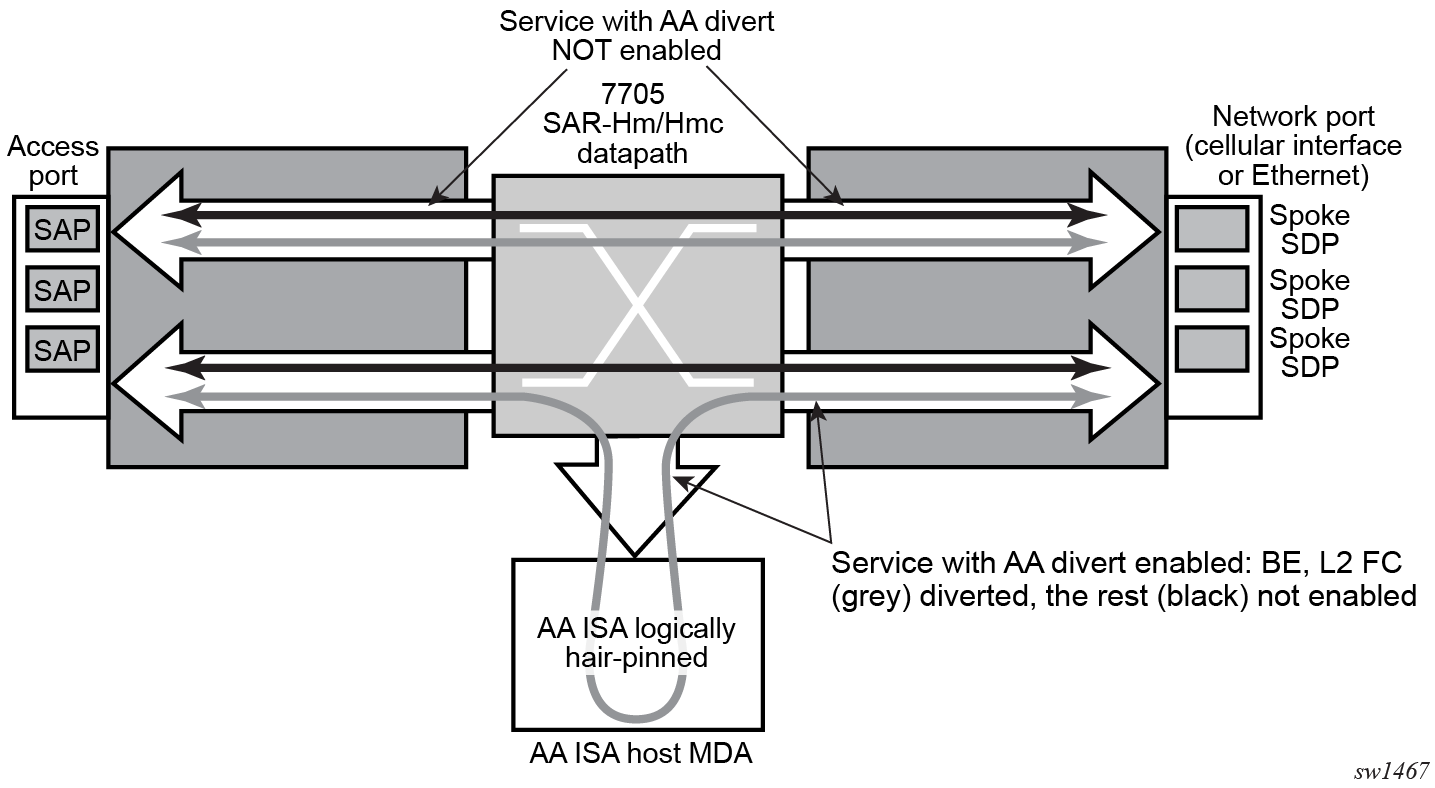
AA FW datapath shows the general mechanism for filtering traffic of interest and diverting this traffic to the AA ISA. This traffic diversion method applies to both bridged and routed configurations.
#--------------------------------------------------
echo "ISA Configuration"
#--------------------------------------------------
    isa
        application-assurance-group 1 create
            description "ISA AA FW Group"
            primary 1/6
            fail-to-open
            divert-fc be
            statistics
                performance
                    collect-stats
                exit
            exit
            no shutdown
        exit
    exit

#--------------------------------------------------
echo "Application-assurance Configuration"
#--------------------------------------------------
    application-assurance
        flow-table-low-wmark 80
        flow-table-high-wmark 90
        group 1
            policer "flowCountPerSub_DL" type flow-count-limit granularity subscriber create
                description "Allow only a certain number of active flows at a time per subscriber"
                flow-count 50
                tod-override 1 create
                    time-range daily start 09:00 end 17:00
                    flow-count 25
                    no shutdown
                exit
            exit
            policer "flowCountPerSub_UL" type flow-count-limit granularity subscriber create
                flow-count 50
                tod-override 1 create
                    time-range daily start 09:00 end 17:00
                    flow-count 25
                    no shutdown
                exit
            exit
            policer "singeBucketSub" type single-bucket-bandwidth granularity subscriber create
                description "Sample bandwidth policer"
                rate 4096
                mbs 300
            exit
        exit
        group 1:0 create
            description "AA partition config"
            ip-prefix-list "IPL" create
                description "A sample IP prefix list"
                prefix 1.1.1.0/24
                prefix 10.1.1.135/32
                prefix 2607::/32
            exit
            event-log "EL" create
                buffer-type circular
                max-entries 1000
                no shutdown
            exit
            port-list "PL" create
                description "Sample port list"
                port range 80 443
                port 8080
            exit
            policy
                begin
                app-service-options
                    characteristic "ASO" persist-id 1 create
                        value "val1" persist-id 1
                        value "val2" persist-id 2
                        default-value "val1"
                    exit
                exit
                app-profile "aa_firewall" create
                    divert
                    characteristic "ASO" value "val2"
                exit
                commit
            exit
            tcp-validate "TV" create
                description "A TCP validate object with strict checked linked to event-log"
                event-log "EL"
                strict
            exit
            session-filter "SF" create
                description "Deny unsolicited network flows except for a known TCP port"
                default-action deny event-log "EL"
                entry 1 create
                    match
                        ip-protocol-num tcp
                        src-ip ip-prefix-list "IPL"
                        src-port port-list "PL"
                    exit
                    action permit event-log "EL"
                exit
            exit
            session-filter "SF2" create
                description "Deny subscribers from sending ICMP"
                default-action permit
                entry 1 create
                    match
                        ip-protocol-num icmp
                    exit
                    action deny
                exit
            exit
        exit
    exit

#--------------------------------------------------
echo "Application-assurance Configuration"
#--------------------------------------------------
    application-assurance
        group 1:0
            policy
                begin
                app-qos-policy
                    entry 1 create
                        action
                            overload-drop
                            error-drop
                            fragment-drop all
                        exit
                        no shutdown
                    exit
                    entry 2 create
                        action
                            tcp-mss-adjust 1500
                        exit
                        no shutdown
                    exit
                    entry 4 create
                        match
                            traffic-direction subscriber-to-network
                        exit
                        action
                            flow-count-limit "flowCountPerSub_UL"
                        exit
                        no shutdown
                    exit
                    entry 5 create
                        match
                            traffic-direction network-to-subscriber
                        exit
                        action
                            flow-count-limit "flowCountPerSub_DL"
                        exit
                        no shutdown
                    exit
                    entry 6 create
                        match
                            traffic-direction subscriber-to-network
                        exit
                        action
                            session-filter "SF2"
                        exit
                        no shutdown
                    exit
                    entry 7 create
                        match
                            traffic-direction network-to-subscriber
                        exit
                        action
                            session-filter "SF"
                        exit
                        no shutdown
                    exit
                    entry 8 create
                        action
                            tcp-validate "TV"
                        exit
                        no shutdown
                    exit
                    entry 9 create
                        match
                            characteristic "ASO" eq "val1"
                        exit
                        action
                            remark
                                fc ef
                            exit
                        exit
                        no shutdown
                    exit
                exit
                commit
            exit
            policy-override
                policy aa-sub sap 1/2/3 create
                    characteristic "ASO" value "val1"
                exit
            exit
            statistics
                aa-admit-deny
                    collect-stats
                    session-filter-stats
                    policer-stats-resources
                    policer-stats
                    tcp-validate-stats
                exit
                aa-partition
                    collect-stats
                    traffic-type
                exit
                threshold-crossing-alert
                    fragment-drop-all direction from-sub create
                        high-wmark 4294967295 low-wmark 0
                    exit
                    session-filter "SF"
                        default-action direction to-sub create
                            high-wmark 4294967295 low-wmark 0
                        exit
                    exit
                exit
            exit
        exit
   exit
The following CLI output shows an example of an Epipe service configured with an "aa_firewall" application profile.
#--------------------------------------------------
echo "Service Configuration"
#--------------------------------------------------
     service
        sdp 1 create
            description "Default sdp description"
            signaling off
            far-end 10.25.81.103
            keep-alive
                shutdown
            exit
            no shutdown
        exit
        customer 1 name "1" create
            description "Default customer"
        exit
        epipe 1 name "1" customer 1 vpn 1 create
            description "Default epipe description for service id 1"
            service-mtu 1200
            sap 1/2/1 create
                description "Default sap description for service id 1"
                app-profile "aa_firewall"
                no shutdown
            exit
            spoke-sdp 1:101 create
                description "Description for Sdp Bind 1 for Svc ID 1"
                ingress
                    vc-label 101
                exit
                egress
                    vc-label 101
                exit
                no shutdown
            exit
            no shutdown
     exit
The following CLI output shows an example of a VPRN service configured with an "aa-firewall" application profile.
#--------------------------------------------------
echo "Service Configuration"
#--------------------------------------------------
    service
        customer 1 name "1" create
            description "Default customer"
        exit
        vprn 2 name "Sample VPRN 2" customer 1 create
            description "Default Description For VPRN ID 2"
            interface "interface_1" create
                address 1.1.1.1/24
                static-arp 1.1.1.2 8a:5a:47:e5:1d:7f
                ipv6
                    address 1::1/126
                    neighbor 1::2 8a:5a:47:e5:1d:7f
                exit
                sap 1/2/3:2 create
                    description "sap-2-none"
                    app-profile "aa_firewall"
                exit
            exit
            bgp-ipvpn
                mpls
                    auto-bind-tunnel
                        resolution-filter
                            no bgp
                        exit
                        resolution disabled
                    exit
                    route-distinguisher 100:2
                    no shutdown
                exit
            exit
            no shutdown
        exit
The following CLI output shows an example of an Epipe configured with AA FW event logging.
#--------------------------------------------------
echo "Service Configuration"
#--------------------------------------------------
    service
        customer 1 name "1" create
            description "Default customer"
        exit
        epipe 1 name "1" customer 1 create
            sap 1/2/3:10 create
                app-profile "aa_firewall"
                no shutdown
            exit
            sap 1/2/4:10 create
                no shutdown
            exit
            no shutdown
        exit
        ies 100 name "100" customer 1 vpn 100 create
            description "Default Ies description for service id 100"
            aa-interface "aa_if" create
                address 10.1.1.2/31
                sap 1/6/aa-svc:1 create
                    no shutdown
                exit
                no shutdown
            exit
            interface "ies-100-9.9.9.1" create
                address 9.9.9.1/24
                sap 1/2/6 create
                    description "sap-100-9.9.9.1"
                exit
            exit
            no shutdown
        exit
#--------------------------------------------------
echo "Application-assurance Configuration"
#--------------------------------------------------
    application-assurance
        group 167:30712 create
            event-log "la8PQRgzyz6q87nIdJBolFLCiVRp0IG4" create
                buffer-type syslog
                max-entries 50000
                syslog
                    address 9.9.9.9
                    facility kernel
                    port 20001
                    severity notice
                    vlan-id 1
                exit
                no shutdown
            exit
            policy
                begin
                app-profile "aa_firewall" create
                    description "default-description for AppProfile aa_firewall"
                    divert
                exit
                app-qos-policy
                    entry 10 create
                        description "default-description for entry 10"
                        match
                            aa-sub sap eq 1/2/3:10
                        exit
                        action
                            fragment-drop out-of-order event-log "la8PQRgzyz6q87nIdJBolFLCiVRp0IG4"
                        exit
                        no shutdown
                    exit
                exit
                commit
            exit
            statistics
                aa-admit-deny
                    collect-stats
                    session-filter-stats
                    policer-stats-resources
                    policer-stats
                exit
            exit
        exit
AA FW command reference
The 7705 SAR-Hm series of routers supports the AA FW commands listed in this section. For command descriptions, see the 7450 ESS, 7750 SR, 7950 XRS, and VSR Classic CLI Command Reference Guide.
ISA AA group configuration commands
— config
            — isa
               — application-assurance-group application-assurance-group-index [create] [aa-subscale sub-scale]

               — no application-assurance-group application-assurance-group-index
                  — description description-string
                  — no description
                  — divert-fc fc-name
                  — no divert-fc
                  — [no] fail-to-open
                — [no] shutdown
                — statistics
                    — performance
                    — [no] collect-stats
AA configuration commands
— config
        — application-assurance
            — bit-rate-high-wmark high-watermark
            — no bit-rate-high-wmark
            — bit-rate-low-wmark low-watermark
            — no bit-rate-low-wmark
            — datapath-cpu-high-wmark high-watermark
            — datapath-cpu-high-wmark max
            — datapath-cpu-low-wmark low-watermark
            — flow-setup-high-wmark high-watermark
            — flow-setup-low-wmark low-watermark
            — no flow-setup-low-wmark
            — flow-table-high-wmark high-watermark
            — no flow-table-high-wmark
            — flow-table-low-wmark low-watermark
            — no flow-table-low-wmark
            — packet-rate-high-wmark high-watermark
            — packet-rate-low-wmark low-watermark
            — no packet-rate-low-wmark low-watermark
AA group configuration commands
config
— application-assurance
— group aa-group-id[:partition-id [create]]
— no group aa-group-id:partition-id
— [no] aa-sub-remote
— description description-string
— no description
— event-log event-log-name [create]
— no event-log event-log-name
— buffer-type buffer-type
— max-entries max-entries
— [no] shutdown
— syslog
— address ip-address
— no address
— description description-string
— no description
— facility syslog-facility
— port port
— severity syslog-severity
— vlan-id service-port-vlan-id
— no vlan-id
— ip-prefix-list ip-prefix-list-name [create]
— no ip-prefix-list ip-prefix-list-name
— description description-string
— no description
— prefix ip-prefix/ip-prefix-length [name prefix-name]
— no prefix ip-prefix/ip-prefix-length
— policer policer-name type type granularity granularity [create]
— no policer policer-name
— action {priority-mark | permit-deny}
— adaptation-rule pir adaptation rule [cir {adaptation rule}]
— no adaptation-rule
— cbs committed-burst-size
— no cbs
— description description-string
— no description
— flow-count flow-count
— no flow-count
— mbs maximum-burst-size
— no mbs
— rate pir-rate [cir cir-rate]
— no rate
— tod-override tod-override-id create
— no tod-override tod-override-id
— cbs committed-burst-size
— no cbs
— description description-string
— no description
— flow-count flow-count
— no flow-count
— mbs maximum-burst-size
— no mbs
— rate pir-rate [cir cir-rate]
— no rate
— [no] shutdown
— time-range daily start start-time end end-time [on day [day]]
— time-range weekly start start-time end end-time
— no time-range
— policy
— abort
— app-profile app-profile-name [create]
— no app-profile app-profile-name
— [no] aa-sub-suppressible
— capacity-cost cost
— no capacity-cost
— characteristic characteristic-name value value-name
— no characteristic characteristic-name
— description description-string
— no description
— [no] divert
— app-qos-policy
— entry entry-id [create]
— no entry entry-id
— action
— bandwidth-policer policer-name
— no bandwidth-policer
— [no] drop
— error-drop [event-log event-log-name]
— no error-drop
— flow-count-limit policer-name [event-log eventlogname]
— no flow-count-limit [event-log eventlogname]
— flow-rate-limit policer-name [event-log eventlogname]
— no flow-rate-limit
— fragment-drop {all | out-of-order} [event-log event-log-name]
— no fragment-drop
— mirror-source [all-inclusive] mirror-service-id
— no mirror-source
— [no] overload-drop
— remark
— dscp in-profile dscp-name out-profile dscp-name
— no dscp
— fc fc-name
— no fc
— priority priority-level
— no priority
— session-filter session-filter-name
— no session-filter
— tcp-mss-adjust segment-size
— no tcp-mss-adjust
— tcp-validate tcp-validate-name
— no tcp-validate
— description description-string
— no description
— match
— aa-sub sap {eq | neq} sap-id
— aa-sub spoke-sdp {eq | neq} sdp-id:vc-id
— no aa-sub
— dscp {eq | neq} dscp-name
— no dscp
— dst-ip {eq | neq} ip-address
— dst-ip {eq | neq} ip-prefix-list ip-prefix-list-name
— no dst-ip
— dst-port {eq | neq} port-num
— dst-port {eq | neq} port-list port-list-name
— dst-port {eq | neq} range start-port-num endport-num
— no dst-port
— ip-protocol-num {eq | neq} protocol-id
— no ip-protocol-num
— src-ip {eq | neq} ip-address
— src-ip {eq | neq} ip-prefix-list ip-prefix-list-name
— no src-ip
— src-port {eq | neq} port-num
— src-port {eq | neq} port-list port-list-name
— src-port {eq | neq} range start-port-num endport-num
— no src-port
— traffic-direction {subscriber-to-network | network-to-subscriber | both}
— [no] shutdown
— app-service-options
— characteristic charateristic-name [create]
— no characteristic charateristic-name
— default-value value-name
— no default-value
— [no] value value-name
— begin
— commit
— port-list port-list-name [create]
— no port-list port-list-name
— description description-string
— no description
— [no] port port-number
— [no] port range start-port-number end-port-number
— session-filter session-filter-name [create]
— no session-filter session-filter-name
— default-action {permit | deny} [event-log event-log-name]
— description description-string
— no description
— entry entry-id[create]
— no entry
— action {permit | deny | tcp-strict-order} [event-log event-logname]
— action http-redirect http-redirect-name[event-log event-logname]
— description description-string
— no description
— match
— dst-ip ip-address
— dst-ip dns-ip-cache dns-ip-cache-name
— dst-ip ip-prefix-list ip-prefix-list-name
— no dst-ip
— dst-port {eq | gt | lt} port-num
— dst-port port-list port-list-name
— dst-port range start-port-num end-port-num
— no dst-port
— ip-protocol-num {ip-protocol-number | protocolname}
— no ip-protocol-num
— src-ip ip-address
— src-ip ip-prefix-list ip-prefix-list
— no src-ip
— src-port {eq | gt | lt} port-num
— src-port range start-port-num end-port-num
— no src-port
— statistics
— aa-admit-deny
— [no] collect-stats
— [no] policer-stats
— [no] policer-stats-resources
— [no] session-filter-stats
— [no] tcp-validate-stats
— aa-partition
— [no] collect-stats
— [no] traffic-type
— threshold-crossing-alert
— error-drop direction direction [create]
— no error-drop direction direction
— high-wmark high-watermark low-wmark low-watermark
— fragment-drop-all direction direction [create]
— no fragment-drop-all direction direction
— high-wmark high-watermark low-wmark low-watermark
— fragment-drop-out-of-order direction direction [create]
— no fragment-drop-out-of-order direction direction
— high-wmark high-watermark low-wmark low-watermark
— overload-drop direction direction [create]
— no overload-drop direction direction
— high-wmark high-watermark low-wmark low-watermark
— policer policer-name direction direction [create]
— no policer policer-name direction direction
— high-wmark high-watermark low-wmark low-watermark
— session-filter session-filter-name
— default-action direction direction [create]
— no default-action direction direction
— high-wmark high-watermark low-wmark low-watermark
— entry entry-id direction direction [create]
— no entry entry-id direction direction
— high-wmark high-watermark low-wmark low-watermark
— tcp-validate tcp-validate-name direction direction [create]
— no tcp-validate tcp-validate-name direction direction
— high-wmark high-watermark low-wmark low-watermark
— tcp-validate tcp-validate-name create
— no tcp-validate tcp-validate-name
— description description-string
— no description
— event-log log event-log-name [all]
— no event-log
— [no] strictAA interface configuration commands
config
        — service service-id
            — ies | vprn
                — aa-interface aa-if-name [create]
                — no aa-interface aa-if-name
                    — address  {ip-address/mask | ip-address netmask}
                    — no address  [ip-address/mask | ip-address netmask]
                    — description  description-string
                    — no description
                    — ip-mtu octets
                    — no ip-mtu
                    — sap  sap-id [create]
                    — no sap  sap-id
                        — description  description-string
                        — no description
                        — egress
                            — filter ip ip-filter-id
                            — no filter [ip ip-filter-id]
                            — qos  policy-id
                            — no qos  [policy-id]
                        — ingress
                            — qos  policy-id
                            — no qos  [policy-id]
                        — [no] shutdown
                    — [no] shutdown
AA show commands
— show
         — application-assurance
               — group aa-group-id[:partition-id]
                  — aa-sub sap sap-id [snapshot]
                  — aa-sub-list [isa mda-id]
                  — policy
                      — app-qos-policy [entry-id]
                  — status [isa mda-id]
                  — status isa mda-id overload
                  — tcp-validate tcp-validate-name [isa mda-id]
               — threshold-crossing-alert [detail]
AA tools commands
— tools
    — dump
          — application-assurance
               — group aa-group-id resources
               — group aa-group-id [:partition-id]
                  — admit-deny-stats
                  — event-log isa sap-id [snapshot]