
802.1X network access control
SR Linux supports network access control of client devices (such as PCs or set-up boxes) on an Ethernet network using the IEEE 802.1X standard, which is also known as Extensible Authentication Protocol (EAP) over LAN (EAPoL).
802.1X basics
The IEEE 802.1X standard defines three participants in an authentication conversation, as shown in the following figure:
- supplicant
The end-user device that requests access to the network.
- authenticator
Controls access to the network. Both the supplicant and the authenticator are referred to as Port Authentication Entities (PAEs).
- authentication server
Processes the user information.
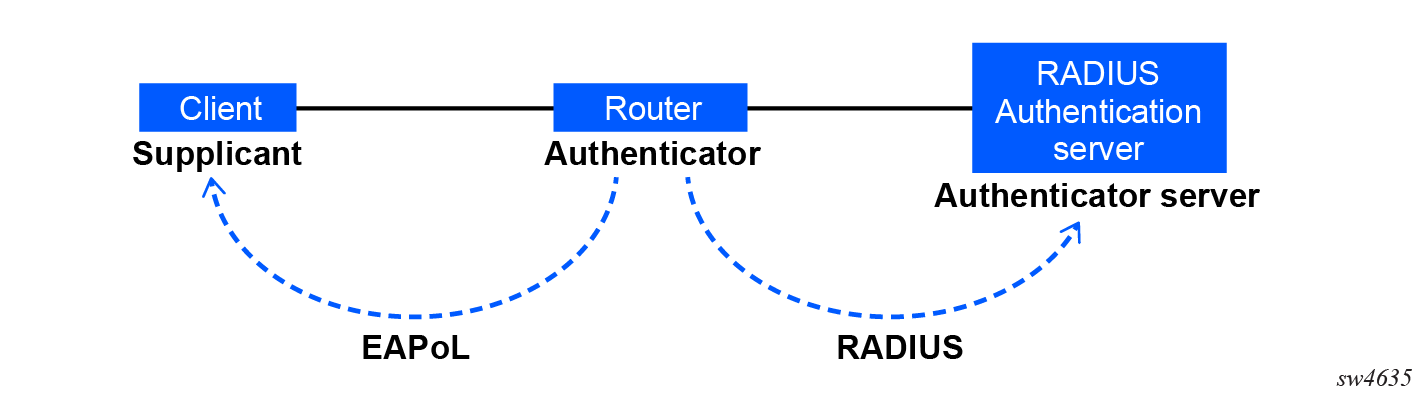
The authentication exchange is carried out between the supplicant and the authentication server, where the authenticator acts only as a bridge. The communication between the supplicant and the authenticator is done through the EAPoL. On the back end, the communication between the authenticator and the authentication server is done with the RADIUS protocol. Therefore, the authenticator is a RADIUS client, and the authentication server is a RADIUS server.
The messages involved in the authentication process are shown in the following figure.
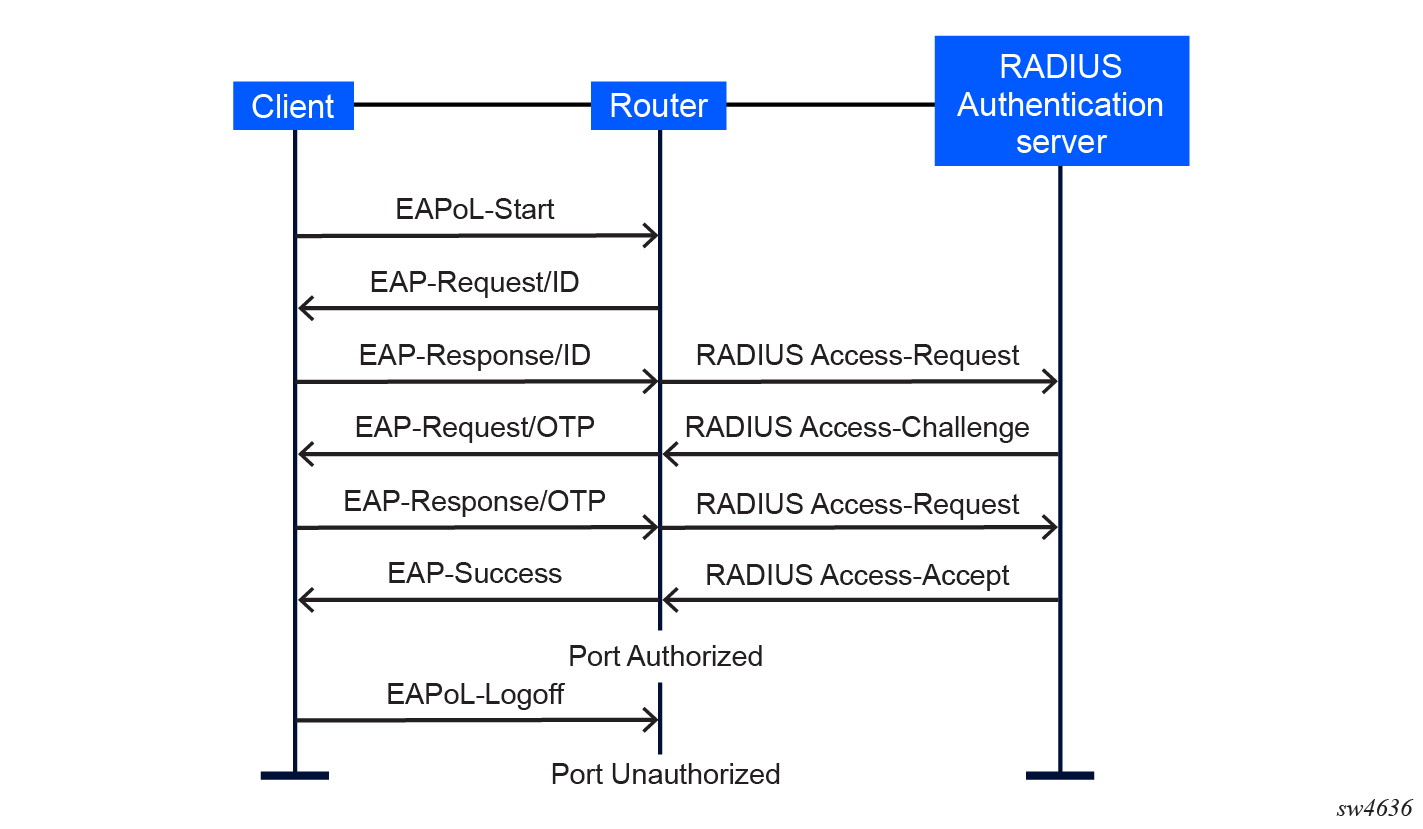
In this scenario, when the Ethernet port becomes operationally up, the router initiates the authentication process by sending a special PDU called an EAP-Request/ID to the client. If an EAP-Request/ID frame is not received during bootup, the client can also initiate the exchange by sending an EAPoL-start PDU. The client responds to the EAP-Request/ID with an EAP-Response/ID frame containing its identity (which is typically the username and password).
After receiving the EAP-Response/ID frame, the router encapsulates the identity information into a RADIUS AccessRequest packet, and sends it to the configured RADIUS server.
The RADIUS server checks the supplied credentials, and if approved, returns an Access Accept message to the router. The router notifies the client with an EAP-Success PDU and puts the port in authorized state.
802.1X modes
SR Linux supports 802.1X authentication for Ethernet ports only. Every Ethernet port can be configured to operate in one of three different operating modes, which you can configure using the following parameters under the interface ethernet dot1x authenticator interface command context:
- force-authorized — Disables 802.1X authentication and causes the port to transition to the authorized state without requiring any authentication exchange. The port transmits and receives normal traffic without requiring 802.1X-based host authentication. This is the default setting.
- force-unauthorized — Causes the port to remain in the unauthorized state, ignoring all attempts by the hosts to authenticate. The router cannot provide authentication services to the host through the interface.
- auto — Enables 802.1X authentication. The port starts in the unauthorized state, allowing only EAPoL frames to be sent and received through the port. Both the router and the host can initiate an authentication procedure. The port remains in an unauthorized state (no traffic except EAPoL frames is allowed) until the first client is authenticated successfully. After this, traffic is allowed on the port for all connected hosts.
802.1X timers
The 802.1X authentication process is controlled by a number of configurable timers and scalars. There are two separate sets, one for the EAPoL message exchange and one for the RADIUS message exchange. The following figure shows an example of 802.1X EAPoL and RADIUS timers.
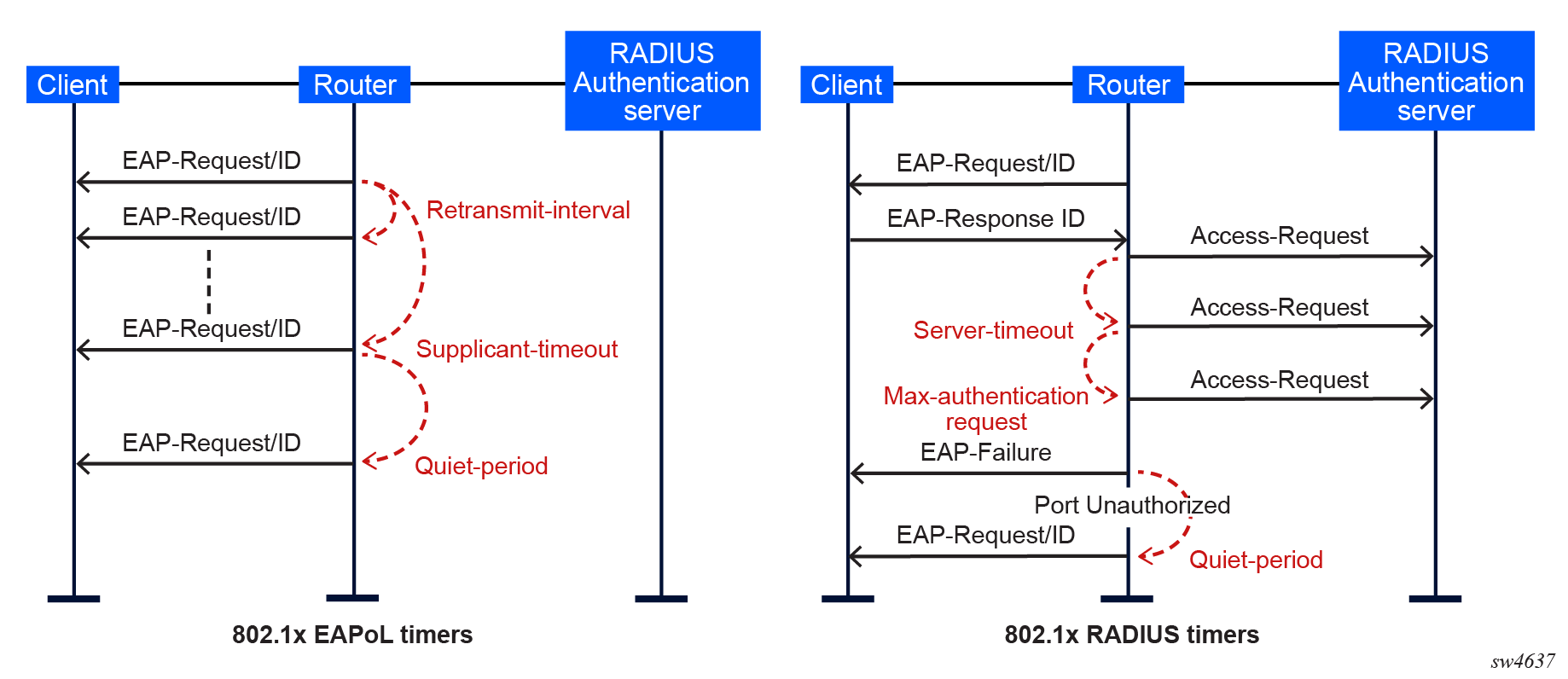
In the preceding figure, the following definitions apply:
- quiet-period — Defines the interval (in seconds) between authentication sessions. Upon logout, the timer starts after sending an EAP-Failure message or after the supplicant-timeout expires. The default value is 60. The range is 1 to 3600.
- supplicant-timeout — Defines the maximum interval (in seconds) after a new authentication procedure begins, during which an EAP-Request/ID frame must be received before the 802.1X authentication session, or the session is considered as failed. The default value is 30. The range is 1 to 300.
- retransmit-interval — Defines the interval (in seconds) the interface waits for a response from an EAPoL-Start before restarting 802.1X authentication on the interface. The default value is 30.
- max-authentication-requests — Defines the maximum number of times that the router sends an authentication request to the RADIUS server before the process is considered as having failed. The default value is value 2. The range is 1 to 10.
Additionally, for EAPoL message exchanges, you can configure the reauthenticate-interval command to enable periodic re-authentication of the device connected to the interface, causing the device to send out an identity request once every configured number of seconds. Configuring a value of 0 disables reauthentication on the interface. The following shows an example reauthenticate-interval command configuration.
reauthentication-interval command configuration
--{ * candidate shared default }--[  ]--
# info with-context interface ethernet-1/1 ethernet dot1x authenticator
    interface ethernet-1/1 {
        ethernet {
            dot1x {
                authenticator {
                    authenticate-interface true
                    reauthenticate-interval 120
                }
            }
        }
    }
802.1X tunneling
Tunneling of untagged 802.1X frames received on a port is supported when the interface ethernet dot1x tunneling command or the interface ethernet l2cp-transparency dot1x command is configured.
When tunneling is enabled on a port using the interface ethernet dot1x tunnel tunnel-all true command, untagged 802.1X frames are treated like user frames and are forwarded through the port instead of being extracted and sent to the RADIUS server for authentication.
When tunneling is required, it must be enabled on all ports receiving 802.1X frames. The dot1x tunneling command must be manually configured consistently across all ports in a LAG.
802.1X multi-host authentication
On SR Linux, multi-host authentication enables authentication of each host individually and decides whether to permit the PDUs from the host through the port. Multi-host authentication is configurable; it is disabled by default.
When the dot1x tunneling command is not configured, the port does not allow any PDUs to pass through, with the exception of dot1x packets, which are extracted.
When the dot1x authenticator host-mode command is set to multi-host-authentication, each host is authenticated individually according to the RADIUS policy, and host traffic is decided whether to be permitted through the port. After the first successful host authentication, the following behavior applies:
- On downstream traffic (network to host), the port is authorized and allows all traffic to go through.
- On upstream traffic (host to network), the port is authorized, allowing only traffic from authenticated hosts. When a host is allowed through the port, all PDUs for that host are allowed to pass through the port, including untagged or tagged packets.
For multi-host authentication, EAPoL packets are sent to the RADIUS server using the RADIUS protocol. The calling station identifier is the source MAC address of the host and is usually present in the packet. The identifier is used to allow or not allow the host source MAC address based on the RADIUS success or failure answer.
The hosts are authenticated periodically. If a host is authenticated and placed on the allow list and a subsequent authentication fails, that host is removed from the allow list.
If a host authenticates unsuccessfully multiple times, that host is put on a disallow list for a specific amount of time. Therefore, enabling per-host authentication provides per-host (source MAC) DoS mitigation.
Per-host authentication and 802.1X interaction
When per-host authentication is first enabled, all MAC addresses on the port are denied. You can allow MAC addresses using the static source MAC or 802.1X host authentication. The following considerations apply when 802.1X authentication is used.
- If the 802.1X authentication mode is configured as force-authorized (using the interface ethernet dot1x authenticator authenticate-interface command), any host that sends EAPoL frames is authenticated without requiring any exchange with the RADIUS server.
- If the 802.1X authentication mode is configured as auto (using the interface ethernet dot1x authenticator authenticate-interface command, the hosts are authenticated using RADIUS.
Static allow source MAC policy
A host can statically be added to the allow MAC list without being authenticated using 802.1X host authentication. In such cases, the host source MAC address must be added manually with CLI using the interface ethernet dot1x multi-host-authentication allowed-mac-address command. Furthermore, the following behavior applies:
- If the same host is added to the list using 802.1X host authentication and CLI, the static configuration takes precedence.
- If the host is added with CLI, the host is placed on the allow list.
- If the same host tries to authenticate using RADIUS and the authentication fails, the host is allowed through the port because it was statically added with CLI.
The following shows an example configuration of a manually added MAC address to the host source.
Static allow configuration
--{ candidate shared default }--[  ]--
# info with-context interface ethernet-1/1 ethernet dot1x authenticator
    interface ethernet-1/1 {
        ethernet {
            dot1x {
                authenticator {
                    authenticate-interface true
                    host-mode multi-host-authentication
                    multi-host-authentication {
                        allowed-mac-address 00:01:00:0B:00:05 {
                        }
                    }
                }
            }
        }
    }
802.1X packet-type reception behavior
SR Linux supports authentication for untagged 802.1X. Tagged and double-tagged 802.1X are not extracted for processing and authentication of the host.
The following tables show 802.1X packet-type behavior when the interface is set to authenticate and an 802.1X packet arrives.
| Interface mode | 802.1X packet type | ||
|---|---|---|---|
| Untagged 802.1X | Single-tagged 802.1X | Double-tagged 802.1X | |
| interface single-tagged configured | drop | tunnel | drop |
| interface double-tagged configured | drop | drop | tunnel |
| interface untagged configured | extract | drop | drop |
| interface optional single-tagged configured (bridged interfaces only) |
extract | tunnel | drop |
| interface optional double-tagged configured (bridged interfaces only) |
extract | tunnel | drop |
| Interface mode | 802.1X packet type | ||
|---|---|---|---|
| Untagged 802.1X | Single-tagged 802.1X | Double-tagged 802.1X | |
| interface single-tagged configured | drop | tunnel | drop |
| interface double-tagged configured | drop | drop | tunnel |
| interface untagged configured | tunnel | drop | drop |
| interface optional single-tagged configured (bridged interfaces only) |
tunnel | tunnel | drop |
| interface optional double-tagged configured (bridged interfaces only) |
tunnel | tunnel | tunnel |
Host authentication behavior
You can configure the same MAC source address (MAC SA) on different ports if the MAC address is authenticated. Multiple hosts with the same MAC address can reside and get authenticated on different ports.
Authentication lists
7730 SXR platforms support 1000 authenticated and allowed hosts per platform and 100 hosts per interface.
802.1X MAC-based authentication
MAC-based authentication (MBA) is a method that authenticates the end host based on its MAC address. In MBA, an authenticator learns the MAC address of the connected end host. Unlike 802.1X, MBA does not use the EAP framework. MBA is therefore especially useful for hosts that do not support 802.1X, such as printers, cameras, or IoT devices. Furthermore, clients that support 802.1X can also be configured to perform MBA as a fall back to 802.1X authentication in cases where 802.1X authentication fails.
MBA is disabled by default on SR Linux. MBA is only allowed in multi-host authentication mode and can be enabled using the mac-based-authentication command under the interface ethernet dot1x multi-host-authentication context.
MBA allows a set of MAC addresses to be programmed into the RADIUS server as username and password; it also allows for these MAC address to be authenticated through the standard RADIUS authentication methods (such as the username and password authentication method). These MAC addresses do not connect to 802.1X profiles but are still allowed access to the network. The authenticator identifies devices that do not support 802.1X and uses the MAC address of these devices as the username and password in its RADIUS request packets.
In MBA, every supplicant trying to gain access to the authenticator port is individually authenticated by default, whereas 802.1X without MBA authenticates one supplicant on a given port to allow access to all supplicants on that port by default. That said, per-host authentication is supported on 802.1X. For more information, see Per-host authentication and 802.1X interaction.
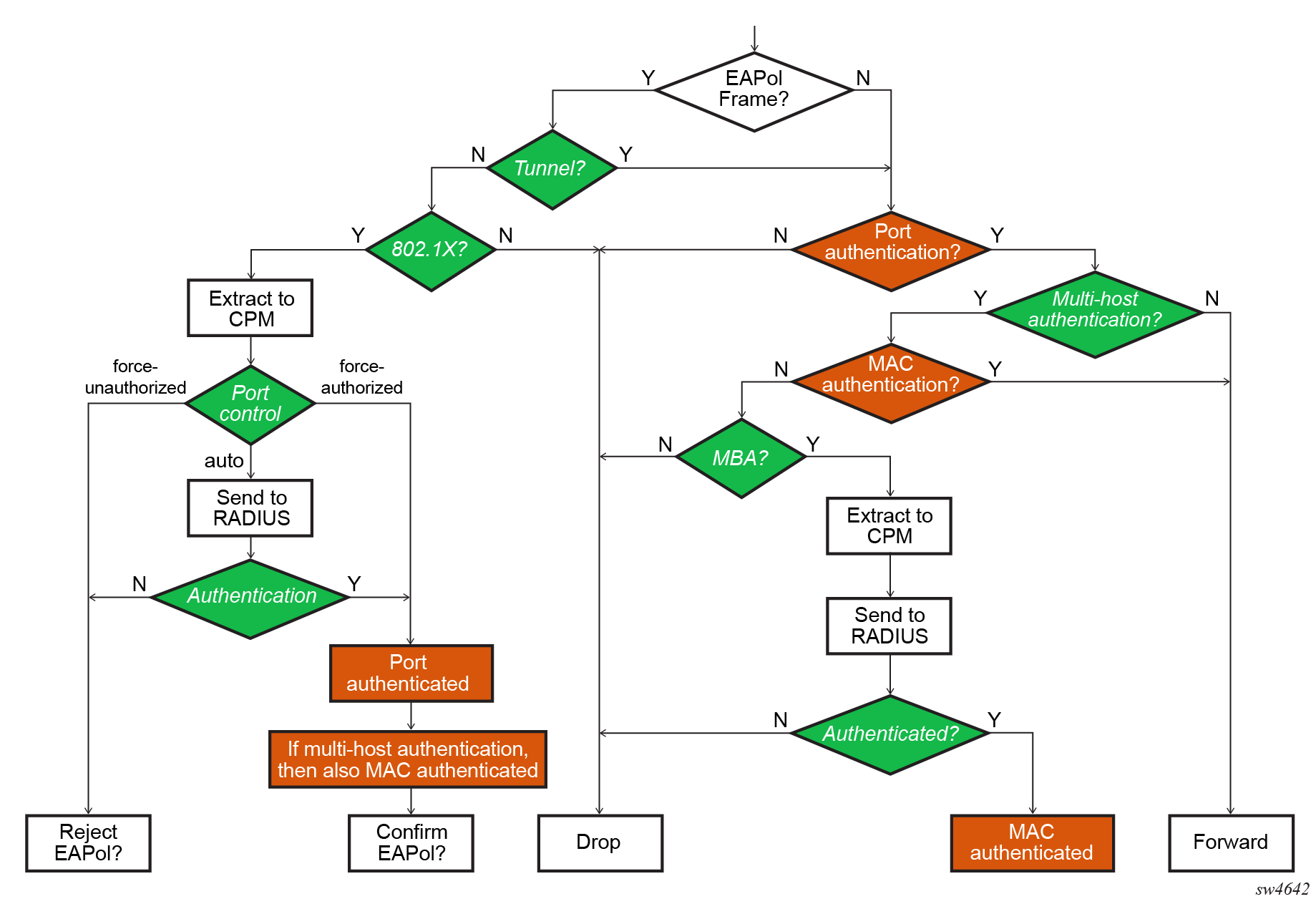
Port authentication mode
The following modes can be set for a port:
- 802.1X enabled
The entire port will be authenticated via EAPoLAN procedures
- 802.1X multi-host enabled
Each host can be authenticated through the following methods:
- EAPoLAN procedures
- MBA if the host is not authenticated through EAPoLAN and the arriving packet is a user packet, or MBA as fallback to 802.1X failed authentication scenarios
- Source MAC policy to allow the source MAC through the portNote: When the host is added to this policy, the host is automatically allowed through the port irrespective of authentication.
The following figure illustrates the detail port authentication.
EAPoL authentication fallback
If a host is authenticated through EAPoL, RADIUS authentication fails, and the authentication option is enabled, host authentication can be reattempted using MBA.
This fall-back mechanism is enabled on a per-port basis.
Host-mode authentication method change
If the authentication method changes from single-host to multi-host, the port becomes unauthorized and reattempts authentication on a per-host basis. In the case of dynamic authentication, the current hosts traffic through the port is dropped until RADIUS authentication is successful, or the MAC address of the host is configured statically in the MAC list in order to send traffic.
If the authentication method changes from multi-host to single-host, all hosts are dropped again and the first authenticated host opens the port for all hosts.
EAPoL configuration
To configure EAPoL use the interface ethernet dot1x command. The following shows an example EAPoL configuration.
EAPoL configuration
--{ candidate shared default }--[  ]--
# info with-context interface ethernet-1/1 ethernet dot1x
    interface ethernet-1/1 {
        ethernet {
            dot1x {
                authenticator {
                    authenticate-interface true
                    interface auto
                    authenticator-initiated true
                    host-mode single-host-authenticates-interface
                    reauthenticate-interval 0
                    retransmit-interval 30
                    quiet-period 60
                    supplicant-timeout 30
                    max-requests 2
                    max-authentication-requests 2
                    radius-policy local
                }
                tunnel {
                    tunnel-all true
                }
            }
        }
    }