
Egress scheduling
On 7730 SXR platforms, the traffic management unit (TMU) uses egress schedulers to manage the distribution of scheduling resources available to perform egress traffic shaping. Two configurable egress scheduling policy types are supported: queue scheduling policies and scheduling class scheduling policies. The following diagram shows an example of how these policies control the hierarchical allocation of scheduling resources to queues.
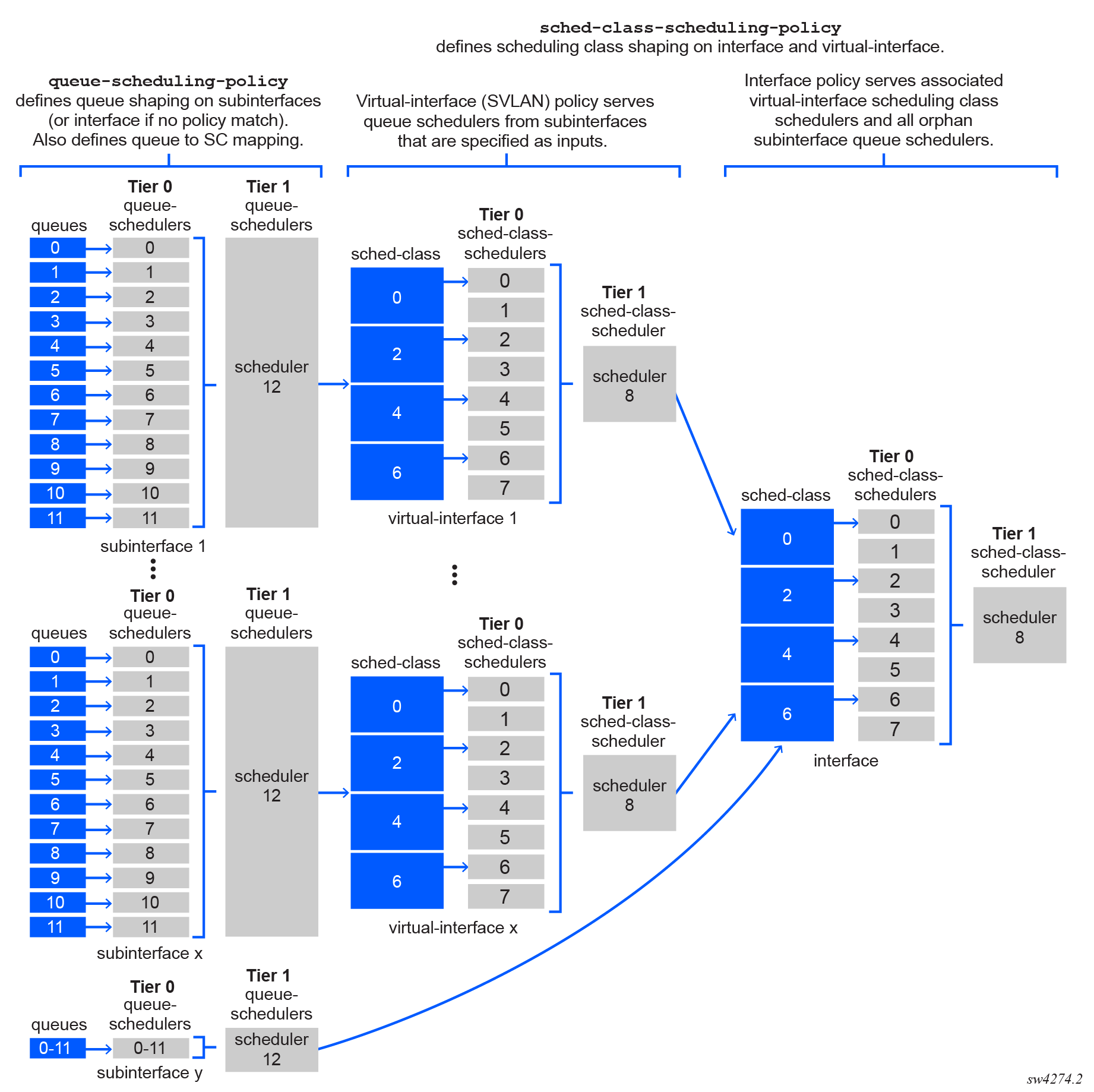
Queue scheduling policies define queue schedulers at subinterface (CVLAN) and interface level, while scheduling class scheduling policies define scheduling class schedulers at virtual interface (SVLAN) and interface level. These hierarchical scheduling policies determine the rate at which the individual queues are serviced, as follows:
- The interface scheduling class schedulers distribute bandwidth among the child virtual interface (SVLAN) schedulers according to the interface sched-class-scheduling-policy.
-
The virtual interface (SVLAN) scheduling class schedulers in turn distribute their assigned bandwidth among the child subinterface (CVLAN) queue schedulers according to the virtual interface sched-class-scheduling-policy.
-
The subinterface (CVLAN) queue schedulers distribute their assigned bandwidth among the queues based on the subinterface queue-scheduling-policy.
-
Any orphan subinterface queues that are not associated with a parent SVLAN scheduling class scheduler (for example, subinterface y in the preceding diagram) and all interface-level queues are allocated bandwidth directly by the interface scheduling class schedulers.
Queue scheduling policy (at subinterface [CVLAN] and interface-queue level)
Queue scheduling policies manage the distribution of scheduling resources available to process traffic in egress queues.
The queue scheduling policies define the following hierarchy of scheduling tiers:
- Tier 0: Up to 12 schedulers, each of which can provide shaping for single or multiple queues. The tier 0 schedulers are aggregated by the tier 1 scheduler.
- Tier 1: One scheduler, which provides aggregate-level shaping for all queues.
A total of 13 tier 0 and tier 1 schedulers can be defined. Within a queue scheduling policy, each defined queue must be mapped as an input to one of the tier 0 schedulers. The tier 0 schedulers are in turn mapped as inputs to the tier 1 scheduler. For each queue scheduler, shaper bucket thresholds determine how the scheduling resources are distributed by the scheduler.
The queue scheduling policies are applied at subinterface-level (such as CVLANs) to manage the defined subinterface queues. They are also applied at interface-level for any traffic that does not match any policies defined for subinterfaces.
The queue scheduling policies also support the mapping of each of the 12 egress queues to one of four scheduling classes: 0, 2, 4, and 6. If multiple queues are assigned to the same tier 0 scheduler, they must also be assigned to the same scheduling class.
The queues within a tier 0 scheduler draw bandwidth proportional to their weights. The tier 0 scheduler draws bandwidth based on the scheduling class. The tier 0 schedulers with higher scheduling classes are scheduled ahead of the lower scheduling classes and are capped by their rate. The scheduler rate can be defined as an absolute value (from 64Kb/s to 400Gb/s), or as a percentage value of the line rate.
The interface-level and virtual-interface-level scheduling class schedulers provide further shaping.
Scheduling class scheduling policy (at virtual interface [SVLAN] and interface level)
Scheduling class scheduling policies manage the distribution of scheduling resources available to process traffic in scheduling classes.
Similar to queue scheduling policies, the scheduling class scheduling policies define the following hierarchy of scheduling tiers:
- Tier 0: Up to 8 schedulers, each of which can provide shaping for single or multiple scheduling classes. . The tier-0 schedulers distribute bandwidth among any child scheduler class schedulers and to child queue schedulers based on the scheduling hierarchy.
- The tier 0 schedulers are aggregated by the tier 1 scheduler.
- Tier 1: One scheduler, which provides aggregate-level shaping for all scheduling classes.
A total of 9 tier 0 and tier 1 schedulers can be defined. Also similar to queue schedulers, shaper bucket thresholds determine how the scheduling resources are distributed by the scheduler within each scheduling class scheduler.
The scheduling class scheduling policies are applied at virtual interface (SVLAN) and interface level.
Queue scheduling policy example
The queue scheduling hierarchy consists of queues shaped by multiple tier 0 schedulers and a single tier 1 scheduler that aggregates all queues from tier 0.
The following example shows the queue scheduling policy configuration for three queues, where scheduler 4 in tier 1 is configured with the inputs auto-input parameter, which indicates that all tier 0 schedulers are inputs to scheduler 4. (The auto-input option cannot be set for a tier 0 scheduler.)
--{ candidate shared default }--[  ]--
# info with-context qos scheduler-policies queue-scheduling-policy test-sub-interface
    qos {
        scheduler-policies {
            queue-scheduling-policy test-sub-interface {
                queue af1-queue {
                    scheduling {
                        scheduling-class 4
                        weight 2
                        packet-length-adjustment {
                            add 0
                        }
                    }
                }
                queue af2-queue {
                    scheduling {
                        scheduling-class 4
                        weight 4
                        packet-length-adjustment {
                            add 0
                        }
                    }
                }
                queue be-queue {
                    scheduling {
                        scheduling-class 0
                        packet-length-adjustment {
                            add 0
                        }
                    }
                }
                queue ef-queue {
                    scheduling {
                        scheduling-class 6
                        packet-length-adjustment {
                            add 0
                        }
                    }
                }
                scheduler 0 {
                    tier 0
                    rate {
                        peak-rate-percentage 100
                    }
                    inputs {
                        queue [
                            be-queue
                        ]
                    }
                }
                scheduler 1 {
                    tier 0
                    rate {
                        peak-rate-percentage 80
                    }
                    inputs {
                        queue [
                            af1-queue
                            af2-queue
                        ]
                    }
                }
                scheduler 2 {
                    tier 0
                    rate {
                        peak-rate-percentage 20
                    }
                    inputs {
                        queue [
                            expedite-queue
                        ]
                    }
                }
                scheduler 4 {
                    tier 1
                    rate {
                        peak-rate-kbps 7000
                    }
                    inputs {
                        inputs auto-input
                    }
                }
            }
        }
    }
Scheduling class scheduling policy examples
Within a scheduling class policy, the scheduling hierarchy consists of scheduling classes shaped by multiple tier 0 schedulers and a single tier 1 scheduler that aggregates all scheduling classes from tier 0.
Virtual interface (SVLAN) scheduling class scheduling policy example
The following example shows a virtual interface (SVLAN) scheduling class scheduling policy configuration for SVLANs 1 and 2. The policy specifies peak rates for scheduling classes 0, 4, and 6 for SVLAN 1 and for scheduling classes 2 and 4 for SVLAN 2. Tier 1 schedulers provide aggregate shaping for both SVLANs.
--{ candidate shared default }--[  ]--
# info with-context qos scheduler-policies sched-class-scheduling-policy svlan_*
    qos {
        scheduler-policies {
            sched-class-scheduling-policy svlan_1 {
                scheduler 1 {
                    tier 0
                    rate {
                        peak-rate-kbps 500000
                    }
                    inputs {
                        scheduling-class [
                            0
                        ]
                    }
                }
                scheduler 2 {
                    tier 0
                    rate {
                        peak-rate-kbps 300000
                    }
                    inputs {
                        scheduling-class [
                            4
                            6
                        ]
                    }
                }
                scheduler 8 {
                    tier 1
                    rate {
                        peak-rate-kbps 800000
                    }
                }
            }
            sched-class-scheduling-policy svlan_2 {
                scheduler 1 {
                    tier 0
                    rate {
                        peak-rate-kbps 400000
                    }
                    inputs {
                        scheduling-class [
                            2
                        ]
                    }
                }
                scheduler 2 {
                    tier 0
                    rate {
                        peak-rate-kbps 200000
                    }
                    inputs {
                        scheduling-class [
                            4
                        ]
                    }
                }
                scheduler 8 {
                    tier 1
                    rate {
                        peak-rate-kbps 600000
                    }
                }
            }
        }
    }
Interface scheduling class scheduling policy example
The following example shows a scheduling class scheduling policy configuration for an interface. One tier 1 scheduler, scheduler 8, allocates bandwidth to the SVLAN schedulers based on the rates defined in the SVLAN scheduling class scheduling policy.
In this example, no explicit tier 0 schedulers are included to shape specific scheduling classes. Therefore, the lower level virtual interface (SVLAN) scheduling classes are allocated bandwidth directly by this tier 1 scheduler.
--{ candidate shared default }--[  ]--
# info with-context sched-class-scheduling-policy intf_shaper
    qos {
        scheduler-policies {
            sched-class-scheduling-policy intf_shaper {
                scheduler 8 {
                    tier 1
                    rate {
                        peak-rate-kbps 1000000
                    inputs {
                        inputs auto-input
                    }
                }
            }
        }
    }
Example of scheduling policies applied to an interface and to virtual interfaces
The following example shows the preceding scheduling class scheduling policies applied to an interface and to virtual interfaces. The virtual interface (SVLAN) configuration also specifies the subinterfaces (CVLANs) that are inputs to the virtual interface policy.
--{ + candidate shared default }--[ qos interfaces interface ethernet-1/4 ]--
A:root@ixrd2# info with-context
    qos {
        interfaces {
            interface ethernet-1/4 {
                interface-ref {
                    interface ethernet-1/4
                }
                output {
                    scheduler {
                        sched-class-scheduling-policy intf_shaper
                        virtual-interface Vport1 {
                            sched-class-scheduling-policy svlan_1
                            inputs {
                                interface ethernet-1/4.1 {
                                }
                                interface ethernet-1/4.2 {
                                }
                            }
                        }
                        virtual-interface Vport2 {
                            sched-class-scheduling-policy svlan_2
                            inputs {
                                interface ethernet-1/4.3 {
                                }
                                interface ethernet-1/4.4 {
                                }
                            }
                        }
                    }
                }
            }
        }
    }
Default scheduling policy settings
Default interface queues
The following table shows the default settings applied to the interface-level queues. At interface level, all 12 queues are created by default. The table lists default settings for all queues, including the scheduling-related parameters.
| default-queue-name | queue-index | committed-burst-size | maximum-burst-size | peak-rate-percent | weight | scheduling-class |
|---|---|---|---|---|---|---|
| queue-0 | 0 | default | max | 100 | 1 | 0 |
| queue-1 | 1 | default | max | 100 | 1 | 0 |
| queue-2 | 2 | default | max | 100 | 1 | 2 |
| queue-3 | 3 | default | max | 100 | 1 | 2 |
| queue-4 | 4 | default | max | 100 | 1 | 4 |
| queue-5 | 5 | default | max | 100 | 1 | 4 |
| queue-6 | 6 | default | max | 100 | 1 | 6 |
| queue-7 | 7 | default | max | 100 | 1 | 6 |
| queue-8 | 8 | default | max | 100 | 1 | 0 |
| queue-9 | 9 | default | max | 100 | 1 | 0 |
| queue-10 | 10 | default | max | 100 | 1 | 0 |
| queue-11 | 11 | default | max | 100 | 1 | 0 |
To change the queue scheduling parameters, assign a custom queue scheduling policy to the interface. Similarly, to modify default scheduling behavior between scheduling classes at the interface level, assign a custom scheduling class scheduling policy to an interface.
Default subinterface queues
At subinterface level, local queues are created only after an output class map is assigned to the subinterface. By default, the queue parameters are set as described in the interface table above, using the queue-index as a key. To change queue scheduling parameters, assign a custom queue scheduling policy to the subinterface.
Default scheduling threshold policies
By default, the system provides the following two non-configurable scheduling threshold policies:
- per-scheduling-class
- single
The following diagram shows the default scheduling threshold policies. Both tier 0 schedulers are assigned the default scheduling-threshold-policy single, while both tier 1 schedulers are assigned the default scheduling-threshold-policy per-scheduling-class.

Custom-defined scheduling threshold policies are not supported.
Scheduling threshold policy: per-scheduling-class
The per-scheduling-class policy ensures that each scheduling class is assigned a distinct priority level within a shaper bucket.
The shaping of scheduling classes occurs in relation to the shaper token level. This process can be illustrated by considering scheduling class 3, which is associated with threshold level 3. If the token level is below threshold level 3, but above threshold level 2, queues associated with scheduling class 3 are shaped to enforce the overall rate of the bucket. Queues associated with scheduling class 3 are not shaped by this bucket if the shaper token level is at or above threshold level 3, or if the token level drops below threshold level 2.
The per-scheduling-class policy is assigned to tier 1 schedulers by default, both in the queue scheduling policies and the scheduling class scheduling policies. These settings are non-configurable.
The default per-scheduling-class policy is as follows:
qos {
   scheduling-policies {
      scheduling-threshold-policy "per-scheduling-class" {
         threshold 0 {
            maximum-scheduling-class 0
         }
         threshold 2 {
            maximum-scheduling-class 2
         }
         threshold 4 {
            maximum-scheduling-class 4
         }
         threshold 6 {
            maximum-scheduling-class 6
         }
      }
   }
}
Scheduling threshold policy: single
The single scheduling threshold policy places all scheduling classes on the first threshold level, avoiding multiple priority levels and the corresponding increases in burst tolerance.
The single policy is assigned to tier 0 schedulers by default, in both the queue scheduling policy and scheduling class scheduling policy. This setting is non-configurable.
qos {
   scheduling-policies {
      scheduling-threshold-policy "single" {
         threshold 0 {
            maximum-scheduling-class 6
         }
      }
   }
}
Modifying threshold level bucket depths
The size of the shaper buckets for all threshold levels used in the default scheduling threshold policies are defined in relation to the burst-allowance and threshold-separation parameters. These parameters are defined for queues and scheduling classes using queue scheduling policies and scheduling class scheduler policies.
Configuring queue scheduling policies
To configure queue scheduling policies, use the qos scheduler-policies queue-scheduling-policy command.
Configure a queue scheduling policy
The following example shows a custom queue scheduling policy configuration with one scheduler in tier 0 and a second scheduler in tier 1. The queue is assigned a scheduling class and weight, while the schedulers are assigned tier, burst allowance, threshold-separation, rate parameters and inputs. All tier 0 scheduling classes are aggregated by the single tier 1 scheduler using the inputs auto-input option.
--{ * candidate shared default }--[  ]--
# info with-context qos scheduler-policies queue-scheduling-policy custom-queue-policy
    qos {
        scheduler-policies {
            queue-scheduling-policy custom-queue-policy {
                queue queue-01 {
                    scheduling {
                        scheduling-class 0
                        weight 10
                    }
                }
                scheduler 0 {
                    tier 0
                    burst-allowance 10000
                    threshold-separation 28672
                    rate {
                        peak-rate-percentage 80
                    }
                    inputs {
                        queue [
                            queue-01
                        ]
                    }
                scheduler 14 {
                    tier 1
                    burst-allowance 11000
                    threshold-separation 28672
                    rate {
                        peak-rate-percentage 100
                    }
                    inputs {
                        inputs auto-input
                    }
               }
            }
        }
    }
Applying queue scheduling policies to subinterfaces
To apply a queue scheduling policy to egress traffic on a subinterface, specify the required policy using the qos interfaces interface output scheduler command.
Apply queue scheduling policies to a subinterface
The following example shows a queue scheduling policy applied to a subinterface.
--{ * candidate shared default }--[  ]--
# info with-context qos interfaces
    qos {
        interfaces {
            interface eth-1/1.1 {
                interface-ref {
                    interface ethernet-1/1
                    subinterface 1
                }
                output {
                    scheduler {
                        queue-scheduling-policy custom-queue-policy
                    }
                }
            }
        }
    }
Configuring scheduling class scheduling policies
To configure scheduling class scheduling policies, use the qos scheduler-policies sched-class-scheduling-policy command. Typically, different policies are applied to virtual interface (SVLAN) and interface, which generally differ at the level of tier 1 aggregate rate.
Configure a scheduling class scheduling policy
The following example shows a custom configuration for one tier 0 scheduler and one tier 1 scheduler in a scheduling class scheduling policy. The schedulers are assigned tier, burst allowance, threshold-separation, rate parameters, and input scheduling classes. All tier 0 scheduling classes are aggregated by the single tier 1 scheduler using the inputs auto-input option.
--{ * candidate shared default }--[  ]--
# info with-context qos scheduler-policies sched-class-scheduling-policy custom-sched-class-policy
    qos {
        scheduler-policies {
            sched-class-scheduling-policy custom-sched-class-policy {
                scheduler 0 {
                    tier 0
                    burst-allowance 10000
                    threshold-separation 28672
                    rate {
                        peak-rate-percentage 90
                    }
                    inputs {
                        scheduling-class [
                            0
                            2
                        ]
                    }
                scheduler 14 {
                    tier 1
                    burst-allowance 11000
                    threshold-separation 28672
                    rate {
                        peak-rate-percentage 100
                    }
                    inputs {
                        inputs auto-input
                    }
                }
            }
        }
    }
Applying scheduling class scheduling policies to interfaces
To apply a scheduling class scheduling policy to egress traffic on an interface, specify the required policy using the qos interfaces interface output scheduler command.
Apply scheduling class scheduling policies to an interface
The following example shows a scheduling class scheduling policy applied to an interface.
--{ * candidate shared default }--[  ]--
# info with-context qos interfaces interface eth-1/1
    qos {
        interfaces {
            interface eth-1/1 {
                interface-ref {
                    interface ethernet-1/1
                }
                output {
                    scheduler {
                        sched-class-scheduling-policy custom-sched-class-policy
                    }
                }
            }
        }
    }
Applying scheduling class scheduling policies to virtual interfaces (SVLANs)
To apply a scheduling class scheduling policy to a virtual interface (SVLAN), specify the required policy using the virtual-interface sched-class-scheduling-policy command under the qos interfaces interface output scheduler context. In addition, to specify the child subinterfaces (CVLANs) that the parent virtual-interface scheduling policy serves, use the virtual-interface inputs command
.Apply scheduling class scheduling policies to a virtual-interface
--{ candidate shared default }--[  ]--
# info with-context qos interfaces interface eth-1/1 output scheduler
    qos {
        interfaces {
            interface eth-1/1 {
                output {
                    scheduler {
                        sched-class-scheduling-policy interface-policy-name
                        virtual-interface SVLAN-name {
                            sched-class-scheduling-policy virtual-interface-policy-name
                            inputs {
                                interface ethernet-1/1.1 {
                                }
                                interface ethernet-1/1.2 {
                                }
                            }
                        }
                    }
                }
            }
        }
    }
Scheduling priority mapping table
The scheduling priority mapping table is a global table that maps individual scheduling classes into three scheduling priorities at the hardware level. Scheduling priority 0 is the lowest priority, and priority 2 is the highest.
The following table shows the default settings:
| Scheduling class | Scheduling priority |
|---|---|
| 0 | 0 |
| 2 | 0 |
| 4 | 1 |
| 6 | 2 |
Configuring the scheduling priority mapping table
To configure the scheduling priority mapping table, use the qos scheduler-policies scheduling-priority-mapping-table command.
Configure scheduling priority mapping table
--{ * candidate shared default }--[  ]--
# info with-context qos scheduler-policies scheduling-priority-mapping-table
    qos {
        scheduler-policies {
            scheduling-priority-mapping-table {
                scheduling-class 0 {
                    scheduling-priority 0
                }
                scheduling-class 2 {
                    scheduling-priority 0
                }
                scheduling-class 4 {
                    scheduling-priority 1
                }
                scheduling-class 6 {
                    scheduling-priority 2
                }
            }
        }
    }
Egress queue scheduling resource management
The resource management of output queues and tier 0 queue schedulers is based on resource sets consisting of:
- One output queue
- One tier 0 queue scheduler
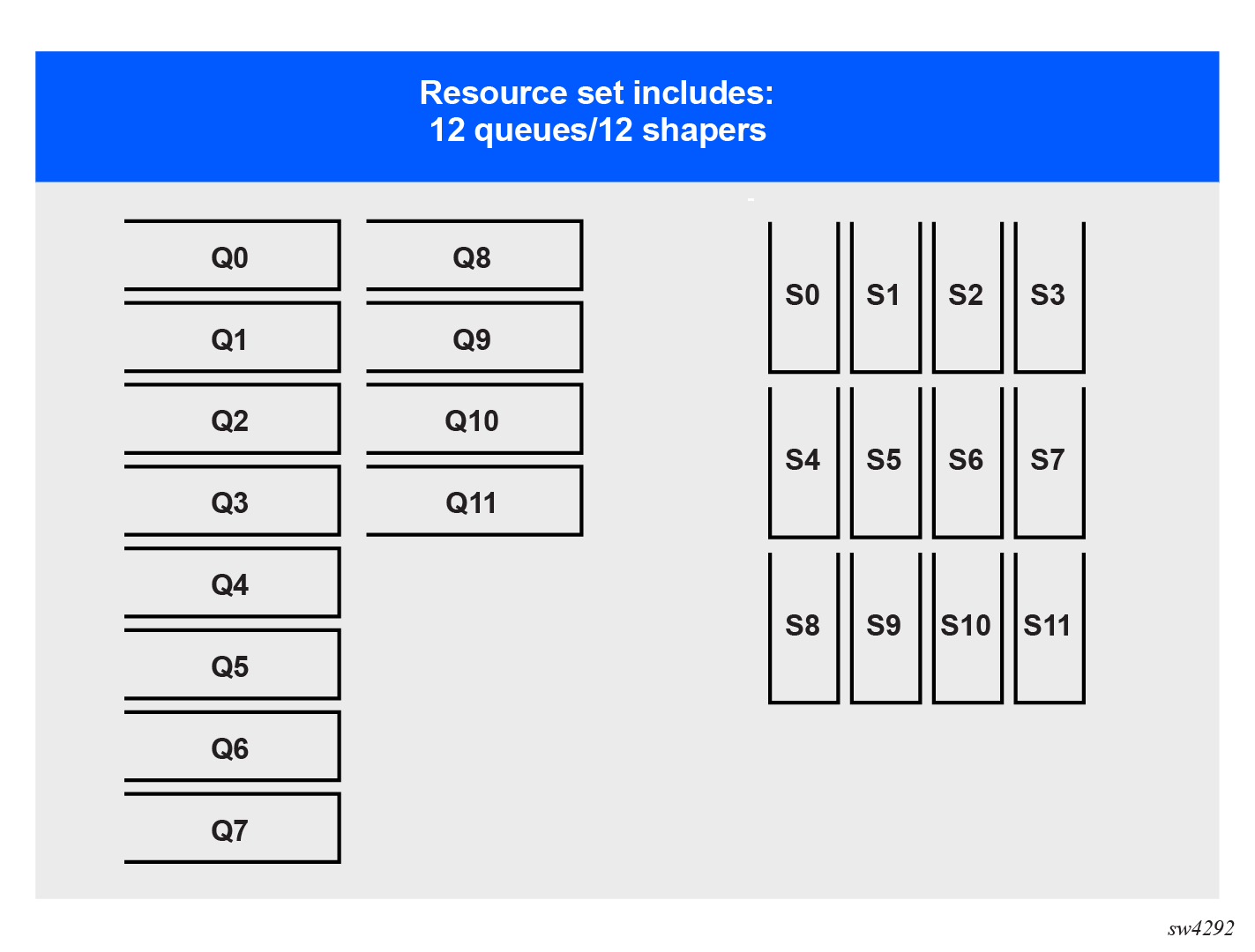
Every subinterface is assigned the number of local queues as defined by the queue-block-size in the associated output class map. For each queue defined in the queue-block-size, the subinterface is allocated one resource set.
For example, if the queue-block-size is set to 12, the subinterface is assigned 12 resource sets containing 12 queues and 12 tier-0 schedulers, as shown in the following diagram.
At the highest level, all resource sets are collected into two resource set pools. Each resource set pool contains 62 resource groups. And each resource groups contains 4096 resource sets.
These resource groups are allocated to interface group resource pools, defining the interface-level resource sets that subinterfaces require to process queues.
At interface level, every interface is statically mapped to an interface group resource pool. The resource groups are dynamically allocated to the interface group resource pool based on demand. On an interface, all subinterfaces associated with the given interface group resource pool share the available resource sets.
The following figure shows the organization of resource sets to interfaces and subinterfaces.
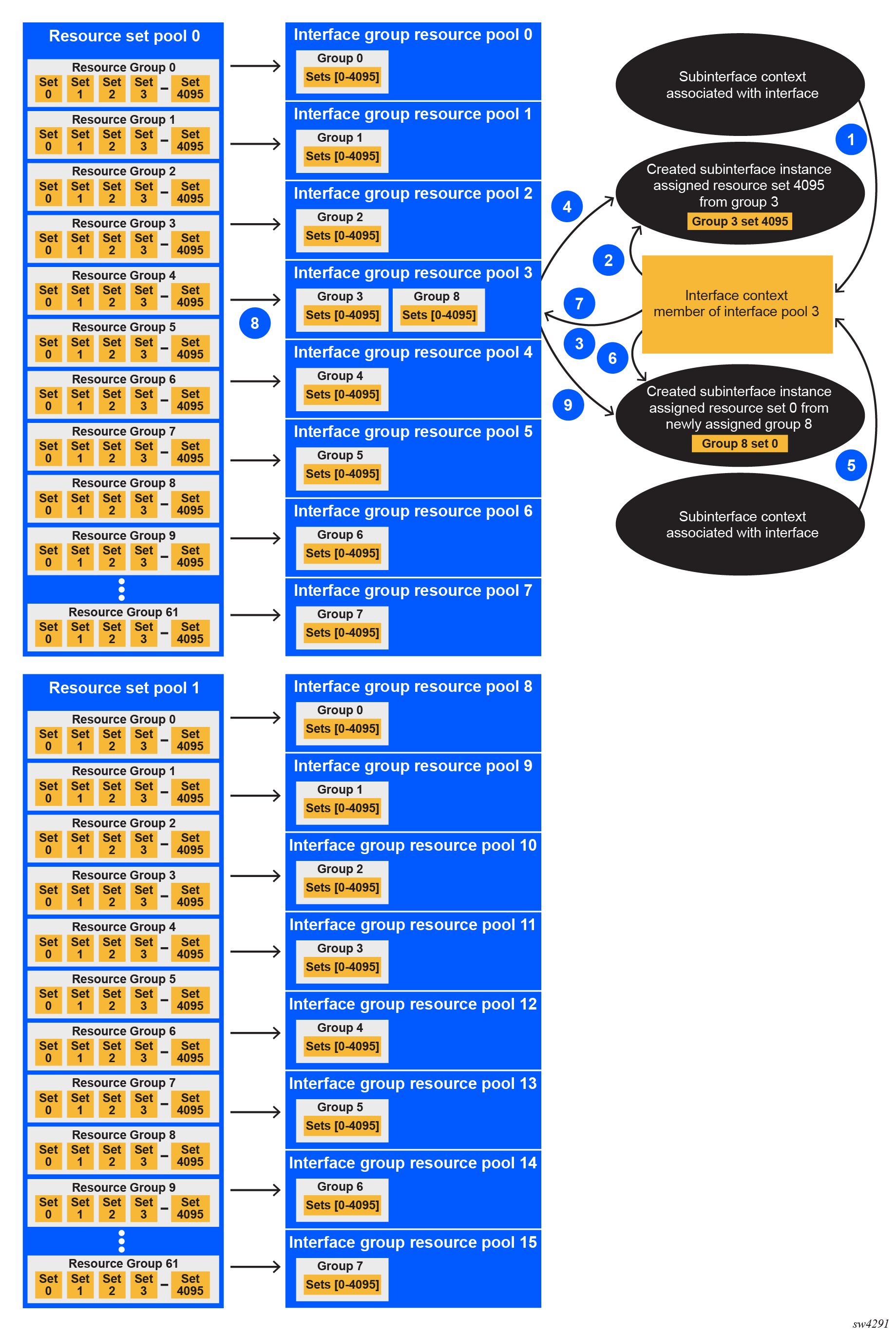
At system initialization, every interface group resource pool is allocated a single resource group from the corresponding resource set pool.
As the individual subinterfaces are created, the resource sets are allocated from the corresponding resource group. If a new subinterface is created and all resource sets in a group are already allocated, a new resource group is allocated to the interface group resource pool. This allocation is persistent, such that when a resource group is allocated to an interface group resource pool, it remains allocated even if all corresponding resource sets become free.
If subinterface queues are mapped to interface queues as a result of exhaustion of available resources, the output-class-map-pending flag indicates the interfaces that failed to allocate the queue resources. To view this flag, use the info from state qos interfaces interface output output-class-map-pending command.
In the system state information, a container is available under scheduling-resources-pools listing the scheduling resource pools individual interfaces are using resources from. This mapping is static, but it is platform dependent.
--{ candidate shared default }--[ ] --
# info from state qos interfaces interface eth1 output scheduler
    scheduling-resources-pools {
        resource-set-pool 1
        interface-group-resource-pool 12
    }
There is also a state table under qos resource-set-pool that tracks the utilization of the individual resource groups and their allocation to interface group resource pools.
--{ candidate shared default }--[ ] --
# info from state platform linecard 1 forwarding-complex 0 qos resource-set-pool 0
    resource-groups {
        used 32
        free 30
    }
    interface-group-resource-pool 0 {
    }
    interface-group-resource-pool 1 {
    }
    interface-group-resource-pool 2 {
        resource-group 8 {
            resource-sets {
                used 4096
                free 0
            }
        }
        resource-group 9 {
            resource-sets {
                used 4096
                free 0
            }
        }
...
        resource-group 22 {
            resource-sets {
                used 4096
                free 0
            }
        }
        resource-group 23 {
            resource-sets {
                used 2560
                free 1536
            }
        }
    }
Each configured subinterface requires one resource set at minimum. However, if the subinterface is created on a LAG, one resource set per LAG member is allocated. Depending on the configuration, this can lead to depletion of the resources. In such a case, the subinterface points to interface-based queues (remote-output-queue) overriding any output class map configuration. If the resource set in the corresponding interface group resource pool becomes available, the system automatically assigns it to the subinterface waiting for such a resource set.