Fixed access sessions
Learn about the key identifiers for fixed access sessions, IBCP tunnels, MAG-u selection, limits on the number of sessions, and the PPPoE and IPoE setup flows.
Layer 2 circuit
The Layer 2 circuit (l2-circuit) is the combination of the Layer 2 access ID and the VLAN parameters.
Fixed access sessions have direct Ethernet connectivity from the client device to the BNG. The cMAG-c assumes that the Ethernet connectivity is configured and makes an abstraction of the underlying technology and topology. The cMAG-c only needs the opaque Layer 2 access ID (l2-access-id) that uniquely identifies the access context of a session. The access context can be a port, a LAG, a pseudowire, an EVPN service, or anything that provides Ethernet connectivity. The MAG-u defines the content of the l2-access-id. The cMAG-c does not interpret it.
The l2-access-id is called the logical port in BBF TR-459. The cMAG-c is aware of all Ethernet parameters such as MAC address, S-VLAN, and C-VLAN. Nokia uses the l2-circuit for the combination of the l2-access-id and VLAN parameters.
In-band control plane and MAG-u selection
The cMAG-c creates IBCP tunnels per Layer 2 access ID for messages between the MAG-u and cMAG-c. Initial packets use these per-Layer 2 access ID tunnels. At session creation, the cMAG-c sets up a per-session tunnel. The MAG-u selection is based on the per-Layer 2 access ID tunnel used for the triggering packet.
Fixed access sessions send in-band cMAG-c messages over the connection to the MAG-u. As defined in BBF TR-459, the cMAG-c creates GTP-U tunnels (called IBCP tunnels) between the MAG-u and the cMAG-c to forward in-band cMAG-c messages.
- From the l2-access-id configuration in the following
context.
subscriber-management ref-points up group - From health reports sent by the MAG-u. See MAG-u health determination for more information.
- The UP group identifies interconnected UPs on which resiliency is available. This step is optional and if no UP group is matched, the session is set up only in the context of the UP associated with the incoming IBCP tunnel.
- The EP acts as a gateway mechanism and provides basic setup parameters. It is mandatory for a packet to match an EP.
The cMAG-c can instruct the MAG-u to forward only specified packet triggers over the IBCP tunnels and to ignore other triggers. For example, ignore IPoE triggers if only PPPoE is deployed or the other way around.
subscriber-management ref-points up fixed-access entry-point
subscriber-management ref-points up fixed-access ibcp-triggers# info from running with-context /subscriber-management ref-points up fixed-access
subscriber-management {
ref-points {
up {
fixed-access {
entry-point fixed-access
ibcp-triggers {
ipoe-dhcp true
ipoe-dhcpv6 true
ipoe-router-solicit true
}
}
}
}
}The cMAG-c sets up a per-session tunnel at session creation.
subscriber-management ref-points up statistics ibcptools subscriber-management statistics clear ref-points up ibcp- If the triggering packet matches a UP group, the session is tied to an FSG of that UP group. The cMAG-c creates the session on the active (and optionally standby) MAG-u of the FSG.
- If the triggering packet does not match a UP group, the cMAG-c installs the session on the MAG-u that corresponds with the per-Layer 2 access ID tunnel on which the packet was received.
Session keys and anti-spoofing
Session keys identify and match data traffic to specific sessions, using different keys for IPoE and PPPoE sessions. The cMAG-c creates sessions and maps keys to ensure packets from different MAG-u nodes match the same session.
The cMAG-c creates a session when receiving the initial triggering packet for a specific session type. Fixed access sessions are, by default, identified by the key <MAG-u, Layer 2 circuit, MAC address>, for IPoE and PPPoE. If a session is set up in the context of a resilient UP group, the MAG-u and Layer 2 circuit keys are internally mapped to a common key based on the UP group configuration. This guarantees that packets coming from different MAG-u nodes within the same UP group match the same session.
When multiple PPPoE sessions share the same key, the remote ID or circuit ID attributes can be used to differentiate between the sessions. This is useful in scenarios where multiple devices behind a residential gateway need separate PPPoE sessions while sharing the same MAC address.
The circuit ID and the remote ID are derived from BBF vendor-specific tags 1 (circuit ID) and 2 (remote ID) as defined in TR 101.
subscriber-management entry-point entry pppoe multiple-sessions-per-macsubscriber-management entry-point entry pppoe multiple-sessions-per-mac discriminatorConfiguration example to enable multiple PPPoE sessions per MAC address
# info from running with-context /subscriber-management entry-point entry pppoe multiple-sessions-per-mac
    subscriber-management {
        entry-point residential {
            entry default {
                pppoe {
                    multiple-sessions-per-mac {
                        discriminator circuit-id
                        limit 4
                    }
                }
            }
        }
    }
If multiple PPPoE sessions per MAC address are enabled, and no remote ID or circuit ID can be found, the cMAG-c sets up the session anyway and no other sessions for the same <UP, l2-circuit, MAC address> key can be set up.
Data plane rules on the MAG-u use the following keys to match data traffic to a specific session:
- IPoE: <l2-circuit, source MAC address> or <l2-circuit, source MAC address, source IP address>
- PPPoE: <l2-circuit, source MAC address, session ID> or <l2-circuit, source MAC address, session ID, source IP address>
subscriber-management authentication-database entry ip-anti-spoofSubscriber identification
The subscriber identification is by default equal to the session key, but you can define alternative subscriber keys..
For fixed access sessions, the subscriber key is by default equal to the session key, that is, there is a single session per subscriber.
- Layer 2 access ID
- MAC address
- S-VLAN
- C-VLAN
- circuit ID with optional string masking
- remote ID with optional string masking
subscriber-management entry-point entry multi-session-subscriberMultiple-sessions subscriber configuration with S-VLAN subscriber key
# info from running with-context /subscriber-management entry-point entry pppoe multiple-sessions-per-mac
    subscriber-management {
        entry-point residential {
            entry default {
                multi-session-subscriber {
                    session-limit 8
                    multiple-session-key {
                        s-vlan true
                    }
                }
            }
        }
}Session limits
The cMAG-c enforces limits on the number of sessions. These limits can be configured within a specific scope; for example, per Layer 2 access ID.
Session limits are applied when the session is created, before authentication. Changing a session limit only affects new sessions. Existing sessions are not removed to align with new session limits.
subscriber-management entry-point entry- per MAC addressWhen enabled, multiple PPPoE sessions for the same MAC address are supported. By default, the support for multiple sessions per MAC is disabled. Use the pppoe multiple-sessions-per-mac limit command to limit the maximum number of sessions per MAC address.Note: See Session keys and anti-spoofing for more information about multiple sessions per MAC address.
- per subscriberWhen enabled, multiple fixed access sessions for the same subscriber are supported. By default, the support for multiple sessions per subscriber is disabled. Use the multi-session-subscriber session-limit command to limit the maximum number of sessions per subscriber.Note: See Subscriber identification for more information about enabling multiple sessions per subscriber.
- per Layer 2 access ID
Use the session-limits per-l2-access-id command to set a limit for the maximum number of sessions per Layer 2 access ID (l2-access-id). The system limits the maximum number of sessions per Layer 2 access ID (for example, port) and the associated MAG-u. By default, two sessions with the same Layer 2 access ID on two different MAG-u nodes do not count for the same session limit. However, if sessions are set up in the context of a UP group, the system maintains the limit per UP group and Layer 2 access ID combination. In this case, two sessions with the same Layer 2 access ID on different MAG-u nodes in the same UP group count for the same session limit.
- per Layer 2 circuit
Use the session-limits per-l2-circuit command to set a limit for the maximum number of sessions per Layer 2 circuit (l2-circuit). The system limits the maximum number of sessions per Layer 2 circuit and the associated MAG-u. By default, two sessions with the same Layer 2 circuit on two different MAG-u nodes do not count for the same session limit. However, if sessions are set up in the context of a UP group, the system maintains the limit per UP group and Layer 2 circuit ID combination. In this case, two sessions with the same Layer 2 circuit ID on different MAG-u nodes in the same UP group count for the same session limit.
- per UP
Use the session-limits per-up command to set a limit for the maximum number of sessions per MAG-u. When the sessions are set up in the context of a UP group, this limit applies to the UP group instead because sessions can dynamically move between MAG-u nodes in one UP group.
It is possible to configure conflicting limits for the same context. For example, two sessions with the same Layer 2 access ID can match two different BNG EP entries. Each entry can have a different per Layer 2 access ID limit. Both sessions count toward the Layer 2 access ID limit of each entry, but the enforced limit at session creation is the per Layer 2 access ID limit of the matching BNG EP entry for the session.
Limits enforced for nonresilient contexts and resilient UP group contexts are never mixed. For example, if a BNG EP is configured with a per-UP session limit of 100, the system allows up to 100 nonresilient sessions on that MAG-u, and another 100 resilient sessions on any UP group linked to that MAG-u.
IPoE
IPoE does not involve a lower-layer connectivity protocol. Address assignment protocols and upstream data packets directly trigger IPoE sessions. The cMAG-c supports DHCP, DHCPv6, and ICMPv6 RS as triggering protocols.
The following figure shows an example of an IPoE session setup flow with DHCP as triggering protocol.
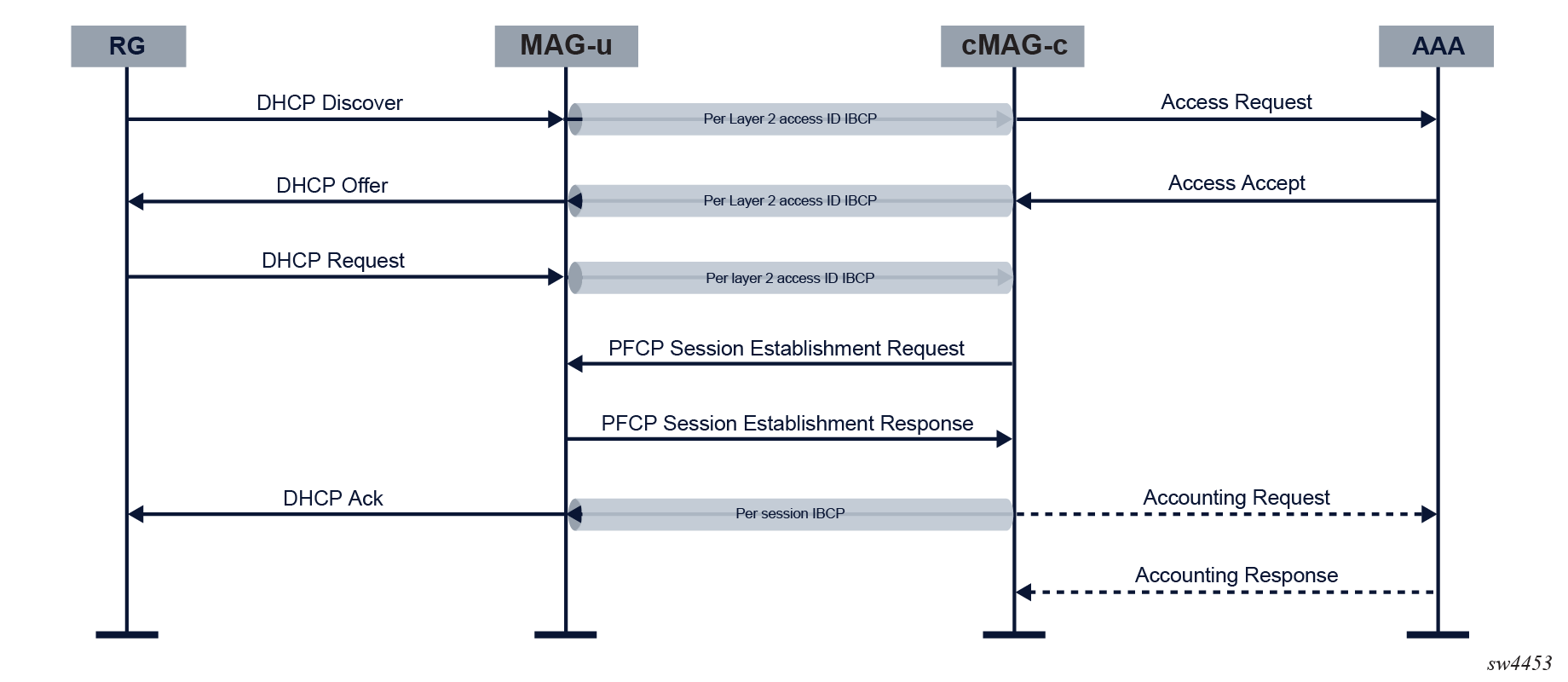
When the cMAG-c receives the initial triggering packet over the per-Layer 2 access ID IBCP tunnel, the following actions are executed:
- The cMAG-c
matches the triggering packet with an EP, and creates an IPoE session using the
configured keys. The cMAG-c
assigns the EP and an IPoE profile. The IPoE profile defines the following behavior
of the cMAG-c:
- The cMAG-c sets dot1p and DSCP values in Ethernet and IP headers of CP messages to the IPoE client.
- For packets that trigger session creation, the cMAG-c verifies the DHCP client Ethernet address (chaddr field). If the DHCP client Ethernet address does not equal the Ethernet source MAC address, the packet is dropped and no session is created.
Use the following command to create an IPoE profile.subscriber-management profiles ipoe-profileUse the following command to assign an IPoE profile to a session matching an EP entry.subscriber-management entry-point entry ipoe profileNote: If no IPoE profile is provisioned for a session, setup continues as if an IPoE profile with default values was provisioned. - The cMAG-c assigns a single authentication flow to the session and starts the authentication. Subsequent triggers for the same IPoE session do not trigger re-authentication.
- The cMAG-c allocates addresses for the session.
- The cMAG-c creates data plane rules and per-session IBCP tunnels on the MAG-u.
- The cMAG-c assigns addresses over the per-session IBCP tunnel.
- If accounting is provisioned, the cMAG-c starts accounting for the session.
The events in the following non-exhaustive list cause deletion of an IPoE session:
- The AAA triggers a failure; for example, RADIUS-initiated disconnect.
- An operator gives an explicit clear command for the session.
- No more DHCP or DHCPv6 lease is running; for example, because of a lease timeout or an explicit release message. Because of the lack of client-generated messages, SLAAC-assigned addresses are not tracked independently and require an active DHCP or DHCPv6 lease in the IPoE session.
- A session timeout has occurred.
SHCV
Subscriber Host Connectivity Verification (SHCV) monitors the connection status of IPoE sessions and removes the appropriate stacks if a session is no longer connected while generating a log event.
The cMAG-c performs SHCV by instructing the user plane function (UPF) at the start of an IPoE session to periodically send ARP requests or Neighbor Solicitations (NS) to end devices. In the case of an IPv4 stack, an ARP request is sent to the device's assigned IPv4 address, whereas for IPv6 stack, an NS is sent to the device's link-local address. If there is no response and all retries fail, SHCV removes the appropriate stack and generates a log event in the syslog server.
subscriber-management profiles shcv-profile periodic intervalThe default is 30 minutes.
subscriber-management profiles shcv-profile periodic retriessubscriber-management profiles shcv-profile periodic timeoutThe default is 10 seconds.
Changes in the SHCV configuration do not affect existing IPoE sessions.
PPPoE
PPPoE session setup is linked with the PPPoE discovery protocol as defined in RFC 2516. PPPoE session setup consists of the following phases:
- PPPoE discovery to enable PPP over Ethernet
- PPP LCP negotiation to negotiate the PPP link connection
- authentication
- IP network connectivity using NCPs, such as Internet Protocol Control Protocol (IPCP) and IPv6CP; for IPv6 followed by IP assignment protocols, such as SLAAC or DHCPv6
The following figure shows an example PPPoE session setup flow for IPv4 network connectivity on a cMAG-c, using PAP as the authentication protocol.
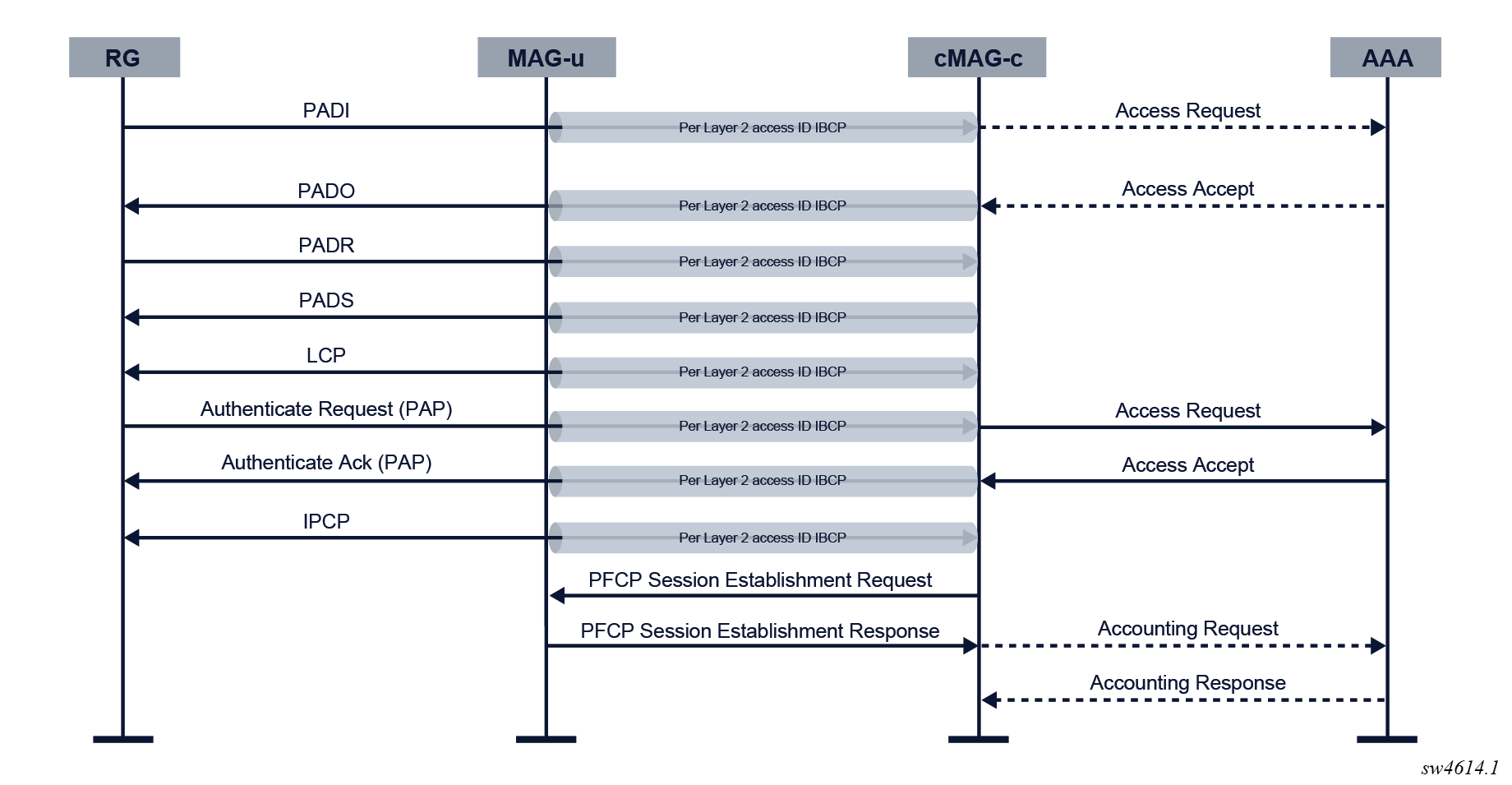
To initiate a PPPoE session, the residential gateway (RG) sends a PPPoE PADI discovery packet. The packet is sent over the default IBCP tunnel because no session context is known yet.
When the cMAG-c receives the initial triggering packet over the default IBCP tunnel, the following actions are executed:
-
The cMAG-c matches the triggering packet with an entry point. The entry point provides the PPPoE properties shown in the following table.Example: PPPoE entry point configuration
Table 1. PPPoE entry-point properties Property Description Mandatory or Optional pppoe-profile The PPPoE profile contains properties for each phase in the PPPoE setup. It also specifies the dot1p value for all PPPoE control plane packets that the cMAG-c sends. If not provisioned the cMAG-c uses the default profile values.
O authentication-flow The authentication flow configuration contains PADI and PAP/CHAP authentication
PADI authentication
O PAP/CHAP authentication
M allocation-scope By default, the cMAG-c allocates a unique PPPoE session ID per combination of Layer 2 circuit ID and MAC address. When an aggregation device ignores MAC addresses and forwards based on PPPoE session ID only, the cMAG-c allocates a unique session ID per Layer 2 circuit.
— random By default, the cMAG-c allocates the first free session ID within the allocation scope, starting with one. However, when randomization is configured, the cMAG-c allocates a random unique session ID within the scope.
— # info detail from running with-context /subscriber-management entry-point fixed-access entry default pppoe subscriber-management { entry-point fixed-access { entry default { pppoe { profile example authentication-flow { pap-chap-adb [ basic-adb ] } session-id { allocation-scope l2-circuit-mac random false } } } } } -
The cMAG-c allocates the PPPoE session ID. If a PPPoE session with the same key exists, the configuration of the PPPoE profile defines whether to delete or keep the existing PPPoE session. By default, the existing session is kept and the initial triggering PADI packet is ignored.
To define the behavior in case of conflicts, use the following CLI.subscriber-management profiles pppoe-profile padi-removes-existing-session -
If the authentication-flow configuration in the entry point requires PADI authentication, the cMAG-c performs the authentication and sends out the PADO. The following properties in the PPPoE profile apply:
-
ac-name
By default, the AC name is the system name configured using the following CLI.subscriber-management system name -
generate-ac-cookie
By default, the generation of an AC cookie is enabled.
# info detail with-context from running /subscriber-management profiles pppoe-profile example discovery subscriber-management { profiles { pppoe-profile example { discovery { generate-ac-cookie true reply-on-padt false } } } } -
-
The cMAG-c performs LCP negotiation as defined in RFC 1661 and RFC 4638. The following table describes the properties in the PPPoE profile.Example: LCP negotiation properties in the PPPoE profile configuration
Table 2. PPPoE profile LCP negotiation properties Property Description max-mtu The cMAG-c derives a downstream PPPoE MTU based on the maximum MTU value and the MRU the PPPoE client signals. If the MRU is smaller than the maximum MTU, the cMAG-c uses the MRU, otherwise the cMAG-c uses the maximum MTU. The cMAG-c sends the derived downstream PPPoE MTU to the MAG-u. The MAG-u applies the MTU on the downstream data path.
Note: The MAG-u may enforce a lower MTU than the derived downstream PPPoE MTU; for example, because of port limitations. The cMAG-c does not learn this lower MTU and cannot send it as the MRU to the PPPoE client; therefore, Nokia recommends aligning the MAG-u and cMAG-c MTU configuration.mru To prevent the PPPoE client from sending packets that the MAG-u dropped, Nokia recommends aligning the MRU with the maximum packet size that a MAG-u can receive.
require-max-payload-tag
The require-max-payload-tag command defines whether an MRU above 1492 is negotiated. When enabled, the cMAG-c uses the PPP-Max-Payload tag, optionally received from the PPPoE client during PPPoE discovery, for MRU negotiations. See RFC 4638 for more information.
When require-max-payload-tag is disabled, the cMAG-c sends the MRU as configured and accepts any MRU value. When require-max-payload-tag is enabled, the cMAG-c uses the value of the PPP-Max-Payload tag as a limit to MRU values.
If the PPP-Max-Payload tag is not present, or if it is lower than 1492, the limit for MRU values is set to 1492. If the configured MRU is bigger than the limit, the limit is sent as the MRU. If the received MRU is bigger than the limit, the limit is used for the MTU calculations.
keep-alive
The keep-alive configuration options include an interval, a maximum number of tries, and a choice to ignore the value of received magic numbers. If no response is received after the configured number of tries, the session is considered disconnected and the cMAG-c terminates the PPPoE session.
# info detail with-context from running /subscriber-management profiles pppoe-profile example lcp
    subscriber-management {
        profiles {
            pppoe-profile example {
                lcp {
                    max-mtu 1492
                    mru 1492
                    require-max-payload-tag true
                    keep-alive {
                        ignore-magic-numbers false
                        interval 30
                        tries 3
                    }
                }
            }
        }
    }
LCP renegotiation is not supported. After LCP negotiation completes and LCP enters the Opened state, the cMAG-c does the following when receiving an LCP Configuration Request message:- If the cMAG-c receives a message within a short interval after the LCP enters the Opened state, the cMAG-c assumes the message is a duplicate and drops it.
- If the cMAG-c receives a message after a short interval, the message triggers the termination of the PPPoE session and subsequently restarts the full session.
-
The cMAG-c continues with authentication when the LCP stack is in the Opened state. Either PAP or CHAP authentication is required. The cMAG-c supports both the PAP (RFC 1334) and CHAP (RFC 1994) authentications. The cMAG-c negotiates the authentication protocol with the PPPoE client during the LCP link negotiation. The following authentication method parameters in the PPPoE profile define the priority in which PAP and CHAP are negotiated:
-
pap
The cMAG-c only requests PAP authentication during LCP link negotiation.
-
chap
The cMAG-c only requests CHAP authentication during LCP link negotiation.
-
pref-pap
During LCP link negotiation, the cMAG-c initially requests PAP authentication from the PPPoE client in an LCP Configure Request message. If the PPPoE client rejects PAP authentication with a Configure Nak message and suggests using CHAP authentication instead, the cMAG-c sends a new LCP Configure Request message indicating to use CHAP authentication.
-
pref-chap
During LCP link negotiation, the cMAG-c initially requests CHAP authentication from the PPPoE client in an LCP Configure Request message. If the PPPoE client rejects CHAP authentication with a Configure Nak message and suggests using PAP authentication instead, the cMAG-c sends a new LCP Configure Request message indicating to use PAP authentication.
Example: Authentication properties in the PPPoE profile configuration
# info detail with-context from running /subscriber-management profiles pppoe-profile example authentication
    subscriber-management {
        profiles {
            pppoe-profile example {
                authentication {
                    method pref-chap
                    chap-challenge-length {
                        min 32
                        max 64
                    }
                }
            }
        }
    }
Both PAP and CHAP authentication are linked to the authentication flow.
-
- After successful authentication, the cMAG-c starts the NCP stacks for the allocated addresses. PPPoE sessions support basic
NCP renegotiation with the following limitations:
- The cMAG-c never triggers renegotiation.
- If the cMAG-c receives an NCP Configuration Request message within a short interval after the NCP enters the Opened state, the cMAG-c assumes the message is a duplicate and drops it.
- Configuration Request messages received while the NCP stack is in the Opened state (beyond the short interval in which duplicates are dropped) are handled as per the RFC, and do not lead to a new IP address in the case of IPCP. Full IP renegotiation for IPCP requires an IPCP Terminate Request from the RG, followed by an IPCP Configuration Request.
- When the only remaining NCP stack changes from the Opened to the Closed state, LCP termination is triggered.
After successful IP allocation and negotiation, the cMAG-c installs the PFCP session on the MAG-u, and the MAG-u begins forwarding data-plane packets and handling LCP keepalive packets. Accounting starts if a charging profile has been provisioned during authentication.
Session termination
When it's necessary to terminate a PPPoE session, the cMAG-c fetches the final counters from the MAG-u and tears down the session by sending an LCP Terminate Request to the PPPoE client. The following non-exhaustive list of events cause the PPPoE session to terminate:
- reception of a LCP Terminate Request from the PPPoE client
- reception of a conflicting PADI if the configuration of the PPPoE profile defines the deletion of the existing PPPoE session in case of conflicts (padi-removes-existing-session)
- reception of a new LCP Configuration Request
- detection of an LCP keep-alive failure
- administrative removal; for example, RADIUS-initiated disconnect or clear commands
- charging quota exhaustion
- all NCP stacks changed from the Opened to the Closed state
- PFCP association loss between the MAG-u and the cMAG-c
- reception of a PADT from the PPPoE client Note:
In this case, the reply-on-padt property in the PPPoE profile applies.
By default, the cMAG-c does not reply with a PADT.
LCP keep-alive offload
The cMAG-c offloads the LCP keep-alive function to the MAG-u, if the MAG-u signals the LCP keep-alive offload capability during the PFCP association.
Until the data plane session is created on the MAG-u, the cMAG-c typically responds to all LCP keep-alive requests. During the data plane session creation, the cMAG-c signals the LCP keep-alive offload to the MAG-u. After the LCP echo-session is installed on the MAG-u, the MAG-u starts answering incoming LCP keep-alive messages, and sends LCP keep-alive messages of its own, as needed. If a keep-alive message reaches the cMAG-c, the cMAG-c still answers it. This can happen, for example, in race conditions where the cMAG-c has already signaled the offload to the MAG-u, but the MAG-u has not yet fully installed it. The MAG-u forwards keep-alive packets until it has fully installed and enabled the offload.
Detection of an LCP keep-alive failure terminates the PPPoE session.
Resiliency based on PADO delay
PADO delay is a method to provision basic but deterministic (that is, determined from first use) MAG-u dual homing. A PADO delay value is provisioned during PADI authentication.
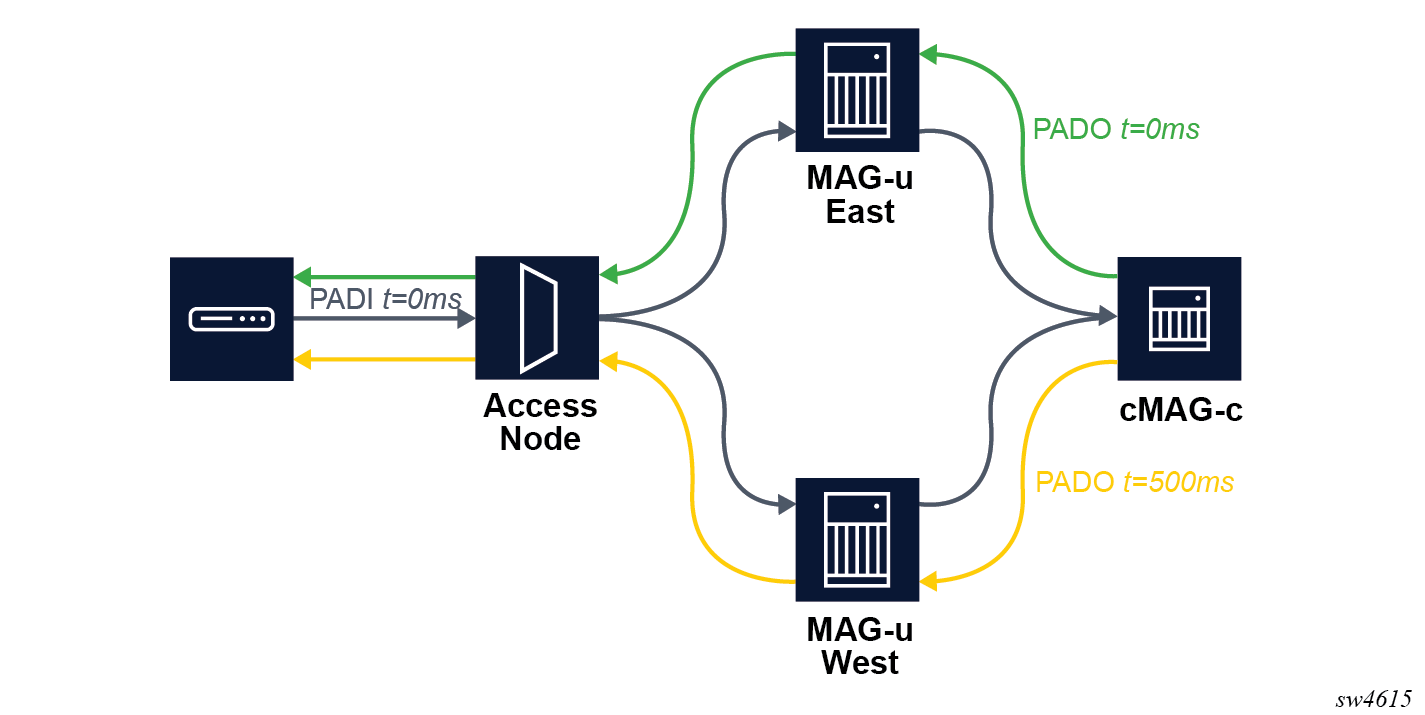
In MAG-u dual homing, a PPPoE client is connected to two MAG-u devices. The cMAG-c sends the PADO packet via one MAG-u device without delay and via the other MAG-u device with delay. The PPPoE client chooses the first received PADO and ignores the second received PADO. In stable conditions, the PADO delay determines a primary MAG-u choice with the option to fall back to a secondary MAG-u. The session setup continues on the primary MAG-u device. The feature is supported regardless of whether there is one cMAG-c device for both MAG-u devices or a different cMAG-c device per MAG-u device.
A prerequisite for deterministic MAG-u dual homing based on PADO delay is PADI authentication. If PADI authentication is not configured, the delay value is not known.
subscriber-management entry-point entry pppoe authentication-flow padi-adbTo configure a delay for PADO packets, you can use one of the following options:
- Use the following
CLI.
subscriber-management authentication-database entry pppoe pado-delay - Provide the delay via the Alc-PPPoE-PADO-Delay VSA during RADIUS authentication.
The following figure shows an example of deterministic MAG-u dual homing. A PPPoE connection is dual homed to two MAG-u devices, called East and West. East and West share a common cMAG-c. The PPPoE client broadcasts the initial PADI to both MAG-u devices. The cMAG-c handles both PADIs and creates two sessions for it because they have different session keys. The session on East has no delay while the session on West has a 500 ms delay. The PPPoE client chooses the first received PADO sent via East. The session is established on East while the session on West times out. If the setup on East fails, the PPPoE client only gets the (delayed) PADO sent via West and the session is established on West.