
TLS
Transport Layer Security (TLS) is used for the following primary purposes:
-
authentication of an end device (client or server) using a digital signature (DS)
TLS uses Public Key Infrastructure (PKI) for device authentication. DSs are used to authenticate the client or the server. The server typically sends a certificate with a DS to the client.
In certain situations, the server can request a certificate from the client to authenticate it. The client has a certificate (called a trust anchor) from the certificate authority (CA), which is used to authenticate a server certificate and its DS. After the client provides a digitally signed certificate to the server and both parties are authenticated, the encryption Protocol Data Units (PDUs) are transmitted.
-
encryption and authentication of application PDUs
After the clients and server are successfully authenticated, the cipher suite is negotiated between the server and clients, and the PDUs are encrypted based on the agreed cipher protocol.
TLS client interaction with applications
On the 7210 SAS, TLS is a standalone configuration. The user must configure TLS profiles with certificates and cryptograhic algorithms to use and then assign the TLS profiles to the appropriate applications. When a TLS profile is assigned to an application, the application should not send any clear text PDUs until the TLS handshake is successfully completed and the encryption ciphers are negotiated between the TLS server and the TLS client.
After successful negotiation and handshake, the TLS is operationally up and notifies the application, which begins transmitting PDUs. These PDUs are encrypted using TLS based on the agreed ciphers. At any point, if the TLS becomes operationally down, the application stops transmitting PDUs.
For example, the following sequence describes a TLS connection for generic TLS client application:
-
A TLS client profile is assigned to the application.
-
The application stops sending clear text PDUs because a TLS profile has been assigned and TLS is not ready to encrypt.
-
TLS begins the handshake.
-
Authentication occurs at the TLS layer.
-
The TLS server and TLS client negotiate ciphers.
-
Salts are negotiated for the symmetric key. A salt is a seed for creating Advanced Encryptions Standard (AES) encryption keys.
-
When negotiations are successfully completed, the handshake finishes and the application is notified.
-
TLS becomes operationally up, and the application can resume transmitting PDUs using the negotiated cipher. Until TLS is operationally up, application PDUs arriving from the peer (either server or client) are dropped.
TLS application support
The following table lists the applications that support TLS.
| Application | TLS server supported | TLS client supported |
|---|---|---|
|
Syslog |
✓ |
TLS handshake
The following figure shows the TLS handshake.
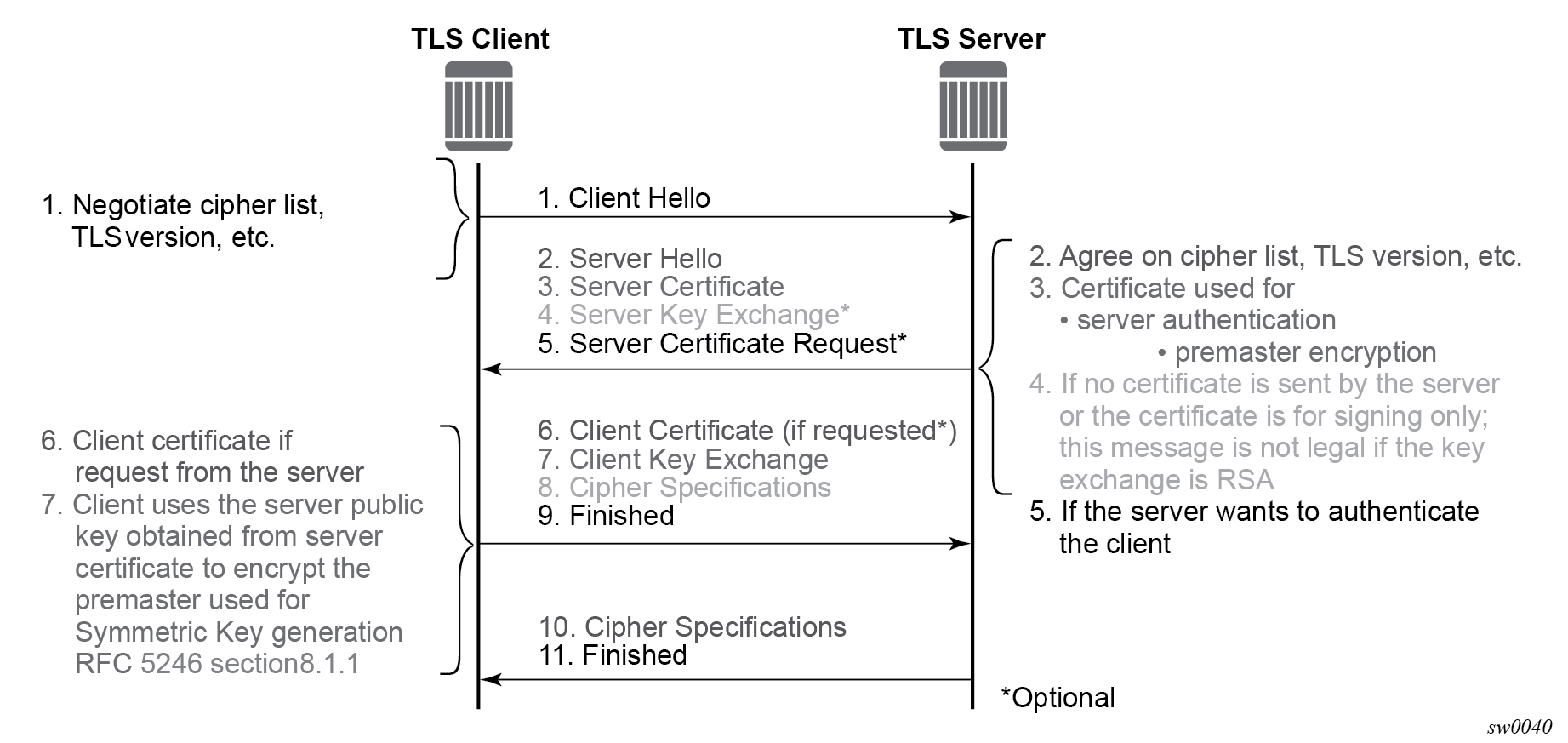
The following table describes the steps in the TLS handshake.
| Step | Description |
|---|---|
|
1 |
The TLS handshake begins with the client Hello message. This message includes the cipher list that the client wants to use and negotiate, among other information. |
|
2 |
The TLS server sends back a server Hello message, along with the first common cipher found on both the client and server cipher lists. The common cipher is used for data encryption. |
|
3 |
The TLS server sends a server certificate message, in which the server provides a certificate that the client can use to authenticate the server identity. The public key of this certificate (RSA key) can also be used to encrypt the symmetric key seed used by the client and server to create the symmetric encryption key. This occurs only if the PKI is using RSA for asymmetric encryption. |
|
4 |
7210 SAS does not support server key exchange. 7210 SAS uses only RSA keys; Diffie-Hellman key exchange is not supported. |
|
5 |
The server can optionally be configured to request a certificate from the client to authenticate the client. |
|
6 |
If the server requests a client certificate, the client must provide it by using a client certificate message. If the client does not respond to the certificate request, the server drops the TLS session. |
|
7 |
The client uses the public server RSA key included in the server certificate to encrypt a seed. The client and server use this seed to create the identical symmetric key used for encrypting and decrypting data plane traffic. |
|
8 |
The client sends a cipher spec message to switch encryption to this symmetric key. |
|
9 |
The client successfully finishes the handshake. |
|
10 |
The server sends a cipher spec message to switch encryption to this symmetric key. |
|
11 |
The server successfully finishes the handshake. |
After a successful handshake, TLS is operationally up and applications can use TLS for application encryption.
TLS 1.3
TLS 1.3 is required for faster handshakes and stronger encryption and authentication algorithms.
All 7210 SAS applications that use TLS 1.2 also support TLS 1.3, unless specifically stated otherwise.
The user can configure the node to use TLS 1.2, TLS 1.3, or both for negotiation with the peer.
When TLS 1.3 is negotiated with a peer, the node no longer negotiates the TLS version down to 1.2 as long as the session is alive.
TLS 1.3 handshake
The TLS 1.3 client handshake is very similar to TLS 1.2 because the client is able to negotiate TLS 1.2 or 1.3 when starting the TLS Hello message to the server. The client includes a "Supported Version" extension in its Hello message. The server responds with its own supported version, agreed ciphers, and so on.
In TLS 1.2 and TLS 1.3, the server can optionally request for the client certificate to authenticate the client. If requested, the client must provide its certificate to the server.
TLS 1.2 and TLS 1.3 configuration
- TLS 1.2
- cipher list
- TLS 1.3
- cipher list
- signature list
- group list
- a list of cipher suites
- a list of supported signatures
- a list of groups for key exchange
The client and server can each configure their own signature, group, and cipher lists. During the handshake protocol between the client and server, the server selects the first group from the group list that it supports to use for the key exchange and negotiates the cipher and signature algorithm from the lists provided by the client.
TLS 1.3 client options and TLS client profile configuration
The following examples display the configuration of the TLS 1.3 client options and the TLS client profile.
Configure TLS 1.3 client information (classic CLI)
A:node-2>config>system>security>tls# info
----------------------------------------------
                cert-profile "profile1" create
                    no shutdown
                exit
                client-cipher-list "cipherlist1" create
                    tls13-cipher 1 name tls-aes128-ccm8-sha256
                exit
                client-group-list "grouplist1" create
                    tls13-group 1 name tls-ecdhe-521
                exit
                client-signature-list "signaturelist1" create
                    tls13-signature 1 name tls-rsa-pss-pss-sha512
                exit
----------------------------------------------
Configure the TLS client profile (classic CLI)
A:node-2>config>system>security>tls# info
----------------------------------------------
                client-tls-profile "profile1" create
                    no shutdown
                    cert-profile "profile1"
                    cipher-list "cipherlist1"
                    group-list "grouplist1"
                    protocol-version tls-version13
                    signature-list "signaturelist1"
                exit
----------------------------------------------
TLS client certificate
The TLS protocol is used for authentication. It allows the server to authenticate the client via PKI. If the server requests authentication from the client, the client response must provide an X.509v3 certificate that the server can authenticate using the digital signature of its client. The 7210 SAS supports the configuration of an X.509v3 certificate for TLS clients. When the server requests a certificate using the Hello message, the client sends a client certificate message to transmit its certificate to the server.
Supported TLS ciphers
As shown in TLS handshake, TLS negotiates the supported ciphers between the client and the server.
The client sends the supported cipher suites in the client Hello message, and the server compares them with the server cipher list. The top protocol on both lists is chosen and returned from the server within the server Hello message.
7210 SAS supports the following TLS 1.2 ciphers as a TLS client:
-
tls-rsa-with3des-ede-cbc-sha
-
tls-rsa-with-aes128-cbc-sha
-
tls-rsa-with-aes256-cbc-sha
-
tls-rsa-with-aes128-cbc-sha256
-
tls-rsa-with-aes256-cbc-sha256
-
tls-rsa-with-aes128-gcm-sha256
-
tls-rsa-with-aes256-gcm-sha384
The 7210 SAS supports the following TLS 1.3 ciphers, groups, and signature algorithms as a TLS client:
-
tls-aes128-gcm-sha256
-
tls-aes256-gcm-sha384
-
tls-chacha20-poly1305-sha256
-
tls-aes128-ccm-sha256
-
tls-aes128-ccm8-sha256
-
Groups:
-
tls-ecdhe-256
-
tls-ecdhe-384
-
tls-ecdhe-521
-
tls-x25519
-
tls-x448
-
-
Signature algorithms:
-
tls-rsa-pkcs1-sha256
-
tls-rsa-pkcs1-sha384
-
tls-rsa-pkcs1-sha512
-
tls-ecdsa-secp256r1-sha256
-
tls-ecdsa-secp384r1-sha384
-
tls-ecdsa-secp521r1-sha512
-
tls-rsa-pss-rsae-sha256
-
tls-rsa-pss-rsae-sha384
-
tls-rsa-pss-rsae-sha512
-
tls-rsa-pss-pss-sha256
-
tls-rsa-pss-pss-sha384
-
tls-rsa-pss-pss-sha512
-
tls-ed25519
-
tls-ed448
-
7210 SAS certificate management
The 7210 SAS implements a centralized certificate management protocol that can be used by TLS.
Use the commands in the following contexts to configure and manage certificates:
admin certificateCertificate profile
The certificate profile is available for the TLS client. The cert-profile command is configured for the client to transmit the provider certificate and its DS to the peer so that the peer can authenticate it via the trust-anchor and CA certificate.
Multiple provider certificates can be configured on the 7210 SAS; however, the 7210 SAS currently uses the smallest index as the active provider certificate, and only sends the certificate to the peer.
Operational guidelines
This section provides operational guidelines for TLS.
TLS authentication behavior
Following the Hello messages, the server sends its certificate in a certificate message. If required, a ServerKeyExchange message may also be sent.
The 7210 SASTLS client establishes a trusted connection without server authentication using a trust-anchor. The RSA key of the certificate is used for public key encryption, with the following basic checks to validate the certificate:
-
time validity
The certificate is checked to ensure that it is neither expired nor not yet valid.
-
certificate type
The certificate is not a CA certificate.
-
keyUsage extension
If present, this must contain a digital signature and key encryption.
-
host verification
The IP address or DNS name of the server is looked up, if available (for LDAP, only the IP address is used), in the common name (cn) or subjectAltName extension. This is to verify that the certificate was issued to that server and not to another.
Client TLS profile and scale
The 7210 SAS supports the creation of client TLS profiles, which can be assigned to applications such as syslog to encrypt the application layer.
The client-tls-profile command is used for negotiating and authenticating the server. After the server is authenticated the server negotiates the ciphers and authentication algorithms to use for data encryption. The client TLS profile must be assigned to an application for it to start encrypting. Up to 16 client TLS profiles can be configured.
Basic TLS configuration
Basic TLS client configuration requires the following:
-
Use the following command to create a cipher list.
configure system security tls client-cipher-list -
Use the following command to assign a TLS cipher list to the TLS client profile.
configure system security tls client-tls-profile cipher-list
Common configuration tasks
This section provides information about common configuration tasks.
Configuring a client TLS profile
Use the following command to configure a client TLS profile.
configure system security tls client-tls-profileConfiguring a TLS client certificate
Use the following commands to configure TLS certificate management.
configure system security tls cert-profile
configure system security tls client-tls-profile cert-profile
TLS command reference
Command hierarchies
Configuration commands
TLS commands
config
    - system
        - security
            - tls
                - cert-profile profile-name [create]
                - no cert-profile profile-name
                    - entry  entry-id [create]
                    - no entry  entry-id
                        - cert cert-filename
                        - no cert
                        - key key-filename
                        - no key
                    - [no] shutdown
                - client-cipher-list name [create]
                - no client-cipher-list name
                    - cipher index name cipher-suite-code
                    - no cipher index
                    - tls13-cipher index name cipher-suite-code
                    - no tls13-cipher index
                - client-group-list name [create]
                - no client-group-list name
                    - tls13-group index name group-suite-code
                    - no tls13-group index
                - client-signature-list name [create]
                - no client-signature-list name
                    - tls13-signature index name signature-suite-code
                    - no tls13-signature index
                - client-tls-profile name [create]
                - no client-tls-profile name
                    - cert-profile name
                    - no cert-profile
                    - cipher-list name
                    - no cipher-list
                    - group-list name
                    - no group-list
                    - protocol-version TLS version
                    - no protocol-version
                    - [no] shutdown
                    - signature-list name
                    - no signature-list
Certificate management commands
admin
    - certificate
        - display type {cert | key} url-string format {pkcs10 | pkcs12 | pkcs7-der | pkcs7-pem | pem | der} [password password]
        - import type {cert | key} input url-string output filename format input-format [password password]
Command descriptions
Configuration commands
TLS commands
tls
Syntax
tls
Context
config>system>security
Platforms
Supported on all 7210 SAS platforms as described in this document, except the 7210 SAS-D
Description
Commands in this context configure Transport Layer Security (TLS) parameters.
cert-profile
Syntax
cert-profile profile-name [create]
no cert-profile profile-name
Context
config>system>security>tls
Platforms
Supported on all 7210 SAS platforms as described in this document, except the 7210 SAS-D
Description
Commands in this context configure TLS certificate profile information. The certificate profile contains certificates that are sent to the TLS peer (server) to authenticate itself. It is mandatory for the TLS server to send this information. The TLS client may optionally send this information upon request from the TLS server.
The no form of this command deletes the specified TLS certificate profile.
Default
no cert-profile
Parameters
- profile-name
-
Specifies the TLS certificate profile name, up to 32 characters in length.
- create
-
Keyword used to create the TLS certificate profile.
entry
Syntax
entry entry-id [create]
no entry entry-id
Context
config>system>security>tls>cert-profile
Platforms
Supported on all 7210 SAS platforms as described in this document, except the 7210 SAS-D
Description
Commands in this context configure an entry for the TLS certificate profile. A certificate profile may have up to eight entries. Currently, TLS uses the entry with the smallest ID number when responding to server requests.
The no form of this command deletes the specified entry.
Default
no entry
Parameters
- entry-id
-
Specifies the ID of the TLS certificate profile entry.
- create
-
Keyword used to create the TLS certificate profile entry.
cert
Syntax
cert cert-filename
no cert
Context
config>system>security>tls>cert-profile>entry
Platforms
Supported on all 7210 SAS platforms as described in this document, except the 7210 SAS-D
Description
This command specifies the filename of an imported certificate for the cert-profile entry.
The no form of this command removes the certificate.
Default
no cert
Parameters
- cert-filename
-
Specifies the filename of the TLS certificate, up to 95 characters in length.
key
Syntax
key key-filename
no key
Context
config>system>security>tls>cert-profile>entry
Platforms
Supported on all 7210 SAS platforms as described in this document, except the 7210 SAS-D
Description
This command specifies the filename of an imported key for the cert-profile entry.
The no form of this command removes the key.
Default
no key
Parameters
- key-filename
-
Specifies the filename of the key, up to 95 characters in length.
client-cipher-list
Syntax
client-cipher-list name [create]
no client-cipher-list name
Context
config>system>security>tls
Platforms
Supported on all 7210 SAS platforms as described in this document, except the 7210 SAS-D
Description
Commands in this context create a cipher list that the client sends to the server in the client Hello message. It is a list of ciphers supported and preferred by the 7210 SAS TLS client for use in the TLS session. The server matches this list against the server cipher list. The most preferred cipher found in both lists is chosen.
The no form of this command removes cipher list.
Default
no client-cipher-list
Parameters
- name
-
Specifies the name of the client cipher list, up to 32 characters in length.
- create
-
Keyword used to create the client cipher list.
cipher
Syntax
cipher index name cipher-suite-code
no cipher index
Context
config>system>security>tls>client-cipher-list
Platforms
Supported on all 7210 SAS platforms as described in this document, except the 7210 SAS-D
Description
This command configures the cipher suite to be negotiated by the server and client.
The no form of this command removes the cipher suite.
Default
no cipher
Parameters
- index
-
Specifies the index number. The index number indicates the location of the cipher in the negotiation list, with the lower index numbers appearing higher in the list and the higher index numbers appearing at the bottom of the list.
- cipher-suite-code
-
Specifies the cipher suite code.
tls13-cipher
Syntax
tls13-cipher index name cipher-suite-code
no tls13-cipher index
Context
config>system>security>tls>client-cipher-list
Platforms
Supported on all 7210 SAS platforms as described in this document, except the 7210 SAS-D
Description
This command configures the TLS 1.3-supported ciphers that are used by the client and server.
The no form of this command removes the cipher suite.
Default
no tls13-cipher
Parameters
- index
-
Specifies the index number. The index number indicates the location of the cipher in the negotiation list, with the lower index numbers appearing higher in the list and the higher index numbers appearing at the bottom of the list.
- cipher-suite-code
-
Specifies the cipher suite code.
client-group-list
Syntax
client-group-list name [create]
no client-group-list name
Context
config>system>security>tls
Platforms
Supported on all 7210 SAS platforms as described in this document, except the 7210 SAS-D
Description
Commands in this context configure a list of group suite codes that the client sends in a client Hello message.
The no form of this command removes the client group list.
Default
no client-group-list
Parameters
- name
-
Specifies the name of the client group list, up to 32 characters.
- create
-
Keyword used to create the client group list.
tls13-group
Syntax
tls13-group index name group-suite-code
no tls13-group index
Context
config>system>security>tls>client-group-list
Platforms
Supported on all 7210 SAS platforms as described in this document, except the 7210 SAS-D
Description
This command configures the TLS 1.3-supported group suite codes sent by the client or server in their respective Hello messages.
The 7210 SAS TLS client supports the use of Elliptic-curve Diffie-Hellman Ephemeral (ECDHE) groups.
The no form of this command removes the group suite code.
Default
no tls13-group
Parameters
- index
-
Specifies the index number, that indicates the location of the group suite code in the client or server group list. The lower index numbers are higher in the list, and the higher index numbers are at the bottom of the list.
- group-suite-code
-
Specifies the group suite code.
client-signature-list
Syntax
client-signature-list name [create]
no client-signature-list name
Context
config>system>security>tls
Platforms
Supported on all 7210 SAS platforms as described in this document, except the 7210 SAS-D
Description
Commands in this context configure a list of TLS 1.3-supported signature suite codes that the client sends in a client Hello message.
The no form of this command removes the client signature list.
Default
no client-signature-list
Parameters
- name
-
Specifies the name of the client signature list, up to 32 characters.
- create
-
Keyword used to create the client signature list.
tls13-signature
Syntax
tls13-signature index name signature-suite-code
no tls13-signature index
Context
config>system>security>tls>client-signature-list
Platforms
Supported on all 7210 SAS platforms as described in this document, except the 7210 SAS-D
Description
This command configures the TLS 1.3-supported signature suite codes sent by the client or server in their respective Hello messages.
The no form of this command removes the signature suite code.
Default
no tls13-signature
Parameters
- index
-
Specifies the index number, that indicates the location of the signature suite code in the client or server group list. The lower index numbers are higher in the list, and the higher index numbers are at the bottom of the list.
- signature-suite-code
-
Specifies the signature suite code.
client-tls-profile
Syntax
client-tls-profile name [create]
no client-tls-profile name
Context
config>system>security>tls
Platforms
Supported on all 7210 SAS platforms as described in this document, except the 7210 SAS-D
Description
Commands in this context configure the TLS client profile to be assigned to applications for encryption.
The no form of this command removes the TLS client profile.
Default
no client-tls-profile
Parameters
- name
-
Specifies the name of the client TLS profile, up to 32 characters in length.
- create
-
Keyword used to create the client TLS profile.
cert-profile
Syntax
cert-profile name
no cert-profile
Context
config>system>security>tls>client-tls-profile
Platforms
Supported on all 7210 SAS platforms as described in this document, except the 7210 SAS-D
Description
This command assigns a TLS certificate profile to be used by the TLS client profile. This certificate is sent to the server for the authentication of the client and public key.
The no form of this command removes the TLS certificate profile assignment.
Default
no cert-profile
Parameters
- name
-
Specifies the name of the TLS certificate profile, up to 32 characters in length.
cipher-list
Syntax
cipher-list name
no cipher-list
Context
config>system>security>tls>client-tls-profile
Platforms
Supported on all 7210 SAS platforms as described in this document, except the 7210 SAS-D
Description
This command assigns the cipher list to be used by the TLS client profile for negotiation in the client Hello message.
The no form of this command removes the cipher list assignment.
Default
no cipher-list
Parameters
- name
-
Specifies the name of the cipher list, up to 32 characters in length.
group-list
Syntax
group-list name
no group-list
Context
config>system>security>tls>client-tls-profile
Platforms
Supported on all 7210 SAS platforms as described in this document, except the 7210 SAS-D
Description
This command assigns an existing TLS 1.3 group list to the TLS client profile.
The no form of this command removes the group list from the client profile.
Default
no group-list
Parameters
- name
-
Specifies the name of the group list, up to 32 characters in length.
protocol-version
Syntax
protocol-version TLS version
no protocol-version
Context
config>system>security>tls>client-tls-profile
Platforms
Supported on all 7210 SAS platforms as described in this document, except the 7210 SAS-D
Description
This command configures the TLS version to be negotiated between the client and server.
When configured, the client adds the specified version as a supported version in its Hello message to the server. If the tls-version-all parameter is specified, the client adds both TLS 1.2 and TLS 1.3 as supported versions in its Hello message.
The no form of this command reverts to the default TLS version.
Default
protocol-version tls-version12
Parameters
- TLS version
-
Specifies the TLS version to include in the client Hello message.
signature-list
Syntax
signature-list name
no signature-list
Context
config>system>security>tls>client-tls-profile
Platforms
Supported on all 7210 SAS platforms as described in this document, except the 7210 SAS-D
Description
This command assigns an existing TLS 1.3 signature list to the TLS client profile.
The no form of this command removes the signature list from the client profile.
Default
no signature-list
Parameters
- name
-
Specifies the name of the signature list, up to 32 characters in length.
certificate
Syntax
certificate
Context
admin
Platforms
Supported on all 7210 SAS platforms as described in this document, except the 7210 SAS-D
Description
Commands in this context configure X.509 certificate-related operational parameters.
display
Syntax
display type {cert | key} url-string format {pkcs10 | pkcs12 | pkcs7-der | pkcs7-pem | pem | der} [password password]
Context
admin>certificate
Platforms
Supported on all 7210 SAS platforms as described in this document, except the 7210 SAS-D
Description
This command displays the content of an input file in plain text.
- System
- system format
- PKCS #12
- PKCS #7 PEM encoded
- PKCS #7 DER encoded
- RFC 4945
- Key
- system format
- PKCS #12
Parameters
- url-string
-
Specifies the local CF card URL of the input file.
- type
-
Keyword to specify the type of input file.
- format
-
Keyword to specify the format of input file.
- password
-
Specifies the password , up to 99 characters in length, to decrypt the input file, if it is an encrypted PKCS#12 file.
import
Syntax
import type {cert | key} input url-string output filename format input-format [password password]
Context
admin>certificate
Platforms
Supported on all 7210 SAS platforms as described in this document, except the 7210 SAS-D
Description
This command converts an input file (key or certificate) to a system format file. The following list summarizes the formats supported by this command:
- Certificate
- PKCS #12
- PKCS #7 PEM encoded
- PKCS #7 DER encoded
- PEM
- DER
- Key
- PKCS #12
- PEM
- DER
Parameters
- url-string
-
Specifies the URL for the input file. This URL could be either a local CF card URL file or an FP URL to download the input file.
- filename
-
Specifies the name of the output file, up to 95 characters in length. The output directory is cf1:\system-pki.
- type
-
Keyword to specify the type of input file.
- input-format
-
Keyword to specify the format of the input file.
- password
-
Specifies the password, up to 32 characters in length, to decrypt the input file if it is an encrypted PKCS#12 file.