
TLS
TLS is primarily used for the following:
-
authentication of an end device (client or server) using a digital signature (DS)
TLS uses Public Key Infrastructure (PKI) for device authentication. DSs are used to authenticate clients or servers. The server typically sends a certificate with a DS to the client. In certain situations, the server can request a certificate from the client to authenticate it. The client has a certificate (called a trust anchor) from the certificate authority (CA), which is used to authenticate a server certificate and its DS. After the client provides a digitally signed certificate to the server and both parties are authenticated, the encryption Protocol Data Units (PDUs) are transmitted.
-
encryption and authentication of application PDUs
After the clients and server are successfully authenticated, the cipher suite is negotiated between the server and clients, and the PDUs are encrypted based on the agreed-upon cipher protocol.
TLS client interaction with applications
On the 7210 SAS, TLS is a standalone configuration. The user must configure TLS profiles with certificates and cryptograhic algorithms to use and then assign the TLS profiles to the appropriate applications. When a TLS profile is assigned to an application, the application does not send any clear text PDUs until the TLS handshake is successfully completed and the encryption ciphers are negotiated between the TLS server and the TLS client.
After successful negotiation and handshake, the TLS is operationally up and notifies the application, which begins transmitting PDUs. These PDUs are encrypted using TLS based on the agreed ciphers. At any point, if the TLS becomes operationally down, the application stops transmitting PDUs.
For example, the following sequence describes a TLS connection for generic TLS client application:
-
A TLS client profile is assigned to the application.
-
The application stops sending clear text PDUs because a TLS profile has been assigned and TLS is not ready to encrypt.
-
TLS begins the handshake.
-
Authentication occurs at the TLS layer.
-
The TLS server and TLS client negotiate ciphers.
-
Salts are negotiated for the symmetric key. A salt is a seed for creating Advanced Encryptions Standard (AES) encryption keys.
-
When negotiations are successfully completed, the handshake finishes and the application is notified.
-
TLS becomes operationally up, and the application can resume transmitting PDUs using the negotiated cipher. Until TLS is operationally up, application PDUs arriving from the peer (either server or client) are dropped.
TLS application support
TLS handshake
The following figure shows the TLS handshake.
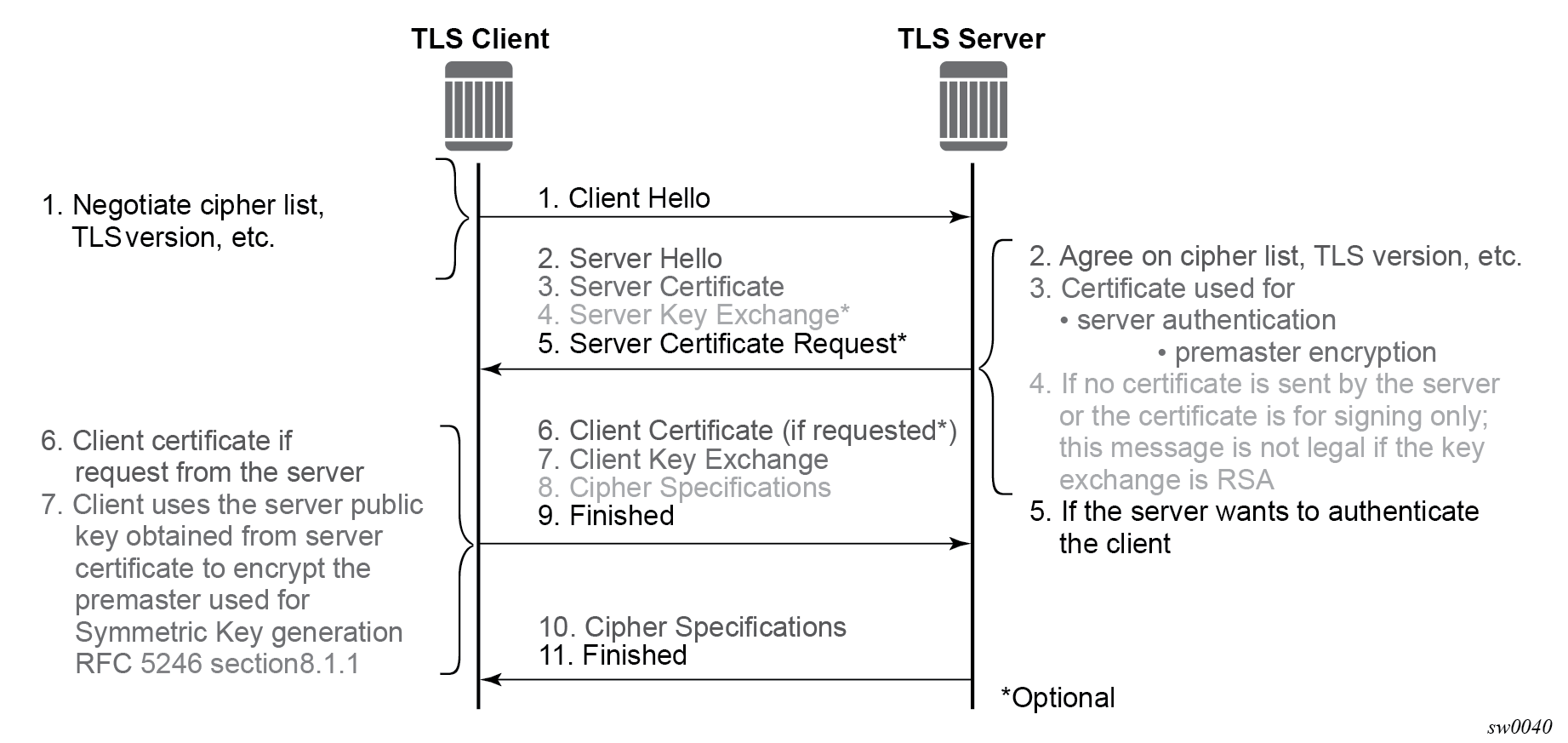
The following table describes the steps in the TLS handshake.
| Step | Description |
|---|---|
|
1 |
The TLS handshake begins with the client Hello message. This message includes the cipher list that the client wants to use and negotiate, among other information. |
|
2 |
The TLS server sends back a server Hello message, along with the first common cipher found on both the client and server cipher lists. The common cipher is used for data encryption. |
|
3 |
The TLS server sends a server certificate message, in which the server provides a certificate that the client can use to authenticate the server identity. The public key of this certificate (RSA key) can also be used to encrypt the symmetric key seed used by the client and server to create the symmetric encryption key. This occurs only if the PKI is using RSA for asymmetric encryption. |
|
4 |
7210 SAS does not support server key exchange. 7210 SAS uses only RSA keys; Diffie-Hellman key exchange is not supported. |
|
5 |
The server can optionally be configured to request a certificate from the client to authenticate the client. |
|
6 |
If the server requests a client certificate, the client must provide it by using a client certificate message. If the client does not respond to the certificate request, the server drops the TLS session. |
|
7 |
The client uses the public server RSA key included in the server certificate to encrypt a seed. The client and server use this seed to create the identical symmetric key used for encrypting and decrypting data plane traffic. |
|
8 |
The client sends a cipher spec message to switch encryption to this symmetric key. |
|
9 |
The client successfully finishes the handshake. |
|
10 |
The server sends a cipher spec message to switch encryption to this symmetric key. |
|
11 |
The server successfully finishes the handshake. |
After a successful handshake, TLS is operationally up and applications can use TLS for application encryption.
TLS 1.3
TLS 1.3 is required for faster handshakes and stronger encryption and authentication algorithms.
All 7210 SAS applications that use TLS 1.2 also support TLS 1.3, unless specifically stated otherwise.
The user can configure the node to use TLS 1.2, TLS 1.3, or both for negotiation with the peer.
When TLS 1.3 is negotiated with a peer, the node no longer negotiates the TLS version down to 1.2 as long as the session is alive.
TLS 1.3 handshake
The TLS 1.3 client handshake is very similar to TLS 1.2 because the client is able to negotiate TLS 1.2 or 1.3 when starting the TLS Hello message to the server. The client includes a "Supported Version" extension in its Hello message. The server responds with its own supported version, agreed ciphers, and so on.
In TLS 1.2 and TLS 1.3, the server can optionally request for the client certificate to authenticate the client. If requested, the client must provide its certificate to the server.
TLS 1.2 and TLS 1.3 configuration
- TLS 1.2
- cipher list
- TLS 1.3
- cipher list
- signature list
- group list
- a list of cipher suites
- a list of supported signatures
- a list of groups for key exchange
The client and server can each configure their own signature, group, and cipher lists. During the handshake protocol between the client and server, the server selects the first group from the group list that it supports to use for the key exchange and negotiates the cipher and signature algorithm from the lists provided by the client.
TLS 1.3 client options and TLS client profile configuration
The following examples display the configuration of the TLS 1.3 client options and the TLS client profile.
Configure TLS 1.3 client information (classic CLI)
A:node-2>config>system>security>tls# info
----------------------------------------------
                cert-profile "profile1" create
                    no shutdown
                exit
                client-cipher-list "cipherlist1" create
                    tls13-cipher 1 name tls-aes128-ccm8-sha256
                exit
                client-group-list "grouplist1" create
                    tls13-group 1 name tls-ecdhe-521
                exit
                client-signature-list "signaturelist1" create
                    tls13-signature 1 name tls-rsa-pss-pss-sha512
                exit
----------------------------------------------
Configure the TLS client profile (classic CLI)
A:node-2>config>system>security>tls# info
----------------------------------------------
                client-tls-profile "profile1" create
                    no shutdown
                    cert-profile "profile1"
                    cipher-list "cipherlist1"
                    group-list "grouplist1"
                    protocol-version tls-version13
                    signature-list "signaturelist1"
                exit
----------------------------------------------
TLS client certificate
The TLS protocol is used for authentication. It allows the server to authenticate the client via PKI. If the server requests authentication from the client, the client response must provide an X.509v3 certificate that the server can authenticate using the digital signature of its client. The 7210 SAS supports the configuration of an X.509v3 certificate for TLS clients. When the server requests a certificate using the Hello message, the client sends a client certificate message to transmit its certificate to the server.
Certificate revocation status verification for TLS
A certificate authority (CA) can revoke issued certificates by listing them in a certificate revocation list (CRL). In TLS, an optional CRL is applied for CA certificates. The CRL does not apply to the intermediate or end issuer of an end entity (EE) certificate. To extend this optional configuration to include EE certificates, use the status-verify default-result commands under the following contexts:
configure system security tls client-tls-profile
configure system security tls server-tls-profile
The command options are revoked (default value) or good.
This default result is used when the revocation status of a certificate cannot be determined because of an invalid CRL (for example, it is missing, expired, or corrupt).
The TLS default-result for EE certificates is set to revoked for safety purposes. If an expired CRL in the CA profile is matched as the issuer of the EE certificate, the EE certificate is treated as revoked. If the expired CRL is further up in the certificate chain, the optional CRL works as expected.
The status-verify default-result command allows users to override the recommended revocation check policy when there is legitimate reason to accept EE certificates without checking their revocation status (for example, to keep the automatic CRL update working during a temporary network issue).
Supported TLS ciphers
As shown in TLS handshake, TLS negotiates the supported ciphers between the client and the server.
The client sends the supported cipher suites in the client Hello message, and the server compares them with the server cipher list. The top protocol on both lists is chosen and returned from the server within the server Hello message.
7210 SAS supports the following TLS 1.2 ciphers as a TLS client:
-
tls-rsa-with3des-ede-cbc-sha
-
tls-rsa-with-aes128-cbc-sha
-
tls-rsa-with-aes256-cbc-sha
-
tls-rsa-with-aes128-cbc-sha256
-
tls-rsa-with-aes256-cbc-sha256
-
tls-rsa-with-aes128-gcm-sha256
-
tls-rsa-with-aes256-gcm-sha384
The 7210 SAS supports the following TLS 1.3 ciphers, groups, and signature algorithms as a TLS client:
-
tls-aes128-gcm-sha256
-
tls-aes256-gcm-sha384
-
tls-chacha20-poly1305-sha256
-
tls-aes128-ccm-sha256
-
tls-aes128-ccm8-sha256
-
Groups:
-
tls-ecdhe-256
-
tls-ecdhe-384
-
tls-ecdhe-521
-
tls-x25519
-
tls-x448
-
-
Signature algorithms:
-
tls-rsa-pkcs1-sha256
-
tls-rsa-pkcs1-sha384
-
tls-rsa-pkcs1-sha512
-
tls-ecdsa-secp256r1-sha256
-
tls-ecdsa-secp384r1-sha384
-
tls-ecdsa-secp521r1-sha512
-
tls-rsa-pss-rsae-sha256
-
tls-rsa-pss-rsae-sha384
-
tls-rsa-pss-rsae-sha512
-
tls-rsa-pss-pss-sha256
-
tls-rsa-pss-pss-sha384
-
tls-rsa-pss-pss-sha512
-
tls-ed25519
-
tls-ed448
-
7210 SAS certificate management
The 7210 SAS implements a centralized certificate management that can be used by TLS.
Use the commands in the following contexts to configure and manage certificates:
admin certificateCertificate profile
The certificate profile is available for the TLS client. The cert-profile command is configured for the client to transmit the provider certificate and its DS to the peer so that the peer can authenticate it via the trust-anchor and CA certificate.
Multiple provider certificates can be configured on the 7210 SAS; however, the 7210 SAS currently uses the smallest index as the active provider certificate, and only sends the certificate to the peer.
Operational guidelines
This section provides operational guidelines for TLS.
TLS authentication behavior (client-side)
Following the Hello messages, if the certificate must be authenticated, the server sends its certificate in a certificate message. If required, a ServerKeyExchange message may also be sent.
Use the commands in the following context to configure client TLS security. The trust-anchor-profile command determines whether the server must be authenticated by the client.
configure system security tls client-tls-profile trust-anchor-profileIf the trust-anchor-profile command is configured and the ca-certificate or ca-profile is missing from this trust-anchor-profile, the TLS connection fails and an ‟unknown_ca” error is generated, as defined in RFC 5246 section 7.2.2.
One of the following configurations can be used to establish server connectivity:
-
If the trust-anchor-profile command is configured under the configure system security tls client-tls-profile context, the server must be authenticated using the trust-anchor-profile command before a trusted connection is established between the server and the client.
-
If there is no trust-anchor-profile command under the configure system security tls client-tls-profile context, the trusted connection can be established without server authentication. The RSA key of the certificate is used for public key encryption, requiring the following basic checks to validate the certificate:
-
time validity
The certificate is checked to ensure that it is neither expired nor not yet valid.
-
certificate type
The certificate is not a CA certificate.
-
keyUsage extension
If present, this must contain a digital signature and key encryption.
-
host verification
The IP address or DNS name of the server is looked up, if available (for LDAP, only the IP address is used), in the common name (cn) or subjectAltName extension. This is to verify that the certificate was issued to that server and not to another.
-
Client TLS profile and trust anchor behavior and scale
The 7210 SAS supports the creation of client TLS profiles, which can be assigned to applications such as LDAP to encrypt the application layer.
The client-tls-profile command is used for negotiating and authenticating the server. After the server is authenticated via the trust anchor profile (configured using the trust-anchor-profile command) of a client TLS profile, the server negotiates the ciphers and authentication algorithms to use for data encryption.
The client TLS profile must be assigned to an application for it to start encrypting. Up to 16 client TLS profiles can be configured. Because each of these client TLS profiles needs a trust anchor profile to authenticate the server, up to 16 trust anchor profiles can be configured. A trust anchor profile holds up to 8 trust anchors (configured using the trust-anchor command), each of which holds a CA profile (ca-profile).
A CA profile is a container for installing CA certificates (ca-certificates). The CA certificates are used to authenticate the server certificate. When the client receives the server certificate, the client reads through the trust anchor profile CA certificates and tries to authenticate the server certificate against each CA certificate. The first CA certificate that authenticates the server is used.
Basic TLS configuration
Basic TLS client configuration requires the following:
-
Use the following command to create a cipher list.
configure system security tls client-cipher-list -
Use the following command to assign a TLS cipher list to the TLS client profile.
configure system security tls client-tls-profile cipher-list
Common configuration tasks
This section provides information about common configuration tasks.
Configuring a client TLS profile
Use the following command to configure a client TLS profile.
configure system security tls client-tls-profileConfiguring a TLS client certificate
Use the following commands to configure TLS certificate management.
configure system security tls cert-profile
configure system security tls client-tls-profile cert-profile
Configuring a TLS trust anchor
Use the commands in the following contexts to configure a TLS trust anchor.
configure system security pki ca-profile
configure system security pki certificate-display-format
configure system security tls trust-anchor-profile
configure system security tls client-tls-profile
TLS trust anchor
A:node-2>config>system>security>pki# info
----------------------------------------------
        ca-profile ‟tls-server-1-ca" create
            cert-file ‟tls-1-Root-CERT"
            crl-file ‟tls-1-CRL-CERT‟
            no shutdown
        exit
----------------------------------------------
A:node-2>config>system>security>tls# info
----------------------------------------------
        trust-anchor-profile "server-1-ca" create
            trust-anchor "tls-server-1-ca"
        exit
        client-tls-profile "server-1-profile" create
            cipher-list "to-active-server"
            trust-anchor-profile ‟server-1-ca‟
            no shutdown
        exit
TLS command reference
Command hierarchies
Configuration commands
TLS commands
config
    - system
        - security
            - tls
                - cert-profile profile-name [create]
                - no cert-profile profile-name
                    - entry  entry-id [create]
                    - no entry  entry-id
                        - cert cert-filename
                        - no cert
                        - key key-filename
                        - no key
                    - [no] shutdown
                - client-cipher-list name [create]
                - no client-cipher-list name
                    - cipher index name cipher-suite-code
                    - no cipher index
                    - tls13-cipher index name cipher-suite-code
                    - no tls13-cipher index
                - client-group-list name [create]
                - no client-group-list name
                    - tls13-group index name group-suite-code
                    - no tls13-group index
                - client-signature-list name [create]
                - no client-signature-list name
                    - tls13-signature index name signature-suite-code
                    - no tls13-signature index
                - client-tls-profile name [create]
                - no client-tls-profile name
                    - cert-profile name
                    - no cert-profile
                    - cipher-list name
                    - no cipher-list
                    - group-list name
                    - no group-list
                    - protocol-version TLS version
                    - no protocol-version
                    - [no] shutdown
                    - signature-list name
                    - no signature-list
                    - status-verify default-result {revoked | good}
                    - no status-verify
                    - trust-anchor-profile name
                    - no trust-anchor-profile
Certificate management commands
admin
    - certificate
        - convert-file filename to output-file-name format {secure | legacy} [force]
        - crl-update ca ca-profile-name
        - display type {cert | key} url-string format {pkcs10 | pkcs12 | pkcs7-der | pkcs7-pem | pem | der} [password password]
        - export type {cert | key | crl} input input-filename output url-string format output-format [password [password]] [pkey pkey-filename]
        - gen-keypair url-string [size {512 | 1024 | 2048}] [type {rsa | dsa}]
        - gen-local-cert-req keypair url-string subject-dn subject-dn [domain-name domain-names] [ip-addr ip-address | ipv6-address] file url-string [use-printable]
        - import type {cert | key} input url-string output filename format input-format [password password]
PKI commands
config
    - system
        - security
            - tls
                - cert-profile name [create]
                - no cert-profile name
                    - cert-file filename
                    - no cert-file
                    - crl-file filename
                    - no crl-file
                    - description description-string
                    - no description
                    - revocation-check {crl | crl-optional}
                    - [no] shutdown
                - certificate-display-format {ascii | utf8}
                - certificate-expiration-warning hours [repeat repeat-hours]
                - no certificate-expiration-warning
                - crl-expiration-warning hours [repeat repeat-hours]
                - no crl-expiration-warning
                - imported-format {any | secure}
                - maximum-cert-chain-depth level
Show commands
show
    - system
        - security
            - tls
                - cert-profile name association
                - cert-profile [name]
                - cert-profile  [name] entry entry
                - client-tls-profile  [client-tls-profile]
                - client-tls-profile client-tls-profile connections
                - trust-anchor-profile trust-anchor-profile association
                - trust-anchor-profile [trust-anchor-profile]

show
    - certificate
        - ca-profile
        - ca-profile auto-crl-update
        - ca-profile name [association]
Command descriptions
Configuration commands
TLS commands
tls
Syntax
tls
Context
config>system>security
Platforms
Supported on all 7210 SAS platforms as described in this document, except the 7210 SAS-D
Description
Commands in this context configure Transport Layer Security (TLS) parameters.
cert-profile
Syntax
cert-profile profile-name [create]
no cert-profile profile-name
Context
config>system>security>tls
Platforms
Supported on all 7210 SAS platforms as described in this document, except the 7210 SAS-D
Description
Commands in this context configure TLS certificate profile information. The certificate profile contains certificates that are sent to the TLS peer (server) to authenticate itself. It is mandatory for the TLS server to send this information. The TLS client may optionally send this information upon request from the TLS server.
The no form of this command deletes the specified TLS certificate profile.
Default
no cert-profile
Parameters
- profile-name
-
Specifies the TLS certificate profile name, up to 32 characters in length.
- create
-
Keyword used to create the TLS certificate profile.
entry
Syntax
entry entry-id [create]
no entry entry-id
Context
config>system>security>tls>cert-profile
Platforms
Supported on all 7210 SAS platforms as described in this document, except the 7210 SAS-D
Description
Commands in this context configure an entry for the TLS certificate profile. A certificate profile may have up to eight entries. Currently, TLS uses the entry with the smallest ID number when responding to server requests.
The no form of this command deletes the specified entry.
Default
no entry
Parameters
- entry-id
-
Specifies the ID of the TLS certificate profile entry.
- create
-
Keyword used to create the TLS certificate profile entry.
cert
Syntax
cert cert-filename
no cert
Context
config>system>security>tls>cert-profile>entry
Platforms
Supported on all 7210 SAS platforms as described in this document, except the 7210 SAS-D
Description
This command specifies the filename of an imported certificate for the cert-profile entry.
The no form of this command removes the certificate.
Default
no cert
Parameters
- cert-filename
-
Specifies the filename of the TLS certificate, up to 95 characters in length.
key
Syntax
key key-filename
no key
Context
config>system>security>tls>cert-profile>entry
Platforms
Supported on all 7210 SAS platforms as described in this document, except the 7210 SAS-D
Description
This command specifies the filename of an imported key for the cert-profile entry.
The no form of this command removes the key.
Default
no key
Parameters
- key-filename
-
Specifies the filename of the key, up to 95 characters in length.
client-cipher-list
Syntax
client-cipher-list name [create]
no client-cipher-list name
Context
config>system>security>tls
Platforms
Supported on all 7210 SAS platforms as described in this document, except the 7210 SAS-D
Description
Commands in this context create a cipher list that the client sends to the server in the client Hello message. It is a list of ciphers supported and preferred by the 7210 SAS TLS client for use in the TLS session. The server matches this list against the server cipher list. The most preferred cipher found in both lists is chosen.
The no form of this command removes cipher list.
Default
no client-cipher-list
Parameters
- name
-
Specifies the name of the client cipher list, up to 32 characters in length.
- create
-
Keyword used to create the client cipher list.
cipher
Syntax
cipher index name cipher-suite-code
no cipher index
Context
config>system>security>tls>client-cipher-list
Platforms
Supported on all 7210 SAS platforms as described in this document, except the 7210 SAS-D
Description
This command configures the cipher suite to be negotiated by the server and client.
The no form of this command removes the cipher suite.
Default
no cipher
Parameters
- index
-
Specifies the index number. The index number indicates the location of the cipher in the negotiation list, with the lower index numbers appearing higher in the list and the higher index numbers appearing at the bottom of the list.
- cipher-suite-code
-
Specifies the cipher suite code.
tls13-cipher
Syntax
tls13-cipher index name cipher-suite-code
no tls13-cipher index
Context
config>system>security>tls>client-cipher-list
Platforms
Supported on all 7210 SAS platforms as described in this document, except the 7210 SAS-D
Description
This command configures the TLS 1.3-supported ciphers that are used by the client and server.
The no form of this command removes the cipher suite.
Default
no tls13-cipher
Parameters
- index
-
Specifies the index number. The index number indicates the location of the cipher in the negotiation list, with the lower index numbers appearing higher in the list and the higher index numbers appearing at the bottom of the list.
- cipher-suite-code
-
Specifies the cipher suite code.
client-group-list
Syntax
client-group-list name [create]
no client-group-list name
Context
config>system>security>tls
Platforms
Supported on all 7210 SAS platforms as described in this document, except the 7210 SAS-D
Description
Commands in this context configure a list of group suite codes that the client sends in a client Hello message.
The no form of this command removes the client group list.
Default
no client-group-list
Parameters
- name
-
Specifies the name of the client group list, up to 32 characters.
- create
-
Keyword used to create the client group list.
tls13-group
Syntax
tls13-group index name group-suite-code
no tls13-group index
Context
config>system>security>tls>client-group-list
Platforms
Supported on all 7210 SAS platforms as described in this document, except the 7210 SAS-D
Description
This command configures the TLS 1.3-supported group suite codes sent by the client or server in their respective Hello messages.
The 7210 SAS TLS client supports the use of Elliptic-curve Diffie-Hellman Ephemeral (ECDHE) groups.
The no form of this command removes the group suite code.
Default
no tls13-group
Parameters
- index
-
Specifies the index number, that indicates the location of the group suite code in the client or server group list. The lower index numbers are higher in the list, and the higher index numbers are at the bottom of the list.
- group-suite-code
-
Specifies the group suite code.
client-signature-list
Syntax
client-signature-list name [create]
no client-signature-list name
Context
config>system>security>tls
Platforms
Supported on all 7210 SAS platforms as described in this document, except the 7210 SAS-D
Description
Commands in this context configure a list of TLS 1.3-supported signature suite codes that the client sends in a client Hello message.
The no form of this command removes the client signature list.
Default
no client-signature-list
Parameters
- name
-
Specifies the name of the client signature list, up to 32 characters.
- create
-
Keyword used to create the client signature list.
tls13-signature
Syntax
tls13-signature index name signature-suite-code
no tls13-signature index
Context
config>system>security>tls>client-signature-list
Platforms
Supported on all 7210 SAS platforms as described in this document, except the 7210 SAS-D
Description
This command configures the TLS 1.3-supported signature suite codes sent by the client or server in their respective Hello messages.
The no form of this command removes the signature suite code.
Default
no tls13-signature
Parameters
- index
-
Specifies the index number, that indicates the location of the signature suite code in the client or server group list. The lower index numbers are higher in the list, and the higher index numbers are at the bottom of the list.
- signature-suite-code
-
Specifies the signature suite code.
client-tls-profile
Syntax
client-tls-profile name [create]
no client-tls-profile name
Context
config>system>security>tls
Platforms
Supported on all 7210 SAS platforms as described in this document, except the 7210 SAS-D
Description
Commands in this context configure the TLS client profile to be assigned to applications for encryption.
The no form of this command removes the TLS client profile.
Default
no client-tls-profile
Parameters
- name
-
Specifies the name of the client TLS profile, up to 32 characters in length.
- create
-
Keyword used to create the client TLS profile.
cert-profile
Syntax
cert-profile name
no cert-profile
Context
config>system>security>tls>client-tls-profile
Platforms
Supported on all 7210 SAS platforms as described in this document, except the 7210 SAS-D
Description
This command assigns a TLS certificate profile to be used by the TLS client profile. This certificate is sent to the server for the authentication of the client and public key.
The no form of this command removes the TLS certificate profile assignment.
Default
no cert-profile
Parameters
- name
-
Specifies the name of the TLS certificate profile, up to 32 characters in length.
cipher-list
Syntax
cipher-list name
no cipher-list
Context
config>system>security>tls>client-tls-profile
Platforms
Supported on all 7210 SAS platforms as described in this document, except the 7210 SAS-D
Description
This command assigns the cipher list to be used by the TLS client profile for negotiation in the client Hello message.
The no form of this command removes the cipher list assignment.
Default
no cipher-list
Parameters
- name
-
Specifies the name of the cipher list, up to 32 characters in length.
group-list
Syntax
group-list name
no group-list
Context
config>system>security>tls>client-tls-profile
Platforms
Supported on all 7210 SAS platforms as described in this document, except the 7210 SAS-D
Description
This command assigns an existing TLS 1.3 group list to the TLS client profile.
The no form of this command removes the group list from the client profile.
Default
no group-list
Parameters
- name
-
Specifies the name of the group list, up to 32 characters in length.
protocol-version
Syntax
protocol-version TLS version
no protocol-version
Context
config>system>security>tls>client-tls-profile
Platforms
Supported on all 7210 SAS platforms as described in this document, except the 7210 SAS-D
Description
This command configures the TLS version to be negotiated between the client and server.
When configured, the client adds the specified version as a supported version in its Hello message to the server. If the tls-version-all parameter is specified, the client adds both TLS 1.2 and TLS 1.3 as supported versions in its Hello message.
The no form of this command reverts to the default TLS version.
Default
protocol-version tls-version12
Parameters
- TLS version
-
Specifies the TLS version to include in the client Hello message.
signature-list
Syntax
signature-list name
no signature-list
Context
config>system>security>tls>client-tls-profile
Platforms
Supported on all 7210 SAS platforms as described in this document, except the 7210 SAS-D
Description
This command assigns an existing TLS 1.3 signature list to the TLS client profile.
The no form of this command removes the signature list from the client profile.
Default
no signature-list
Parameters
- name
-
Specifies the name of the signature list, up to 32 characters in length.
status-verify
Syntax
status-verify default-result {revoked | good}
no status-verify
Context
config>system>security>tls>client-tls-profile
Platforms
Supported on all 7210 SAS platforms as described in this document, except the 7210 SAS-D
Description
This command configures the certificate revocation status verification parameters for end-entity (EE) certificates in the TLS client or server. This configuration overrides the existing revocation check policy.
By default the router checks the certification revocation status, but if this command is set to good, the end-entity certificate revocation status is overwritten and a good revocation status is returned for the EE certificate.
If this command is set to revoked, the router returns the actual revocation status of the end-entity certificate.
The no form of this command returns the actual revocation status to that of the end entity certificate.
Default
status-verify default-result revoked
Parameters
- good
-
Keyword to specify that the certificate is considered acceptable.
- revoked
-
Keyword to specify that the certificate is considered revoked.
trust-anchor-profile
Syntax
trust-anchor-profile name
no trust-anchor-profile
Context
config>system>security>tls>client-tls-profile
Platforms
Supported on all 7210 SAS platforms as described in this document, except the 7210 SAS-D
Description
This command assigns the trust anchor used by this TLS profile to authenticate the client.
The no form of this command removes the configured trust anchor profile.
Default
no trust-anchor-profile
Parameters
- name
-
Specifies the name of the trust anchor profile, up to 32 characters in length.
Certificate management commands
certificate
Syntax
certificate
Context
admin
Platforms
Supported on all 7210 SAS platforms as described in this document, except the 7210 SAS-D
Description
Commands in this context configure X.509 certificate-related operational parameters.
convert-file
Syntax
convert-file filename to output-file-name format {secure | legacy} [force]
Context
admin>certificate
Platforms
Supported on all 7210 SAS platforms as described in this document, except the 7210 SAS-D
Description
This command converts imported certificates and keys in the cf1:/system-pki directory between secure and legacy format.
Parameters
- filename
-
Specifies an existing filename, up to 95 characters.
- output-file-name
-
Specifies the output file name, up to 95 characters. If the output filename already exists, and the force keyword is not selected, the system prompts to proceed or abort.
- format
-
Specifies the target format.
- force
-
Keyword to force the conversion, even if there is an existing file with the same output filename.
crl-update
Syntax
crl-update ca ca-profile-name
Context
admin>certificate
Platforms
Supported on all 7210 SAS platforms as described in this document, except the 7210 SAS-D
Description
This command manually triggers the Certificate Revocation List file (CRL) update for the specified CA profile.
Using this command requires shutting down the auto-crl-update command.
Parameters
- ca-profile-name
-
Specifies the CA profile name, up to 32 characters.
display
Syntax
display type {cert | key} url-string format {pkcs10 | pkcs12 | pkcs7-der | pkcs7-pem | pem | der} [password password]
Context
admin>certificate
Platforms
Supported on all 7210 SAS platforms as described in this document, except the 7210 SAS-D
Description
This command displays the content of an input file in plain text.
- System
- system format
- PKCS #12
- PKCS #7 PEM encoded
- PKCS #7 DER encoded
- RFC 4945
- Key
- system format
- PKCS #12
Parameters
- url-string
-
Specifies the local CF card URL of the input file.
- type
-
Keyword to specify the type of input file.
- format
-
Keyword to specify the format of input file.
- password
-
Specifies the password , up to 99 characters in length, to decrypt the input file, if it is an encrypted PKCS#12 file.
export
Syntax
export type {cert | key | crl} input input-filename output url-string format output-format [password [password]] [pkey pkey-filename]
Context
admin>certificate
Platforms
Supported on all 7210 SAS platforms as described in this document, except the 7210 SAS-D
Description
This command performs certificate operations.
Parameters
- type
-
Keyword to specify the type of output file.
- input-filename
-
Specifies the name of the input file, up to 95 characters in length.
- url-string
-
Specifies the local CF card URL of the file.
- output-format
-
Keyword to specify the format of the output file.
- password
-
Specifies the password, up to 32 characters in length, to decrypt the input file if it is an encrypted PKCS#12 file.
- pkey-filename
-
Specifies the name of the P key file, up to 95 characters in length.
gen-keypair
Syntax
gen-keypair url-string [size {512 | 1024 | 2048}] [type {rsa | dsa}]
Context
admin>certificate
Platforms
Supported on all 7210 SAS platforms as described in this document, except the 7210 SAS-D
Description
This command generates RSA, DSA, or ECDSA private key or public key pairs at the specified location.
Parameters
- url-string
-
Specifies the path of the key file.
- size
-
Keyword to specify the key size in bits.
- type
-
Keyword to specify the type of key.
gen-local-cert-req
Syntax
gen-local-cert-req keypair url-string subject-dn subject-dn [domain-name domain-names] [ip-addr ip-address | ipv6-address] file url-string [use-printable]
Context
admin>certificate
Platforms
Supported on all 7210 SAS platforms as described in this document, except the 7210 SAS-D
Description
This command generates a PKCS#10 formatted certificate request by using a local existing key pair file.
Parameters
- url-string
-
Specifies the name of the keyfile in cf1:\system-pki\key that is used to generate a certificate request.
- subject-dn
-
Specifies the distinguished name that is used as the subject in a certificate request, including:
- C-Country
- ST-State
- O-Organization name
- OU-Organization Unit name
- CN-Common Name
This parameter is formatted as a text string including any of the above attributes. The attribute and its value is linked by using "=”, and ",” is used to separate different attributes, for example: C=US,ST=CA,O=ALU,CN=SR12.
- domain-names
-
Specifies a domain name string can be specified and included as the dNSName in the Subject Alternative Name extension of the certificate request, up to 512 characters in length.
- ip-address | ipv6-address
-
Specifies an IPv4 or IPv6 address string that can be included as the ipAddress in the Subject Alternative Name extension of the certificate request, up to 64 characters in length.
- use-printable
-
Keyword to specify to encode the certificate in printable text format instead of UTF8.
import
Syntax
import type {cert | key} input url-string output filename format input-format [password password]
Context
admin>certificate
Platforms
Supported on all 7210 SAS platforms as described in this document, except the 7210 SAS-D
Description
This command converts an input file (key or certificate) to a system format file. The following list summarizes the formats supported by this command:
- Certificate
- PKCS #12
- PKCS #7 PEM encoded
- PKCS #7 DER encoded
- PEM
- DER
- Key
- PKCS #12
- PEM
- DER
Parameters
- url-string
-
Specifies the URL for the input file. This URL could be either a local CF card URL file or an FTP URL to download the input file.
- filename
-
Specifies the name of the output file, up to 95 characters in length. The output directory is cf1:\system-pki.
- type
-
Keyword to specify the type of input file.
- input-format
-
Keyword to specify the format of the input file.
- password
-
Specifies the password, up to 32 characters in length, to decrypt the input file if it is an encrypted PKCS#12 file.
PKI commands
pki
Syntax
pki
Context
config>system>security
Platforms
Supported on all 7210 SAS platforms as described in this document, except the 7210 SAS-D
Description
Commands in this context configure Public Key Infrastructure (PKI) parameters.
ca-profile
Syntax
ca-profile name [create]
no ca-profile name
Context
config>system>security>pki
Platforms
Supported on all 7210 SAS platforms as described in this document, except the 7210 SAS-D
Description
This command creates a new CA profile or enters the context of an existing CA profile. Up to 128 CA profiles can be created in the system. A shutdown of the ca-profile command does not affect the current up and running ipsec-tunnel associated with the ca-profile; however, subsequent authentication fails.
Executing a no shutdown command in this context causes the system to reload the configured cert-file and crl-file.
A ca-profile can be applied under the ipsec-tunnel configuration.
The no form of this command removes the name parameter from the configuration. A CA profile cannot be removed until all the associations (IPSec tunnels) are removed.
Default
no ca-profile
Parameters
- name
-
Specifies the CA profile name, up to 32 characters in length.
- create
-
Keyword used to create the CA profile.
cert-file
Syntax
cert-file filename
no cert-file
Context
config>system>security>pki>ca-profile
Platforms
Supported on all 7210 SAS platforms as described in this document, except the 7210 SAS-D
Description
This command specifies the name of a file as the CA certificate of the CA profile and saves it in the cf1:\system-pki\cert directory.
When a no shutdown command is issued, the system checks the following against the configured cert-file:
- The configured cert-file is a DER-formatted X.509v3 certificate file.
- All mandatory fields defined in section 4.1 of RFC5280 exist and conform to the RFC 5280-definedformat.
- The Version field has a value of 0x2.
- The Validity field indicates that the certificate is still valid.
- The X.509 basic constraints extension exists, and the CA Boolean is True.
- If the Key Usage extension exists, at least keyCertSign and CRLSign are asserted.
- If the certificate is not a self-signing certificate, the system looks for the issuer’s CA certificate to verify that this certificate is signed by issuer’s CA. If there is no such CA profile configured, the system proceeds with a warning message.
- If the certificate is not a self-signing certificate, the system looks for the issuer’s CA Certificate Revocation List (CRL) to verify that it has not been revoked. If there is no CA profile configured or there is no CRL, the system proceeds with a warning message.
If any of the preceding checks fail, the no shutdown command fails.
Changing or removing the cert-file is allowed only when the ca-profile is in a shutdown state.
The no form of this command removes the filename from the configuration.
Default
no cert-file
Parameters
- filename
-
Specifies a local compact flash file URL, up to 95 characters in length.
crl-file
Syntax
crl-file filename
no crl-file
Context
config>system>security>pki>ca-profile
Platforms
Supported on all 7210 SAS platforms as described in this document, except the 7210 SAS-D
Description
This command specifies the name of a file as the CRL file of the CA profile and saves it in the cf1:\system-pki\crl directory.
When a no shutdown command is issued, the system checks the following against the configured crl-file:
- A valid cert-file of the ca-profile is already configured.
- The configured crl-file is a DER-formatted CRLv2 file.
- All mandatory fields defined in section 5.1 of RFC 5280 exist and conform to the RFC 5280 defined format.
- The version field has a value of 0x1.
- The delta CRL Indicator does not exist (delta CRL is not supported).
- The CRL signature is verified by using the cert-file of the ca-profile.
If any of the preceding checks fail, the no shutdown command fails.
Changing or removing the crl-file is allowed only when the ca-profile is in a shutdown state.
The no form of this command removes the filename from the configuration.
Default
no crl-file
Parameters
- filename
-
Specifies the name of the CRL file stored in the cf1:\system-pki\crl directory, up to 95 characters in length.
revocation-check
Syntax
revocation-check {crl | crl-optional}
Context
config>system>security>pki>ca-profile
Platforms
Supported on all 7210 SAS platforms as described in this document, except the 7210 SAS-D
Description
This command specifies the revocation method the system uses to check the revocation status of certificate issued by the CA. If the crl-optional option is configured, when the user enables the ca-profile, the system tries to load the configured CRL (specified by the crl-file command in the ca-profile). However, if the system fails to load the configured CRL for the following reasons, the system still brings the ca-profile operationally up, but leaves the CRL configured as non-existent:
- CRL file does not exist
- CRL is not properly encoded - maybe due to interrupted file transfer
- CRL does not match cert
- wrong CRL version
- CRL expired
The crl-optional command option makes configuration of a valid CRL in a ca-profile optional. However, from a security point of view, it is important to always verify the revocation status of a certificate.
If the system needs to use the CRL of a specific CA profile to check the revocation status of an end-entity certificate, and the CRL is non-existent due to the preceding reasons, the system treats a case like this as being unable to get an answer from CRL and falls back to the next status verify method or default result.
If the system needs to check the revocation of a CA certificate in a certificate chain, and if the CRL is non-existent because of the preceding reasons, the system skips checking the revocation status of the CA certificate. For example, if CA1 is issued by CA2, if the revocation-check for CA2 is crl-optional and the CRL for CA2 is non-existent, the system does not check the certificate revocation status of CA1 and it is considered as "good”.
Users must shutdown the ca-profile to change the revocation-check configuration.
Default
revocation-check crl
Parameters
- crl
-
Keyword to specify to use the configured CRL.
- crl-optional
-
Keyword to specify that the CRL is optional..
shutdown
Syntax
[no] shutdown
Context
config>system>security>pki>ca-profile
Platforms
Supported on all 7210 SAS platforms as described in this document, except the 7210 SAS-D
Description
This command disables the CA profile. The system verifies the configured cert-file and crl-file. If the verification fails, the no shutdown command fails.
A ca-profile that is in a shutdown state cannot be used in certificate authentication.
The no form of this command enables the CA profile.
Default
shutdown
certificate-display-format
Syntax
certificate-display-format {ascii | utf8}
Context
config>system>security>pki
Platforms
Supported on all 7210 SAS platforms as described in this document, except the 7210 SAS-D
Description
This command specifies the display format used for the certificates and CRLs.
Default
certificate-display-format ascii
Parameters
- ascii
-
Keyword to specify the ASCII format for the certificates and CRLs.
- utf8
-
Keyword to specify the UTF8 format for the certificates and CRLs.
certificate-expiration-warning
Syntax
certificate-expiration-warning hours [repeat repeat-hours]
no certificate-expiration-warning
Context
config>system>security>pki
Platforms
Supported on all 7210 SAS platforms as described in this document, except the 7210 SAS-D
Description
With this command configured, the system issues two types of warnings related to certificate expiration:
-
BeforeExp — A warning message issued before certificate expire
-
AfterExp — A warning message issued when certificate expire
This command specifies when system will issue BeforeExp message before a certificate expires. For example, with certificate-expiration-warning 5, the system will issue a BeforeExp message 5 hours before a certificate expires. An optional repeat <repeat-hour> parameter will enable the system to repeat the BeforeExp message every hour until the certificate expires.
If the user only wants AfterExp, then certificate-expiration-warning 0 can be used to achieve this.
BeforeExp and AfterExp warnings can be cleared in following cases:
-
The certificate is reloaded by the admin certificate reload command. In this case, if the reloaded file is not expired, then AfterExp is cleared. And, if the reloaded file is outside of configured warning window, then the BeforeExp is also cleared.
-
When the ca-profile/ipsec-gw/ipsec-tunnel/cert-profile is shutdown, then BeforeExp and AfterExp of corresponding certificates are cleared.
-
When no certificate-expiration-warning command is configured, then all existing BeforeExp and AfterExp are cleared.
-
Users may change the configuration of the certificate-expiration-warning so that certain certificates are no longer in the warning window. BeforeExp of corresponding certificates are cleared.
-
If the system time changes so that the new time causes the certificates to no longer be in the warning window, then BeforeExp is cleared. If the new time causes an expired certificate to come non-expired, then AfterExp is cleared.
The no form of this command removes the issuing of warnings from the system.
Default
no certificate-expiration-warning
Parameters
- hours
-
Specifies the amount of time before a certificate expires when the system issues a BeforeExp message.
- repeat-hours
-
Specifies the time interval for the system to repeat the BeforeExp message.
crl-expiration-warning
Syntax
crl-expiration-warning hours [repeat repeat-hours]
no crl-expiration-warning
Context
config>system>security>pki
Platforms
Supported on all 7210 SAS platforms as described in this document, except the 7210 SAS-D
Description
This command specifies when the system issues BeforeExp message before a CRL expires; for example, if certificate-expiration-warning 5 is configured, the system issues a BeforeExp message 5 hours before a CRL expires. An optional repeat repeat-hours parameter enables the system to repeat the BeforeExp message every hour until the CRL expires.
To issue only the AfterExp warning message, configure the certificate-expiration-warning command with a value of "0”.
See the certificate-expiration-warning command for information about the cases in which BeforeExp and AfterExp warnings can be cleared.
The no form of this command removes the issuing of BeforeExp messages from the system.
Default
no crl-expiration-warning
Parameters
- hours
-
Specifies the amount of time before a CRL expires when the system issues BeforeExp messages.
- repeat-hours
-
Specifies the time interval for the system to repeat the BeforeExp message.
imported-format
Syntax
imported-format {any | secure}
Context
config>system>security>pki
Platforms
Supported on all 7210 SAS platforms as described in this document, except the 7210 SAS-D
Description
This command specifies the allowed format of imported certificates or keys in the cf1:/system-pki directory.
Default
imported-format any
Parameters
- any
-
Keyword to allow any imported format.
- secure
-
Keyword to allow only enhanced secure imported formats.
maximum-cert-chain-depth
Syntax
maximum-cert-chain-depth level
Context
config>system>security>pki
Platforms
Supported on all 7210 SAS platforms as described in this document, except the 7210 SAS-D
Description
This command defines the maximum depth of certificate chain verification. This number is applied system wide.
The no form of this command reverts to the default value.
Default
maximum-cert-chain-depth 7
Parameters
- level
-
Specifies the maximum depth of certificate chain verification. The certificate under verification is not counted in the chain; for example, if this parameter is set to 1, the certificate under verification must be directly signed by the trust anchor CA.
Show commands
tls
Syntax
tls
Context
show>system>security
Platforms
Supported on all 7210 SAS platforms as described in this document, except the 7210 SAS-D
Description
Commands in this context display TLS-related information.
cert-profile
Syntax
cert-profile name association
cert-profile [name]
cert-profile [name] entry entry
Context
show>system>security>tls
Platforms
Supported on all 7210 SAS platforms as described in this document, except the 7210 SAS-D
Description
This command displays information about server and client profiles that are using this certificate profile.
Parameters
- name
-
Specifies the name of a certificate profile, up to 32 characters in length, for which to display information.
- entry
-
Specifies the certificate profile entry number for which to display information.
- association
-
Keyword to display users of the certificate profile.
Output
The following output is an example of certificate profile information, and Output fields: certificate profile describes the output fields.
Sample output*A:Dut-A>show>system>security>tls# cert-profile
===============================================================================
Certificate Profile
===============================================================================
Certificate Profile Name AdminState OperState OperFlags
-------------------------------------------------------------------------------
cp up up
===============================================================================
A:Dut-A>show>system>security# tls cert-profile "cp" association
===============================================================================
TLS Client Profiles using cert-profile "cp"
===============================================================================
TLS Client Profile Name
-------------------------------------------------------------------------------
ctp1.2
ctp1.3
-------------------------------------------------------------------------------
Number of TLS Client Profile entries: 2
===============================================================================
A:Dut-A# show system security tls cert-profile "cp" entry 1
===============================================================================
TLS Certificate Profile: "cp" Entry: 1 Detail
===============================================================================
Certificate File : client-cert.pem
Key File         : client-key.pem
Status Flags     : (Not Specified)
Comp Chain       : complete
Compute Chain CA Profiles
-------------------------------------------------------------------------------
clientCA
===============================================================================
|
Label |
Description |
|---|---|
|
Certificate Profile Name |
Displays the certificate profile name |
|
AdminState |
Displays the administrative state |
|
OperState |
Displays the operational state |
|
OperFlags |
Displays the operational flags |
|
TLS Client Profile Name |
Displays the TLS client profile name |
|
Number of TLS Client Profile entries |
Displays the number of TLS client profile entries |
|
TLS Certificate Profile |
Displays the TLS certificate profile name |
|
Entry |
Displays the certificate profile entry number |
|
Certificate File |
Displays the certificate file name |
|
Key File |
Displays the key file name |
|
Status Flags |
Displays the status flags |
|
Comp Chain |
Displays the comp chain |
client-tls-profile
Syntax
client-tls-profile [client-tls-profile]
client-tls-profile client-tls-profile connections
Context
show>system>security>tls
Platforms
Supported on all 7210 SAS platforms as described in this document, except the 7210 SAS-D
Description
This command displays TLS client profile information.
Parameters
- client-tls-profile
-
Specifies the client TLS profile name, up to 32 characters.
- connections
-
Keyword to display connections that use the TLS client profile.
Output
The following output is an example of certificate profile information, and Output fields: TLS client profile describes the output fields.
Sample outputA:Dut-A>show>system>security# tls client-tls-profile
===============================================================================
Client Profile Information
===============================================================================
Name AdminState OperState
-------------------------------------------------------------------------------
ctp1.2 up up
ctp1.3 up up
===============================================================================
*A:Dut-A>show>system>security# tls client-tls-profile "ctp1.3" connections
===============================================================================
Active TLS connections using client-tls-profile "ctp1.3"
===============================================================================
     Cipher                        Matched Trust Anchor
       Server IP
-------------------------------------------------------------------------------
Syslog
1    TLS_AES_128_GCM_SHA256        CA1
100.120.224.167:6514
-------------------------------------------------------------------------------
Number of TLS connections: 1
===============================================================================
|
Label |
Description |
|---|---|
|
Name |
Displays the client TLS profile name |
|
AdminState |
Displays the administrative state |
|
OperState |
Displays the operational state |
|
Cipher |
Displays the cipher |
|
Server IP |
Displays the server IP address |
|
Matched Trust Anchor |
Displays the matched trust anchor name |
|
Syslog |
Displays the syslog information |
|
Number of TLS connections |
Displays the number of TLS connections |
trust-anchor-profile
Syntax
trust-anchor-profile trust-anchor-profile association
trust-anchor-profile [trust-anchor-profile]
Context
show>system>security>tls
Platforms
Supported on all 7210 SAS platforms as described in this document, except the 7210 SAS-D
Description
This command displays TLS trust anchor profile information.
Parameters
- trust-anchor-profile
-
Specifies the TLS trust anchor profile name, up to 32 characters.
- association
-
Keyword to display trust anchor profile users.
Output
The following output is an example of certificate profile information, and Output fields: TLS trust anchor profile describes the output fields.
Sample output*A:Dut-A# show system security tls trust-anchor-profile
===============================================================================
Trust Anchor Profile Information
===============================================================================
Name CA Profiles Down
-------------------------------------------------------------------------------
TA 0
===============================================================================
*A:Dut-A# show system security tls trust-anchor-profile "TA"
===============================================================================
CA-profile List for Trust Anchor "TA"
===============================================================================
CA Profile Name                                AdminState     OperState
-------------------------------------------------------------------------------
CA1                                            up             up
===============================================================================
|
Label |
Description |
|---|---|
|
Name |
Displays the TLS trust anchor profile name |
|
CA Profiles Down |
Displays the number of operation down CA profiles |
|
CA Profile Name |
Displays CA profile name |
|
AdminState |
Displays the administrative state |
|
OperState |
Displays the operational state |
ca-profile
Syntax
ca-profile
ca-profile auto-crl-update
ca-profile name [association]
Context
show>certificate
Platforms
Supported on all 7210 SAS platforms as described in this document, except the 7210 SAS-D
Description
This command displays CA profile information.
Parameters
- auto-crl-update
-
Keyword to display the CA profiles with the automated CRL update configured.
- name
-
Specifies the CA profile name, up to 32 characters.
- association
-
Keyword to display CA profile users.
Output
The following output is an example of certificate profile information, and Output fields: CA profile describes the output fields.
Sample output*A:Dut-A# show certificate ca-profile
-------------------------------------------------------------------------------
Max Cert Chain Depth: 7 (default)
-------------------------------------------------------------------------------
Certificate Display Format: 1 ASCII
-------------------------------------------------------------------------------
Time Frames For Expiry Warning Generation Before:
Certificate Expiry Warning : 10 Hours Repeat Interval : 2 Hours
CRL Expiry Warning : 10 Hours Repeat Interval : 4 Hours
===============================================================================
CA Profile
===============================================================================
CA Profile Admin Oper Cert File CRL File
State State
-------------------------------------------------------------------------------
CA1 up up cacert.pem cacrl.pem
clientCA up up CaRsaeClientCrt.pem CaRsaeClientCrl.pem
-------------------------------------------------------------------------------
Entries found: 2
===============================================================================
*A:Dut-A#
show certificate ca-profile "ca" association
===============================================================================
CA-Profile Associations
===============================================================================
-------------------------------------------------------------------------------
Associated TLS Trust Anchor Profiles
-------------------------------------------------------------------------------
Profile Name
-------------------------------------------------------------------------------
ta
-------------------------------------------------------------------------------
TLS Trust Anchor Profiles: 1
-------------------------------------------------------------------------------
===============================================================================
|
Label |
Description |
|---|---|
|
Max Cert Chain Depth |
Displays the maximum certificate chain depth |
|
Certificate Display Format |
Displays the certificate display format |
|
Certificate Expiry Warning |
Displays the time before the certificate expiration warning |
|
CRL Expiry Warning |
Displays the time before the CRL expiration warning |
|
Repeat Interval |
Displays time of the repeat interval for the warning |
|
CA Profile |
Displays the CA profile name |
|
Admin State |
Displays the administrative state |
|
Oper State |
Displays the operational state |
|
Cert File |
Displays the certificate file name |
|
CRL File |
Displays the CRL filer name |
|
Profile Name |
Displays the CA profile name |
|
TLS Trust Anchor Profiles |
Displays the number of TLS trust anchor profiles |