
IPv6 stateful inbound filtering
Overview
IPv6 stateful inbound filtering protects user devices from unsolicited inbound traffic initiated outside the protected domain. This functionality is conceptually equivalent to what is known in NAT environments as Endpoint-Independent Filtering (EIF), but in this case, it operates without address or port translation. As a result, specific NAT-related terminology and CLI configuration constructs are reused in this context.
This feature requires BB-ESA-VM;therefore, concepts such as “inside” and “outside” refer respectively to the protected subscriber zone (on the inside) and any external network (on the outside). Unsolicited inbound access from outside the protected zone is permitted only when explicitly configured through port forwarding, or when the relevant state is created implicitly by traffic initiated from the protected side.
This functionality may be described as a lightweight firewall. Accordingly, the term firewall is used interchangeably with IPv6 stateful inbound filtering throughout this section. The corresponding CLI configuration construct is therefore referred to as a firewall policy.
The two implementations of IPv6 stateful inbound filtering include:
-
vRGW - stateful inbound filtering is integrated and inseparable from subscriber management and applies only to residential subscriber traffic in the vRGW context
-
Large-Scale - stateful inbound filtering is independent of subscriber management and can protect residential subscriber traffic or any other IPv6 traffic
Supported protocols and extension headers
By default, TCP, UDP, and ICMP traffic is supported and subject to inbound filtering.
Additional protocols (for example, GRE with protocol number 47) can be explicitly enabled by configuration using their protocol numbers. After they are enabled, these protocols are subject to inbound filtering based on IP address and protocol number only, as no additional Layer 4 information (such as ports) is available. Up to eight such protocols can be configured per firewall policy using the unknown-protocols command. Alternatively, the command can be set to all (MD-CLI) or any(classic CLI) which enables inbound filtering for all unknown protocols.
configure service nat firewall-policy unknown-protocols protocolThe following IPv6 extension headers are supported:
-
Hop-by-Hop Options (0)
-
Routing Header (43), with the Segments Left field set to 0
-
Fragment Header (44)
-
Authentication Header (AH) (51)
-
Destination Options (60)
-
Shim Header (140)
Packets with unknown IPv6 extension headers are dropped.
ICMPv6
ICMPv6 error messages (codes up to 127) are handled based on the encapsulated invoking packet. Layer 3 and Layer 4 information is re-extracted from the packet and is used to perform a flow lookup. If an existing flow is found, the error message is forwarded. Otherwise, the error message is dropped.
ICMPv6 echo flows are created and matched by a 4-tuple identifier in the format <source IP, destination IP, protocol, identifier>. Echo replies must always match an existing flow. A single configurable timeout applies to these flows.
Other informational or non-transit ICMPv6 messages are dropped.
Application Layer Gateway
Application Layer Gateways (ALGs) are used to track protocols where one flow triggers the creation of several associated flows. For example, a single Session Initiation Protocol (SIP) session can trigger several additional media connections. These flows are not always triggered from inside the home, but traffic should still be allowed to pass. To support this, the stateful filtering creates additional flows when a supported ALG connection is recognized and enabled.
Silent drops
By default, IPv6 stateful inbound filtering responds to packets initiated from outside the protected zone that are dropped because of the absence of a matching session or filtering restrictions by sending an ICMPv6 Destination Unreachable message (Type 1, Code 1: Communication with destination administratively prohibited).
This behavior can be disabled through configuration. When enabled, ICMPv6 responses are rate-limited.
IPv6 filtering hairpinning
Hairpinning is supported. This allows protected nodes within the inside domain to communicate with each other through IPv6 stateful inbound filtering. The required state can be created either through ALG-based hairpinning (for example, via an ALG) or through an explicitly configured Static Port Forward (SPF).
Additional filtering control
IPv6 stateful inbound filtering has two filtering modes that control which action to take when an inbound packet does not match an existing flow.
When the following filtering mode command is configured, security is prioritized as most important, and packets that do not match an existing flow are dropped.
configure service nat nat-policy filtering address-and-port-dependentWhen the following filtering mode command is configured, application transparency takes precedence. When a packet matches any flow that has the correct protocol and destination IP address, the packet is allowed to pass and the IP address and port of the foreign endpoint are ignored. The assumption is that the application that triggered the original session requires additional remotely triggered sessions for correct operation.
configure service nat nat-policy filtering endpoint-independent In addition to filtering, it is possible to limit the number of sessions (or flows) per subscriber. Sessions can be split into priority and non-priority categories based on their mapped forwarding class. Separate limits apply to each category to prevent non-priority sessions from starving priority sessions. This granular control helps protect the filtering device and the host against DoS attacks and resource starvation.
TCP MSS adjustment
TCP Maximum Segment Size (MSS) adjustment can be used to clamp the MSS value that is sent during a TCP handshake. If the MSS option is absent or exceeds the configured value, the stateful filter changes it to the configured value.
The MSS adjustment is useful when a low-MTU link is used, for example, during tunneling. If the MSS is changed to match the low MTU, IP layer packet fragmentation can be avoided, improving the performance of both the stateful filter and the end hosts.
Port forwards
IPv6 stateful inbound filtering supports static port forwarding. This enables a specific source port to be opened, allowing unsolicited inbound traffic from outside the protected zone.
The following example shows a static port-forward configuration for Large-Scale filtering using the following command.
tools perform nat port-forwarding-action lsn create router “inside-vprn-1” ip 2001:db8::1 protocol tcp port 30000 lifetime infinite firewall-policy ‘demo-fw-policy-1” For vRGW filtering, static port forwards are configured under the AAA context. See the 7450 ESS, 7750 SR, and VSR RADIUS Attributes Reference Guide for more information.
DMZ
DMZ is applicable only to vRGW deployments. It is enabled on a per-host basis, and disables stateful filtering for that host. Before traffic can be forwarded on SLAAC hosts, the exact /128 address must be learned, either by DAD snooping or initial upstream traffic. For security reasons, the system does not send any ND for an unknown /128 address for network-initiated flows.
Firewall policy and domain configuration concept
A firewall policy defines the behavior of IPv6 stateful inbound filtering. This includes the filtering mode, flow timers, flow limits, any ALGs applied to the associated subscribers, and so on. The firewall policy also indirectly references, via a domain, the outside routing context to which traffic is forwarded.
The domain itself is defined within the outside routing context and provides information related to infrastructure characteristics, such as routing, redundancy, and watermarks, instead of the filtering functions behavior.
In vRGW filtering, the domain is defined under the following contexts.
configure router firewall
configure service vprn firewall
In Large-Scale filtering, the domain is defined under the following contexts.
configure router nat outside
configure service vprn nat outside
Maintaining domain configuration under two distinct configuration hierarchies ensures a clear separation between Large-Scale filtering and vRGW filtering deployments.
Subscribers are automatically protected if they are assigned an IP address from a domain prefix. It is possible to mix protected and unprotected hosts within a single subscriber, but unprotected hosts must receive an IP address that is outside of the firewall domain.
The router or VPRN where the firewall domain is configured must not be the same as the router or VPRN where the subscriber is terminated.
Subjecting IPv6 traffic to stateful inbound filtering
Enabling traffic for stateful filtering is triggered by a firewall policy.
In vRGW filtering, this association between the subscribers and firewall policy is achieved through a subscriber profile. All subscribers bound to the profile are subject to IPv6 stateful filtering. This association is configured using the following command.
configure subscriber-mgmt sub-profile "sub-profile-1" firewall-policy “demo-fw-policy-1”
In Large-Scale filtering, the firewall policy can be applied to traffic in two possible ways:
-
destination prefix-based policy
The firewall policy is applied based on the destination IPv6 prefix using the following commands.- MD-CLI
configure service vprn "inside" configure router nat inside large-scale nat66 destination-prefix 2001:db8::/96 firewall-policy “demo-fw-policy-1” - classic
CLI
configure service vprn "inside"
configure router
    nat
        inside
             nat66
                 destination-prefix 2001:db8::/96 firewall-policy “demo-fw-policy-1”
- MD-CLI
-
ingress filter-based policy
The firewall policy is applied using an ingress IPv6 filter in the inside routing context using the following commands.- MD-CLI
configure filter ipv6-filter "test" entry 1 { match { src-ip { ipv6-prefix-list "demo-v6-prefix" } } action { nat { firewall-policy "demo-fw-policy-1" } } } - classic
CLI
configure filter ipv6-filter 123
    entry 1 create
        match
            src-ip
                ipv6-prefix-list "demo-v6-prefix"
            exit
        exit
        action
            nat
                firewall-policy "demo-fw-policy-1"
            exit
        exit
    exit
- MD-CLI
Statistics
The statistics that are added specifically for this functionality are described in the following table and can be obtained using the following CLI commands:
-
MD-CLI state command
state isa nat-group esa vm statistics nat dropped nat66 <statistic name> -
classic CLI show command
show isa nat-group esa vm statistics dropped
| Statistics counter name | Description |
|---|---|
|
The number of dropped TCP packets received on the outside for IPv6 traffic because of unmatched flows Unmatched flows are defined as follows:
This event also increases the following aggregated counter: The YANG state path for this statistic
follows:
|
|
The number of dropped UDP packets received on the outside for IPv6 traffic because of unmatched flows. Unmatched flows are defined as follows:
This event also increases the following aggregated counter: The YANG state path for this statistic
follows:
|
|
The number of dropped ICMPv6 packets received on the outside for IPv6 traffic because of unmatched flows Unmatched flows are defined as follows:
This event also increases the following aggregated counter: The YANG state path for this statistic
follows:
|
|
The number of dropped packets other than TCP, UDP, or ICMPv6 received on the outside for IPv6 traffic because of unmatched flows Unmatched flows are defined as follows:
This event also increases the following aggregated counter: The YANG state path for this statistic
follows:
|
|
The number of forwarded IPv6 fragments from the ESA-VM in the downstream direction |
|
The number of received IPv6 fragments in the ESA-VM in the upstream direction |
Large-scale IPv6 stateful filtering configuration example
The following figure shows an example pass-through NAT.
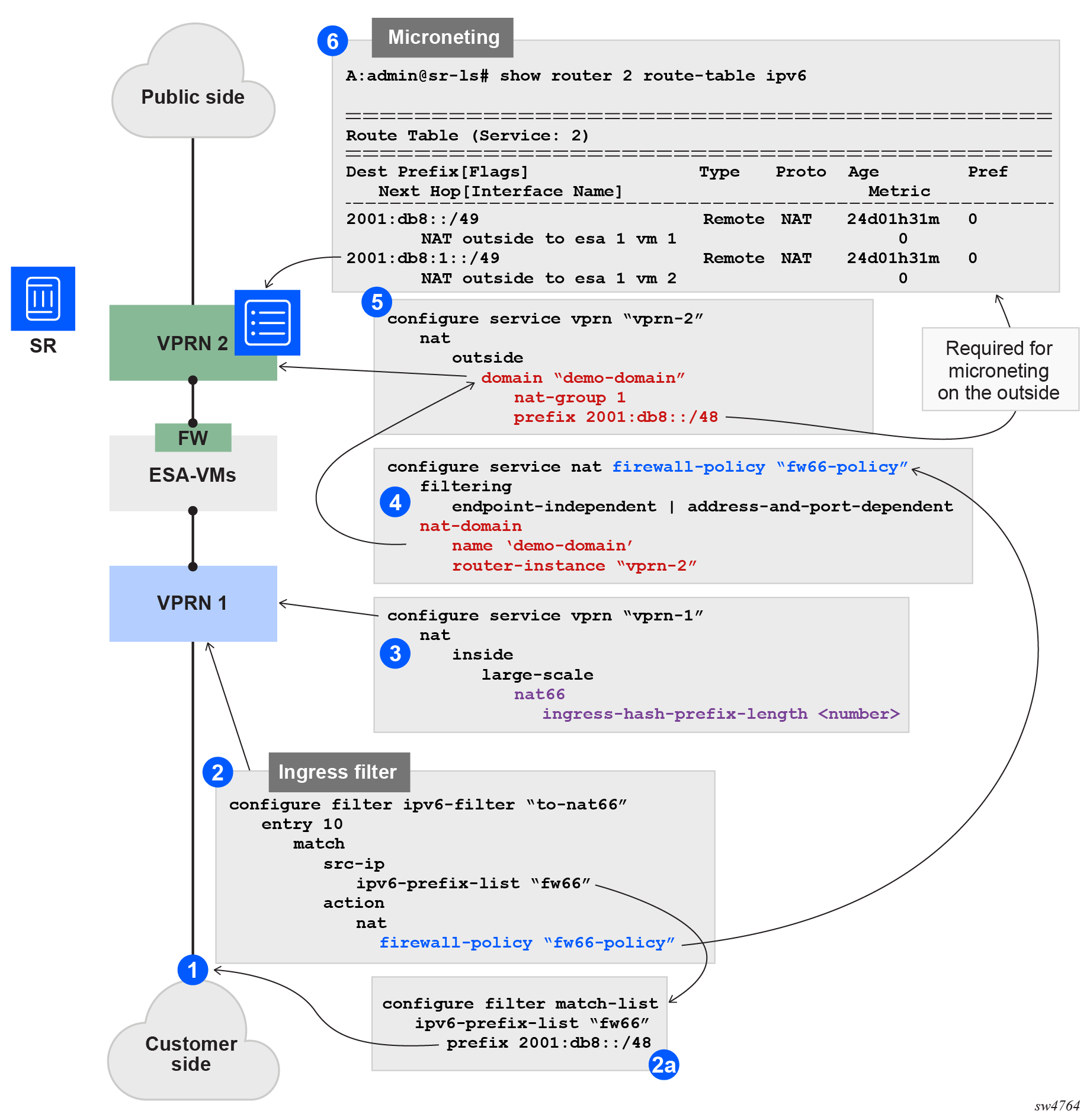
The following example configuration assumes that subscribers are allocated from the /64 prefix (each /64 prefix is unique). The details of this example configuration are as follows:
-
The ingress filter, applied to an interface in the inside routing context, forwards traffic with source IP addresses under the /48 IPv6 prefix (16K IPv6 /64 prefixes) to ESA-VMs for stateful filtering. Points 2 and 2a in Pass-through NAT show the filter and prefix configuration.
-
This filter references a firewall policy (point 4 in Pass-through NAT) that contains information about the outside routing context and the firewall domain within that context.
-
The firewall domain, configured at point 5 in Pass-through NAT, includes the NAT-group ID and a prefix that represents the source IPv6 range for all traffic requiring firewalling. In principle, this prefix should match the one configured in the filter on the inside, although there is no CLI enforcement to guarantee this. This prefix is used on the outside to create a return route for downstream traffic, and those routes, which can be further divided into smaller subnets, point to the ESA-VMs.
-
These routes (smaller subnets) are created on the outside, as shown at point 6 in Pass-through NAT.
-
In the inside routing context (point 3 in Pass-through NAT), the purpose of the hash-prefix-length command is to reduce the number of routes created on the outside. Without it, each individual IPv6 subscriber route would appear in the outside routing table. The hash-prefix-length command groups subscribers into blocks of size 2^n, corresponding to smaller source prefixes under the main IPv6 prefix referenced in the filter. These aggregated prefixes are then installed in the outside routing table instead of individual subscriber routes. As a consequence, ingress hashing (traffic distribution across ESA-VMs) is also based on these aggregated prefixes instead of individual subscriber routes.
vRGW configuration example
Residential firewalls are provisioned in three steps.
-
A firewall domain is created in the router or VPRN where the firewall is connected to an unsafe network, such as the Internet. In this domain, a list of prefixes specifies the prefixes that are subject to firewall rules.
-
A firewall policy is created that specifies operational rules for the firewall and which domain to use.
-
The firewall policy is linked to an ESM subscriber using the subscriber profile.
Provision a residential firewall (MD-CLI)
[ex:/configure service vprn "4" firewall]
A:admin@node-2# info
    domain "domain_4" {
        admin-state enable
        nat-group 1
        prefix 2001:db8::/32 {
        }
    }

[ex:/configure service nat]
A:admin@node-2# info
    firewall-policy "firewall_4" {
        description "IPv6 Firewall policy for VPRN 4"
        filtering address-and-port-dependent
        domain {
            router-instance "4"
            name "domain_4"
        }
    }

[ex:/configure subscriber-mgmt]
A:admin@node-2# info
    sub-profile "profile_1" {
        firewall-policy "firewall_4"
    }
Provision a residential firewall (classic CLI)
A:node-2>config>service>vprn>firewall# info
----------------------------------------------
                domain "domain_4" nat-group 1 create
                    prefix 2001:DB8::/32 create
                    exit
                    no shutdown
                exit
----------------------------------------------

A:node-2>config>service>nat# info
----------------------------------------------
            firewall-policy "firewall_4" create
                description "IPv6 Firewall policy for VPRN 4"
                domain router 4 name "domain_4"
                filtering address-and-port-dependent
                exit
            exit
A:node-2>config>subscr-mgmt# info
----------------------------------------------
        sub-profile "profile_1" create
            firewall-policy "firewall_4"
        exit
----------------------------------------------