
Secure boot
SR OS Secure Boot ensures the system executes only trusted software that originates from Nokia IP Routing.
At every boot of the control card, each step in the boot process verifies the digital signature of the next software element to boot for integrity and authenticity up to the SR OS operating system images. This boot sequence forms the Secure Boot chain of trust.
Software image signatures use RSA-4096 keys and SHA-384 hashes.
The Secure Boot chain is rooted in the platform CPM firmware, which is based on UEFI specifications. As such, Nokia Platform Key, Key Exchange Key, and allowed and disallowed databases are provisioned when the user activates Secure Boot to perform the required signature verification.
Firmware updates are also digitally signed and verified using the same process. The existing firmware verifies the signature at boot time, before the firmware update can proceed.
Secure Boot chain
The following figures displays the Secure Boot chain of trust for SR OS platforms.
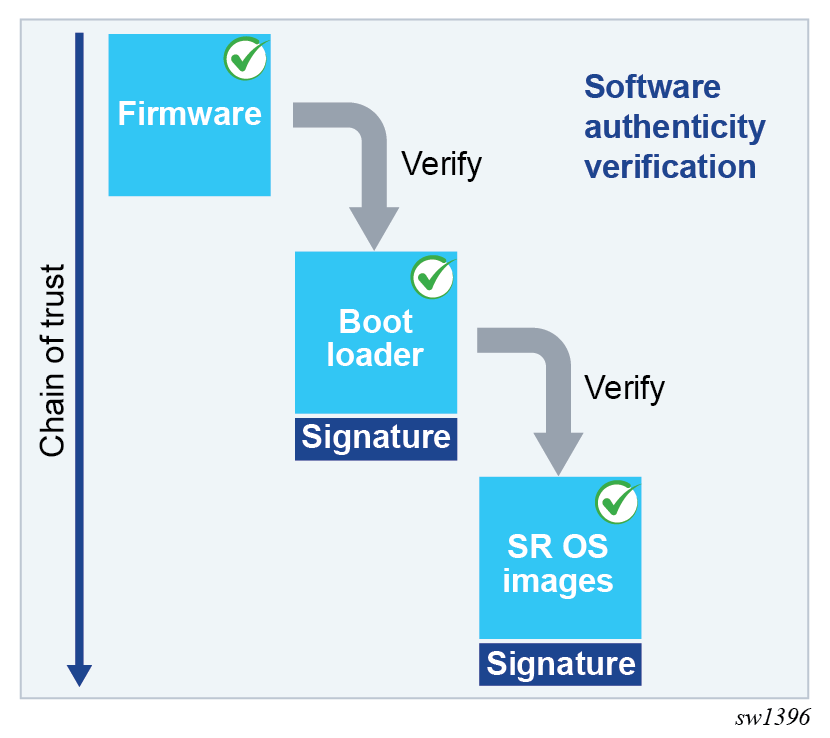
Activate Secure Boot
Secure Boot is enabled, per CPM card, by providing the card slot, card serial number, and confirmation code.
- MD-CLI
admin system security secure-boot activate card A admin system security secure-boot activate confirmation-code secure-boot-permanent admin system security secure-boot activate serial-number NS123456789 - classic
CLI
admin system security secure-boot activate card "A" serial-number NS123456789 confirmation-code secure-boot-permanent
The following example shows the warning messages and a prompt for proceeding with Secure Boot activation.
WARNING: CLI This operation will permanently activate secure boot on card A and cannot be reversed.
WARNING: CLI After activation, the system will only accept digitally signed software and will not boot using un-signed software.
WARNING: CLI This operation will immediately reset card A.
WARNING: CLI Configuration and/or Boot options may have changed since the last save.
Are you sure you want to continue (y/n)?
The system requires the card serial number and Secure Boot confirmation code to prevent unintentionally activating Secure Boot in the network. The confirmation code is secure-boot-permanent.
The Secure Boot activate command verifies that the BOF primary image uses the same software release as the currently running software and automatically reboots the designated CPM card if the software release matches. Otherwise, an error is generated in the CLI.
Operational commands and logs
This section describes the following:
- Secure Boot state
- software update process
- update Secure Boot variables
Secure Boot state
Use the following command to display Secure Boot state information, including the Secure Boot status and UEFI variables status per CPM.
show card A detailHardware Data
Secure boot status : enabled
UEFI variables status : ok
where
- Secure Boot status — indicates if Secure Boot is enabled or disabled
- UEFI variables status — indicates if Secure Boot variables need updating
At each boot, the system records in the security log whether Secure Boot is enabled or disabled for each CPM. The following is an example of such a log message.
24 2023/05/17 06:09:03.140 EDT MAJOR: SECURITY #2241 Base Card A
"CPM A has booted with a secure-boot status of enabled"
Use the following command to obtain Secure Boot UEFI variables for each CPM card:
- MD-CLI
perform system security secure-boot show uefi-variables card - classic
CLI
tools dump system security secure-boot uefi-vars card
The command displays the following x509 certificates and SHA-256 hash UEFI variables:
- Platform Key (PK)
- Key Exchange Key (KEK)
- Allowed Database (DB)
- Disallowed Database (DBx)
Software update
After enabling Secure Boot, and before upgrading to a new software release, the user must verify that the new software image is properly signed. The additional verification is required on systems with Secure Boot enabled because the system only boots Nokia-signed software images and does not boot unsigned or improperly signed images.
Use the following command to validate the signature of the TiMOS *.tim images contained in the software-image url location referenced in the command. This verification includes cpm.tim, iom.tim, support.tim, both.tim, kernel.tim, as well as the boot.ldr if present in the CF3 directory.
admin system security secure-boot validate software-image urlUpdate Secure Boot variables
Use the following commands to configure Secure Boot UEFI key updates and revocation.
admin system security secure-boot update-key
admin system security secure-boot revoke-key