
Overview
This overview describes the structure of the configuration and state data models available for the Nokia Service Router Linux (SR Linux). It includes an introduction to the tree hierarchy and details how to interpret field descriptions.
Tree hierarchy
The tree hierarchy consists of branches that show the fields and parameters that are available. Tree hierarchy example shows a tree hierarchy example.
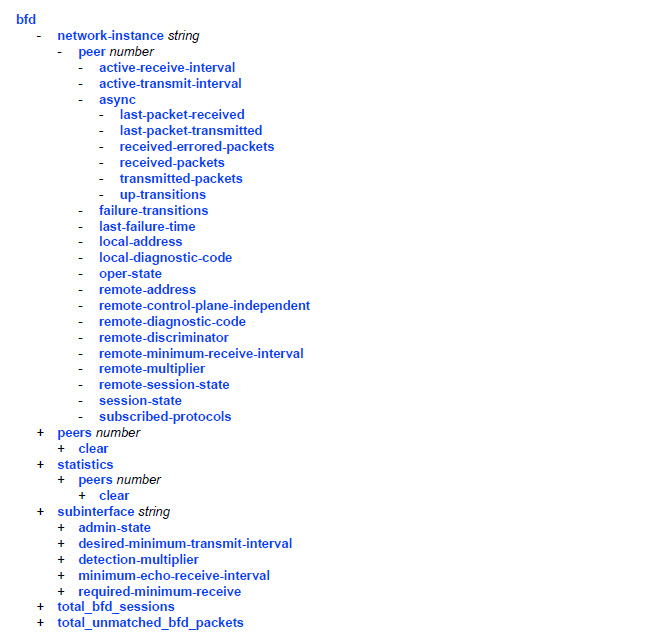
Each chapter of this guide describes a branch in the tree with field names linked to their corresponding descriptions. These descriptions indicate the required syntax for each field. See Field descriptions for more information.
Italic names after a field indicate the parameter type. Parameter types include (but are not limited to):
Boolean (true and false values)
keyword (enumerated values)
string
number
IPv4 prefix
IPv6 prefix
IPv4 address
IPv6 address
MAC address
For more information about the input values, click the field or parameter name in the tree. The link will take you to the description where these values are defined.
A parameter type may also be a combination of different base types. These parameters are displayed in the tree with the individual parameter types enclosed in round brackets and separated by a pipe. For example: (keyword | number)
Transaction and report types
The following transaction, report types, and actions are used with the SR Linux:
-
configuration transactions
-
state transactions
-
show reports
-
action commands
-
action inputs
-
action outputs
-
Configuration transactions are denoted with a plus sign (+)
-
State transactions are denoted with a minus sign (-)
-
Action commands are denoted with the letter (x)
-
Action inputs are denoted with the letter (i)
-
Action outputs are denoted with the letter (o)
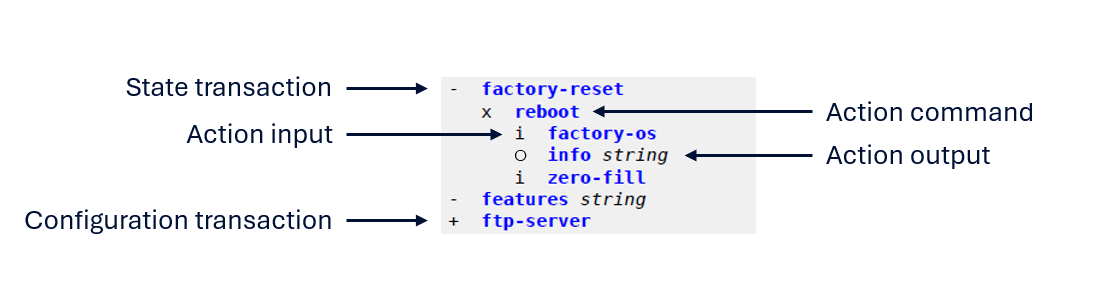
Configuration and state transactions
Configuration transactions are used to create, modify, or delete configuration data (nodes under the configuration branch).
State transactions are used to view data. They can include both configuration and operational (state) information. State data is not modified through configuration transactions.
Show reports
Show reports are Python plug-ins used to create custom output. A set of pre-defined show reports are provided and described in the SR Linux System Management Guide. These pre-defined reports can be used as examples for how to create additional custom reports.
Actions
An action may have a Configurable value of True or False, depending on whether it is defined under a configuration branch or the state branch.
Actions are not configuration data. They cannot be added, changed, or removed through configuration transactions. An action is invoked as an operation on a specific action instance.
Action input and action output nodes are parameters and results of that invocation. They are not configuration data and are not committed to the configuration datastore, regardless of the Configurable field value shown in the schema tree context.
Hardware platform designation
The platforms field is used to define the hardware platforms that are valid for a transaction. If a transaction is only valid on specific platforms, the designation is similar to the following:
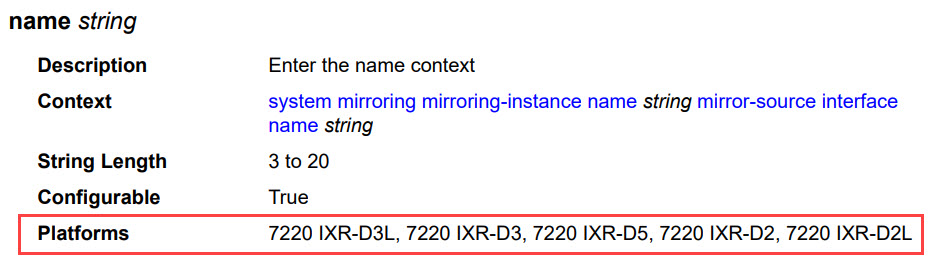
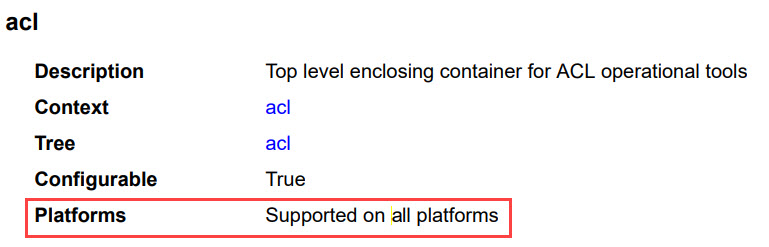
Field descriptions
Syntax for each field is displayed in bold, followed by supported parameters and their type. In the example that follows, the bfd network-instance element shows that the parameter type is a string:
    - bfd
        - network-instance string
Field descriptions describes valid fields for commands. Not all fields are applicable for all commands.
Field |
Description |
|---|---|
|
Context |
Configuration path to the command |
|
Tree |
Defines the command location in the tree hierarchy |
|
Description |
Describes the command |
|
Configurable |
Indicates whether the element sits under a state branch (False) or a configurable branch (True). See Configurable field for more information. |
|
String Length |
For a string, indicates a range (number of characters allowed) |
|
Range |
For a number, indicates the range of allowed values |
|
Default |
Default value |
|
Units |
Base unit type |
|
Options |
Enumerated values allowed |
|
Reference |
Reference to an instance in the configuration needed before the configuration is considered valid |
|
Max Element |
For lists and leaf-lists, the maximum number of elements |
|
Platforms |
Defines the supported hardware platforms |
|
Note |
Indicates the kind of element as either an action command, action input, or an action output. See Note field for more information. |
Configurable field
The Configurable field indicates whether a node in the model is configurable or whether it represents operational (state) data.
This field is set to either:
-
True
The node or at least one ancestor is configurable (no
config falsevalue applies to the node or any ancestor). -
False
The node and its ancestors contain operational data and are not configurable (
config falseis present on the node or an ancestor).
Action elements may have a Configurable value of true or false depending on where the element sits in the tree hierarchy. Action elements themselves are not configurable.
Note field
This field indicates the kind of element as one of the following:
- Action command – the action operation defined in YANG
- Action input – a parameter supplied when the action is invoked (optional)
- Action output – a result returned when the action completes (optional)
For all other elements, this field is not shown.
For more information about actions, see Actions.
References
A description of each parameter is also available from the online CLI help function. See the SR Linux System Management Guide for information on using the CLI help.