
IPFIX
IP Flow Information Export (IPFIX) is a tool used to sample IPv4, IPv6, MPLS, and Ethernet traffic data flows through a router. IPFIX enables traffic sampling and analysis by network users and network engineers to support capacity planning, trend analysis, and workload characterization in a network service provider environment.
IPFIX is also known as cflowd version 10 which is an IETF-standardized protocol used to export detailed network flow information from devices to external collectors. IPFIX provides flexible, extensible, and vendor-neutral visibility into network traffic for monitoring, analytics, security, and accounting use cases.
IPFIX is defined by RFC 7011–7015 and represents the standardized evolution of NetFlow v9.
Key benefits
The following are the key benefits of IPFIX:
-
Standards-based and vendor-neutral.
-
Highly extensible through templates and custom fields.
-
Supports modern networking technologies (IPv6, MPLS, overlays).
-
Scales to high-speed and large-scale deployments.
-
Enables deep traffic visibility for operations and security teams.
IPFIX operation
The following figure shows the basic operation of IPFIX. This example only describes the basic IPFIX operation overview and is not intended to specify implementation.
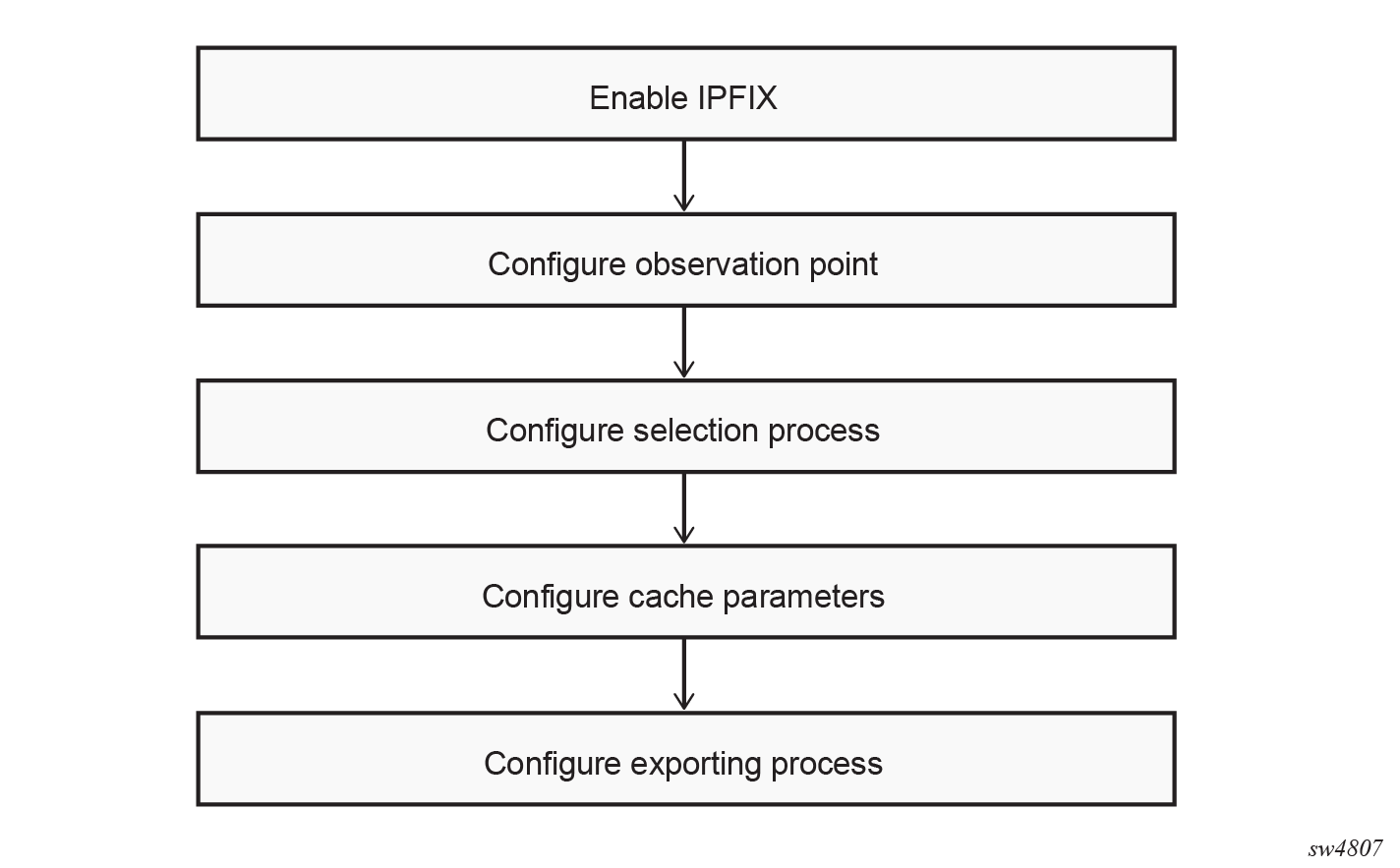
Observation point and domain
The workflow begins at the observation point. An observation point is the exact location in the forwarding path where packets are examined for potential inclusion in flow processing. Every observation point belongs to a single observation domain. The observation domain provides logical separation for export streams and is identified by a unique 32-bit observation domain ID. This identifier is included in every IPFIX message sent to the collector. Its purpose is to allow collectors to distinguish between different logical metering contexts, particularly in systems with multiple line cards, multiple routing instances, or distributed processing architectures.
Selection process
Not every packet must participate in flow accounting. Before any flow state is created, the packet is evaluated by the Selection process. Each selection process is identified by a unique name, allowing multiple processes to operate concurrently with independent configurations. SR Linux supports sample-count-based sampling where the packets are selected at regular intervals, defined by configurable parameters such as packet interval, the frequency at which packets are sampled and optional packet spacing, memory, or spacing considerations for sampled packets.
Flow cache operation
After a packet is admitted for processing, the metering process extracts the relevant header fields needed to determine flow membership. A flow is defined as a set of packets sharing identical flow keys during a specific time interval. These flow keys typically include source and destination IP addresses, transport ports, protocol number, ingress interface, and potentially additional attributes such as VLAN ID, MPLS labels, or BGP next-hop information.
The metering process performs a lookup in the flow cache to determine whether a matching flow already exists. If no matching flow is found, a new flow record is created. This record contains the flow keys, an initial packet count of one, the corresponding byte count, and the timestamp marking the beginning of the flow. If a matching flow exists, the metering process updates the existing flow record. The packet counter and byte counter are incremented, and the last-seen timestamp is refreshed. This classification and update process occurs for every selected packet.
The flow cache is a temporary state database that holds all active flows. It allows the system to aggregate multiple packets into a single Flow Record instead of exporting individual packet events. Each flow record maintains both identity and statistical information. In addition to counters and timestamps, the record may include metadata such as TCP flags observed during the flow, forwarding status, autonomous system information, or MPLS label stack data. Flows remain in the cache until one of the expiration conditions occurs:
-
An active timeout forces export of long-lived flows, even if traffic is ongoing. This prevents flows from remaining in the cache indefinitely and ensures periodic reporting for persistent sessions.
-
An idle timeout expires a flow when no new packets have been observed for a configured duration. This mechanism ensures that completed conversations are exported promptly.
-
The system may evict older or least-recently-used flows to make room for new entries. When eviction occurs, the flow is exported before removal to preserve accounting integrity.
When a flow expires for any reason, it transitions from the metering process to the exporting process.
Template formatting and record preparation
Before a flow record can be transmitted to a collector, it must be formatted according to an IPFIX template. IPFIX uses a template-based export model. A template defines the structure of the data record, specifying exactly which information elements are included, their order, and their length. This design allows the exporter to support variable-length records and to adapt the record structure depending on traffic type. Templates are transmitted to the collector in advance of any data records. The collector stores the template and uses it to decode subsequent data sets.
When a flow expires, the exporting process encodes the flow record according to the appropriate template. Each field is serialized into a data record, which is then added to a data set associated with that template ID. If multiple expired flows share the same structure, they are grouped into the same data set for efficiency.
IPFIX message
After data records are prepared, the system constructs an IPFIX message. The message begins with a fixed header containing the protocol version (10), the total message length, the export timestamp, a sequence number, and the observation domain ID. The sequence number increments with every data record exported. This enables collectors to detect message loss when using unreliable transport protocols such as UDP. Following the header, one or more sets are appended. These sets may contain templates, options templates, or data records. Templates are periodically retransmitted to ensure that collectors remain synchronized, particularly in long-lived sessions or after collector restarts. After the message reaches the configured size threshold or timer threshold, it is transmitted to the collector.
Exporting process
The IPFIX messages are transmitted to the collector over UDP using the configured source and destination IP addresses and port. The maximum packet size and template refresh interval are configurable to ensure reliable delivery and correct interpretation of flow data.
In addition to standard flow records, the exporter can send options templates, which provide supplementary metadata such as interface identifiers, exporter statistics, or other context. Options templates are transmitted at a configured interval to maintain the collector’s awareness of the exporting device’s state.
Configuring IPFIX
Perform the following steps to configure IPFIX:
-
Configure the interfaces as shown in the example.
--{ + candidate shared default }--[  ]--
# info with-context interface ethernet-1/1
    interface ethernet-1/1 {
        description toward_ixia_1_10_11
        admin-state enable
        vlan-tagging true
        subinterface 1 {
            description to_ixia
            admin-state enable
            ipv4 {
                admin-state enable
                address 30.0.0.1/16 {
                }
            }
            vlan {
                encap {
                    single-tagged {
                        vlan-id 1
                    }
                }
            }
        }
    }
--{ + candidate shared default }--[ ]-- # info with-context interface ethernet-1/32 interface ethernet-1/32 { description toward_ixia_1_10_16 admin-state enable vlan-tagging true subinterface 1 { admin-state enable ipv4 { admin-state enable address 40.0.0.1/16 { } } vlan { encap { single-tagged { vlan-id 1 } } } } } -
Configure the network instances as shown in the example.
--{ + candidate shared default }--[  ]--
# info with-context network-instance default
    network-instance default {
        type ip-vrf
        admin-state enable
        interface ethernet-1/1.1 {
            interface-ref {
                interface ethernet-1/1
                subinterface 1
            }
        }
    }
--{ + candidate shared default }--[ ]-- # info with-context network-instance default network-instance default { type ip-vrf admin-state enable interface ethernet-1/32.1 { interface-ref { interface ethernet-1/32 subinterface 1 } } } -
Configure the exporting process as shown in the example.
--{ + candidate shared default }--[ ]-- # info with-context system ipfix exporting-process exp-1 system { ipfix { exporting-process exp-1 { export-mode parallel destination dest-2 { udp-exporter { ipfix-version 10 destination-ip-address 30.0.0.2 network-instance default } } } } } -
Configure cache parameters as shown in the example.
--{ + candidate shared default }--[ ]-- # info with-context system ipfix cache cache-1 system { ipfix { cache cache-1 { exporting-process [ exp-1 ] timeout-cache { maximum-flows 500000 active-timeout 180 idle-timeout 70 } } } } -
Configure the selection process as shown in the example.
--{ + candidate shared default }--[ ]-- # info with-context system ipfix selection-process sel-proc-1 system { ipfix { selection-process sel-proc-1 { cache cache-1 selector selector-1 { sample-count-based { packet-interval 1 packet-space 1 } } } } } -
Configure the observation point as shown in the example.
--{ + candidate shared default }--[ ]-- # info with-context system ipfix observation-point obs-point-1 system { ipfix { observation-point obs-point-1 { observation-domain-id 11111 selection-process [ sel-proc-1 ] interface ethernet-1/1.1 { direction input } } } } -
Enable IPFIX as shown in the example.
--{ + candidate shared default }--[  ]--
# info with-context system ipfix admin-state
    system {
        ipfix {
            admin-state enable
        }
    }
IPFIX show commands
Use the following show commands to display IPFIX status, collector, and interface information.
Show IPFIX status
--{ + candidate shared default }--[  ]--
# show system ipfix status
===============================================================================
IPFIX Admin Status: enable
IPFIX Oper Status : up
===============================================================================
selection process: sel-proc-1
selector         : selector-1
Cache            : cache-1
Packet Space     : 1
Packets Observed : 489026
Packets Dropped  : 112333
===============================================================================
cache name          : cache-1
Active Timeout      : 180
Idle Timeout        : 70
Cache Size          : 500000
Active Flows        : 5
================================================================================
Show IPFIX exporting process detail
--{ + candidate shared default }--[  ]--
# show system ipfix exporting-process destination dest-2 detail
================================================================================
exporting process       : exp-1
destination name        : dest-2
Host Address            : 30.0.0.2
Port                    : 4739
Version                 : 10
template refresh timeout: 600
network instance        : default
Pkts Sent               : 9450
Last Changed            : 2026-02-24T16:01:49.450Z
================================================================================
Show IPFIX observation point information
--{ + candidate shared default }--[  ]--
# show system ipfix observation-point interface ethernet-1/1.1
================================================================================
Observation Point     : obs-point-1
Observation Domain ID : 11111

--------------------------------------------------------------------------------
Interface name : ethernet-1/1.1
Direction      : input
================================================================================