
EVPN-MPLS with multihoming
EVPN is an IETF technology defined in RFC 7432, BGP MPLS-Based Ethernet VPN, which uses a specific BGP address family and allows VPLS services to operate as IP-VPNs. BGP is used to distribute MAC addresses and flooding tree setup information.
EVPN-MPLS is supported where PEs are connected by any type of MPLS tunnel. EVPN-MPLS is typically used as an evolution of VPLS services in the WAN, with Data Center Interconnect being on of its main applications.
EVPN can be used in MPLS networks where PEs are interconnected through any type of tunnel, including RSVP-TE, SR-TE, LDP, BGP, SR-ISIS, segment routing OSPF, RIB-API, MPLS forwarding policy, SR policy, or MPLS over UDP (MPLSoUDP).
See "Ethernet Virtual Private Networks" in the 7450 ESS, 7750 SR, 7950 XRS, and VSR Layer 2 Services and EVPN Guide for detailed information about EVPN-MPLS.
See EVPN-MPLS for information about relevant verification commands.
The following figure shows the EVPN-MPLS topology for this example.
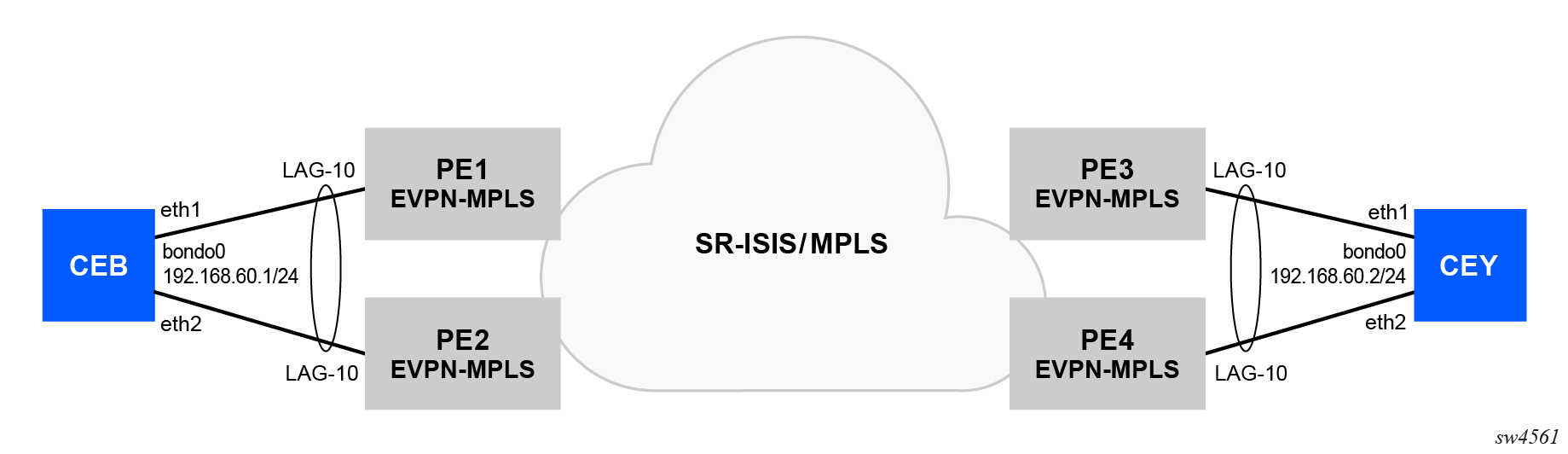
The client on either side is multihomed to two PE devices. An EVPN-MPLS service will be created to establish communication between the clients. SR-ISIS will be used as the transport protocol. See Segment routing for information about the relevant SR-ISIS configuration.
Configuration
CE-facing port configuration on PE1, PE2, PE3 and PE4:
/configure port 1/1/c11/1 admin-state enable
/configure port 1/1/c11/1 ethernet mode access
LAG configuration on PE1 and PE2:
/configure lag "lag-10" admin-state enable
/configure lag "lag-10" mode access
/configure lag "lag-10" lacp mode active
/configure lag "lag-10" lacp system-id 00:00:00:00:01:02
/configure lag "lag-10" lacp administrative-key 32768
/configure lag "lag-10" port 1/1/c11/1 { }
LAG configuration on PE3 and PE4:
/configure lag "lag-10" admin-state enable
/configure lag "lag-10" mode access
/configure lag "lag-10" lacp mode active
/configure lag "lag-10" lacp system-id 00:00:00:00:03:04
/configure lag "lag-10" lacp administrative-key 32768
/configure lag "lag-10" port 1/1/c11/1 { }
BGP configuration on PE1:
/configure router "Base" bgp router-id 10.10.10.1
/configure router "Base" bgp group "pe" peer-as 64500
/configure router "Base" bgp neighbor "10.10.10.2" group "pe"
/configure router "Base" bgp neighbor "10.10.10.2" family evpn true
/configure router "Base" bgp neighbor "10.10.10.3" group "pe"
/configure router "Base" bgp neighbor "10.10.10.3" family evpn true
/configure router "Base" bgp neighbor "10.10.10.4" group "pe"
/configure router "Base" bgp neighbor "10.10.10.4" family evpn true
BGP configuration on PE2:
/configure router "Base" bgp router-id 10.10.10.2
/configure router "Base" bgp group "pe" peer-as 64500
/configure router "Base" bgp neighbor "10.10.10.1" group "pe"
/configure router "Base" bgp neighbor "10.10.10.1" family evpn true
/configure router "Base" bgp neighbor "10.10.10.3" group "pe"
/configure router "Base" bgp neighbor "10.10.10.3" family evpn true
/configure router "Base" bgp neighbor "10.10.10.4" group "pe"
/configure router "Base" bgp neighbor "10.10.10.4" family evpn true
BGP configuration on PE3:
/configure router "Base" bgp router-id 10.10.10.3
/configure router "Base" bgp group "pe" peer-as 64500
/configure router "Base" bgp neighbor "10.10.10.1" group "pe"
/configure router "Base" bgp neighbor "10.10.10.1" family evpn true
/configure router "Base" bgp neighbor "10.10.10.2" group "pe"
/configure router "Base" bgp neighbor "10.10.10.2" family evpn true
/configure router "Base" bgp neighbor "10.10.10.4" group "pe"
/configure router "Base" bgp neighbor "10.10.10.4" family evpn true
BGP configuration on PE4:
/configure router "Base" bgp router-id 10.10.10.4
/configure router "Base" bgp group "pe" peer-as 64500
/configure router "Base" bgp neighbor "10.10.10.1" group "pe"
/configure router "Base" bgp neighbor "10.10.10.1" family evpn true
/configure router "Base" bgp neighbor "10.10.10.2" group "pe"
/configure router "Base" bgp neighbor "10.10.10.2" family evpn true
/configure router "Base" bgp neighbor "10.10.10.3" group "pe"
/configure router "Base" bgp neighbor "10.10.10.3" family evpn true
Ethernet Segment (ES) configuration on PE1 and PE2:
/configure service system bgp evpn ethernet-segment "ES-1" admin-state enable
/configure service system bgp evpn ethernet-segment "ES-1" esi 0x00121212121212000101
/configure service system bgp evpn ethernet-segment "ES-1" multi-homing-mode all-active
/configure service system bgp evpn ethernet-segment "ES-1" association { lag "lag-10" }
Ethernet Segment (ES) configuration on PE3 and PE4:
/configure service system bgp evpn ethernet-segment "ES-1" admin-state enable
/configure service system bgp evpn ethernet-segment "ES-1" esi 0x00343434343434000103
/configure service system bgp evpn ethernet-segment "ES-1" multi-homing-mode all-active
/configure service system bgp evpn ethernet-segment "ES-1" association { lag "lag-10" }
EVPN-MPLS configuration on PE1, PE2, PE3, and PE4:
/configure service vpls "EVPN-MPLS" admin-state enable
/configure service vpls "EVPN-MPLS" service-id 70
/configure service vpls "EVPN-MPLS" customer "1"
/configure service vpls "EVPN-MPLS" bgp 1 route-distinguisher "64500:70"
/configure service vpls "EVPN-MPLS" bgp 1 route-target export "target:64500:70"
/configure service vpls "EVPN-MPLS" bgp 1 route-target import "target:64500:70"
/configure service vpls "EVPN-MPLS" bgp-evpn evi 70
/configure service vpls "EVPN-MPLS" bgp-evpn mpls 1 admin-state enable
/configure service vpls "EVPN-MPLS" bgp-evpn mpls 1 ingress-replication-bum-label true
/configure service vpls "EVPN-MPLS" bgp-evpn mpls 1 auto-bind-tunnel resolution filter
/configure service vpls "EVPN-MPLS" bgp-evpn mpls 1 auto-bind-tunnel resolution-filter sr-isis true
/configure service vpls "EVPN-MPLS" sap lag-10 { }
ACL and QoS policies can be applied under the SAP context.
Customer verification
Login to CEB:
docker exec -it ceb bashPing CEY from CEB:
└──> ping -c 100 192.168.60.2
PING 192.168.60.2 (192.168.60.2) 56(84) bytes of data.
64 bytes from 192.168.60.2: icmp_seq=1 ttl=64 time=9.93 ms
64 bytes from 192.168.60.2: icmp_seq=2 ttl=64 time=5.25 ms
64 bytes from 192.168.60.2: icmp_seq=3 ttl=64 time=4.81 ms

--- 192.168.60.2 ping statistics ---
100 packets transmitted, 100 received, 0% packet loss, time 99142ms
rtt min/avg/max/mdev = 4.488/5.589/16.327/1.665 ms