
VPRN
Virtual Private Routed Network (VPRN), commonly referred to as VRF, is a method of distributing routing information using BGP and MPLS to forward data, providing a Layer 3 Virtual Private Network (VPN) service to end customers.
Each VPRN consists of a set of customer sites connected to one or more PE routers. Each associated PE router maintains a separate IP forwarding table for each VPRN. Additionally, the PE routers exchange the routing information configured or learned from all customer sites via MP-BGP peering. Each route exchanged via the MP-BGP protocol includes a Route Distinguisher (RD), which identifies the VPRN association and handles the possibility of IP address overlap.
See "VPRN service" in the 7450 ESS, 7750 SR, 7950 XRS, and VSR Layer 3 Services Guide: IES and VPRN for detailed information about VPRN configuration.
See VPRN for information about relevant show commands.
The following figure shows the VPRN topology used in this example.
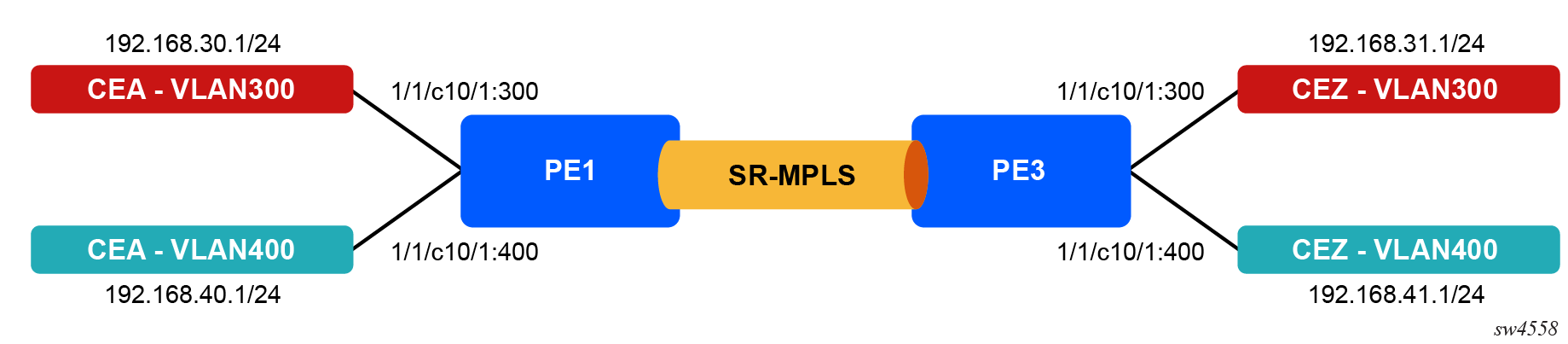
Two VPRNs - RED and BLUE - will be created on PE1 and PE3 to establish communication between the clients on either sides. SR-ISIS will be used as the tunneling protocol. See Segment routing for information about SR-ISIS configuration.
The route targets for both VPRNs will be exchanged with each other using route policies, enabling each VPRN's client to reach the other VPRN's client.
Configuration
CE-facing Port configuration on PE1 and PE3:
/configure port 1/1/c10/1 admin-state enable
/configure port 1/1/c10/1 ethernet mode access
/configure port 1/1/c10/1 ethernet encap-type dot1q
/configure port 1/1/c10/1 ethernet mtu 5000
BGP configuration on PE1 to advertise the VPN-IPv4 family to PE3:
/configure router "Base" bgp router-id 10.10.10.1
/configure router "Base" bgp group "pe" peer-as 64500
/configure router "Base" bgp neighbor "10.10.10.3" group "pe"
/configure router "Base" bgp neighbor "10.10.10.3" family vpn-ipv4 true
BGP configuration on PE3 to advertise VPN-IPv4 family to PE1:
/configure router "Base" bgp router-id 10.10.10.3
/configure router "Base" bgp group "pe" peer-as 64500
/configure router "Base" bgp neighbor "10.10.10.1" group "pe"
/configure router "Base" bgp neighbor "10.10.10.1" family vpn-ipv4 true
VPRN ACL configuration on PE1:
/configure filter ip-filter "VPRN-RED-ACL" filter-id 103
/configure filter ip-filter "VPRN-RED-ACL" entry 10 match protocol icmp
/configure filter ip-filter "VPRN-RED-ACL" entry 10 match dst-ip address 192.168.31.1
/configure filter ip-filter "VPRN-RED-ACL" entry 10 match dst-ip mask 255.255.255.255
/configure filter ip-filter "VPRN-RED-ACL" entry 10 action accept

/configure filter ip-filter "VPRN-BLUE-ACL" filter-id 104
/configure filter ip-filter "VPRN-BLUE-ACL" entry 10 match protocol icmp
/configure filter ip-filter "VPRN-BLUE-ACL" entry 10 match dst-ip address 192.168.41.1
/configure filter ip-filter "VPRN-BLUE-ACL" entry 10 match dst-ip mask 255.255.255.255
/configure filter ip-filter "VPRN-BLUE-ACL" entry 10 action accept
VPRN route policies on PE1 and PE3:
The route policies configure the route targets to be exported and imported in each VPRN. In this example, both RED and BLUE VPRN targets are imported, enabling them to communicate with each other. Additional communities can be added as needed.
/configure policy-options community "BLUE" { member "target:64565:40" }
/configure policy-options community "RED" { member "target:64555:30" }
/configure policy-options policy-statement "export-blue" entry-type named
/configure policy-options policy-statement "export-blue" named-entry "blue" action action-type accept
/configure policy-options policy-statement "export-blue" named-entry "blue" action community add ["BLUE"]
/configure policy-options policy-statement "export-red" entry-type named
/configure policy-options policy-statement "export-red" named-entry "red" action action-type accept
/configure policy-options policy-statement "export-red" named-entry "red" action community add ["RED"]
/configure policy-options policy-statement "import-red-blue" entry-type named
/configure policy-options policy-statement "import-red-blue" named-entry "red" from community name "RED"
/configure policy-options policy-statement "import-red-blue" named-entry "red" from protocol name [bgp-vpn]
/configure policy-options policy-statement "import-red-blue" named-entry "red" action action-type accept
/configure policy-options policy-statement "import-red-blue" named-entry "blue" from community name "BLUE"
/configure policy-options policy-statement "import-red-blue" named-entry "blue" from protocol name [bgp-vpn]
/configure policy-options policy-statement "import-red-blue" named-entry "blue" action action-type accept
RED VPRN service configuration on PE1:
/configure service vprn "RED" admin-state enable
/configure service vprn "RED" service-id 30
/configure service vprn "RED" customer "1"
/configure service vprn "RED" autonomous-system 64555
/configure service vprn "RED" bgp-ipvpn mpls admin-state enable
/configure service vprn "RED" bgp-ipvpn mpls route-distinguisher "10.10.10.1:64555"
/configure service vprn "RED" bgp-ipvpn mpls vrf-import policy ["import-red-blue"]
/configure service vprn "RED" bgp-ipvpn mpls vrf-export policy ["export-red"]
/configure service vprn "RED" bgp-ipvpn mpls auto-bind-tunnel resolution filter
/configure service vprn "RED" bgp-ipvpn mpls auto-bind-tunnel resolution-filter sr-isis true
/configure service vprn "RED" interface "to-cea" ipv4 primary address 192.168.30.254
/configure service vprn "RED" interface "to-cea" ipv4 primary prefix-length 24
/configure service vprn "RED" interface "to-cea" sap 1/1/c10/1:300 ingress qos sap-ingress policy-name "CE-ingress-QoS"
/configure service vprn "RED" interface "to-cea" sap 1/1/c10/1:300 ingress filter ip "VPRN-RED-ACL"
/configure service vprn "RED" interface "to-cea" sap 1/1/c10/1:300 egress qos sap-egress policy-name "CE-egress-QoS"
BLUE VPRN service configuration on PE1:
/configure service vprn "BLUE" admin-state enable
/configure service vprn "BLUE" service-id 40
/configure service vprn "BLUE" customer "1"
/configure service vprn "BLUE" autonomous-system 64565
/configure service vprn "BLUE" bgp-ipvpn mpls admin-state enable
/configure service vprn "BLUE" bgp-ipvpn mpls route-distinguisher "10.10.10.1:64565"
/configure service vprn "BLUE" bgp-ipvpn mpls vrf-import policy ["import-red-blue"]
/configure service vprn "BLUE" bgp-ipvpn mpls vrf-export policy ["export-blue"]
/configure service vprn "BLUE" bgp-ipvpn mpls auto-bind-tunnel resolution filter
/configure service vprn "BLUE" bgp-ipvpn mpls auto-bind-tunnel resolution-filter sr-isis true
/configure service vprn "BLUE" interface "to-cea" ipv4 primary address 192.168.40.254
/configure service vprn "BLUE" interface "to-cea" ipv4 primary prefix-length 24
/configure service vprn "BLUE" interface "to-cea" sap 1/1/c10/1:400 ingress qos sap-ingress policy-name "CE-ingress-QoS"
/configure service vprn "BLUE" interface "to-cea" sap 1/1/c10/1:400 ingress filter ip "VPRN-BLUE-ACL"
/configure service vprn "BLUE" interface "to-cea" sap 1/1/c10/1:400 egress qos sap-egress policy-name "CE-egress-QoS"
See QoS for QoS policy configuration.
RED VPRN service configuration on PE3:
/configure service vprn "RED" admin-state enable
/configure service vprn "RED" service-id 30
/configure service vprn "RED" customer "1"
/configure service vprn "RED" autonomous-system 64555
/configure service vprn "RED" bgp-ipvpn mpls admin-state enable
/configure service vprn "RED" bgp-ipvpn mpls route-distinguisher "10.10.10.3:64555"
/configure service vprn "RED" bgp-ipvpn mpls vrf-import policy ["import-red-blue"]
/configure service vprn "RED" bgp-ipvpn mpls vrf-export policy ["export-red"]
/configure service vprn "RED" bgp-ipvpn mpls auto-bind-tunnel resolution filter
/configure service vprn "RED" bgp-ipvpn mpls auto-bind-tunnel resolution-filter sr-isis true
/configure service vprn "RED" interface "to-cez" ipv4 primary address 192.168.31.254
/configure service vprn "RED" interface "to-cez" ipv4 primary prefix-length 24
/configure service vprn "RED" interface "to-cez" { sap 1/1/c10/1:300 }
BLUE VPRN service configuration on PE3:
/configure service vprn "BLUE" admin-state enable
/configure service vprn "BLUE" service-id 40
/configure service vprn "BLUE" customer "1"
/configure service vprn "BLUE" autonomous-system 64565
/configure service vprn "BLUE" bgp-ipvpn mpls admin-state enable
/configure service vprn "BLUE" bgp-ipvpn mpls route-distinguisher "10.10.10.3:64565"
/configure service vprn "BLUE" bgp-ipvpn mpls vrf-import policy ["import-red-blue"]
/configure service vprn "BLUE" bgp-ipvpn mpls vrf-export policy ["export-blue"]
/configure service vprn "BLUE" bgp-ipvpn mpls auto-bind-tunnel resolution filter
/configure service vprn "BLUE" bgp-ipvpn mpls auto-bind-tunnel resolution-filter sr-isis true
/configure service vprn "BLUE" interface "to-cez" ipv4 primary address 192.168.41.254
/configure service vprn "BLUE" interface "to-cez" ipv4 primary prefix-length 24
/configure service vprn "BLUE" interface "to-cez" { sap 1/1/c10/1:400 }
Customer verification
Login to CEA:
docker exec -it cea bashPing CEZ VLAN 300 from CEA:
└──> ping -c 100 -Q 34  192.168.31.1
PING 192.168.31.1 (192.168.31.1) 56(84) bytes of data.
64 bytes from 192.168.31.1: icmp_seq=1 ttl=62 time=9.81 ms
64 bytes from 192.168.31.1: icmp_seq=2 ttl=62 time=5.93 ms
64 bytes from 192.168.31.1: icmp_seq=3 ttl=62 time=6.45 ms

--- 192.168.31.1 ping statistics ---
100 packets transmitted, 100 received, 0% packet loss, time 99151ms
rtt min/avg/max/mdev = 4.360/6.300/14.803/2.373 ms
While the ping is in progress, check the SAP, ACL, and QoS statistics.