
Getting started
About this guide
-
7450 ESS
-
7750 SR
-
7950 XRS
-
Virtualized Service Router (VSR)
Required feature sets for each service type are described with configuration examples in this guide; related show commands that you can use to view and verify specific configuration information are included in Show commands.
Use this guide as a one-stop reference for basic service configuration. Where applicable, links to the SR OS customer documentation are provided in this guide for additional reading.
This guide does not provide detailed information about service types and is not intended to replace the SR OS customer documentation listed in the 7450 ESS, 7750 SR, and 7950 XRS Guide to Documentation. For detailed information about service features and options, see the SR OS customer documentation WebHelp or the Nokia Doc Center.
This guide is organized into functional chapters and provides concepts and descriptions of the implementation flow, as well as Command Line Interface (CLI) syntax and command usage.
Command outputs shown in this guide are examples only; actual displays may differ depending on supported functionality and user configuration.
Conventions
This section describes the general conventions used in this guide.
Precautionary and information messages
The following information symbols are used in the documentation.
Options or substeps in procedures and sequential workflows
Options in a procedure or a sequential workflow are indicated by a bulleted list. In the following example, at step 1, the user must perform the described action. At step 2, the user must perform one of the listed options to complete the step.
Options in a procedure
- User must perform this step.
- This step offers three options. User must perform one option to complete this
step.
- This is one option.
- This is another option.
- This is yet another option.
Substeps in a procedure or a sequential workflow are indicated by letters. In the following example, at step 1, the user must perform the described action. At step 2, the user must perform two substeps (a. and b.) to complete the step.
Substeps in a procedure
- User must perform this step.
- User must perform all substeps to complete this action.
- This is one substep.
- This is another substep.
SR OS service configuration
Unless otherwise indicated, this guide uses MD-CLI command syntax. Required feature sets
for each service type are described with configuration examples; related
show command examples are described in Show commands. All configuration examples shown in this guide are in
the MD-CLI full context format. The reference chassis used is the 7750 SR-1, and the software version is SR OS Release 25.7.R1. Use the show system info command to verify the
chassis model and software version of your router.
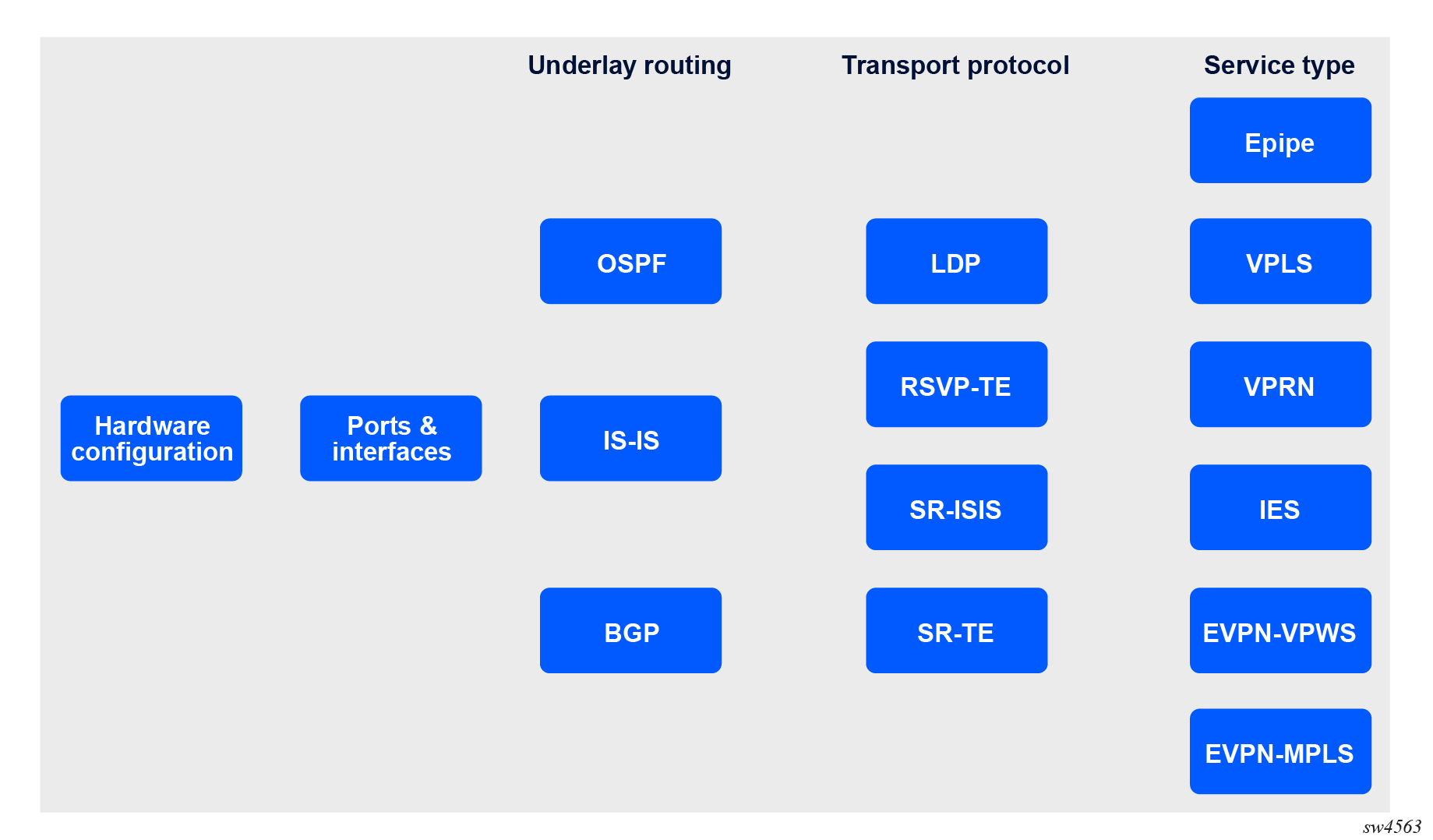
The following figure shows the services for which basic step-by-step configurations and show command examples are described in this guide.
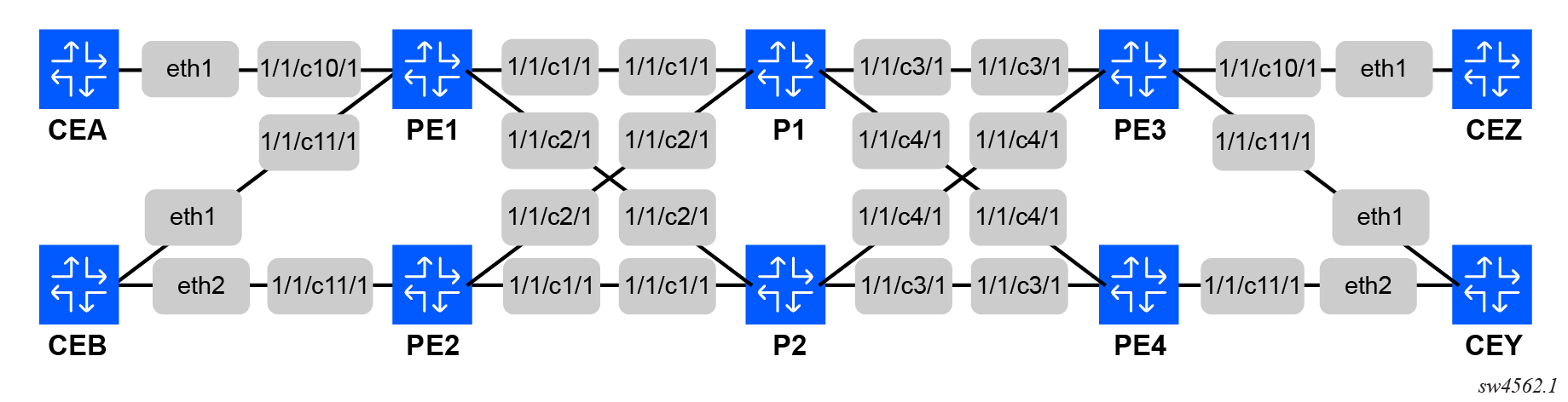
Topology
The following figure shows the topology used for the configuration examples in this guide. The topology consists of four Provider Edge (PE) routers, two Provider (P) routers, and four Customer Edge (CE) routers. All configuration examples in this guide are specific to PE routers. For configuration on other routers, see their containerlab startup configuration files for details.
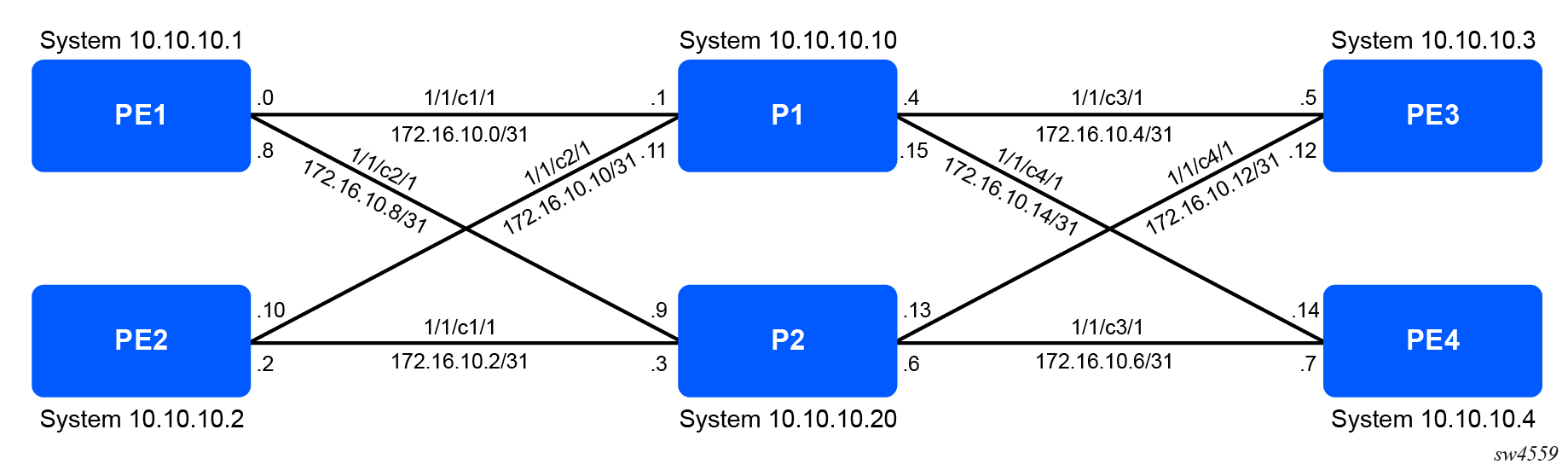
The following figure shows the IPv4 addressing used for the configuration examples in this guide.
Containerlab reference
All configuration used in this guide, along with complete working configurations for the reference topology, are available for deployment in Containerlab at https://github.com/nokia/sros-docs-lab.
MD-CLI command reference
The following table lists the MD-CLI commands commonly used in this guide. For a complete list of SR OS CLI trees and command descriptions, see 7450 ESS, 7750 SR, 7950 XRS, and VSR MD-CLI Command Reference Guide. For a comparison of the SR OS MD-CLI with those used by other OS, see 7450 ESS, 7750 SR, 7950 XRS, and VSR MD-CLI Quick Reference Guide.
| Action | Command |
|---|---|
| Enter private candidate mode | configure private |
| Commit configuration changes | commit |
| Delete configuration elements | delete command path |
| Discard configuration changes | discard |
| Compare candidate to running | compare / |
| View configuration in current context | info |
| View configuration in full context format | info full-context |
| View full configuration of router | admin show configuration |
| Search for keyword in output | command | match keyword |
| Find a command | tree flat detail | match keyword |
| Exit candidate mode | exit |
| Exit the router | logout |