
MACsec
Media Access Control Security (MACsec) is an industry standard security technology that provides secure communication for almost all types of traffic on Ethernet links. MACsec provides point-to-point security on Ethernet links between directly connected nodes and is capable of identifying and preventing most security threats including:
- denial of service
- intrusion
- man-in-the-middle
- masquerading
- passive wiretapping
- playback attacks
MACsec is standardized in IEEE 802.1AE.
The following sections describe the features and functions of MACsec on SR Linux.
MACsec terminology
MACsec uses Security Channels (SC) and Secure Association Keys (SAKs) to encrypt a Connectivity Association (CA).
A CA represents a group of nodes connected through a unidirectional secure channel. It is a security relationship, established and maintained by key agreement protocols comprised of a fully connected subset of the service access points. These access points are in stations attached to a single LAN that are supported by MACsec. Each CA has its own Security Association (SA) that uses its own SAK. More than one SA is permitted in a CA for the purpose of a key change without traffic interruption, but at least two SAs are required for rollover.
MACsec security TAG
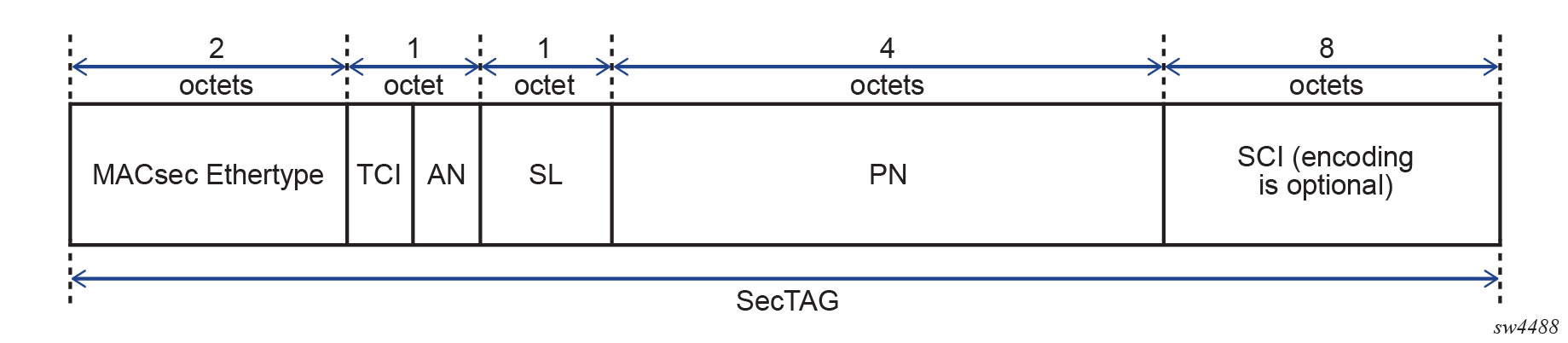
The MACsec 802.1AE header includes a security TAG (SecTAG) field that contains the following information:
- association number within the channel
- packet number to provide a unique initialization vector for encryption and authentication algorithms, as well as protection against replay attack
- optional LAN-wide secure channel identifier
The SecTAG field, which is identified by the MACsec EtherType, conveys the following information:
- TAG Control Information (TCI)
- Association Number (AN)
- Short Length (SL)
- Packet Number (PN)
- Optionally-encoded Secure Channel Identifier (SCI)
The following figure shows the format of the SecTAG.
MACsec and VLAN tags in clear
The main modes of encryption in MACsec are:
- VLAN in clear text (WAN mode)
- VLAN encrypted (LAN mode)
MACsec uses 802.1AE standard to encrypt the Layer 2 packet including the 802.1Q tag and the payload.
With 802.1AE encryption, the following apply to MACsec:
- frames are encrypted and protected with an integrity check value (ICV)
- MACsec EtherType is 0x88e5
- there is no impact to IP MTU or fragmentation
The following figure shows the MACsec LAN mode structure.
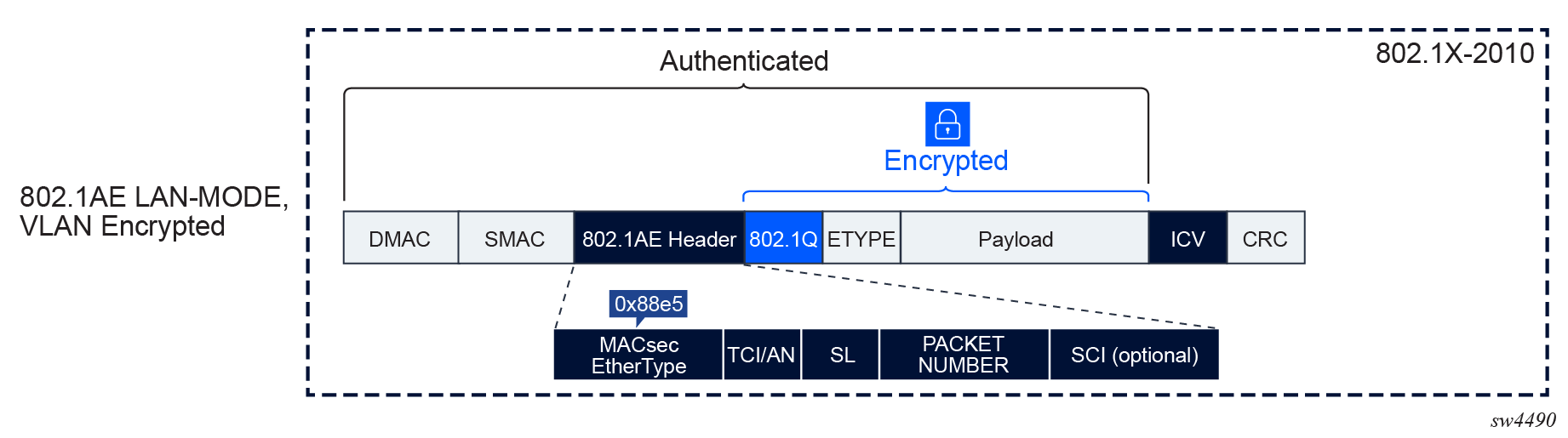
The original 802.1AE encrypts the 802.1Q and QinQ tags. In a WAN environment where the switching could be based on 802.1Q tag, Nokia recommends putting the 802.1Q in clear.
The following figure shows the MACsec WAN mode structure.
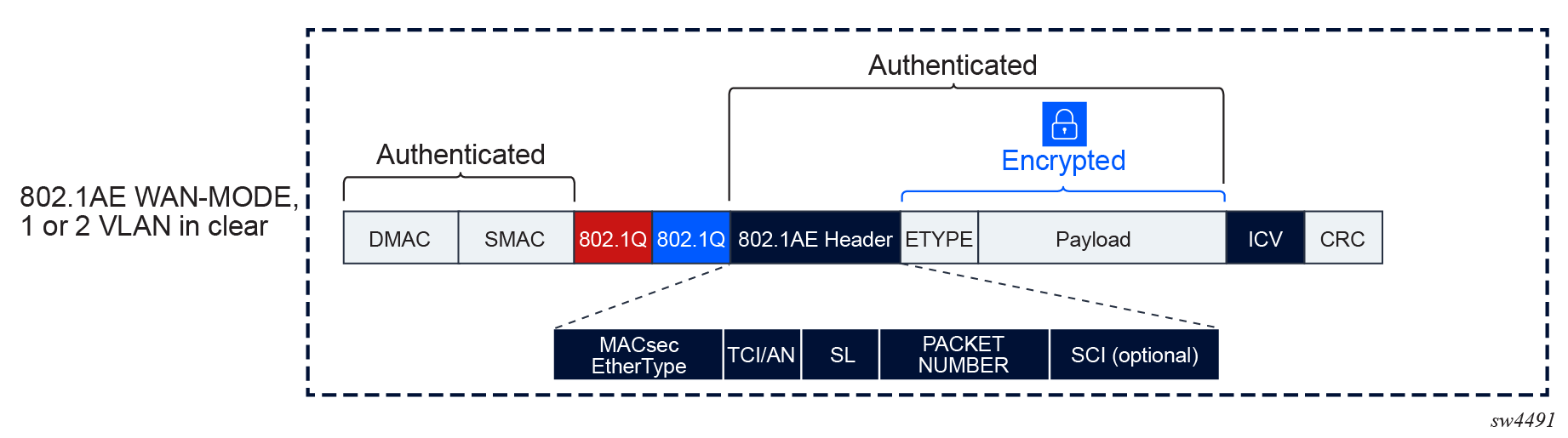
MACsec can be configured to leave one or two VLAN tags in clear. When MACsec is configured to put a single VLAN tag in clear, MACsec blindly puts 4 bytes in clear, regardless of whether there is a VLAN present. The same is true when two VLAN tags are in clear; when this occurs, MACsec blindly puts 8 bytes in clear.
MACsec encryption offset
When enabling encryption, MACsec can set an offset that sends the first 30 or 50 octets in unencrypted plain text.
When the offset is set to 30, the IPv4 and TCP and UDP headers are left unencrypted while the rest of the traffic is encrypted. When the offset is set to 50, the IPv6 and TCP and UDP headers are left unencrypted while the rest of the traffic is encrypted.
The MACsec encryption offset is typically used for forward traffic when a feature requires data to be expressed in octets to perform a function like load balancing (that is, where the IP and TCP and UDP headers in the first 30 or 50 octets need to be in clear text to properly load balance traffic).
The default offset is 0, so all traffic on the link is encrypted when the encryption option is enabled and an offset is not set.
MACsec pre-shared key and keychain
MACsec uses pre-shared key (PSK) to wrap the SAK. SAKs are generated and distributed by the key server in CA to encrypt data plane PDUs. The key server on the CA is negotiated through MACsec Key Agreement (MKA) protocol based on a configurable key server value.
PSK is built using the following:
On SR Linux, the PSK is configured using keychains and can be rolled over based on the keychain lifetime. The CAK and CKN can only be changed in the key entry of a keychain when the key entry is administratively down.
The following figure shows how MACsec uses the CAK to secure the SAK to be distributed from the key server to the peer.
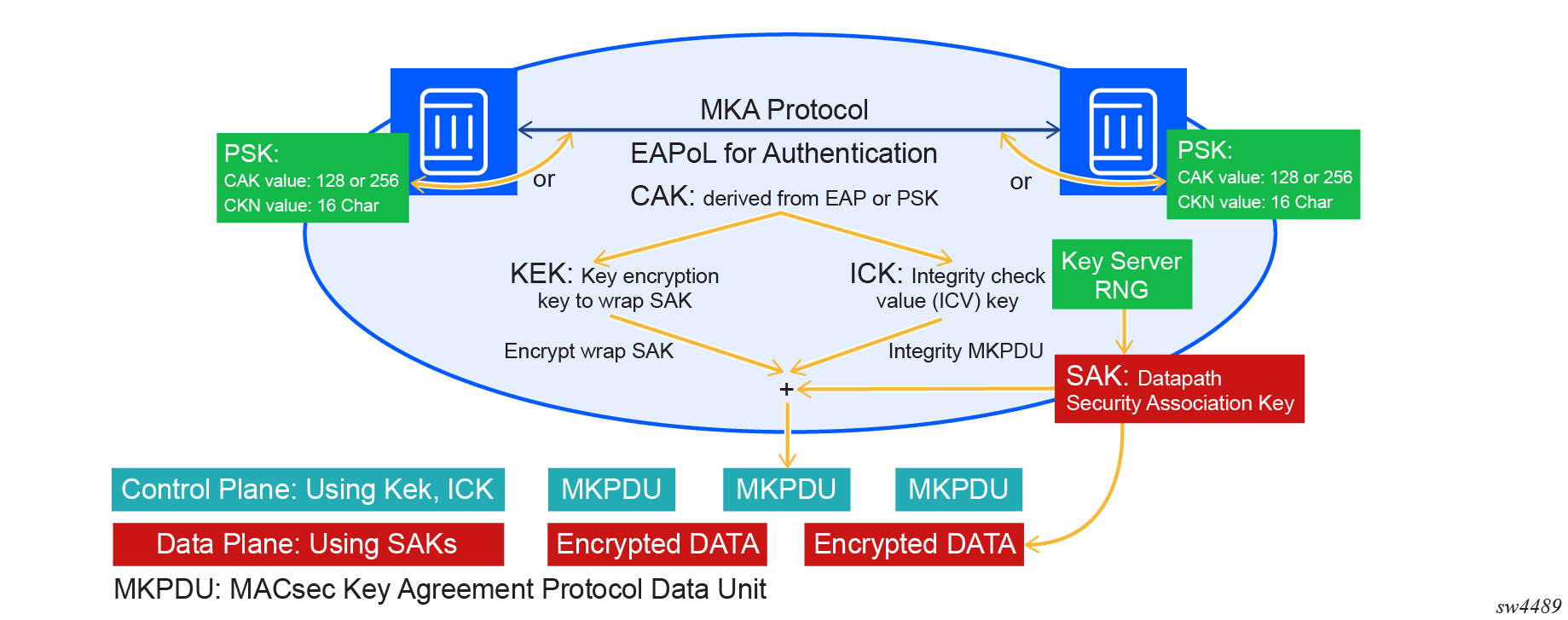
After the CAK is configured in the keychain it is used to obtain the following keys:
The key server then generates a SAK that is shared with the CAs of the security domain, and that SAK is used to secure all data traffic traversing the link. The key server periodically creates and shares a randomly created SAK over the point-to-point link for as long as MACsec is enabled.
The KEK is used by MKA to securely transport a succession of SAKs for use by MACsec to other members of a CA. It is derived from the CAK using the transformations described in the following table.
| KEK | CAK derivatives and definition |
|---|---|
| KEK | KDF (Key, Label, Key ID, KEKLength) |
| Key | CAK |
| Label | IEEE8021 KEK |
| Key ID | The first 16 octets of the CKN, with null octets appended to pad to 16 octets if necessary |
| KEKLength | Two octets representing an integer value (128 for a 128 bit KEK, 256 for a 256 bit KEK) with the most significant octet first |
The ICK is used to verify the integrity of MKA PDUs and is derived from the CAK using the transformations described in the following table.
| ICK | CAK derivatives and definition |
|---|---|
| ICK | KDF (Key, Label, Key ID, ICK) |
| LengthKey | CAK |
| Label | IEEE8021 ICK |
| Key ID | The first 16 octets of the CKN, with null octets appended to pad to 16 octets if necessary |
| ICKLength | Two octets representing an integer value (128 for a 128 bit ICK, 256 for a 256 bit ICK) with the most significant octet first |
MACsec keychain considerations
When configuring a MACsec keychain, Nokia recommends that key entries in a keychain:
- should not have the same start time
- should have a time distance of at least one minute
- should not have the same CKN
The following shows an example of a keychain configuration.
Keychain configuration
--{ * candidate shared default }--[ system authentication keychain AABBCCDD ]--
A:root@srl2# info with-context
    system {
        authentication {
            keychain AABBCCDD {
                admin-state enable
                type macsec
                key 1 {
                    algorithm aes-256-cmac
                    macsec {
                        cak $aes1$AWbFjByk7B2lWG8=$vzHM3n5itXoYRc2CceaTCpQv8QmKRlCiXO9NneByprL/T71keYsutp9SWHwT3ZLOuBLbSzJT0jLfhK6zgq6KVg==
                        key-name AABBCCDDEEFF0000000000000000000000000000000000000000000000000001
                        admin-state enable
                    }
                    send-lifetime {
                        start-time 2025-02-21T21:00:00.000Z
                    }
                }
                key 2 {
                    algorithm aes-256-cmac
                    macsec {
                        cak $aes1$AWZ90wmhzvYqFm8=$nkij57SBGanMvRjrLkXy0PM9tIG5BQ+boT0e9qGC+u3oLV5ZkeLWJHxC1Yq/gvl+4cBfwbyYru4vznc9xU2AfA==
                        key-name AABBCCDDEEFF0000000000000000000000000000000000000000000000000002
                        admin-state enable
                    }
                    send-lifetime {
                        start-time 2025-02-21T21:01:00.000Z
                    }
                }
            }
        }
    }
SR Linux uses keychain for PSK rotation. The following describes MACsec keychain considerations:
- Keychain type must be set to MACsec.
- The receive-lifetime command is not functional for the MACsec keychain type.
- The send-lifetime command may be used when the key entry becomes active.
- If there is only a single key entry, the key entry life time value is automatically set to infinity.
- To activate a key entry for MACsec, the send-lifetime command should be set to the current time under system time and the key-entry macsec command should be administratively enabled.
- The key-entry macsec command is disabled by default.
Furthermore, the key-entry macsec command context cannot be
deleted when it is administratively enabled:
- If key-entry macsec is disabled but the key entry is active, the MKA goes down, causing MACsec to go down. When MACsec is operationally down, it does not send traffic in clear text, and all PDUs are blackholed.
- The CAK and the CAK name cannot be changed or removed while key-entry macsec is administratively enabled.
- When the key entry is active and the send-lifetime is deleted or modified, the new send-lifetime does not take effect in the key entry. That is, if the new send-lifetime of the first entry is configured beyond the send-lifetime of the second key entry, the new send-lifetime of the first key entry does not affect the second key entry activation.
MACsec protocol exclusion
MACsec can exclude the following CPU-generated protocols from encryption and decryption:
- PTP
- LACP
- LLDP
MACsec keychain fallback
MACsec keychain fallback provides a secondary or backup keychain to ensure continuous encryption and the integrity of network traffic in cases where the primary keychain fails or is enabled. This fallback keychain allows the MACsec session to remain active, preventing service disruptions when a primary keychain PSK mismatch occurs, a key expires, or in any other situation where an issue that interrupts the operation of the primary keychain arises.
When a MACsec session fails due to a PSK key (CAK) or key name (CKN) mismatch or expiry, the system can automatically switch to the fallback keychain, enabling the session to continue operation. The fallback keychain has a single entry that is always active (called infinity life). The MACsec fallback keychain is optional.
The following outlines the MACsec fallback keychain process on SR Linux when a primary keychain is configured with multiple key entries, and a fallback keychain is configured with a single key entry and an infinity life:
- MACsec uses the primary keychain and walks through the key entries at the begin time of each entry.
- After the begin time of a key entry is triggered, the following events prompt the
system to use the fallback keychain:
- the new key entry is not capable of establishing an MKA session and the previous key entry times out after 20 seconds
- the MKA key entry becomes operationally down
- The fallback keychain becomes the active principal MKA session, distributing a new
SAK to be used until the primary keychain establishes a valid MKA session again.
When the primary keychain establishes the MKA again, the fallback keychain becomes
the backup MKA session, and the primary keychain MKA becomes the active principal
encrypting MKA session.Note: The fallback keychain's key entry establishes an MKA session when the key entry's start time is triggered and is always established with an infinity life, but this MKA session does not generate a SAK until it becomes the principal MKA session.
To configure MACsec fallback keychain on SR Linux, use the transport-security macsec interface mka fallback-key-chain command. The following shows an example MACsec fallback keychain configuration.
MACsec fallback keychain configuration
--{ + candidate shared default }--[ system authentication ]--
A:root@srl2# info with-context
    keychain aabbccddeeff001 {
     admin-state enable
        type macsec
        key 1 {
            algorithm aes-128-cmac
            macsec {
                cak $aes1$AWbF/HhcXltzsm8=$J5U/4xwpX5x0y7Rb0Ux4tlbN3oIlYaMu3OfmCHKYRdM=
                key-name aabbccddeeff0011aabbccddeeff0011
                admin-state enable
            }
            send-lifetime {
                start-time 2026-01-05T13:46:42.730Z
                send-and-receive true
            }
        }
    }
    keychain kc1 {
type macsec-fallback
        key 1 {
            algorithm aes-128-cmac
            macsec {
                cak $aes1$AWbbKZtQRJCXQ28=$m7qUUZBD2y4C1Ue87W1Ux3ErR6/qJe6amhzNUHl5B8Y=
                key-name aabbccddeeff0011aabbccddeeff0013
            }
        }
    }

--{ + candidate shared default }--[ transport-security macsec interface ethernet-1/1 mka ]--
A:root@srl2# info with-context
    transport-security {
        macsec {
            interface 1 {
                mka {
                    mka-policy 1
                    key-chain AABBCCDD
                    fallback-key-chain WWXXYYZZ
                }
            }
        }
    }