
PXE boot services
Preboot eXecution Environment (PXE) allows a network client to boot a software image retrieved from a network server. The SR Linux DHCP server and TFTP server can be configured to provide PXE boot functionality to connected network clients. The process works as follows:
-
A PXE client starts and requests DHCP services.
-
The SR Linux DHCP server assigns an address to the client and provides the address of the SR Linux TFTP server and the name of the boot file to download.
-
The PXE client downloads the boot file from the SR Linux TFTP server and boots from it.
When the network client and DHCP server are on different subnets, DHCP relay is configured to forward messages between the PXE client and the DHCP server.
A typical use for PXE boot services involves one or more racks of network devices, with two SR Linux top of rack (ToR) switches per rack for redundancy. One ToR switch is configured with a DHCP server, and the other ToR switches are configured as DHCP relays.
PXE boot services example
The following diagram shows an example of using PXE boot services with DHCP relay to provide a client with an image file to boot from.
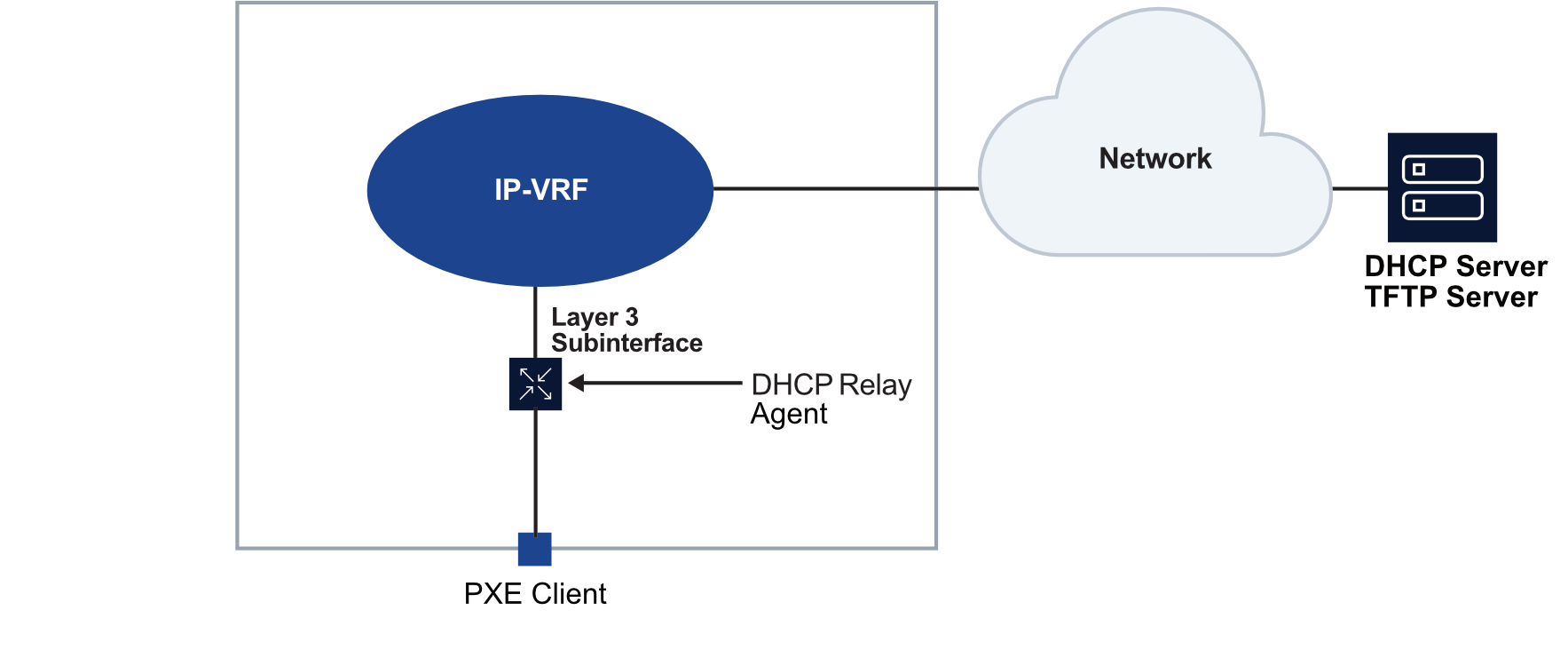
When the PXE client starts, it broadcasts a DHCP request. The DHCP relay agent forwards the request from the client to the DHCP server. The forwarded request includes the client's interface information and MAC address in DHCP option 82. The DHCP server uses this information to match the request with a static IP address allocation for the client, then returns a message containing an IP address for the client to use, as well as the IP address of the TFTP server and the name of a boot file. The client connects to the TFTP server and downloads the boot file.
The following configuration applies to the DHCP relay agent. This configuration specifies the IP address of the DHCP server and the following DHCP option 82 sub-options to include with the DHCP message relayed to the DHCP server.
-
The circuit-id sub-option contains the system_name/VRF_instance/sub-interface_id:vlan_id of the ingress subinterface where the DHCP relay agent is enabled that receives the DHCP Discover message from the client.
-
The remote-id sub-option contains the MAC address of the DHCP client.
--{ + candidate shared default }--[  ]--
# info with-context interface ethernet-1/1 subinterface 1 ipv4 dhcp-relay
    interface ethernet-1/1 {
        subinterface 1 {
            ipv4 {
                dhcp-relay {
                    admin-state enable
                    option [
                        circuit-id
                        remote-id
                    ]
                    server [
                        101.1.5.1
                    ]
                }
            }
        }
    }
The DHCP server matches the information received in the option 82 circuit-id and remote-id sub-options against its configured static allocations and assigns the client an IP address. The DHCP server includes in its DHCP offer message the next-server address (carried in the SIADDR field), which is the IP address of the TFTP server, and the name of the boot file (option 67) to download from the TFTP server.
--{ + candidate shared default }--[  ]--
# info with-context system dhcp-server network-instance green dhcpv4 static-allocation
    system {
        dhcp-server {
            network-instance green {
                dhcpv4 {
                    static-allocation {
                        relay-information "tor1|green|ethernet-1/1|1:0" remote-id 00:00:64:01:05:05 {
                            ip-address 100.1.5.135/24
                            options {
                                bootfile-name tftp1.bin
                                lease-time 900
                                next-server 10.10.10.1
                            }
                        }
                    }
                }
            }
        }
    }
The TFTP server is configured to use 10.10.10.1 as its source address. Boot file
tftp1.bin is placed in the /srv/tftpboot directory on
the SR Linux device.
--{ +* candidate shared default }--[  ]--
# info with-context system tftp-server network-instance green
    system {
        tftp-server {
            network-instance green {
                admin-state enable
                root-directory /srv/tftpboot
                source-address [
                    10.10.10.1
                ]
            }
        }
    }