
Micro-segmentation
Micro-segmentation is a security capability for data centers and enterprises intended to prevent lateral movement of security threats within the network. It divides networks into smaller, isolated zones (known as micro-segments) and establishes rules to restrict traffic between them. An example of a micro-segment defined within an enterprise network is a set of homogeneous devices such as DNS servers, printers, print servers, client applications, or server applications.
Micro-segmentation uses group-based policies (GBPs) to control access between segments. A GBP defines a set of groups, with a tag value assigned to each group. The GBP associates the groups with a subinterface or IP prefix and specifies an ACL to enforce access rules based on group tagging.
Controlling access using GBPs provides a more efficient use of system TCAM resources than using IP addresses. For example, an interface ACL configuration to control traffic between 50 printers and 3 print servers may require a minimum of 150 TCAM entries if the ACL uses source and destination IP addresses as match criteria. In a GBP, the printers and print servers are placed into separate groups, and the GBP maps their IP addresses to group values. An ACL configured within the GBP filters traffic based on the group values, so that traffic from the printers group to the print server group is accepted, and all other traffic from the printers group is dropped. Filtering based on source and destination group in this way requires only a single TCAM entry to accept traffic from the printers group to the print servers group, and another TCAM entry to drop all other traffic from the printers group.
Associating group-based policies with network resources
Group-based policies can be associated with network resources in the following ways:
-
A GBP configured in a network-instance can include any or all of the subinterfaces within the network-instance, with a group assigned to each subinterface. See Associating groups with interfaces.
-
SR Linux can use information in BGP routes to derive the group tag to associate with an IP host or IP prefix. The group tag from the Group Policy ID extended community can be included in routes installed in the FIB, and the FIB-programmed group tag can be copied into the Group Policy ID extended community in routes advertised to BGP peers. See GBP tagging for BGP routes.
-
A GBP group can be associated with a static route, and a static route associated with a GBP group can be configured to follow the forwarding behavior of a parent route already present in the route table of the same network-instance. See Static routes and micro-segmentation.
- A set of group tags can be carried in the Group Policy ID extended community, and routing policies can use the Group Policy ID extended community as a match condition for BGP routes. See Routing policies and micro-segmentation.
Platform support
Micro-segmentation is supported on the following platforms:
- 7220 IXR-D2/D3
- 7220 IXR-D4/D5
Micro-segmentation topologies
Micro-segmentation can be used in the following topology models. For more information about these models and configuration examples, see Group-based policies in VPN services.
Layer 2 only model
The Layer 2 model uses MAC-VRFs only. The following illustration shows a Layer 2 only model for micro-segmentation.
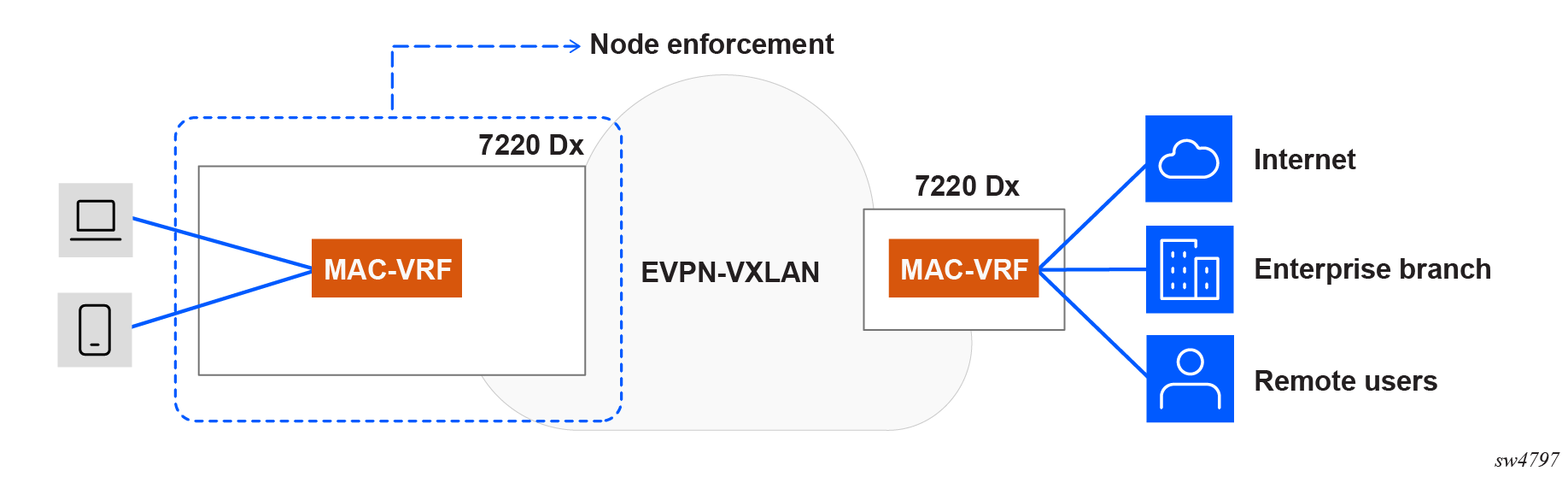
In the group-based policy for each MAC-VRF, groups are associated with Layer 2 subinterfaces. GBP tags are distributed in EVPN routes. GBP ACLs are configured so that the ingress node enforces intra-VRF communication. Source and destination GBP tags are found in MAC lookup.
Distributed IRB model
The distributed IRB model enforces policies at the ingress node, which allows unwanted traffic to be dropped at the point of entry and avoids unnecessary bandwidth consumption within the network. The following illustration shows a distributed IRB model for micro-segmentation.
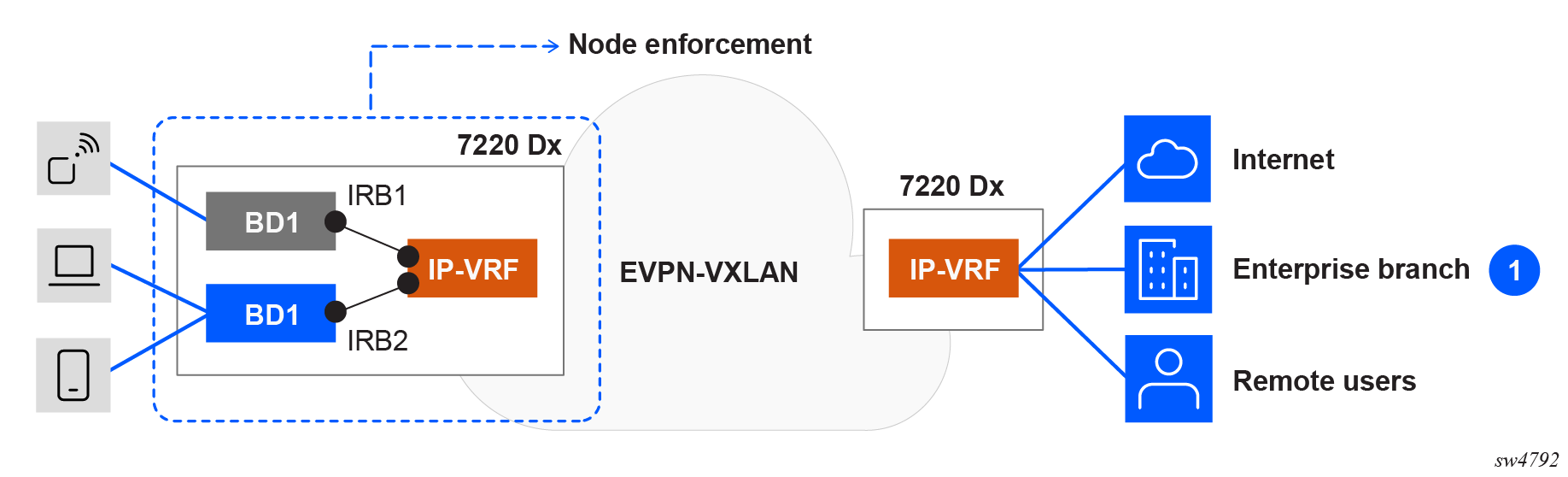
In the distributed IRB model, the ingress node connects the broadcast domains via IRBs into an IP-VRF. Groups are associated with Layer 2 subinterfaces and static routes. GBP tags are distributed in EVPN routes. GBP ACLs are configured so that the ingress node enforces intra-subnet and inter-subnet communication.
- For intra-subnet communication, the source and destination GBP tags are found using MAC address lookups in the MAC table, which stores GBP tag associations used for Layer 2 policy enforcement.
- For inter-subnet communication, the source GBP tags are found using MAC table lookups, and the destination GBP tags are found from an LPM (Longest Prefix Match) on the corresponding IP-VRF route table.
Centralized IRB model
In the centralized IRB model, access nodes are connected to broadcast domains, and inter-subnet communication is handled exclusively by a centralized IRB on a central node. The following illustration shows a centralized IRB model for micro-segmentation.
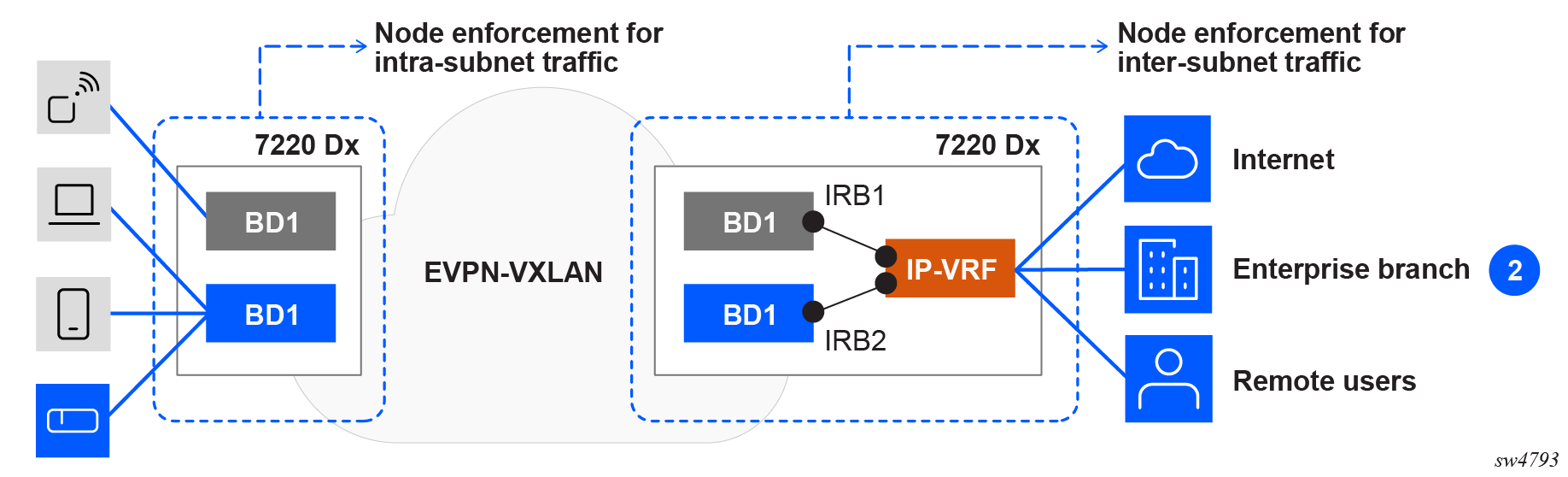
In the centralized IRB model, the ingress node aggregates the MAC-VRF broadcast domains over an EVPN-VXLAN fabric. A central node connects the broadcast domains via IRBs into an IP-VRF. The access node forwards traffic based on MAC lookups, while inter-subnet forwarding occurs at the central node. Groups are associated with Layer 2 subinterfaces and static routes. GBP tags are distributed in EVPN routes. GBP ACLs are configured so that the ingress node enforces intra-subnet communication, and the egress node enforces inter-subnet communication on ingress of the IP-VRF IRB subinterfaces. Note that there is no GBP ACL on ingress of the MAC-VRF of the egress node.
- For intra-subnet communication, the source and destination GBP tags are obtained from MAC table lookups on the ingress node.
- For inter-subnet communication, the source and destination GBP tags are derived from either LPM lookups of the source and destination IP addresses in the route table of the egress node, or the source tag is from a source MAC lookup and destination tag from a LPM table lookup.
ARP and ND traffic cannot be snooped over VXLAN. As a result, the centralized IRB model requires Layer 2 proxy-ARP/ND on the access node. This ensures that ARP/ND packets are intercepted at the ingress node and advertised via EVPN, enabling correct resolution at the central node.
There is no GBP configuration in the MAC-VRFs on the egress node.
Centralized IRB model for Layer 2 aggregation
In a network with Layer 2 access nodes that lack GBP enforcement capabilities, policy enforcement for both intra- and inter-subnet communication is performed at the egress node. Intra-subnet communication relies on routing through a central IRB node, typically leveraging Layer 3 proxy-ARP/ND and host routes in the IP-VRF route table. In this architecture, enforcement for both intra- and inter-subnet traffic is based on GBP tags derived from LPM lookups of the source and destination IP addresses.
The following illustration shows a centralized IRB model for Layer 2 aggregation.
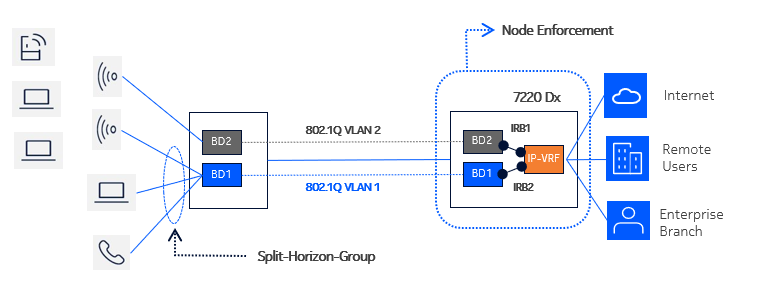
In this model, ingress split-horizon-groups are configured on the access node to avoid local intra-subnet communication. GBP tags are assigned to subinterfaces on the access node, as well as to subinterfaces and static routes on the egress node. Host routes (/32 routes) are populated in the IP-VRF route-table.
GBP ACLs are configured so that the egress node enforces inter-subnet and intra-subnet communication:
-
For inter-subnet communication, the source GBP tags are found in LPM lookup, and the destination GBP tags are found in LPM lookup.
-
For intra-subnet communication, the egress node relies on Layer 3 proxy-ARP/ND and host routing, specifically populating /32 host routes in the central node's route table. This approach prevents local switching of traffic within the ingress node's broadcast domain and allows full enforcement at the egress node.
Group-based policies
In a network-instance, a group-based policy (GBP) defines groups, their association rules, and the GBP ACL filter that applies to the groups. The following parameters are configured in a GBP:
-
group
The list of groups (micro-segments) used in this network-instance. See Creating a group-based policy
-
tag-value
The tag value assigned to a group; this value is used in BGP route advertisement and the GBP ACL. This value is mandatory.
-
interface
The list of subinterfaces with their associated GBP group. See Associating groups with interfaces.
-
acl
The GBP ACL definition for this network-instance. See the SR Linux ACL and Traffic Steering Guide.
In a GBP, you configure the complete list of groups and associated tag-values used in the network-instance, even if not all groups are locally connected to the switch. For example, a group may only exist on a remote switch and its route advertised over BGP. To display a remote route group name in info from state or show commands, this group must be locally configured; otherwise, only the tag-value found in the BGP extended-community is displayed as associated with the route. The group name is also mandatory for use in ACL source or destination match criteria.
A group-based-policy can be configured only in network-instances of type IP-VRF and MAC-VRF, and not type default.
Valid tag values for IP-VRFs and MAC-VRFs
Tag values assigned to a group are unique per group within the network-instance. The valid tag value range depends on the platform and VRF type, as shown in the following tables:
| 7220 IXR-D2/D3 | 7220 IXR-D4/D5 | |
|---|---|---|
|
Tag field length |
7 bits | 14 bits |
|
Value range |
0 to 127 | 0 to 16383 |
| 7220 IXR-D1/D2/D3 | 7220 IXR-D4/D5 | |
|---|---|---|
|
Tag field length |
8 bits | 14 bits |
|
Value range |
0 to 255 | 0 to 16383 |
GBP ACLs always use tag values in this per-platform range for MAC and IP-VRF ACL TCAM entries because they use the configured GBP tag value for the group.
For TCAM allocation, the system handles Layer 2 GBP tags and Layer 3 GBP tags differently.
For GBP ACLs configured in a MAC-VRF, the system handles only Layer 2 GBP tags, so it
configures a single TCAM entry for each GBP ACL entry with L2srcTAG and
L3dstTAG.
- The destination tag is always looked up in the LPM table (Layer 3 GBP tag) as
L3dstTAG. - The source tag may come from the MAC table (Layer 2 GBP tag) in the case of a distributed design with a MAC-VRF and IP-VRF on the same system and IRB interfaces, or the source tag may come from the source IP lookup (Layer 3 GBP tag).
- Two TCAM sub-entries are programmed with
L2srcTAGandL3srcTAGfor each ACL entry that uses asource-groupmatch condition, provided that the GBP tag-value in the IP-VRF is within the allowed range for of MAC-VRF GBP tag values for the platform. - If the tag value in the IP-VRF is larger than the supported maximum tag value for a
MAC-VRF, one TCAM entry is programmed with
L3srcTAGalone.
The same tag value can be reused across multiple VRFs and does not need to be unique network-wide, with the following exception: for Layer 3 micro-segmentation with route leaking, the tag value for the leaked groups and routes must be consistent between the VRFs involved.
Tag value 0 is assigned by default to LPM and MAC table entries that do not have a tag value assigned through configuration or by BGP. You can configure a group name such as "untagged" with tag value 0 that can be used in the GBP ACL.
Creating a group-based policy
To configure groups for a group-based policy in a network-instance, specify a name and tag value for each group. In the following example, three groups are created, and a tag value is assigned to each one.
--{ + candidate shared default }--[  ]--
# info with-context network-instance gbpex group-based-policy
    network-instance gbpex {
        group-based-policy {
            group grp1 {
                tag-value 100
            }
            group grp2 {
                tag-value 101
            }
            group grp3 {
                tag-value 103
            }
        }
    }
Associating groups with interfaces
The GBP configured in a network-instance can include any or all of the subinterfaces within the network-instance. The GBP can assign a group to each subinterface.
When the GBP is enforced on the ingress node:
- For routed and IRB subinterfaces: the source tag is assigned to the IP prefixes configured on this subinterface. These prefixes can be advertised in BGP EVPN routes with their associated GPID.
- For bridged subinterfaces: the source tag is assigned to the MAC address ingressing on this subinterface.
When the GBP is enforced on the egress node:
- For routed and IRB subinterfaces: the destination tag is assigned to the IP packets egressing on this subinterface.
- For bridged subinterfaces: The source tag is assigned to the Layer 2 packets egressing on this subinterface.
To assign a group to a subinterface, add the subinterface to the GBP and specify the group to which it belongs. The following example configures a GBP in an IP-VRF network-instance. In the GBP, a group is assigned to each subinterface.
--{ + candidate shared default }--[  ]--
# info with-context network-instance gbpex
    network-instance gbpex {
        type ip-vrf
        interface ethernet-1/1.1 {
        }
        interface ethernet-1/2.1 {
        }
        group-based-policy {
            group grp1 {
                tag-value 100
            }
            group grp2 {
                tag-value 101
            }
            interface ethernet-1/1.1 {
                group [
                    grp1
                ]
            }
            interface ethernet-1/2.1 {
                group [
                    grp2
                ]
            }
        }
    }
GBP tagging for BGP routes
SR Linux can use information in BGP routes to derive the group tag to associate with an IP host or IP prefix. The group tag is carried in the Group Policy ID extended community (type=0x03, subtype=17) attached to the BGP route, as described in draft-lrss-bess-evpn-group-policy. You can configure SR Linux to include the group tag from this extended community (EC) in routes it installs in the FIB, and you can configure SR Linux to copy the FIB-programmed group tag into the Group Policy ID EC in routes advertised to BGP peers.
Installing BGP routes into the FIB with GBP information
In a micro-segmentation topology, there are situations when the group tag a switch associates with an IP host, or set of IP hosts in a prefix range, should be derived from the BGP route that the switch received for that IP host or IP prefix. The BGP route could be an IPv4-unicast route, an IPv6-unicast route, or an EVPN type-2 or type-5 route that was originated by a remote switch closer to the IP hosts covered by the route. In these situations, the group associated with the IP prefix is carried in the Group Policy ID EC attached to the BGP route.
For GBP ACLs to decide whether to accept or drop a packet with a source or destination address matched by a BGP route with a Group Policy ID extended community, the BGP route must be installed into the FIB with a group tag copied from the extended community.
To configure SR Linux to do
this, enable group-based-policy.install-from-community for the appropriate
address family. For example, the following configuration applies to IPv4 unicast BGP routes
installed into the FIB:
--{ + candidate shared default }--[  ]--
# info with-context network-instance gbpex protocols bgp
    network-instance gbpex {
        protocols {
            bgp {
                afi-safi ipv4-unicast {
                    admin-state enable
                    ipv4-unicast {
                        group-based-policy {
                            install-from-community true
                        }
                    }
                }
            }
        }
    }
The BGP route may have been received on the wire without any Group Policy ID EC, but a VRF import policy or peer import policy added one. This is not handled any differently than receiving the EC on the wire.
The BGP route may carry multiple Group Policy ECs. In this case, SR Linux prefers the EC with zero in the Policy ID scope. If this applies to multiple ECs, the EC with the lowest Group Policy ID value of is chosen.
The Group Policy ID EC that BGP selects to install may have a non-zero value in the Policy ID Scope. This is not considered an error, and the Group Policy ID value is programmed as encoded.
The Group Policy ID EC that BGP selects to install may carry a Group Policy ID value that is out of range of the limits of the platform (see Valid tag values for IP-VRFs and MAC-VRFs). If the value is out of range, the BGP route is installed without any GBP tag.
Advertising BGP routes with Group Policy ID extended community
When a switch advertises a Group Policy ID EC in the BGP RIB-OUT, it may do so because it received the route from another device and is simply propagating it, or the switch added the EC by route policy action. It is also possible that the switch added the EC by copying the FIB-programmed GBP tag value into the Group Policy ID field of the EC. In this case, the FIB-programmed GBP tag value comes from the following:
- The group tag configured with
network-instance.group-based-policy.interface - Static route configuration
- Route policy action
- The BGP
install-from-communityoperation
To configure SR Linux to copy
the FIB-programmed GBP tag value into the Group Policy ID field of the EC, enable
group-based-policy.add-community for the appropriate address family. The
following example configures BGP to add the Group Policy ID EC to IPv4 unicast routes
advertised to any BGP peer in this network-instance.
--{ + candidate shared default }--[  ]--
# info with-context network-instance gbpex protocols bgp
    network-instance gbpex {
        protocols {
            bgp {
                afi-safi ipv4-unicast {
                    admin-state enable
                    ipv4-unicast {
                        group-based-policy {
                            add-community true
                        }
                    }
                }
            }
        }
    }
Static routes and micro-segmentation
A GBP group can be associated with a static route, and a static route associated with a GBP group can be configured to follow the forwarding behavior of a parent route already present in the route table of the same network-instance.
Associating a GBP group with a static route
In a micro-segmentation configuration, you can assign the set of IP endpoints and hosts covered by a static route prefix to a GBP group. The association between the static route and GBP group occurs within the context of a single Layer 3 network-instance (default or a configured IP-VRF). For example, if a static route is installed into an IP-VRF, the static route can be associated with any the groups configured for the network-instance. However, it cannot be associated with groups defined under a different network-instance.
The following example specifies a group to be used with a static route. Each static route can be associated with only one group at a time.
--{ + candidate shared default }--[  ]--
# info with-context network-instance gbpex static-routes
    network-instance gbpex {
        static-routes {
            route 192.168.18.0/24 {
                group-based-policy {
                    group [
                        grp1
                    ]
                }
            }
        }
    }
Configuring a static route to follow another route
A static route can be configured to inherit the forwarding behavior of a parent route already present in the route table of the same network-instance. In this case, the NHG of the next-longest-prefix-match route becomes the effective NHG of the static route. This is useful in a micro-segmentation configuration where the enforcement switch may not have an IP route in its FIB that matches the intended boundary of a Layer 3 GBP group.
For example, consider a switch that has an IP interface with address 100.0.0.1/24 and has installed a route for 100.0.0.1/32 and a route for 100.0.0.0/24 in its FIB. In this subnet, hosts 100.0.0.4 and 100.0.0.5 comprise the group grp1. The switch does not have a route for 100.0.0.4/31 in its FIB that exactly covers just these two hosts, so a static route is configured for 100.0.0.4/31, and the static route is associated with group grp1. This static route is set to follow the next-longest-prefix-match route in the FIB, which causes the route to inherit the forwarding behavior of the 10.0.0.0/24 local route.
The following example configures static route 100.0.0.4/31, associates it with group grp1,
and sets the follow.next-longest option to true, so that
it follows the next-longest-prefix-match route when the static route itself is not present
in the FIB.
--{ +* candidate shared default }--[  ]--
# info with-context network-instance gbpex static-routes
    network-instance gbpex {
        static-routes {
            route 100.0.0.4/31 {
                group-based-policy {
                    group [
                        grp1
                    ]
                }
                follow {
                    next-longest true
                }
            }
        }
    }
Routing policies and micro-segmentation
A set of group tags can be carried in the Group Policy ID extended community (type=0x03, subtype=17), and routing policies can use the Group Policy ID extended community as a match condition for BGP routes.
Configuring a Group Policy ID extended community
In a Group Policy ID extended community, a set of group tags is specified using the format
gbp-tag:x:y to indicate member representation.
If the member format is gbp-tag:<d1>:<d2>, then
<d1> is a decimal representation of the number encoded in the 16-bit
Policy ID Scope field, and <d2> is a decimal representation of the
number encoded in the 16-bit Group Policy ID field.
If the member format is gbp-tag:<r>, then the entire string is a regex
matched against a string constructed from the extended community as follows: The
sequence of characters gbp-tag: is followed by a decimal number
representation of the Policy ID Scope, followed by another colon, followed by a
decimal representation of the Group Policy ID.
The following terms are supported:
- single digit term – match if the character is
x, wherexcan be a digit character [0-9] or a colon - range term – match if the character is a digit with any value in the range
x..yinclusive - sub-expression – match if there is a sequence of characters matching the regular expression in brackets ()
- wildcard term (.) – match any single character, which can be a digit character [0-9] or a colon
The following example configures a Group Policy ID extended community that matches using a decimal representation of the 16-bit Policy ID Scope field and a decimal representation of 16-bit Group Policy ID field:
--{ + candidate shared default }--[  ]--
# info with-context routing-policy extended-community-set gbpecs
    routing-policy {
        extended-community-set gbpecs {
            member [
                gbp-tag:0:53
            ]
        }
    }
The following example configures a Group Policy ID extended community that uses a regular expression to match all Group Policy ID extended communities:
--{ + candidate shared default }--[  ]--
# info with-context routing-policy extended-community-set gbpecs
    routing-policy {
        extended-community-set gbpecs {
            member [
                "gbp-tag:.*"
            ]
        }
    }
See the SR Linux Routing
Protocols Guide
for additional examples of using gbp-tag in regular expressions.
Using a Group Policy ID extended community in a routing policy
The following example configures a routing policy that uses the Group Policy ID extended community as a match condition for BGP routes:
--{ +* candidate shared default }--[  ]--
# info routing-policy policy p1
    statement st1 {
        match {
            bgp {
                extended-community {
                    extended-community-set gbpecs
                    match-set-options all
                }
            }
        }
        action {
            policy-result accept
        }
    }
LPM source lookup mode
If an SR Linux device is deployed
in a role that requires the source tag to be derived from the lookup of the source IP address
in the LPM table, the device must be configured to operate in LPM source lookup mode. To do
this, you configure the
platform.resource-management.group-based-policy.lpm-source-lookup leaf to
true. Each change in the value of this leaf requires a chassis reboot.
A change of lpm-source-lookup from false to
true overrides the configured UFT profile on a 7220 IXR device and may reduce
the overall IP route scale by 50 percent or more; a change of
lpm-source-lookup from true to false
reverts the UFT profile to standard configuration and restores IP route scale to expected
levels.
When LPM source lookup mode is operationally active, the lookup applies to all IPv4 and IPv6 packets received on all routed subinterfaces of the default network-instance and all IP-VRF network-instances. For terminating VXLAN packets, the lookup is done post-decapsulation using the inner-header source IP address. If the LPM lookup for a source IP address finds a route without a tag, it is equivalent to tag 0.
Configuring LPM source lookup mode
To enable LPM source lookup mode, you set the lpm-source-lookup parameter to true and reboot the SR Linux device.
The following example enables LPM source lookup mode:
--{ +* candidate shared default }--[  ]--
# info with-context platform resource-management group-based-policy
    platform {
        resource-management {
            group-based-policy {
                lpm-source-lookup true
            }
        }
    }
Group-based policies in VPN services
This chapter describes the components of group-based policies in VPN services on SR Linux.
Group-based policy (GBP) provides policy enforcement for traffic between hosts of the same tenant, where those hosts can be located in the same or different subnet. GBP configuration defines a set of groups, with a tag value assigned to each group. The GBP configuration associates subinterfaces and IP prefixes with the different groups and specifies an ACL to enforce access rules based on group tagging.
Configuration and process
This chapter describes the configuration of GBPs.
GBP tags in MAC-VRF/IP-VRF
In the context of a MAC-VRF, GBP tag association and enforcement only affects known unicast traffic. BUM traffic bypasses the GBP ACLs; this is irrespective of the source tag associated with the source MAC address.
In the context of an IP-VRF, GBP tag association only applies to unicast IP traffic.
The following sections describe the GBP tag association, programming, advertisement, and processing.
Local GBP tag association and programming
Local GBP tag association and programming are supported in MAC-VRFs and IP-VRFs.
GBP tagging on MAC-VRFs
GBP tags are configured at the bridged subinterface level, for example,
ethernet-1/1.1 receives the tag 10. All MAC addresses learned
over that subinterface are associated with that tag in the MAC table. This is valid
for dynamic or static MAC addresses.
YANG state is added to show the GBP tag ID in the MAC table as the 16-bit value that is programmed. This is displayed using the following command:
info from state network-instance bridge-table mac-table mac[address] group-based-policy-tag <value>
The allowed tag value range depends on the platform. The tag is programmed along with the MAC entry in the MAC table and not in the proxy-ARP/ND or ARP/ND tables.
- IRB MACs do not have any GBP tag, so they have a GBP tag value of 0.
- Routed traffic coming from a bridged subinterface receives the source tag from the Layer 2 source MAC lookup and the destination tag from a Layer 3 destination LPM lookup in the route table.
- To advertise the IRB MACs with a specific GBP tag, an export policy matching the IRB IPs (within a prefix list) and EVPN route type 2 are added, with an action to add the GBP extended community with the needed value.
- The following internal MACs display the GBP tag N/A (or no GBP tag) in the
MAC table:
- IRB interface MACs
- IRB interface anycast MACs
- Layer 2 proxy anti-spoofing MACs
- Reserved MACs
- Eth-CFM MACs
- IRB interface VRRP MACs
- MAC addresses learned on a subinterface that is not associated with a GBP group show a tag value of 0 in the MAC table.
- MAC addresses learned on a subinterface that is associated with a GBP group that receives a tag value of 0 also show a tag value of 0 in the MAC table.
GBP tagging on IP-VRFs
-
routed subinterface level
All the local address prefixes associated with the subinterface inherit the configured GBP tag.
-
static route level
GBP tags are configured using the
network-instance static-routes
                                route group-based-policy group <name>
command.
YANG state is added to show the tag ID in the route table, as the 16-bit value that is programmed. This is displayed using the following command:
info from state network-instance route-table ipv4/6-unicast route group-based-policy-tag
Default tags are used following the same principles in the MAC table. For example, local subnets configured on Layer 3 subinterfaces not associated with a GBP group have a tag value of 0 in the route table.
GBP tag advertisement in EVPN
The GBP tags associated with MACs, MAC/IPs, and IP Prefixes are encoded in an extended community defined in draft-lrss-bess-evpn-group-policy, and advertised along with the EVPN MAC/IP Advertisement routes and IP Prefix routes.
The following considerations apply to the GBP tag advertisement in EVPN, assuming that
the group-based-policy add-community command is configured in the
corresponding network instances:
- Advertised MAC/IP routes take the tag from the MAC table entry for the MAC
address.
- MAC/IP routes advertised for ARP/ND entries take the tag from the MAC entry, and the same applies to EVPN-IFL-HOST advertised routes.
- On reception, the best route's tag is processed if
group-based-policy install-from-communityis configured. If a route is not the best, the GBP tag that conveys the non-selected route is ignored.
- The default tag (tag value 0) and the advertisement of routes with a tag value of
0:
- When MAC or route entries are associated with a tag value of 0, all the BGP routes for those MAC addresses or IP prefixes will not include the GBP extended community.
- For example, suppose you have three subinterfaces in a MAC-VRF:
-
subif1
This subinterface is a static group A with a tag value of 10. All MAC addresses learned on
subif1are advertised with the GBP extended community that includes tag value 10. This includes the MAC/IP Advertisement routes without IP, with IP, and EVPN-IFL-HOST routes advertised. -
subif2
This subinterface is static group B with a tag value of 0. All MAC addresses learned on
subif2are advertised without the GBP extended community. -
subif3
This subinterface is static with no group. All MAC addresses learned on
subif3are advertised without the GBP extended community.
-
GBP tag processing
EVPN MAC/IP Advertisement routes received with a tag value of 0 (no extended community or extended community with a value of 0) are programmed with a tag value of 0.
Nodes only support a limited size of GBP tags, typically lower than the full GBP tag size of 16 bits. Limits can also be different between Layer 2 and Layer 3 GBP tags. Therefore, received BGP routes may convey tags that exceed the size supported by the importing node:
- If the received tag falls into the supported range in the platform and network instance, then the tag is accepted and programmed.
- If the received tag does not fall into the supported range in the platform or
network instance:
- An import policy can be applied to replace the received GBP extended community with a new GBP extended community that contains a supported value. The tag is now valid and can be programmed in the MAC or route table.
- If no import policy is applied, the MAC entry or IP route entry is programmed with a tag value of 0.
By default, GBP extended communities are propagated by ABRs and ASBRs in Model B scenarios or across multi-instance network instances, unless explicitly modified by import or export policies.
GBP tags in ARP/ND and host entries
Individual ARP/ND entries in the host table can be associated with a different GBP tag from the tag of their parent IRB interface. This is shown in the following figure:
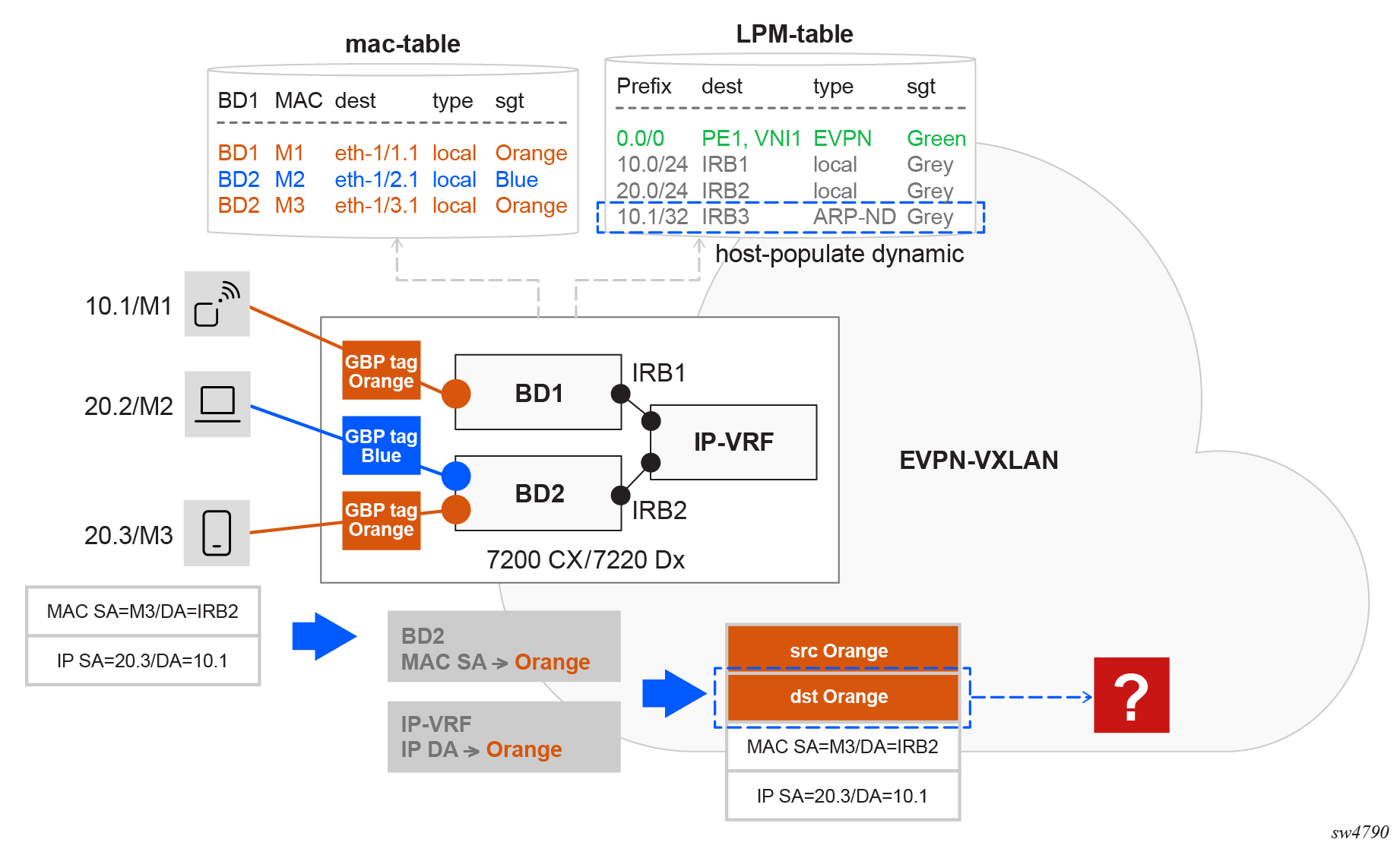
For traffic from 20.3 to 10.1, the ACL rule requires that the destination tag lookup in the IP-VRF returns ORANGE, which corresponds to the tag assigned to 10.1’s bridged subinterface.
To address this, the bridged subinterface tag (ORANGE) is propagated to the corresponding ARP/ND binds in the ARP/ND tables and ARP/ND host routes in the route table. This can only be completed when the associated ARP/ND entry MAC originates from the same bridged subinterface.
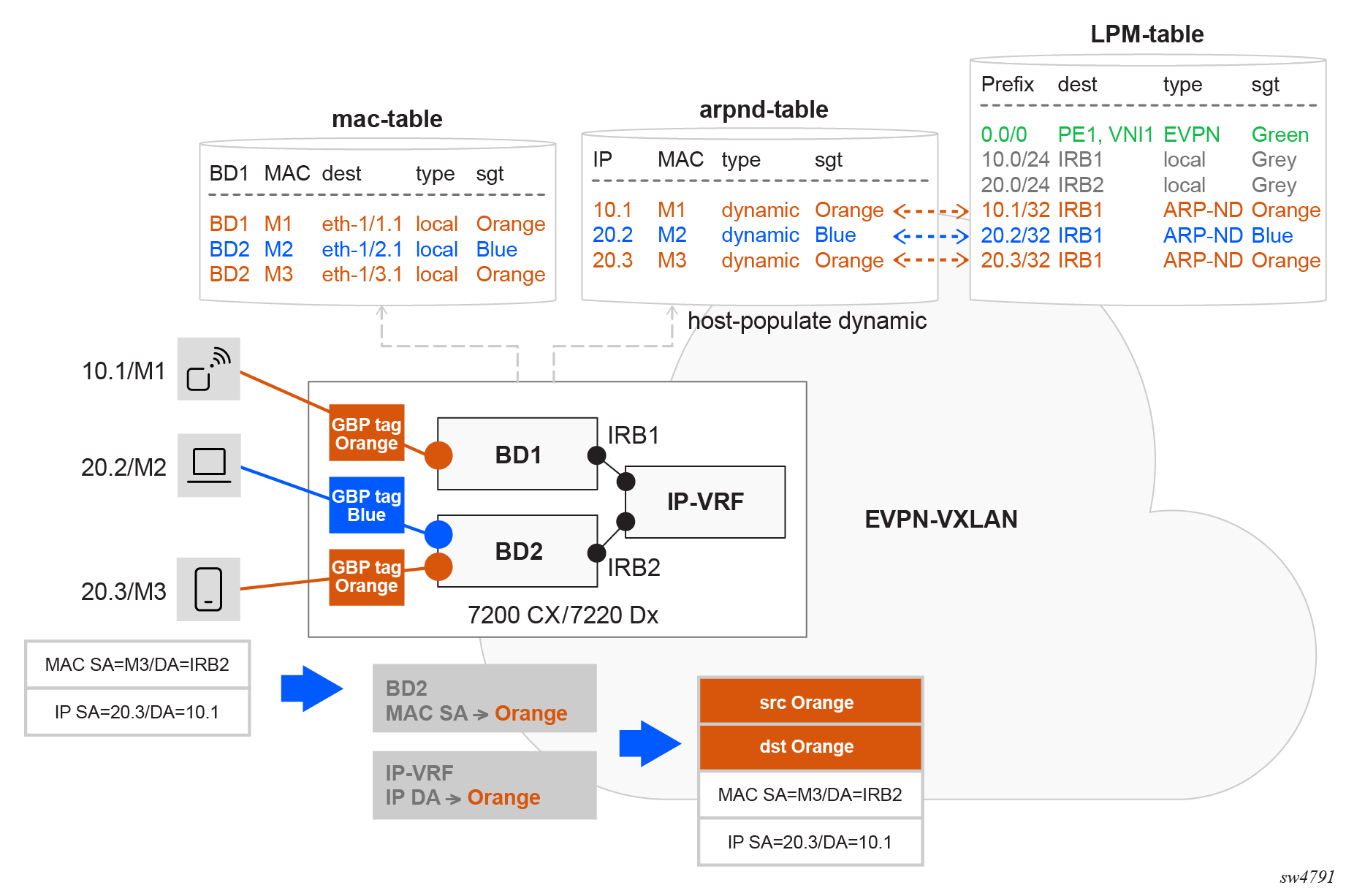
arpnd_mgr uses the GBP tag of the IRB subinterface to
program the group-based-policy-tag of all the entries. Once a tag is
associated with a MAC entry, and an ARP/ND entry is created referencing that MAC, the
system links the ARP/ND binding to the existing MAC tag in the MAC table. The
arpnd_mgr pulls that information and displays the tag in the state
leaf, as
follows:info from state subinterface ipv4/ipv6 arp/neighbor-discovery neighbor[=ipv4/ipv6-address] group-based-policy-tag <gbp-tag>In Propagation of tags to ARP/ND binds and host routes, suppose 10.1 is attached to an ORANGE bridged subinterface, however the IRB subinterface of BD1 is associated with tag GREY. When applying a GBP ACL in the IP-VRF, traffic to 10.1/32 should be associated with tag ORANGE, and not GREY. In order to program 10.1/32 in the route table with tag ORANGE, the bridged subinterface in BD1 is configured with tag ORANGE. When MAC M1 is learned on the subinterface, M1 gets tag ORANGE in the MAC table. When GBP is enabled in the IP-VRF of BD1 (and in BD1 itself), the system populates the ARP/ND entry for 10.1 with tag ORANGE.
When the interface subinterface[=irb1] ipv4/6 arp/neighbor-discovery host-route
populate dynamic command is configured in IRB1, arpnd_mgr
triggers the creation of an ARP/NP host route in the route table for 10.1/32, which also
inherits the GBP tag ORANGE (inherited from the MAC table).
When host-route populate is not enabled, the destination IP lookup to
resolve the ARP retrieves the GBP tag from the ARP entry, so the destination tag in the
example is ORANGE.
If host-route populate is enabled, but interface
subinterface[=irb1] ipv4/6.arp/neighbor-discovery host-route populate
datapath-programming is not, the ARP/ND host is not programmed in the route
table, but the destination GBP tag is obtained from a lookup on the LEM/host table to
resolve the ARP.
If there is a static route for the host route in the route table and it is associated with a different GBP tag, the static route tag is used as the destination tag.
Bypassing the GBP ACL enforcement
The following packets bypass the GBP enforcement and are not subject to the GBP ACLs, irrespective of their MAC or IP addresses:
-
BUM traffic ingressing a bridged subinterface
This ensures ARP requests can be forwarded without being dropped.
-
Layer 3 traffic routed via an IRB with ARP/ND resolved but no MAC in MAC table
For traffic routed from the IP-VRF into the MAC-VRF via IRB, if the ARP/ND resolution exists, but the corresponding MAC entry is missing from the MAC table, the traffic bypasses the GBP ACL configured in the IP-VRF.
-
Packets routed from the MAC-VRF to the IRB
These packets bypass the GBP ACL applied to the MAC-VRF. Instead, packets are routed from the MAC-VRF to the IRB and are filtered by the GBP ACL configured in the IP-VRF.
-
CPM self generated traffic and extracted traffic to CPM
This traffic bypasses the GBP ACLs. In 7220 IXR-Dx platforms, the extraction TCAM slice has a higher priority than the one for GBP. This ensures that all extracted traffic bypasses the GBP ACLs. The CPM traffic includes, but is not limited to:- ICMP
- ARP/ND
- routing protocols (IGP, BGP)
- BFD
-
CPM reinjected packets
For example, unknown ARP Requests when the Layer 2 proxy-ARP function is enabled in the MAC-VRF. Reinjected packets are placed in the egress pipeline so that GBP ACLs cannot be applied to them.
As a result of this behavior, for example, when a user attempts to verify reachability to a remote host using an ICMP ping, the packet may be filtered by the GBP ACL. In contrast, an ICMP trace route to the same destination may succeed because the packets are processed by all CPMs along the path.
Any other packets do not bypass the ACL enforcement when GBP is enabled in the network instance.
GBP in an EVPN distributed IRB network
GBP in an EVPN distributed IRB network enforces policies at the ingress node and allows unwanted traffic to be dropped at the point of entry. This avoids unnecessary bandwidth consumption within the network. Hosts can reside in the same subnet or across different subnets. In both cases, the system classifies the source traffic into the appropriate GBP tag and maps the destination to its corresponding GBP tag. When the source and destination GBP tags are identified, they are passed to the ACL, which uses them to determine whether the traffic should be forwarded or dropped. For more information about micro-segmentation and the distributed IRB model, see the SR Linux ACL and Traffic Steering Guide.
For intra-subnet communication, the source and destination GBP tags are derived from MAC address lookups in the MAC table, which stores GBP tag associations used for Layer 2 policy enforcement.
For inter-subnet communication, the source GBP tag is derived from a MAC address lookup in the MAC table. The destination GBP tag is obtained from an LPM on the corresponding IP-VRF route table.
GBP in an EVPN broadcast domain or centralized IRB network
GBP in an EVPN broadcast domain or centralized IRB network is used in data centers where access nodes are connected to broadcast domains and inter-subnet communication is handled exclusively by a centralized IRB on a central node. In this architecture, the access node forwards traffic based on MAC lookups, while inter-subnet forwarding occurs at the central node. Policy enforcement must be distributed: Layer 2 enforcement is performed at the access node for intra-subnet traffic and Layer 3 enforcement is carried out at the central IRB node for inter-subnet traffic. For more information about micro-segmentation and the centralized IRB model, see the SR Linux ACL and Traffic Steering Guide.
For intra-subnet communication, the source and destination GBP tags are obtained from MAC address lookups in the ingress node’s MAC table, which maintains GBP tag associations for Layer 2 policy enforcement.
- LPM lookups of the source and destination IP addresses in the route table of the egress node
- source tag from a source MAC lookup and destination tag in the LPM table
GBP configuration and state examples
This chapter contains examples of GBP configurations.
GBP in Layer 2 centralized IRB EVPN VXLAN example
GBP can be configured on SR Linux in a centralized IRB EVPN VXLAN scenario. For more information about micro-segmentation and this Layer 2 model, see the SR Linux ACL and Traffic Steering Guide. This example includes multiple SR Linux routers configured to provide connectivity while enforcing policies based on group membership.
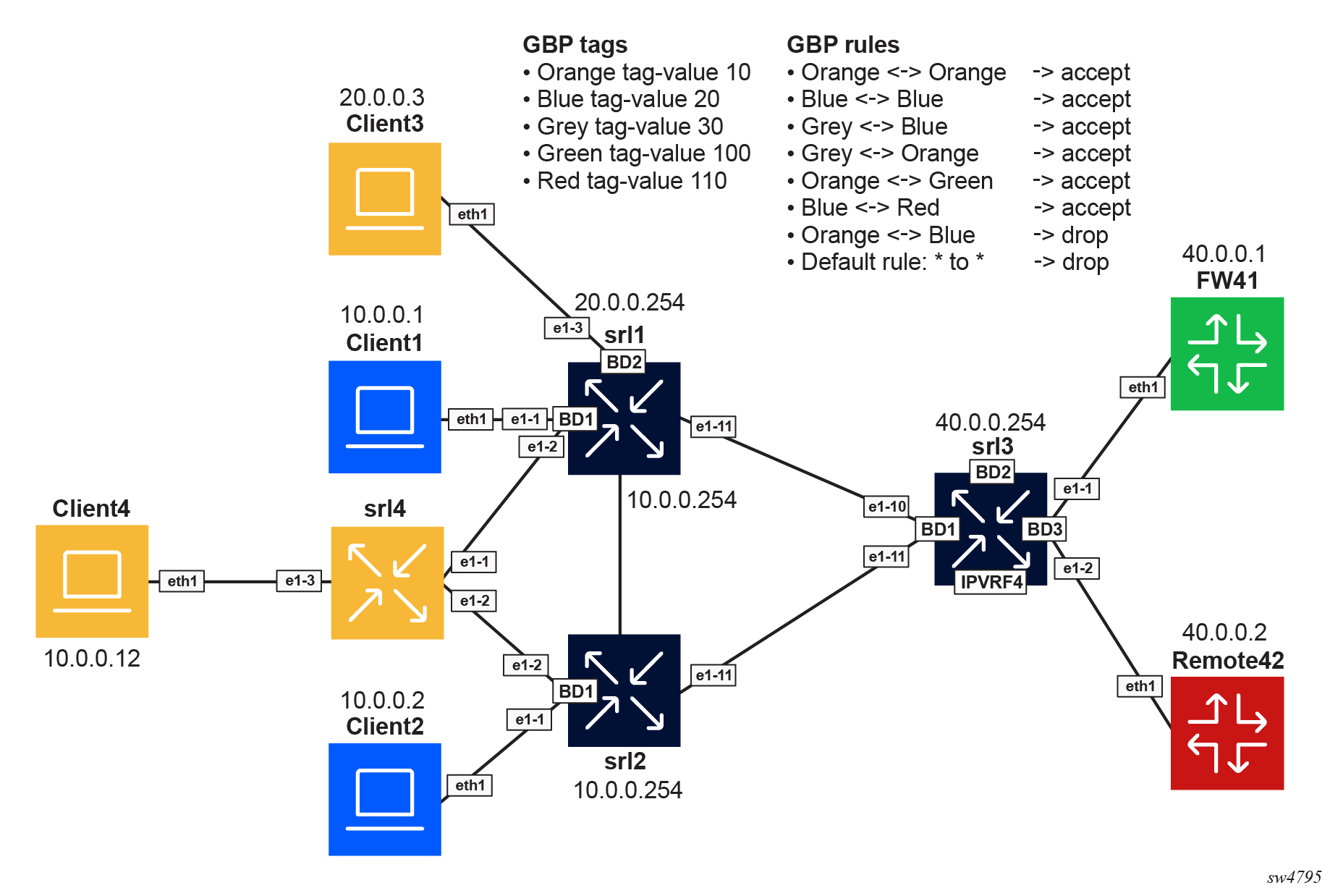
| Tag name | Tag value |
|---|---|
| ORANGE | 10 |
| BLUE | 20 |
| GREY | 30 |
| GREEN | 100 |
| RED | 110 |
| Group 1 | Group 2 | Action |
|---|---|---|
| ORANGE | ORANGE | Accept |
| BLUE | BLUE | Accept |
| GREY | BLUE | Accept |
| GREY | ORANGE | Accept |
| ORANGE | GREEN | Accept |
| BLUE | RED | Accept |
| ORANGE | BLUE | Drop |
The following steps describe the configuration of GBP on the nodes.
- Enable the following global configuration in the three
routers.
--{ candidate shared default }--[  ]--
A:admin@srl1# info flat platform resource-management group-based-policy
set / platform resource-management group-based-policy mac-lookup true
set / platform resource-management group-based-policy lpm-source-lookup true
The statement mac-lookup true enables a source MAC lookup in the MAC table to find the associated GBP tag in MAC-VRFs. This command requires a chassis reboot.
The statement lpm-source-lookup true enables the source IP lookup in the LPM table in IP-VRFs. This command does not require a chassis reboot.
The state leaf
chassis-reboot-requiredunderplatform resource-management group-based-policycan be checked to verify if a reboot is needed. - Configure BGP EVPN to distribute and program the GBP tags in each network
instance. Enable the following configuration under each BGP EVPN instance in all
network instances where GBP is
used.
--{ candidate shared default }--[ ]-- A:admin@srl1# info flat network-instance * protocols bgp-evpn bgp-instance 1 group-based-policy set / network-instance BD1 protocols bgp-evpn bgp-instance 1 group-based-policy add-community true set / network-instance BD1 protocols bgp-evpn bgp-instance 1 group-based-policy install-from-community true set / network-instance BD2 protocols bgp-evpn bgp-instance 1 group-based-policy add-community true set / network-instance BD2 protocols bgp-evpn bgp-instance 1 group-based-policy install-from-community true - Define the groups on each router by configuring the groups in all network
instances, even if they are not used in that network instance. This ensures
consistency across the
network.
// srl1 --{ candidate shared default }--[ ]-- A:admin@srl1# info flat network-instance * group-based-policy group * set / network-instance BD1 group-based-policy group BLUE tag-value 20 set / network-instance BD1 group-based-policy group GREEN tag-value 100 set / network-instance BD1 group-based-policy group GREY tag-value 30 set / network-instance BD1 group-based-policy group ORANGE tag-value 10 set / network-instance BD1 group-based-policy group RED tag-value 110 set / network-instance BD2 group-based-policy group BLUE tag-value 20 set / network-instance BD2 group-based-policy group GREEN tag-value 100 set / network-instance BD2 group-based-policy group GREY tag-value 30 set / network-instance BD2 group-based-policy group ORANGE tag-value 10 set / network-instance BD2 group-based-policy group RED tag-value 110 // srl2 --{ candidate shared default }--[ ]-- A:admin@srl2# info flat network-instance * group-based-policy group * set / network-instance BD1 group-based-policy group BLUE tag-value 20 set / network-instance BD1 group-based-policy group GREEN tag-value 100 set / network-instance BD1 group-based-policy group GREY tag-value 30 set / network-instance BD1 group-based-policy group ORANGE tag-value 10 set / network-instance BD1 group-based-policy group RED tag-value 110 // srl3 --{ candidate shared default }--[ ]-- A:admin@srl3# info flat network-instance * group-based-policy group * set / network-instance BD1 group-based-policy group BLUE tag-value 20 set / network-instance BD1 group-based-policy group GREEN tag-value 100 set / network-instance BD1 group-based-policy group GREY tag-value 30 set / network-instance BD1 group-based-policy group ORANGE tag-value 10 set / network-instance BD1 group-based-policy group RED tag-value 110 set / network-instance BD2 group-based-policy group BLUE tag-value 20 set / network-instance BD2 group-based-policy group GREEN tag-value 100 set / network-instance BD2 group-based-policy group GREY tag-value 30 set / network-instance BD2 group-based-policy group ORANGE tag-value 10 set / network-instance BD2 group-based-policy group RED tag-value 110 set / network-instance BD3 group-based-policy group BLUE tag-value 20 set / network-instance BD3 group-based-policy group GREEN tag-value 100 set / network-instance BD3 group-based-policy group GREY tag-value 30 set / network-instance BD3 group-based-policy group ORANGE tag-value 10 set / network-instance BD3 group-based-policy group RED tag-value 110 set / network-instance IPVRF4 group-based-policy group BLUE tag-value 20 set / network-instance IPVRF4 group-based-policy group GREEN tag-value 100 set / network-instance IPVRF4 group-based-policy group GREY tag-value 30 set / network-instance IPVRF4 group-based-policy group ORANGE tag-value 10 set / network-instance IPVRF4 group-based-policy group RED tag-value 110 - Associate the endpoints to the groups on each
router.
// srl1 --{ candidate shared default }--[ ]-- A:admin@srl1# info flat network-instance * group-based-policy interface * set / network-instance BD1 group-based-policy interface ethernet-1/1.1 group [ BLUE ] set / network-instance BD1 group-based-policy interface ethernet-1/2.1 group [ ORANGE ] set / network-instance BD2 group-based-policy interface ethernet-1/3.1 group [ ORANGE ] // srl2 --{ candidate shared default }--[ ]-- A:admin@srl2# info flat network-instance * group-based-policy interface * set / network-instance BD1 group-based-policy interface ethernet-1/1.1 group [ BLUE ] set / network-instance BD1 group-based-policy interface ethernet-1/2.1 group [ ORANGE ] // srl3 --{ + candidate shared default }--[ ]-- A:admin@srl3# info flat network-instance * group-based-policy interface * set / network-instance BD3 group-based-policy interface ethernet-1/1.1 group [ GREEN ] set / network-instance BD3 group-based-policy interface ethernet-1/2.1 group [ RED ] set / network-instance IPVRF4 group-based-policy interface irb0.1 group [ GREY ] set / network-instance IPVRF4 group-based-policy interface irb0.2 group [ GREY ] set / network-instance IPVRF4 group-based-policy interface irb0.3 group [ GREY ] - Define the policies between the groups on each router. To simplify the example,
the same policies are configured in all the routers. The same configuration is
applied to srl2 and srl3 on the corresponding network
instances.
// srl1
--{ candidate shared default }--[  ]--
A:admin@srl1# info flat network-instance * group-based-policy acl
set / network-instance BD1 group-based-policy acl entry 10 match source-group [ ORANGE ]
set / network-instance BD1 group-based-policy acl entry 10 match destination-group [ ORANGE ]
set / network-instance BD1 group-based-policy acl entry 10 action accept
set / network-instance BD1 group-based-policy acl entry 20 match source-group [ BLUE ]
set / network-instance BD1 group-based-policy acl entry 20 match destination-group [ BLUE ]
set / network-instance BD1 group-based-policy acl entry 20 action accept
set / network-instance BD1 group-based-policy acl entry 30 match source-group [ BLUE ]
set / network-instance BD1 group-based-policy acl entry 30 match destination-group [ GREY ]
set / network-instance BD1 group-based-policy acl entry 30 action accept
set / network-instance BD1 group-based-policy acl entry 40 match source-group [ GREY ]
set / network-instance BD1 group-based-policy acl entry 40 match destination-group [ BLUE ]
set / network-instance BD1 group-based-policy acl entry 40 action accept
set / network-instance BD1 group-based-policy acl entry 45 match source-group [ GREY ]
set / network-instance BD1 group-based-policy acl entry 45 match destination-group [ ORANGE ]
set / network-instance BD1 group-based-policy acl entry 45 action accept
set / network-instance BD1 group-based-policy acl entry 47 match source-group [ ORANGE ]
set / network-instance BD1 group-based-policy acl entry 47 match destination-group [ GREY ]
set / network-instance BD1 group-based-policy acl entry 47 action accept
set / network-instance BD1 group-based-policy acl entry 50 match source-group [ ORANGE ]
set / network-instance BD1 group-based-policy acl entry 50 match destination-group [ GREEN ]
set / network-instance BD1 group-based-policy acl entry 50 action accept
set / network-instance BD1 group-based-policy acl entry 60 match source-group [ GREEN ]
set / network-instance BD1 group-based-policy acl entry 60 match destination-group [ ORANGE ]
set / network-instance BD1 group-based-policy acl entry 60 action accept
set / network-instance BD1 group-based-policy acl entry 70 match source-group [ BLUE ]
set / network-instance BD1 group-based-policy acl entry 70 match destination-group [ RED ]
set / network-instance BD1 group-based-policy acl entry 70 action accept
set / network-instance BD1 group-based-policy acl entry 80 match source-group [ RED ]
set / network-instance BD1 group-based-policy acl entry 80 match destination-group [ BLUE ]
set / network-instance BD1 group-based-policy acl entry 80 action accept
set / network-instance BD1 group-based-policy acl entry 90 match source-group [ ORANGE ]
set / network-instance BD1 group-based-policy acl entry 90 match destination-group [ BLUE ]
set / network-instance BD1 group-based-policy acl entry 90 action log true
set / network-instance BD1 group-based-policy acl entry 90 action drop
set / network-instance BD1 group-based-policy acl entry 100 match source-group [ BLUE ]
set / network-instance BD1 group-based-policy acl entry 100 match destination-group [ ORANGE ]
set / network-instance BD1 group-based-policy acl entry 100 action log true
set / network-instance BD1 group-based-policy acl entry 100 action drop
set / network-instance BD1 group-based-policy acl entry 200 action log true
set / network-instance BD1 group-based-policy acl entry 200 action drop
set / network-instance BD2 group-based-policy acl entry 10 match source-group [ ORANGE ]
set / network-instance BD2 group-based-policy acl entry 10 match destination-group [ ORANGE ]
set / network-instance BD2 group-based-policy acl entry 10 action accept
set / network-instance BD2 group-based-policy acl entry 20 match source-group [ BLUE ]
set / network-instance BD2 group-based-policy acl entry 20 match destination-group [ BLUE ]
set / network-instance BD2 group-based-policy acl entry 20 action accept
set / network-instance BD2 group-based-policy acl entry 30 match source-group [ BLUE ]
set / network-instance BD2 group-based-policy acl entry 30 match destination-group [ GREY ]
set / network-instance BD2 group-based-policy acl entry 30 action accept
set / network-instance BD2 group-based-policy acl entry 40 match source-group [ GREY ]
set / network-instance BD2 group-based-policy acl entry 40 match destination-group [ BLUE ]
set / network-instance BD2 group-based-policy acl entry 40 action accept
set / network-instance BD2 group-based-policy acl entry 45 match source-group [ GREY ]
set / network-instance BD2 group-based-policy acl entry 45 match destination-group [ ORANGE ]
set / network-instance BD2 group-based-policy acl entry 45 action accept
set / network-instance BD2 group-based-policy acl entry 47 match source-group [ ORANGE ]
set / network-instance BD2 group-based-policy acl entry 47 match destination-group [ GREY ]
set / network-instance BD2 group-based-policy acl entry 47 action accept
set / network-instance BD2 group-based-policy acl entry 50 match source-group [ ORANGE ]
set / network-instance BD2 group-based-policy acl entry 50 match destination-group [ GREEN ]
set / network-instance BD2 group-based-policy acl entry 50 action accept
set / network-instance BD2 group-based-policy acl entry 60 match source-group [ GREEN ]
set / network-instance BD2 group-based-policy acl entry 60 match destination-group [ ORANGE ]
set / network-instance BD2 group-based-policy acl entry 60 action accept
set / network-instance BD2 group-based-policy acl entry 70 match source-group [ BLUE ]
set / network-instance BD2 group-based-policy acl entry 70 match destination-group [ RED ]
set / network-instance BD2 group-based-policy acl entry 70 action accept
set / network-instance BD2 group-based-policy acl entry 80 match source-group [ RED ]
set / network-instance BD2 group-based-policy acl entry 80 match destination-group [ BLUE ]
set / network-instance BD2 group-based-policy acl entry 80 action accept
set / network-instance BD2 group-based-policy acl entry 90 match source-group [ ORANGE ]
set / network-instance BD2 group-based-policy acl entry 90 match destination-group [ BLUE ]
set / network-instance BD2 group-based-policy acl entry 90 action log true
set / network-instance BD2 group-based-policy acl entry 90 action drop
set / network-instance BD2 group-based-policy acl entry 100 match source-group [ BLUE ]
set / network-instance BD2 group-based-policy acl entry 100 match destination-group [ ORANGE ]
set / network-instance BD2 group-based-policy acl entry 100 action log true
set / network-instance BD2 group-based-policy acl entry 100 action drop
set / network-instance BD2 group-based-policy acl entry 200 action log true
set / network-instance BD2 group-based-policy acl entry 200 action drop
Show and state commands
--{ + running }--[  ]--
A:admin@srl1# show network-instance BD1 bridge-table mac-table all
-----------------------------------------------------------------------------------------------
Mac-table of network instance BD1
-----------------------------------------------------------------------------------------------
+---------+----------------+--------+--------+------+-----+----------+--------+---------------
|Address  |    Destination |   Dest |  Type  |Active|Aging|   Not-   |  GBP   |  Last Update |
|         |                |  Index |        |      |     |Programmed|  Tags  |              |
|         |                |        |        |      |     |  Reason  |        |              |
+=========+================+========+========+======+=====+==========+========+==============+
|00:CA:CA:| reserved       | 0      |reserved| false| N/A | reserved | N/A    |2025-11-26T20:|
|DE:BA:CA |                |        |        |      |     |          |        | 23:46.000Z   |
|         |                |        |        |      |     |          |        |              |
|1A:2D:08:|vxlan-interface:|86914466| evpn-  | true | N/A | none     | 30     |2025-11-26T20:|
|FF:00:41 |vxlan0.1        |        | static |      |     |          |        |24:05.000Z    |
|         |vtep:100.0.0.3  | 1308   |        |      |     |          |        |              |
|         |vni:1           |        |        |      |     |          |        |              |
|         |                |        |        |      |     |          |        |              |
|1A:BE:06:| reserved       | 0      |reserved| false| N/A | reserved | N/A    |2025-11-26T20:|
|FF:00:00 |                |        |        |      |     |          |        |23:46.000Z    |
|         |                |        |        |      |     |          |        |              |
|1A:E6:07:|vxlan-interface:|86914466| evpn-  | true | N/A | none     | 0      |2025-11-26T20:|
|FF:00:00 |vxlan0.1        |        | static |      |     |          |        |23:57.000Z    |
|         |vtep:100.0.0.2  |1304    |        |      |     |          |        |              |
|         |vni:1           |        |        |      |     |          |        |              |
|         |                |        |        |      |     |          |        |              |
|AA:C1:AB:| ethernet-1/2.1 | 2      | evpn   | true | N/A | none     | 10     |2025-11-26T20:|
|A7:F1:20 |                |        |        |      |     |          |(ORANGE)| 39:39.000Z   |
|         |                |        |        |      |     |          |        |              |
|AA:C1:AB:| ethernet-1/1.1 | 1      | learnt | true | 300 | none     | 20     |2025-11-26T20:|
|DF:05:9E |                |        |        |      |     |          | (BLUE) | 40:12.000Z   |
+---------+------------------------+--------+--------+------+-----+----------+--------+------+
Total Irb Macs                 :    0 Total    0 Active
Total Static Macs              :    0 Total    0 Active
Total Duplicate Macs           :    0 Total    0 Active
Total Learnt Macs              :    1 Total    1 Active
Total Evpn Macs                :    1 Total    1 Active
Total Evpn static Macs         :    2 Total    2 Active
Total Irb anycast Macs         :    0 Total    0 Active
Total Proxy Antispoof Macs     :    0 Total    0 Active
Total Reserved Macs            :    2 Total    0 Active
Total Eth-cfm Macs             :    0 Total    0 Active
Total Irb Vrrps                :    0 Total    0 Active

--{ candidate shared default }--[  ]--
A:admin@srl1# show network-instance BD1 bridge-table mac-table mac 1A:70:07:FF:00:41
----------------------------------------------------------------------------------------
Mac-table of network instance BD1
----------------------------------------------------------------------------------------
Mac                     : 1A:70:07:FF:00:41
Destination             : vxlan-interface:vxlan0.1 vtep:100.0.0.2 vni:1
Dest Index              : 867613807248
Type                    : evpn-static
Programming Status      : Success
Aging                   : N/A
Last Update             : 2025-11-26T16:08:48.000Z
Duplicate Detect time   : N/A
Hold down time remaining: N/A
GBP Tags                : 0
---------------------------------------------------------------------------------------

--{ candidate shared default }--[  ]--
A:admin@srl1# show network-instance BD1 bridge-table mac-table mac AA:C1:AB:D8:B8:6E
---------------------------------------------------------------------------------------
Mac-table of network instance BD1
---------------------------------------------------------------------------------------
Mac                     : AA:C1:AB:D8:B8:6E
Destination             : ethernet-1/2.1
Dest Index              : 2
Type                    : learnt
Programming Status      : Success
Aging                   : 292
Last Update             : 2025-11-26T19:53:51.000Z
Duplicate Detect time   : N/A
Hold down time remaining: N/A
GBP Tags                : 10 (ORANGE)
----------------------------------------
--{ candidate shared default }--[  ]--
A:admin@srl1# info from state interface irb0 subinterface 1 ipv4 arp neighbor * | as table
+--------+-------+----------+-----------------+---------+-----------------+--------+----------+
| Inter- | Sub-  | Ipv4-    |    Link-layer-  | Origin  | Expiration-time | Group- | Datapath-|
| face   | inter-| address  |    address      |         |                 | based- | programm-|
|        | face  |          |                 |         |                 | policy-| ing      |
|        |       |          |                 |         |                 | tag    | status   |
|        |       |          |                 |         |                 |        |          |
|        |       |          |                 |         |                 |        |          |
|        |       |          |                 |         |                 |        |          |
|        |       |          |                 |         |                 |        |          |
|        |       |          |                 |         |                 |        |          |
+========+=======+==========+=================+=========+=================+========+==========+
| irb0   |     1 | 10.0.0.1 |AA:C1:AB:E3:B4:CF| dynamic | 2025-11-        |     20 | success  |
|        |       |          |                 |         | 26T23:53:48.808Z|        |          |
|        |       |          |                 |         | (3 hours from   |        |          |
|        |       |          |                 |         | now)            |        |          |
| irb0   |     1 | 10.0.0.2 |AA:C1:AB:0F:24:1E| evpn    |                 |     20 | success  |
| irb0   |     1 | 10.0.0.12|AA:C1:AB:D8:B8:6E| dynamic | 2025-11-        |     10 | success  |
|        |       |          |                 |         | 26T23:53:56.753Z|        |          |
|        |       |          |                 |         | (3 hours from   |        |          |
|        |       |          |                 |         | now)            |        |          |
+--------+-------+----------+-----------------+---------+-----------------+--------+----------+

--{ candidate shared default }--[  ]--
A:admin@srl1# info from state interface irb0 subinterface 1 ipv4 arp neighbor * group-based-policy-tag | as table
+---------------------+--------------+------------------+------------------------+
|      Interface      | Subinterface |   Ipv4-address   | Group-based-policy-tag |
+=====================+==============+==================+========================+
| irb0                |            1 | 10.0.0.1         |                     20 |
| irb0                |            1 | 10.0.0.2         |                     20 |
| irb0                |            1 | 10.0.0.12        |                     10 |
+---------------------+--------------+------------------+------------------------+
--{ candidate shared default }--[  ]--
A:admin@srl1# info from state network-instance IPVRF4 route-table ipv4-unicast route * id * route-type * route-owner * origin-network-instance * group-based-policy-tag | as table
+--------+---------------+----+-------------------+-----------------------+----------+--------+
|Network-| Ipv4-prefix   | Id |    Route-type     |   Route-owner         | Origin-  | Group- |
|instance|               |    |                   |                       | network- | based- |
|        |               |    |                   |                       | instance | policy-|
|        |               |    |                   |                       |          | tag    |
|        |               |    |                   |                       |          |        |
+========+===============+====+===================+=======================+==========+========+
| IPVRF4 | 10.0.0.0/24   |  0 | bgp-evpn          | bgp_evpn_mgr          | IPVRF4   |     30 |
| IPVRF4 | 10.0.0.0/24   |  6 | local             | net_inst_mgr          | IPVRF4   |     30 |
| IPVRF4 | 10.0.0.2/32   |  0 | bgp-evpn-ifl-host | bgp_evpn_ifl_host_mgr | IPVRF4   |     20 |
| IPVRF4 | 10.0.0.254/32 |  6 | host              | net_inst_mgr          | IPVRF4   |     30 |
| IPVRF4 | 10.0.0.255/32 |  6 | host              | net_inst_mgr          | IPVRF4   |     30 |
| IPVRF4 | 20.0.0.0/24   |  7 | local             | net_inst_mgr          | IPVRF4   |     30 |
| IPVRF4 | 20.0.0.254/32 |  7 | host              | net_inst_mgr          | IPVRF4   |     30 |
| IPVRF4 | 20.0.0.255/32 |  7 | host              | net_inst_mgr          | IPVRF4   |     30 |
| IPVRF4 | 40.0.0.0/24   |  0 | bgp-evpn          | bgp_evpn_mgr          | IPVRF4   |     30 |
+--------+---------------+----+-------------------+-----------------------+----------+--------+

--{ candidate shared default }--[  ]--
A:admin@srl3# info from state network-instance IPVRF4 route-table ipv4-unicast route * id * route-type * route-owner * origin-network-instance * group-based-policy-tag | as table
+--------+---------------+----+-------------------+-----------------------+----------+--------+
|Network-|  Ipv4-prefix  | Id |    Route-type     |  Route-owner          | Origin-  | Group- |
|instance|               |    |                   |                       | network- | based- |
|        |               |    |                   |                       | instance | policy-|
|        |               |    |                   |                       |          | tag    |
|        |               |    |                   |                       |          |        |
+========+===============+====+===================+=======================+==========+========+
| IPVRF4 | 10.0.0.0/24   |  0 | bgp-evpn          | bgp_evpn_mgr          | IPVRF4   |     30 |
| IPVRF4 | 10.0.0.1/32   |  0 | bgp-evpn-ifl-host | bgp_evpn_ifl_host_mgr | IPVRF4   |     20 |
| IPVRF4 | 10.0.0.2/32   |  0 | bgp-evpn-ifl-host | bgp_evpn_ifl_host_mgr | IPVRF4   |     20 |
| IPVRF4 | 10.0.0.12/32  |  0 | bgp-evpn-ifl-host | bgp_evpn_ifl_host_mgr | IPVRF4   |     10 |
| IPVRF4 | 20.0.0.0/24   |  0 | bgp-evpn          | bgp_evpn_mgr          | IPVRF4   |     30 |
| IPVRF4 | 20.0.0.3/32   |  0 | bgp-evpn-ifl-host | bgp_evpn_ifl_host_mgr | IPVRF4   |     10 |
| IPVRF4 | 40.0.0.0/24   |  5 | local             | net_inst_mgr          | IPVRF4   |     30 |
| IPVRF4 | 40.0.0.254/32 |  5 | host              | net_inst_mgr          | IPVRF4   |     30 |
| IPVRF4 | 40.0.0.255/32 |  5 | host              | net_inst_mgr          | IPVRF4   |     30 |
+--------+---------------+----+-------------------+-----------------------+-------------------+
--{ candidate shared default }--[  ]--
A:admin@srl3# show acl gbp-filter IPVRF4 entry 200
=================================================================
Network Instance: IPVRF4
Entries         : 13
-----------------------------------------------------------------
Entry 200
  Match               : protocol=<undefined>, [any](*)->[any](*)
  Action              : drop
  Collect Stats       : true
  Match Packets       : 135
  Last Match          : 3 seconds ago
-----------------------------------------------------------------
GBP in Layer 3 distributed IRB EVPN VXLAN example
GBP can be configured on SR Linux in a Layer 3 distributed IRB EVPN VXLAN model. For more information about micro-segmentation and this Layer 3 model, see the SR Linux ACL and Traffic Steering Guide. This example includes multiple SR Linux routers configured to provide Layer 3 connectivity between different broadcast domains while enforcing policies based on group membership.
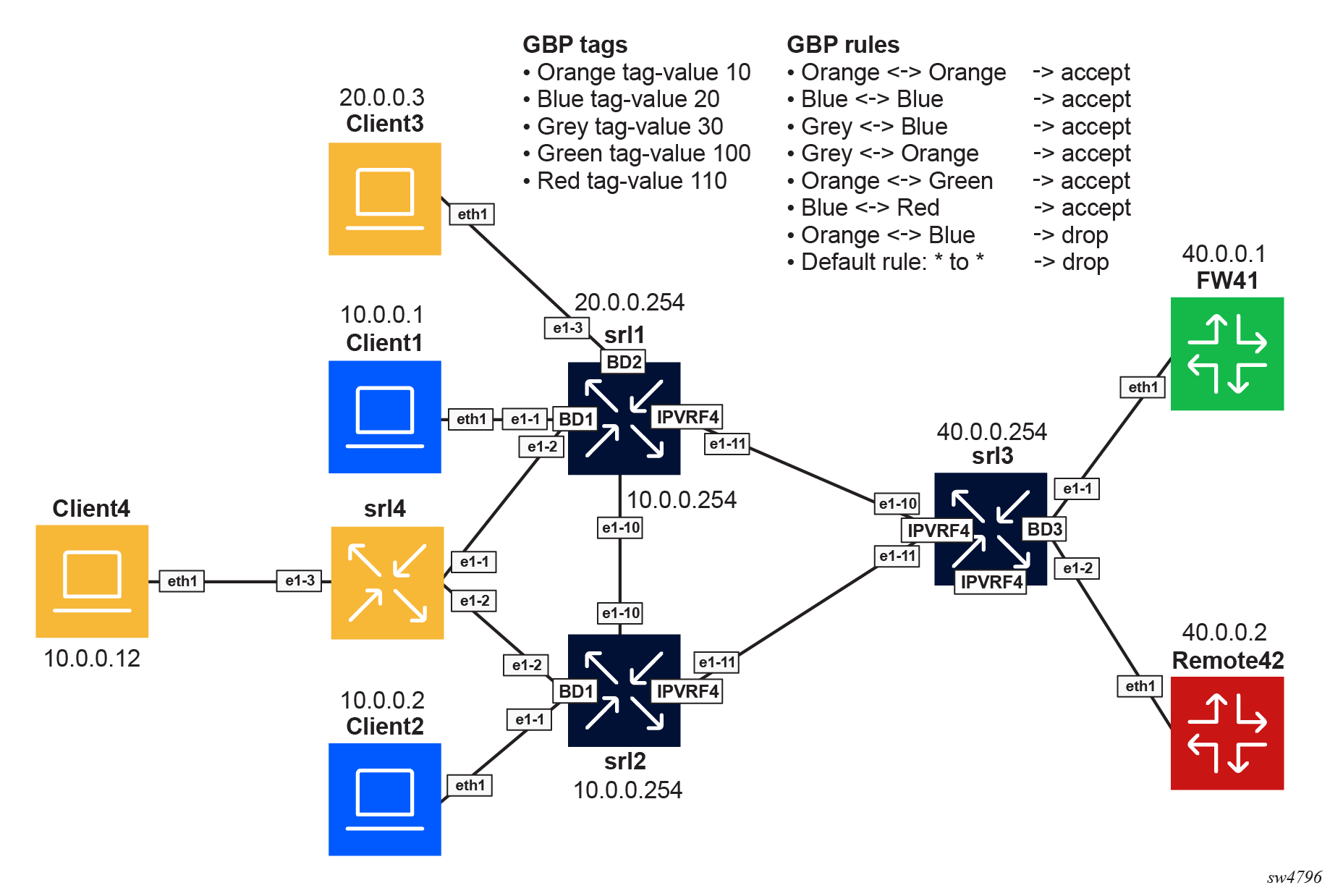
| Tag name | Tag value |
|---|---|
| ORANGE | 10 |
| BLUE | 20 |
| GREY | 30 |
| GREEN | 100 |
| RED | 110 |
| Group 1 | Group 2 | Action |
|---|---|---|
| ORANGE | ORANGE | Accept |
| BLUE | BLUE | Accept |
| GREY | BLUE | Accept |
| GREY | ORANGE | Accept |
| ORANGE | GREEN | Accept |
| BLUE | RED | Accept |
| ORANGE | BLUE | Drop |
The following steps describe the configuration of GBP on the nodes.
- Enable the following global configuration in the three
routers.
--{ candidate shared default }--[  ]--
A:admin@srl1# info flat platform resource-management group-based-policy
set / platform resource-management group-based-policy mac-lookup true
set / platform resource-management group-based-policy lpm-source-lookup true
The statement mac-lookup true enables a source MAC lookup in the MAC table to find the associated GBP tag in MAC-VRFs. This command requires a chassis reboot.
The statement lpm-source-lookup true enables the source IP lookup in the LPM table in IP-VRFs. This command does not require a chassis reboot.
The state leaf
chassis-reboot-requiredunderplatform resource-management group-based-policycan be checked to verify if a reboot is needed. - Configure BGP EVPN to distribute and program the GBP tags in each network
instance. Enable the following configuration under each BGP EVPN instance in all
network instances where GBP is
used.
--{ candidate shared default }--[ ]-- A:admin@srl1# info flat network-instance * protocols bgp-evpn bgp-instance 1 group-based-policy set / network-instance BD1 protocols bgp-evpn bgp-instance 1 group-based-policy add-community true set / network-instance BD1 protocols bgp-evpn bgp-instance 1 group-based-policy install-from-community true set / network-instance BD2 protocols bgp-evpn bgp-instance 1 group-based-policy add-community true set / network-instance BD2 protocols bgp-evpn bgp-instance 1 group-based-policy install-from-community true set / network-instance IPVRF4 protocols bgp-evpn bgp-instance 1 group-based-policy add-community true set / network-instance IPVRF4 protocols bgp-evpn bgp-instance 1 group-based-policy install-from-community true - Define the groups on each router by configuring the groups in all network
instances, even if they are not used in that network instance. This ensures
consistency across the
network.
// srl1 --{ candidate shared default }--[ ]-- A:admin@srl1# info flat network-instance * group-based-policy group * set / network-instance BD1 group-based-policy group BLUE tag-value 20 set / network-instance BD1 group-based-policy group GREEN tag-value 100 set / network-instance BD1 group-based-policy group GREY tag-value 30 set / network-instance BD1 group-based-policy group ORANGE tag-value 10 set / network-instance BD1 group-based-policy group RED tag-value 110 set / network-instance BD2 group-based-policy group BLUE tag-value 20 set / network-instance BD2 group-based-policy group GREEN tag-value 100 set / network-instance BD2 group-based-policy group GREY tag-value 30 set / network-instance BD2 group-based-policy group ORANGE tag-value 10 set / network-instance BD2 group-based-policy group RED tag-value 110 set / network-instance IPVRF4 group-based-policy group BLUE tag-value 20 set / network-instance IPVRF4 group-based-policy group GREEN tag-value 100 set / network-instance IPVRF4 group-based-policy group GREY tag-value 30 set / network-instance IPVRF4 group-based-policy group ORANGE tag-value 10 set / network-instance IPVRF4 group-based-policy group RED tag-value 110 // srl2 --{ candidate shared default }--[ ]-- A:admin@srl2# info flat network-instance * group-based-policy group * set / network-instance BD1 group-based-policy group BLUE tag-value 20 set / network-instance BD1 group-based-policy group GREEN tag-value 100 set / network-instance BD1 group-based-policy group GREY tag-value 30 set / network-instance BD1 group-based-policy group ORANGE tag-value 10 set / network-instance BD1 group-based-policy group RED tag-value 110 set / network-instance IPVRF4 group-based-policy group BLUE tag-value 20 set / network-instance IPVRF4 group-based-policy group GREEN tag-value 100 set / network-instance IPVRF4 group-based-policy group GREY tag-value 30 set / network-instance IPVRF4 group-based-policy group ORANGE tag-value 10 set / network-instance IPVRF4 group-based-policy group RED tag-value 110 // srl3 --{ candidate shared default }--[ ]-- A:admin@srl3# info flat network-instance * group-based-policy group * set / network-instance BD3 group-based-policy group BLUE tag-value 20 set / network-instance BD3 group-based-policy group GREEN tag-value 100 set / network-instance BD3 group-based-policy group GREY tag-value 30 set / network-instance BD3 group-based-policy group ORANGE tag-value 10 set / network-instance BD3 group-based-policy group RED tag-value 110 set / network-instance IPVRF4 group-based-policy group BLUE tag-value 20 set / network-instance IPVRF4 group-based-policy group GREEN tag-value 100 set / network-instance IPVRF4 group-based-policy group GREY tag-value 30 set / network-instance IPVRF4 group-based-policy group ORANGE tag-value 10 set / network-instance IPVRF4 group-based-policy group RED tag-value 110 - Associate the endpoints to the groups on each
router.
// srl1 --{ candidate shared default }--[ ]-- A:admin@srl1# info flat network-instance * group-based-policy interface * set / network-instance BD1 group-based-policy interface ethernet-1/1.1 group [ BLUE ] set / network-instance BD1 group-based-policy interface ethernet-1/2.1 group [ ORANGE ] set / network-instance BD2 group-based-policy interface ethernet-1/3.1 group [ ORANGE ] set / network-instance IPVRF4 group-based-policy interface irb0.1 group [ GREY ] set / network-instance IPVRF4 group-based-policy interface irb0.2 group [ GREY ] // srl2 --{ candidate shared default }--[ ]-- A:admin@srl2# info flat network-instance * group-based-policy interface * set / network-instance BD1 group-based-policy interface ethernet-1/1.1 group [ BLUE ] set / network-instance BD1 group-based-policy interface ethernet-1/2.1 group [ ORANGE ] set / network-instance IPVRF4 group-based-policy interface irb0.1 group [ GREY ] // srl3 --{ candidate shared default }--[ ]-- A:admin@srl3# info flat network-instance * group-based-policy interface * set / network-instance BD3 group-based-policy interface ethernet-1/1.1 group [ GREEN ] set / network-instance BD3 group-based-policy interface ethernet-1/2.1 group [ RED ] set / network-instance IPVRF4 group-based-policy interface irb0.3 group [ GREY ] - Define the policies between the groups on each router. To simplify the example,
the same policies are configured in all the routers. The same configuration is
applied to srl2 and srl3 on the corresponding network
instances.
// srl1
--{ candidate shared default }--[  ]--
A:admin@srl1# info flat network-instance * group-based-policy acl
set / network-instance BD1 group-based-policy acl entry 10 match source-group [ ORANGE ]
set / network-instance BD1 group-based-policy acl entry 10 match destination-group [ ORANGE ]
set / network-instance BD1 group-based-policy acl entry 10 action accept
set / network-instance BD1 group-based-policy acl entry 20 match source-group [ BLUE ]
set / network-instance BD1 group-based-policy acl entry 20 match destination-group [ BLUE ]
set / network-instance BD1 group-based-policy acl entry 20 action accept
set / network-instance BD1 group-based-policy acl entry 30 match source-group [ BLUE ]
set / network-instance BD1 group-based-policy acl entry 30 match destination-group [ GREY ]
set / network-instance BD1 group-based-policy acl entry 30 action accept
set / network-instance BD1 group-based-policy acl entry 40 match source-group [ GREY ]
set / network-instance BD1 group-based-policy acl entry 40 match destination-group [ BLUE ]
set / network-instance BD1 group-based-policy acl entry 40 action accept
set / network-instance BD1 group-based-policy acl entry 45 match source-group [ GREY ]
set / network-instance BD1 group-based-policy acl entry 45 match destination-group [ ORANGE ]
set / network-instance BD1 group-based-policy acl entry 45 action accept
set / network-instance BD1 group-based-policy acl entry 47 match source-group [ ORANGE ]
set / network-instance BD1 group-based-policy acl entry 47 match destination-group [ GREY ]
set / network-instance BD1 group-based-policy acl entry 47 action accept
set / network-instance BD1 group-based-policy acl entry 50 match source-group [ ORANGE ]
set / network-instance BD1 group-based-policy acl entry 50 match destination-group [ GREEN ]
set / network-instance BD1 group-based-policy acl entry 50 action accept
set / network-instance BD1 group-based-policy acl entry 60 match source-group [ GREEN ]
set / network-instance BD1 group-based-policy acl entry 60 match destination-group [ ORANGE ]
set / network-instance BD1 group-based-policy acl entry 60 action accept
set / network-instance BD1 group-based-policy acl entry 70 match source-group [ BLUE ]
set / network-instance BD1 group-based-policy acl entry 70 match destination-group [ RED ]
set / network-instance BD1 group-based-policy acl entry 70 action accept
set / network-instance BD1 group-based-policy acl entry 80 match source-group [ RED ]
set / network-instance BD1 group-based-policy acl entry 80 match destination-group [ BLUE ]
set / network-instance BD1 group-based-policy acl entry 80 action accept
set / network-instance BD1 group-based-policy acl entry 90 match source-group [ ORANGE ]
set / network-instance BD1 group-based-policy acl entry 90 match destination-group [ BLUE ]
set / network-instance BD1 group-based-policy acl entry 90 action log true
set / network-instance BD1 group-based-policy acl entry 90 action drop
set / network-instance BD1 group-based-policy acl entry 100 match source-group [ BLUE ]
set / network-instance BD1 group-based-policy acl entry 100 match destination-group [ ORANGE ]
set / network-instance BD1 group-based-policy acl entry 100 action log true
set / network-instance BD1 group-based-policy acl entry 100 action drop
set / network-instance BD1 group-based-policy acl entry 200 action log true
set / network-instance BD1 group-based-policy acl entry 200 action drop
set / network-instance BD2 group-based-policy acl entry 10 match source-group [ ORANGE ]
set / network-instance BD2 group-based-policy acl entry 10 match destination-group [ ORANGE ]
set / network-instance BD2 group-based-policy acl entry 10 action accept
set / network-instance BD2 group-based-policy acl entry 20 match source-group [ BLUE ]
set / network-instance BD2 group-based-policy acl entry 20 match destination-group [ BLUE ]
set / network-instance BD2 group-based-policy acl entry 20 action accept
set / network-instance BD2 group-based-policy acl entry 30 match source-group [ BLUE ]
set / network-instance BD2 group-based-policy acl entry 30 match destination-group [ GREY ]
set / network-instance BD2 group-based-policy acl entry 30 action accept
set / network-instance BD2 group-based-policy acl entry 40 match source-group [ GREY ]
set / network-instance BD2 group-based-policy acl entry 40 match destination-group [ BLUE ]
set / network-instance BD2 group-based-policy acl entry 40 action accept
set / network-instance BD2 group-based-policy acl entry 45 match source-group [ GREY ]
set / network-instance BD2 group-based-policy acl entry 45 match destination-group [ ORANGE ]
set / network-instance BD2 group-based-policy acl entry 45 action accept
set / network-instance BD2 group-based-policy acl entry 47 match source-group [ ORANGE ]
set / network-instance BD2 group-based-policy acl entry 47 match destination-group [ GREY ]
set / network-instance BD2 group-based-policy acl entry 47 action accept
set / network-instance BD2 group-based-policy acl entry 50 match source-group [ ORANGE ]
set / network-instance BD2 group-based-policy acl entry 50 match destination-group [ GREEN ]
set / network-instance BD2 group-based-policy acl entry 50 action accept
set / network-instance BD2 group-based-policy acl entry 60 match source-group [ GREEN ]
set / network-instance BD2 group-based-policy acl entry 60 match destination-group [ ORANGE ]
set / network-instance BD2 group-based-policy acl entry 60 action accept
set / network-instance BD2 group-based-policy acl entry 70 match source-group [ BLUE ]
set / network-instance BD2 group-based-policy acl entry 70 match destination-group [ RED ]
set / network-instance BD2 group-based-policy acl entry 70 action accept
set / network-instance BD2 group-based-policy acl entry 80 match source-group [ RED ]
set / network-instance BD2 group-based-policy acl entry 80 match destination-group [ BLUE ]
set / network-instance BD2 group-based-policy acl entry 80 action accept
set / network-instance BD2 group-based-policy acl entry 90 match source-group [ ORANGE ]
set / network-instance BD2 group-based-policy acl entry 90 match destination-group [ BLUE ]
set / network-instance BD2 group-based-policy acl entry 90 action log true
set / network-instance BD2 group-based-policy acl entry 90 action drop
set / network-instance BD2 group-based-policy acl entry 100 match source-group [ BLUE ]
set / network-instance BD2 group-based-policy acl entry 100 match destination-group [ ORANGE ]
set / network-instance BD2 group-based-policy acl entry 100 action log true
set / network-instance BD2 group-based-policy acl entry 100 action drop
set / network-instance BD2 group-based-policy acl entry 200 action log true
set / network-instance BD2 group-based-policy acl entry 200 action drop
set / network-instance IPVRF4 group-based-policy acl entry 10 match source-group [ ORANGE ]
set / network-instance IPVRF4 group-based-policy acl entry 10 match destination-group [ ORANGE ]
set / network-instance IPVRF4 group-based-policy acl entry 10 action accept
set / network-instance IPVRF4 group-based-policy acl entry 20 match source-group [ BLUE ]
set / network-instance IPVRF4 group-based-policy acl entry 20 match destination-group [ BLUE ]
set / network-instance IPVRF4 group-based-policy acl entry 20 action accept
set / network-instance IPVRF4 group-based-policy acl entry 30 match source-group [ BLUE ]
set / network-instance IPVRF4 group-based-policy acl entry 30 match destination-group [ GREY ]
set / network-instance IPVRF4 group-based-policy acl entry 30 action accept
set / network-instance IPVRF4 group-based-policy acl entry 40 match source-group [ GREY ]
set / network-instance IPVRF4 group-based-policy acl entry 40 match destination-group [ BLUE ]
set / network-instance IPVRF4 group-based-policy acl entry 40 action accept
set / network-instance IPVRF4 group-based-policy acl entry 45 match source-group [ GREY ]
set / network-instance IPVRF4 group-based-policy acl entry 45 match destination-group [ ORANGE ]
set / network-instance IPVRF4 group-based-policy acl entry 45 action accept
set / network-instance IPVRF4 group-based-policy acl entry 47 match source-group [ ORANGE ]
set / network-instance IPVRF4 group-based-policy acl entry 47 match destination-group [ GREY ]
set / network-instance IPVRF4 group-based-policy acl entry 47 action accept
set / network-instance IPVRF4 group-based-policy acl entry 50 match source-group [ ORANGE ]
set / network-instance IPVRF4 group-based-policy acl entry 50 match destination-group [ GREEN ]
set / network-instance IPVRF4 group-based-policy acl entry 50 action accept
set / network-instance IPVRF4 group-based-policy acl entry 60 match source-group [ GREEN ]
set / network-instance IPVRF4 group-based-policy acl entry 60 match destination-group [ ORANGE ]
set / network-instance IPVRF4 group-based-policy acl entry 60 action accept
set / network-instance IPVRF4 group-based-policy acl entry 70 match source-group [ BLUE ]
set / network-instance IPVRF4 group-based-policy acl entry 70 match destination-group [ RED ]
set / network-instance IPVRF4 group-based-policy acl entry 70 action accept
set / network-instance IPVRF4 group-based-policy acl entry 80 match source-group [ RED ]
set / network-instance IPVRF4 group-based-policy acl entry 80 match destination-group [ BLUE ]
set / network-instance IPVRF4 group-based-policy acl entry 80 action accept
set / network-instance IPVRF4 group-based-policy acl entry 90 match source-group [ ORANGE ]
set / network-instance IPVRF4 group-based-policy acl entry 90 match destination-group [ BLUE ]
set / network-instance IPVRF4 group-based-policy acl entry 90 action log true
set / network-instance IPVRF4 group-based-policy acl entry 90 action drop
set / network-instance IPVRF4 group-based-policy acl entry 100 match source-group [ BLUE ]
set / network-instance IPVRF4 group-based-policy acl entry 100 match destination-group [ ORANGE ]
set / network-instance IPVRF4 group-based-policy acl entry 100 action log true
set / network-instance IPVRF4 group-based-policy acl entry 100 action drop
set / network-instance IPVRF4 group-based-policy acl entry 200 action log true
set / network-instance IPVRF4 group-based-policy acl entry 200 action drop
Show and state commands
--{ candidate shared default }--[  ]--
A:admin@srl1# show network-instance BD1 bridge-table mac-table all
-----------------------------------------------------------------------------------------------
Mac-table of network instance BD1
-----------------------------------------------------------------------------------------------
+-------------------+------------------+--------------+------------+--------+-------+---------+
|      Address      |    Destination   |  Dest Index  |    Type    | Active | Aging |         |
|                   |                  |              |            |        |       | GBP Tags|
|                   |                  |              |            |        |       |         |
+===================+==================+==============+============+========+=======+=========+
| 00:00:5E:00:01:01 | irb-interface    | 0            | irb-       | true   | N/A   | N/A     |
|                   |                  |              | interface- |        |       |         |
|                   |                  |              | anycast    |        |       |         |
| 1A:70:07:FF:00:41 | vxlan-interface: | 867613807248 | evpn-static| true   | N/A   | 0       |
|                   | vxlan0.1         |              |            |        |       |         |
|                   | vtep:100.0.0.2   |              |            |        |       |         |
|                   | vni:1            |              |            |        |       |         |
| 1A:B3:06:FF:00:41 | irb-interface    | 0            | irb        | true   | N/A   | N/A     |
|                   |                  |              | interface  |        |       |         |
|                   |                  |              |            |        |       |         |
| AA:C1:AB:0F:24:1E | vxlan-interface: | 867613807248 | evpn       | true   | N/A   | 20      |
|                   | vxlan0.1         |              |            |        |       |         |
|                   | vtep:100.0.0.2   |              |            |        |       |         |
|                   | vni:1            |              |            |        |       |         |
| AA:C1:AB:D8:B8:6E | ethernet-1/2.1   | 2            | learnt     | true   | 300   | 10      |
|                   |                  |              |            |        |       |(ORANGE) |
|                   |                  |              |            |        |       |         |
| AA:C1:AB:E3:B4:CF | ethernet-1/1.1   | 1            | learnt     | true   | 300   | 20      |
|                   |                  |              |            |        |       |(BLUE)   |
+-------------------+------------------+--------------+------------+--------+-------+---------+
Total Irb Macs                 :    1 Total    1 Active
Total Static Macs              :    0 Total    0 Active
Total Duplicate Macs           :    0 Total    0 Active
Total Learnt Macs              :    2 Total    2 Active
Total Evpn Macs                :    1 Total    1 Active
Total Evpn static Macs         :    1 Total    1 Active
Total Irb anycast Macs         :    1 Total    1 Active
Total Proxy Antispoof Macs     :    0 Total    0 Active
Total Reserved Macs            :    0 Total    0 Active
Total Eth-cfm Macs             :    0 Total    0 Active
Total Irb Vrrps                :    0 Total    0 Active

--{ candidate shared default }--[  ]--
A:admin@srl1# show network-instance BD1 bridge-table mac-table mac 1A:70:07:FF:00:41
---------------------------------------------------------------------------------------------
Mac-table of network instance BD1
---------------------------------------------------------------------------------------------
Mac                     : 1A:70:07:FF:00:41
Destination             : vxlan-interface:vxlan0.1 vtep:100.0.0.2 vni:1
Dest Index              : 867613807248
Type                    : evpn-static
Programming Status      : Success
Aging                   : N/A
Last Update             : 2025-11-26T16:08:48.000Z
Duplicate Detect time   : N/A
Hold down time remaining: N/A
GBP Tags                : 0
---------------------------------------------------------------------------------------------

--{ candidate shared default }--[  ]--
A:admin@srl1# show network-instance BD1 bridge-table mac-table mac AA:C1:AB:D8:B8:6E
---------------------------------------------------------------------------------------------
Mac-table of network instance BD1
---------------------------------------------------------------------------------------------
Mac                     : AA:C1:AB:D8:B8:6E
Destination             : ethernet-1/2.1
Dest Index              : 2
Type                    : learnt
Programming Status      : Success
Aging                   : 292
Last Update             : 2025-11-26T19:53:51.000Z
Duplicate Detect time   : N/A
Hold down time remaining: N/A
GBP Tags                : 10 (ORANGE)
----------------------------------------
--{ candidate shared default }--[  ]--
A:admin@srl1# info from state interface irb0 subinterface 1 ipv4 arp neighbor * | as table
+--------+-------+----------+-----------------+---------+-----------------+--------+----------+
| Inter- | Sub-  | Ipv4-    |    Link-layer-  | Origin  | Expiration-time | Group- | Datapath-|
| face   | inter-| address  |    address      |         |                 | based- | programm-|
|        | face  |          |                 |         |                 | policy-| ing      |
|        |       |          |                 |         |                 | tag    | status   |
|        |       |          |                 |         |                 |        |          |
|        |       |          |                 |         |                 |        |          |
|        |       |          |                 |         |                 |        |          |
|        |       |          |                 |         |                 |        |          |
|        |       |          |                 |         |                 |        |          |
+========+=======+==========+=================+=========+=================+========+==========+
| irb0   |     1 | 10.0.0.1 |AA:C1:AB:E3:B4:CF| dynamic | 2025-11-        |     20 | success  |
|        |       |          |                 |         | 26T23:53:48.808Z|        |          |
|        |       |          |                 |         | (3 hours from   |        |          |
|        |       |          |                 |         | now)            |        |          |
| irb0   |     1 | 10.0.0.2 |AA:C1:AB:0F:24:1E| evpn    |                 |     20 | success  |
| irb0   |     1 | 10.0.0.12|AA:C1:AB:D8:B8:6E| dynamic | 2025-11-        |     10 | success  |
|        |       |          |                 |         | 26T23:53:56.753Z|        |          |
|        |       |          |                 |         | (3 hours from   |        |          |
|        |       |          |                 |         | now)            |        |          |
+--------+-------+----------+-----------------+---------+-----------------+--------+----------+

--{ candidate shared default }--[  ]--
A:admin@srl1# info from state interface irb0 subinterface 1 ipv4 arp neighbor * group-based-policy-tag | as table
+---------------------+--------------+------------------+------------------------+
|      Interface      | Subinterface |   Ipv4-address   | Group-based-policy-tag |
+=====================+==============+==================+========================+
| irb0                |            1 | 10.0.0.1         |                     20 |
| irb0                |            1 | 10.0.0.2         |                     20 |
| irb0                |            1 | 10.0.0.12        |                     10 |
+---------------------+--------------+------------------+------------------------+
--{ candidate shared default }--[  ]--
A:admin@srl1# info from state network-instance IPVRF4 route-table ipv4-unicast route * id * route-type * route-owner * origin-network-instance * group-based-policy-tag | as table
+--------+---------------+----+-------------------+-----------------------+----------+--------+
|Network-| Ipv4-prefix   | Id |    Route-type     |   Route-owner         | Origin-  | Group- |
|instance|               |    |                   |                       | network- | based- |
|        |               |    |                   |                       | instance | policy-|
|        |               |    |                   |                       |          | tag    |
|        |               |    |                   |                       |          |        |
+========+===============+====+===================+=======================+==========+========+
| IPVRF4 | 10.0.0.0/24   |  0 | bgp-evpn          | bgp_evpn_mgr          | IPVRF4   |     30 |
| IPVRF4 | 10.0.0.0/24   |  6 | local             | net_inst_mgr          | IPVRF4   |     30 |
| IPVRF4 | 10.0.0.2/32   |  0 | bgp-evpn-ifl-host | bgp_evpn_ifl_host_mgr | IPVRF4   |     20 |
| IPVRF4 | 10.0.0.254/32 |  6 | host              | net_inst_mgr          | IPVRF4   |     30 |
| IPVRF4 | 10.0.0.255/32 |  6 | host              | net_inst_mgr          | IPVRF4   |     30 |
| IPVRF4 | 20.0.0.0/24   |  7 | local             | net_inst_mgr          | IPVRF4   |     30 |
| IPVRF4 | 20.0.0.254/32 |  7 | host              | net_inst_mgr          | IPVRF4   |     30 |
| IPVRF4 | 20.0.0.255/32 |  7 | host              | net_inst_mgr          | IPVRF4   |     30 |
| IPVRF4 | 40.0.0.0/24   |  0 | bgp-evpn          | bgp_evpn_mgr          | IPVRF4   |     30 |
+--------+---------------+----+-------------------+-----------------------+----------+--------+

--{ candidate shared default }--[  ]--
A:admin@srl3# info from state network-instance IPVRF4 route-table ipv4-unicast route * id * route-type * route-owner * origin-network-instance * group-based-policy-tag | as table
+--------+---------------+----+-------------------+-----------------------+----------+--------+
|Network-|  Ipv4-prefix  | Id |    Route-type     |  Route-owner          | Origin-  | Group- |
|instance|               |    |                   |                       | network- | based- |
|        |               |    |                   |                       | instance | policy-|
|        |               |    |                   |                       |          | tag    |
|        |               |    |                   |                       |          |        |
+========+===============+====+===================+=======================+==========+========+
| IPVRF4 | 10.0.0.0/24   |  0 | bgp-evpn          | bgp_evpn_mgr          | IPVRF4   |     30 |
| IPVRF4 | 10.0.0.1/32   |  0 | bgp-evpn-ifl-host | bgp_evpn_ifl_host_mgr | IPVRF4   |     20 |
| IPVRF4 | 10.0.0.2/32   |  0 | bgp-evpn-ifl-host | bgp_evpn_ifl_host_mgr | IPVRF4   |     20 |
| IPVRF4 | 10.0.0.12/32  |  0 | bgp-evpn-ifl-host | bgp_evpn_ifl_host_mgr | IPVRF4   |     10 |
| IPVRF4 | 20.0.0.0/24   |  0 | bgp-evpn          | bgp_evpn_mgr          | IPVRF4   |     30 |
| IPVRF4 | 20.0.0.3/32   |  0 | bgp-evpn-ifl-host | bgp_evpn_ifl_host_mgr | IPVRF4   |     10 |
| IPVRF4 | 40.0.0.0/24   |  5 | local             | net_inst_mgr          | IPVRF4   |     30 |
| IPVRF4 | 40.0.0.254/32 |  5 | host              | net_inst_mgr          | IPVRF4   |     30 |
| IPVRF4 | 40.0.0.255/32 |  5 | host              | net_inst_mgr          | IPVRF4   |     30 |
+--------+---------------+----+-------------------+-----------------------+-------------------+
--{ candidate shared default }--[  ]--
A:admin@srl3# show acl gbp-filter IPVRF4 entry 200
=================================================================
Network Instance: IPVRF4
Entries         : 13
-----------------------------------------------------------------
Entry 200
  Match               : protocol=<undefined>, [any](*)->[any](*)
  Action              : drop
  Collect Stats       : true
  Match Packets       : 135
  Last Match          : 3 seconds ago
-----------------------------------------------------------------