
Flexible algorithm (Flex-Algo) for IS-IS
Segment routing with flexible algorithms (Flex-Algo) is an advanced networking technique that enhances the efficiency and performance of network routing. Flex-Algo enables the definition of custom routing policies based on multiple constraints such as latency, bandwidth, reliability, and administrative requirements beyond just the shortest path. This adaptability allows networks to handle diverse applications with varying requirements, such as real-time video, large data transfers, and mission-critical communications. Flex-Algo also enables more efficient network utilization, improved quality of service, and the ability to meet specific service level agreements.
Flex-Algo — as described in RFC 9350 — provides a way for IGPs to compute constraint-based paths across a domain. Flex-Algo uses extensions to IS-IS to advertise TLVs containing one or more flexible algorithm definitions (FADs). Each FAD is associated with a numeric identifier and identifies a set of metrics and constraints to calculate the best path along the constrained topology.
Flex-Algo works by incorporating additional attributes into the routing decision process. For example, a network path might be chosen based on its low latency for a video conferencing application, or on its high bandwidth for a large file transfer. This capability allows networks to dynamically adapt to changing conditions and demands.
When used with segment routing, one or more prefix node-SIDs can be associated with a Flex-Algo identifier, thereby providing a level of traffic engineering without any associated control plane overhead or additional label stack imposition. The classic SPF technology used for shortest path calculation is referred to as algorithm 0.
SR Linux supports Flex-Algo with IS-IS and segment routing, specifically, SR-MPLS and SRv6.
Flexible algorithm definition (FAD)
A FAD is the construct that identifies how a path for a flexible algorithm will be computed, and consists of three components:
-
a calculation type
-
a metric type
-
a set of constraints, such as include or exclude statements
To guarantee loop-free forwarding for paths computed with Flex-Algo, all routers that participate in a flexible algorithm must receive its definition. In IS-IS, the definition of the flexible algorithm is advertised using the FAD sub-TLV, which is a sub-TLV of the Router Capability TLV and has area scope, as shown in the following diagram.
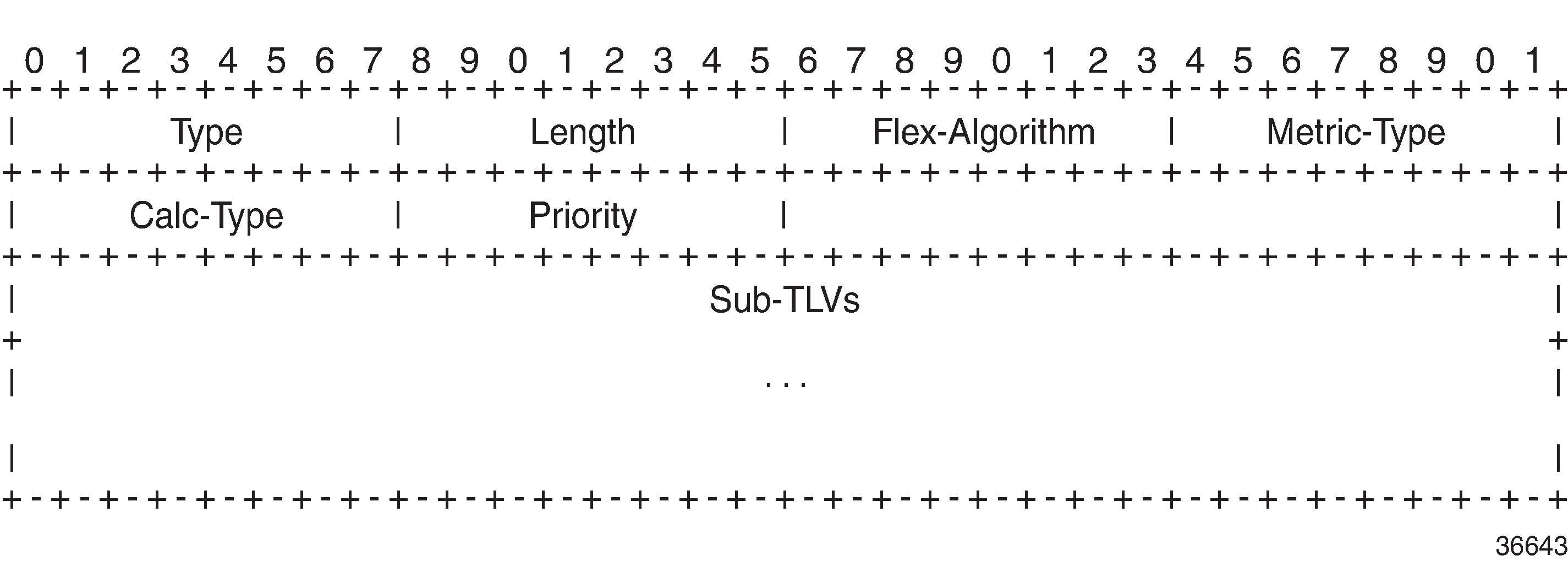
The Flex-Algo field contains a numeric identifier in the range 128 to 255 that is associated with the FAD through configuration. The Metric-Type field contains one of IGP metric (0), Min Unidirectional Link Delay (1), or TE Default Metric (2). The Calc-Type field contains a value from 0 to 127, identifying the IGP algorithm type, such as shortest path (0). One or more sub-TLV fields may be present to specify colors that are used to include or exclude links during the Flex-Algo path computation. These are encoded using Include-any Admin Group, Include-all Admin-Group, and Exclude Admin Group sub-TLVs.
The Sub-TLV field may also contain a Flags sub-TLV. In RFC 9350, only the M-flag (Prefix Metric) is defined. The M-flag indicates that the Flex-Algo Prefix Metric (FAPM) sub-TLV must be advertised with the prefix. The FAPM is not a sub-TLV of the FAD, but rather a sub-TLV of the Extended IP Reachability TLV, and is intended to assist with inter-area and inter-domain Flex-Algo path calculations.
Any IGP shortest-path tree calculation is limited to a single area, and the same applies to Flex-Algo. To allow for inter-area or inter-domain Flex-Algo calculations, the FAPM sub-TLV can be attached to Extended IP Reachability TLVs that are advertised between areas or domains. The FAPM sub-TLV contains the metric equivalent to the metric of the redistributing router to reach the prefix. If the FAD Flags sub-TLV has the M-flag set, the FAPM must be used when calculating prefix reachability for inter-area and inter-domain prefixes.
Only a subset of the routers participating in each flexible algorithm need to advertise the definition of the flexible algorithm. However, every router that is part of the intended Flex-Algo topology must be configured to participate in the flexible algorithm and all participating routers must use the same identical flexible algorithm. If a router is not configured to participate in a specific flexible algorithm, it ignores FAD sub-TLV advertisements for that flexible algorithm.
Application-specific link attributes
Advertisement of link attributes for the purpose of traffic engineering was initially introduced by RFC 5305, which included a number of sub-TLVs encoded within the Extended IS Reachability TLV, such as admin group, TE default metric, maximum link bandwidth, and unreserved bandwidth.
RFC 7308 updated RFC 5305 by increasing the size of the admin group sub-TLV, thereby allowing for advertisement of more than the standard 32 admin groups per link. RFC 5305 was again updated by RFC 8570, which proposed the use of metric extensions, adding additional sub-TLVs to the Enhanced IS Reachability TLV, such as unidirectional link delay, unidirectional link loss, and unidirectional available bandwidth. These traffic-engineering extensions have been widely deployed for RSVP-TE purposes.
Other applications that also make use of traffic-engineering link attributes have been defined, such as SR, Loopfree Alternates (LFAs), and Flex-Algo. If these applications coexist, it may be advisable to unambiguously indicate which traffic-engineering attributes apply to which application. Their requirements may differ on a link-to-link basis, or two applications may not be fully congruent; for example, SR may not be fully deployed network-wide. For these reasons, Flex-Algo specifies the use of Application-Specific Link Attributes (ASLAs), from RFC 8919, which defines two code points for IS-IS ASLA advertisements:
-
ASLA sub-TLV for Extended IS Reachability and Neighbor Link Attributes TLVs (TLVs 22, 23, 25, 141, 222, and 223)
-
Application-Specific Shared Risk Link Group (SRLG) TLV (not supported on SR Linux)
The ASLA sub-TLV contains Link Attribute sub-sub-TLVs, the format of which matches the existing formats defined in RFC 5305, RFC 7308, and RFC 8570.
The ASLA sub-TLV advertisements are coupled with an Application Identifier Bit Mask that identifies the applications associated with an advertisement. Two bit masks are available for use:
-
The Standard Applications Bit Mask (SABM) is used for applications, where the definition of each bit is controlled by IANA (for applications such as flexible algorithm).
-
The User-Defined Applications Bit Mask (UDABM) allows for future non-standard extensibility.
The encoding shown in the following diagram is used by both the ASLA sub-TLV and the Application-Specific SRLG TLV.
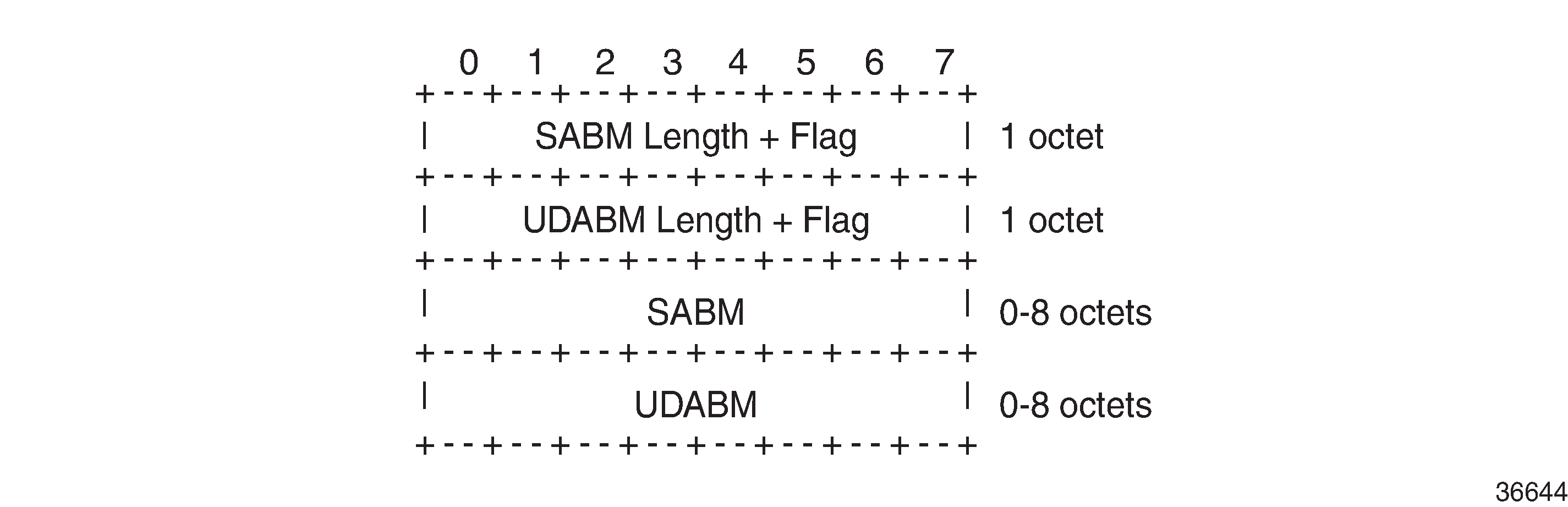
The SABM Length + Flag field contains a single L-flag, known as the Legacy flag. When the L-flag is set in the Application Identifier Bit Mask, all the applications specified in the bit mask must use the legacy traffic-engineering advertisements for the corresponding link. That is, link attributes should be carried as sub-TLVs of the Extended IS Reachability TLV rather than sub-sub-TLVs of the ASLA sub-TLV. This allows for a level of backward compatibility such that legacy advertisements may continue to be used if:
-
Only RSVP-TE is deployed.
-
Only SR/LFA is deployed.
-
A combination of RSVP-TE and SR/LFA is deployed, but the set of links that each application uses are fully congruent.
The UDABM Length + Flag field contains a single R-flag, which is reserved for future use.
The SABM field defines four bits to identify applications:
-
R-bit (bit 0) specifies RSVP-TE
-
S-bit (bit 1) specifies SR
-
F-Bit (bit 2) specifies LFA
-
X-bit (bit 3) specifies Flex-Algo
Applicability of Flex-Algo to segment routing
A router may use various algorithms when calculating reachability to other nodes or prefixes attached to those nodes. RFC 8667 — IS-IS extensions for SR — describes the use of the SR-Algorithm sub-TLV (carried as part of the Router Capabilities TLV) to advertise the algorithms that the router can support. By default, an SR router will signal support for algorithm 0 (metric-based SPF). To advertise participation for a specific Flex-Algo for SR, the Flex-Algo value must also be advertised in the SR-Algorithm sub-TLV.
When an SR router advertises a Prefix SID, it includes an SR-algorithm, so it is possible to associate a Prefix SID with a specific algorithm. For example, a router may advertise prefix P1 with Prefix SID {index=1, algorithm=0} and prefix P2 with Prefix SID {index=2, algorithm=128}. This indicates to other SR routers that to reach prefix P1, the default metric-based SPF should be used to calculate the best path, and to reach prefix P2, Flex-Algo 128 (and whatever that algorithm dictates) should be used.
Equally, in an SR-MPLS environment with an SR Global Block (SRGB) of {1000-1999}, a router may advertise prefix P1 with Prefix SID {index=1, algorithm=0}, and also Prefix SID {index=101, algorithm=129}. This indicates to other SR routers that when label 1001 is the active label to reach prefix P1, the default metric-based SPF should be used to calculate the best path, and when label 1101 is the active label, Flex-Algo 129 should be used.
The following diagram shows an SR-MPLS domain where all links have metric 10 except for links PE-5-PE-4 and PE-4-PE-3, which both have metric 30. All links have a unidirectional link latency of 10 ms, except for links PE-5-PE-4 and PE-4-PE-3, which both have a unidirectional latency of 5 ms. All routers use an SRGB of {1000-1999}.
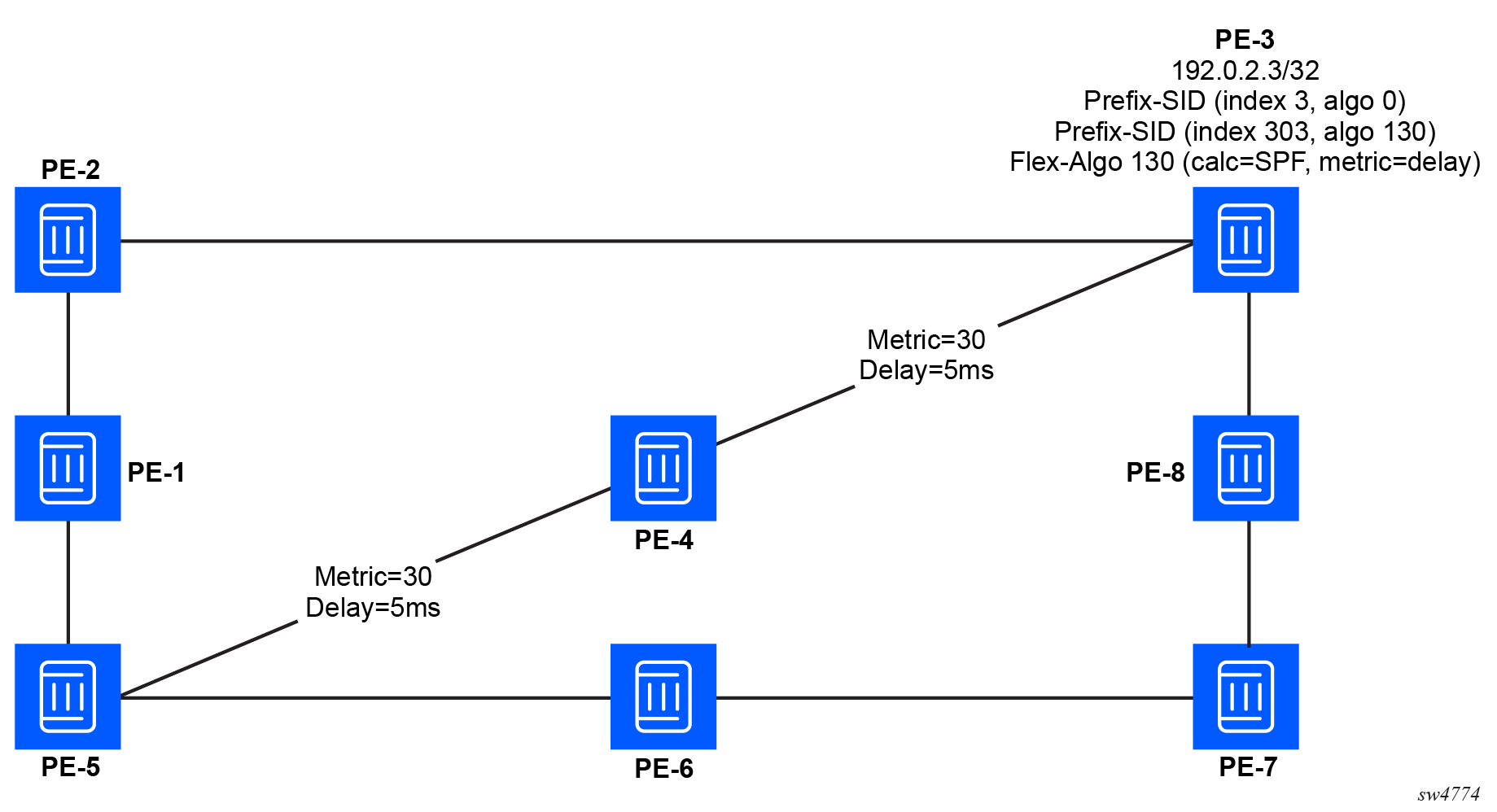
In addition to the default algorithm 0 (metric-based SPF), all routers participate in Flex-Algo 130 with FAD {calc-type=SPF, metric=delay, constraints=none}. Router PE-3 advertises prefix 192.0.2.3/32 with Prefix SID {index=3, algorithm=0} and Prefix SID {index=303, algorithm=130}. Router PE-5 has an SR-TE LSP provisioned with a destination of PE-3 (192.0.2.3) and a top (active) label of 1003. As a result, it is associated with algorithm 0 and uses the shortest path IGP metric PE-5-PE-1-PE-2-PE-3 to reach its destination. Router PE-5 is also provisioned with a second SR-TE LSP, again with a destination of PE-3 (192.0.2.3), but this time with a top (active) label of 1303. This second LSP is associated with Flex-Algo 130 and uses the shortest path delay metric PE-5-PE-4-PE-3 to reach its destination.
Configuring the FAD
To guarantee loop-free forwarding for paths that are computed for a specific Flex-Algo, all routers configured to participate in that Flex-Algo must agree on the FAD. The agreement ensures that routing loops and inconsistent forwarding behavior is avoided.
Each router that is configured to participate in a specific Flex-Algo must select the FAD based on standardized tie-breaking rules. This ensures consistent FAD selection in cases where different routers advertise different definitions for a specific Flex-Algo. The following tie-breaking rules apply:
-
From the FAD advertisements in the area (including both locally generated advertisements and received advertisements), the router selects the one with the highest priority value.
-
If there are multiple FAD advertisements with the same priority, the router selects one that originated from the router with the highest system ID.
A router that is not participating in a specific Flex-Algo is allowed to advertise the FAD for that specific Flex-Algo. Any change in the FAD may result in temporary disruption of traffic that is forwarded based on those Flex-Algo paths. The impact is similar to any other event that requires network-wide convergence.
If a node is configured to participate in a Flex-Algo but the selected FAD includes a calculation type, metric type, constraint, flag, or sub-TLV that is not supported by the node, the node stops participation and removes any forwarding state associated with the Flex-Algo.
To configure the FAD, use the flexible-algorithm flexible-algorithm-definitions flexible-algorithm-definition command.
Configure FAD
--{ candidate shared default }--[  ]--
# info with-context network-instance default flexible-algorithm flexible-algorithm-definitions
    network-instance default {
        flexible-algorithm {
            flexible-algorithm-definitions {
                flexible-algorithm-definition 128 {
                    admin-state enable
                    metric-type delay
                    priority 237
                    flags-tlv true
                }
            }
        }
    }
Including or excluding extended administrative groups in the FAD
To apply additional constraints on the Flex-Algo best path calculations, you can assign extended administrative groups to specific links, and then configure the FAD to include or exclude the extended administrative groups as required.
To configure extended administrative groups, perform the following steps:
-
Define the extended administrative group name (color) and bit position using
the following command:
flexible-algorithm global-attributes extended-admin-groups group
The bit position value (from 0 to 255) corresponds to one of the positions in the extended admin group bitmask.
-
Assign the extended administrative groups to interfaces using the following
command:
flexible-algorithm interface-attributes interface extended-admin-group
The interfaces configured with Flex-Algo attributes cannot be loopback or system interfaces.
-
Configure the FAD to include or exclude extended administrative groups using
the following flexible-algorithm-definition parameters:
- include-any — Includes any links that are associated with at least one of the referenced extended administrative groups in the path calculation.
- include-all — Includes only links that are associated with all of the referenced extended administrative groups in the path calculation. Links with only a subset of the specified extended admin-groups are excluded.
- exclude — Excludes links that are associated with the referenced extended administrative groups from the path calculation.
Define the extended administrative group name and bit position
--{ candidate shared default }--[ ]--
# info with-context network-instance default flexible-algorithm global-attributes extended-admin-groups
    network-instance default {
        flexible-algorithm {
            global-attributes {
                extended-admin-groups {
                    group blue {
                        bit-position 3
                    }
                    group green {
                        bit-position 2
                    }
                    group red {
                        bit-position 1
                    }
                }
            }
        }
    }
Assign extended administrative groups to interfaces
--{ candidate shared default }--[ ]--
# info with-context network-instance default flexible-algorithm interface-attributes
    network-instance default {
        flexible-algorithm {
            interface-attributes {
                interface ethernet-1/1.1 {
                    extended-admin-group [
                        red
                    ]
                    interface-ref {
                        interface ethernet-1/1
                        subinterface 1
                    }
                }
                interface ethernet-1/2.1 {
                    extended-admin-group [
                        green
                    ]
                    interface-ref {
                        interface ethernet-1/2
                        subinterface 1
                    }
                }
                interface ethernet-1/3.1 {
                    extended-admin-group [
                        blue
                    ]
                    interface-ref {
                        interface ethernet-1/3
                        subinterface 1
                    }
                }
            }
        }
    }
Configure the FAD to include and exclude extended administrative groups
--{ candidate shared default }--[ ]--
# info with-context network-instance default flexible-algorithm flexible-algorithm-definitions flexible-algorithm-definition 128
     network-instance default {
        flexible-algorithm {
            flexible-algorithm-definitions {
                flexible-algorithm-definition 128 {
                    admin-state enable
                    metric-type delay
                    priority 237
                    flags-tlv true
                    exclude [
                        red
                    ]
                    include-any [
                        blue
                        green
                    ]
                }
            }
        }
    }
Configuring IS-IS Flex-Algo advertisement and participation
After the FAD is defined, use the flexible-algorithm-binding command within the IS-IS instance to advertise the FAD into IS-IS. The Flex-Algo must be assigned a numeric identifier in the range of 128 to 255. The advertised true command advertises the locally specified FAD. The participate true command configures participation for the specific Flex-Algo and must be enabled on all routers that are part of this Flex-Algo topology.
Finally, LFA may be enabled. If it is, the LFA SPF uses the same Flex-Algo topology as that used to calculate the primary path. Also, LFA settings (such as TI-LFA, Remote-LFA) within a Flex-Algo are inherited from the base IS-IS/LFA configuration.
Configure IS-IS Flex-Algo advertisement and particpation
The following example configures IS-IS to advertise the previously configured FAD 128 and enables the router to participate in the specified algorithm.
--{ candidate shared default }--[  ]--
# info with-context network-instance default protocols isis instance sr-isis-1 segment-routing flexible-algorithm-binding 128
    network-instance default {
        protocols {
            isis {
                instance sr-isis-1 {
                    segment-routing {
                        flexible-algorithm-binding 128 {
                            isis-level l1l2
                            advertised true
                            participate true
                            loopfree-alternate true
                        }
                    }
                }
            }
        }
Configuring Flex-Algo prefix node SIDs
At each egress node, a Prefix Node-SID must be assigned to each Flex-Algo in use. This is advertised as a Prefix SID sub-TLV that contains (among other things) the algorithm to use to reach the associated Prefix Node-SID. The Node-SID is taken from the generic SRGB; no special or dedicated label space is required.
A prefix node SID (IPv4 or IPv6) must be assigned for each participating Flex-Algo.
The Flex-Algo SIDs are allocated from the label block assigned to segment routing. Configuring a special range is not required.
Configure Flex-Algo prefix node SID
--{ candidate shared default }--[  ]--
# info with-context network-instance default segment-routing mpls local-prefix-sid 1 flex-algo 128 ipv4-node-sid
    network-instance default {
        segment-routing {
            mpls {
                local-prefix-sid 1 {
                    flex-algo 128 {
                        ipv4-node-sid {
                            index 101
                        }
                    }
                }
            }
        }
    }
Flex-Algo traffic steering using static routes with indirect next hops
An indirect next-hop refers to a next-hop address that is reachable via an intermediate route rather than being directly connected to the local router. When a static route with an indirect next-hop is configured, the local router performs recursive lookups to determine the appropriate forwarding information to reach the final destination. This process enables the router to forward packets via one or more indirect next-hops that are not directly connected but reachable through existing routes, ensuring correct path resolution.
When combined with Flex-Algo, static routes with indirect next hops provide granular control over traffic flows, allowing you to steer traffic to destinations using adaptable algorithms to enhance overall network efficiency and resilience.
Benefits of Flex-Algo for traffic steering with static routes
When integrated with static routes using indirect next-hops, Flex-Algo enhances traffic engineering capabilities by optimizing path selection, ensuring that traffic is steered efficiently across the network in accordance with predefined constraints and objectives.
The following are some example Flex-Algo use cases:
- Load balancing — Distributes traffic evenly across multiple paths to prevent congestion and optimize resource utilization.
- Latency optimization — Prioritizes paths with lower latency to enhance application performance.
- Cost-based routing — Selects paths based on predefined cost metrics, balancing resource usage and performance.
Without support for Flex-Algo, indirect next-hops are resolved using a best-effort path, which may not provide the required performance for advanced use cases.
Indirect next-hop resolution over an algorithm-aware SR-MPLS tunnel
SR Linux tunnel resolution allows indirect next-hops to be resolved over an SR-MPLS tunnel. Without this capability, indirect next-hops are resolved solely using the IP routing table, without awareness of segment routing constraints.
The SR-MPLS tunnel resolution mechanism is algorithm-aware, allowing indirect next-hops to resolve to a Flex-Algo path with a specific Flex-Algo algorithm. The Flex-Algo path provides enhanced traffic steering based on algorithm-specific constraints.
The SR-MPLS tunnels are assigned at the next-hop group and child nexthop level.
SR Linux also supports a falllback mechanism for SR-MPLS tunnel resolution. When the desired algorithm-aware SR-MPLS tunnel cannot be resolved, you can designate the default algorithm SR-MPLS tunnel as a fall back.
MPLS-based next-hop resolution is mutually exclusive with other next-hop types
Within the same next-hop-group, indirect MPLS-based next-hop tunnel-resolution is mutually exclusive with other next-hop resolution types. Indirect MPLS next-hops cannot be combined with the following tunnel-resolution next-hop types:
- regular IP next-hops
- direct MPLS next-hops
- GRE tunnel next-hops
Fallback options
When the desired algorithm-aware SR-MPLS tunnel cannot be resolved, you can specify fallback options using the tunnel-resolution flex-algo-mode [spf-tunnel-fallback | strict | disabled] command, where:
- spf-tunnel-fallback
Specifies to use the Flex-Algo tunnel when available; otherwise, fall back to the default algorithm SR-MPLS tunnel.
- strict
Enforces strict resolution via the specified Flex-Algo tunnel, rejecting resolution if unavailable.
- disabled
Disables resolution to Flex-Algo tunnels and enforces strict resolution to default SR-MPLS tunnels using algorithm 0. The selection of eligible tunnels is governed by the allowed-tunnel-types configuration. If no tunnel types are specified, no tunnel resolution occurs, and recursive resolution falls back to IP next hops.
Configuring an indirect next hop group for Flex-Algo traffic steering
To configure a static next-hop-group for Flex-Algo traffic steering with an indirect next-hop, use the next-hop-groups command to configure the following parameters:
- tunnel-resolution
Specifies the Flex-Algo configuration for indirect static-routes, applied at the next-hop-group or child next-hop level. Also provides a container for the following parameters:
- algorithm
Specifies the tunnel algorithm (128 to 255).
- flex-algo-mode
Specifies tunnel fallback options: spf-tunnel-fallback, strict, or disabled.
- allowed-tunnel-types
Specifies the allowed tunnel types (sr-isis).
- algorithm
- nexthop
Specifies an index value for the next-hop and provides a container for the following parameters:
- ip-address
Specifies the IP address of the indirect next-hop.
-
resolve true
Enables the system to recursively resolve the indirect next-hop address.
The configuration of resolve true is a prerequisite for enabling tunnel-resolution to an indirect next-hop over an SR-MPLS tunnel. This applies when resolving the next-hop via Algorithm 0 (default SPF) or a user-defined flexible algorithm. Without resolve true enabled, the system does not attempt any resolution and expects the configured nexthop IP address to be a directly connected neighbor.
-
tunnel-resolution
When configured for a next-hop-group, the tunnel-resolution configuration is inherited by each child nexthop context, unless the child nexthop configuration specifies different settings.
- ip-address
Configure Flex-Algo traffic steering using static routes with indirect next hops
--{ + candidate shared default }--[  ]--
# info with-context network-instance default next-hop-groups group my-flex-group
    network-instance default {
        next-hop-groups {
            group my-flex-group {
                admin-state enable
                tunnel-resolution {
                    algorithm 128
                    flex-algo-mode spf-tunnel-fallback
                    allowed-tunnel-types [
                        sr-isis
                    ]
                }
                nexthop 10 {
                    ip-address 10.20.20.20
                    resolve true
                }
                nexthop 20 {
                    ip-address 10.30.30.30
                    resolve true
                    tunnel-resolution {
                        algorithm 129
                        flex-algo-mode strict
                        allowed-tunnel-types [
                            sr-isis
                        ]
                    }
                }
            }
        }
    }
The following table describes the behavior depending on the settings applied to the resolve, algorithm, flex-algo-mode, and allowed-tunnel-type parameters.
| resolve setting | algorithm setting | flex-algo-mode setting | allowed-tunnel-type setting | Tunnel resolution |
|---|---|---|---|---|
| true | no algorithm configured | spf-tunnel-fallback | sr-isis | Resolves to algorithm 0 tunnels (default SR-MPLS tunnels). |
| true | no algorithm configured | strict | sr-isis | Resolves only to algorithm 0 tunnels, ignoring any Flex-Algo tunnels. |
| true | no algorithm configured | disabled | sr-isis | Resolves only to algorithm 0 tunnels, ignoring any Flex-Algo tunnels. |
| true | no algorithm configured | spf-tunnel-fallback, strict | None specified | No tunnel resolution; configuration is rejected. |
| true | no algorithm configured | disabled | None specified | Falls back to IP next-hop (base SPF), ignoring all tunnels including Flex-Algo tunnels. |
| true | 128 to 255 | spf-tunnel-fallback | sr-isis | Prefers matching to the Flex-Algo tunnel, and falls back to algorithm 0 tunnels if the Flex-Algo tunnel is unavailable. |
| true | 128 to 255 | strict | sr-isis | Resolves only to the Flex-Algo tunnel, with no fallback to algorithm 0 tunnels. |
| true | 128 to 255 | disabled | sr-isis | Resolves only to algorithm 0 tunnels, ignoring Flex-Algo tunnels. |
| true | 128 to 255 | spf-tunnel-fallback, strict | None specified | No tunnel resolution; configuration is rejected. |
| true | 128 to 255 | disabled | None specified | Falls back to IP next-hop (base SPF), ignoring all tunnels including Flex-Algo tunnels. |
| false | Not applicable | Not applicable | Not applicable | Without resolve true enabled, the system does not attempt any resolution and expects the configured next-hop IP address to be a directly connected neighbor. |
Associating the Flex-Algo indirect next hop group with a static route
Configuring static routes
The following example configures a static route to use indirect static next-hop-group my-flex-group, defined in the preceding procedure.
--{ + candidate shared default }--[  ]--
# info with-context network-instance default static-routes
    network-instance default {
        static-routes {
            route 10.10.10.0/24 {
                static-next-hop-group my-flex-group
            }
        }
    }
Flex-Algo traffic steering using BGP automated steering
BGP automated steering using Flex-Algo refers to the use of adaptive, programmable algorithms within BGP routing processes to automatically manage and optimize the selection of routes. It leverages real-time performance data and adaptable algorithms to make informed routing decisions without manual intervention and enhance network performance, resilience, and operational efficiency.
Some example use cases include:
- Traffic engineering – Optimizes the distribution of traffic across multiple links to prevent congestion and balance load.
- Disaster recovery – Automatically reroutes traffic in the event of a link or node failure to maintain network connectivity.
- Quality of service (QoS) management – Steers traffic to routes that meet specific QoS requirements, such as low latency for real-time applications.
- Cost optimization – Selects routes that minimize operational costs by favoring lower-cost links while maintaining performance standards.
BGP automated steering operational model
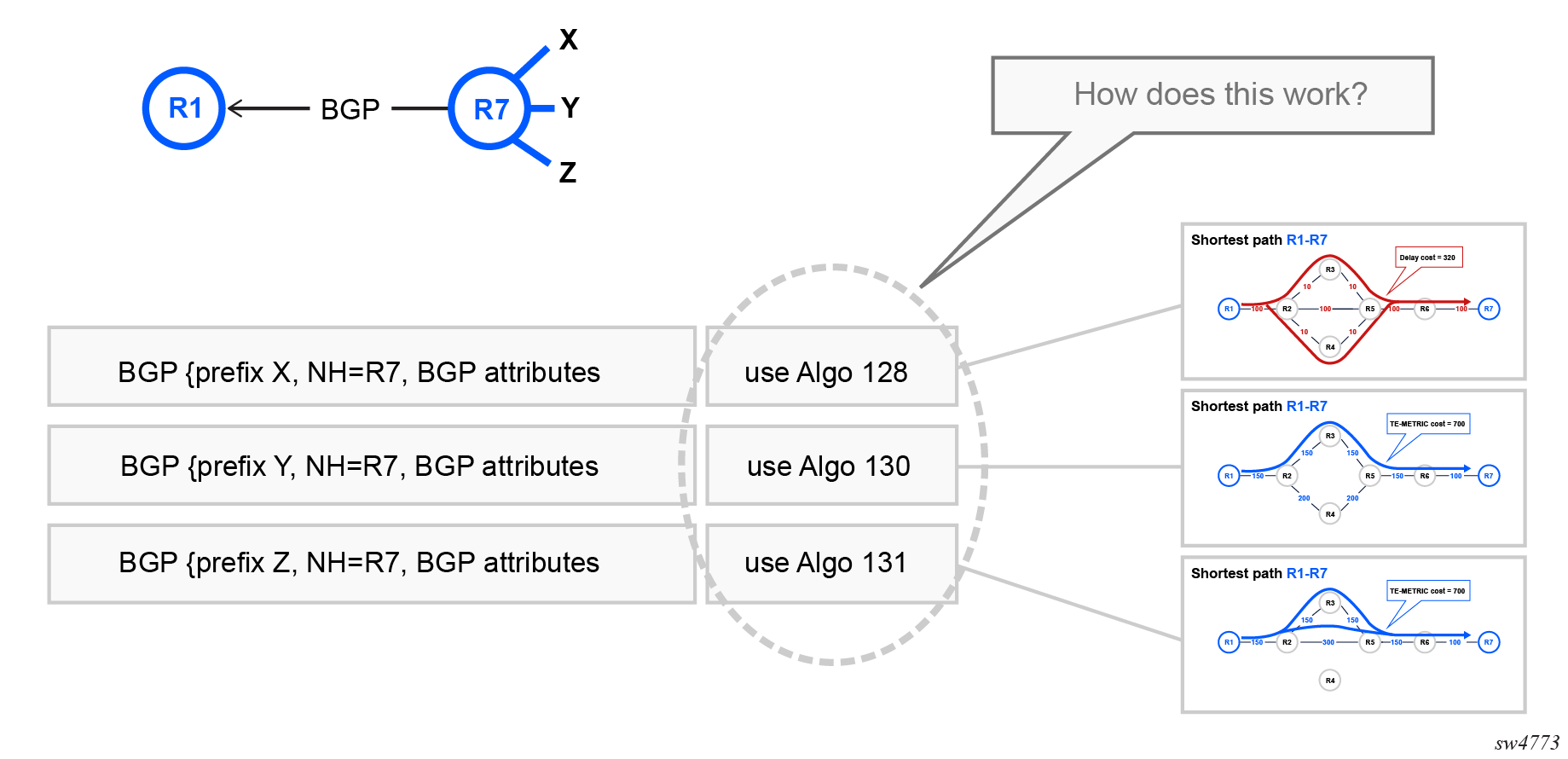
At a high level, automated steering using BGP requires two operational steps:
- Tagging BGP NLRI (unicast, IP-VPN, EVPN, or BGP-LU)
- Steering NLRI payload traffic based on the tag
The high level principle is shown in the following figure.
Tagging BGP NLRI
Tagging BGP NLRI typically consists of assigning the NLRI an extended community using an import route policy, but the tag can be any other attribute that a BGP route policy can match. Standard route policy commands are sufficient to add the required tag for FlexAlgo traffic steering.
Steering NLRI payload traffic based on the tag
To steer NLRI payload traffic, you must configure import route policy statements to match on the extended community and instruct the router to resolve the BGP next-hop using a specific Flex-Algo tunnel. At a high level, the steps are as follows:
- Use a route policy match statement to match the desired BGP NLRI and extended community.
- Define a route policy action to specify the algorithm associated with the BGP NLRI. Automated traffic steering requires a set-flex-algo action in the route policy specifying the desired algorithm (128-255) as the next-hop for the matching traffic.
- Enable BGP Flex-Algo aware next-hop resolution by specifying flex-algo as a selection attribute for tunnel resolution, which binds Flex-Algo aware LSPs to the BGP next-hop.
Tunnel-resolution mode and flex-algo parameter settings
When Flex-Algo is assigned using an import route policy, the Flex-Algo behavior depends on tunnel-resolution mode and flex-algo mandatory parameter settings, as described in the following table.
| Parameter settings | Result | |
|---|---|---|
| tunnel-resolution | flex-algo mandatory | |
| require | true |
The IGP computes Flex-Algo MPLS segment routing LSP resolution to resolve the next-hop. If no Flex-Algo aware LSP exists, the next-hop resolution fails. |
| false | Flex-Algo tunnel resolution is disabled and the specified Flex-Algo is ignored. Instead the system performs next-hop resolution to the best tunnel (segment routing, LDP, and so on) based on configured tunnel preference. If no applicable tunnels exist, then the next-hop is not resolved. | |
| prefer | true | The IGP computes Flex-Algo MPLS segment routing LSP resolution to resolve the next-hop. If no Flex-Algo aware LSP exists, the next-hop resolution fails. (IP route resolution for Flex-Algo aware next-hops is not supported.) |
| false | Flex-Algo tunnel resolution is disabled and the specified Flex-Algo is ignored. Instead the system performs next-hop resolution to the best tunnel (segment routing, LDP, and so on) based on configured tunnel preference. If no applicable tunnels exist, then the next-hop is not resolved. | |
| disabled | true | With flex-algo mandatory true, any resolution must be to an algorithm aware tunnel; however, the tunnel-resolution mode disabled indicates that the IP RTM must be used (no tunnels are allowed). If Flex-Algo is assigned through route policy in this case, it is considered an incorrect configuration. Because the IP RTM is not algorithm-aware, the next-hop is unresolved. |
| false | Flex-Algo tunnel resolution is disabled and the specified Flex-Algo is ignored. Instead next-hop resolution is resolved to the best IP route entry in the IP routing table. If it is not resolved by the IP routing table, then the next-hop remains unresolved. | |
Supported NLRI
BGP based FlexAlgo automated steering supports next-hop resolution for the following NLRI:
- Unlabeled IP routes
- IP-VPN and EVPN-MPLS routes imported into IP VRFs (non ABR/ASBR)
- IP-VPN and EVPN-MPLS routes at an ABR/ASBR
- Labeled-unicast (BGP-LU) routes
Tunnel-resolution mode setting not supported with BGP-LU
- When route-resolution admin-state is disabled (the default), the implicit tunnel-resolution mode is require.
- When route-resolution admin-state is enabled, the implicit tunnel-resolution mode is prefer.
BGP Flex-Algo aware resolution matrix
The following definitions describe the headings included in the following table:
- Allowed tunnels
The list of protocols that can be used to resolve tunnels.
- Algorithm for Next-Hop Resolution
When a BGP NLRI is received, an ingress route policy can assign a flexible algorithm to resolve the next hop via a Flex-Algo tunnel. If no Flex-Algo is specified, the default algorithm 0 is used.
- Existing SR-ISIS Tunnels to Next Hop
The list of segment routing tunnels, by algorithm, available toward the BGP next hop.
- mandatory
The boolean flex-algo mandatory as described in the preceding section.
- mode
The configuration option tunnel-resolution mode as described in the preceding section.
- Final Resolution Expected
The expected outcome when the configured conditions from prior configuration and state options are applied.
- Notes
Any specific additional information as needed.
| allowed tunnels |
Algorithm for Next-Hop Resolution(by route policy) |
Existing SR-ISIS Tunnels to Next Hop |
mandatory | mode | Final resolution Expected | Notes |
|---|---|---|---|---|---|---|
| LDP, SR‑ISIS | 129 | 129, 0 | TRUE | prefer | SR-ISIS <algo 129> | — |
| not set | 129, 0 | TRUE | prefer | LDP, SR-ISIS <algo 0>, RTM | If no Flex-Algo is assigned through route policy, no Flex-Algo constraints are applied and BGP next-hop recursion follows the standard behavior equivalent to when flex-algo mandatory false is set. | |
| 129 | 129, 0 | FALSE | prefer | LDP, SR-ISIS <algo 0>, RTM | Resolution is based on the configured tunnel preference. Flex-Algo tunnels are ignored. | |
| not set | 129, 0 | FALSE | prefer | LDP, SR-ISIS <algo 0>, RTM | Resolution is based on the configured tunnel preference. Flex-Algo tunnels are ignored. | |
| LDP, SR‑ISIS | 129 | 0 | TRUE | prefer | unresolved | — |
| not set | 0 | TRUE | prefer | LDP, SR-ISIS <algo 0>, RTM | If no Flex-Algo is assigned through route policy, no Flex-Algo constraints need to be applied and BGP next-hop recursion follows the standard behavior equivalent to when flex-algo mandatory false is set. | |
| 129 | 0 | FALSE | prefer | LDP, SR-ISIS <algo 0>, RTM | Resolution is based on configured tunnel preference. Flex-Algo tunnels are ignored. | |
| not set | 0 | FALSE | prefer | LDP, SR-ISIS <algo 0>, RTM | Resolution is based on configured tunnel preference. Flex-Algo tunnels are ignored. | |
| LDP, SR‑ISIS | 129 | 129, 0 | TRUE | require | SR-ISIS <algo 129> | — |
| not set | 129, 0 | TRUE | require | LDP, SR-ISIS <algo 0> | If no Flex-Algo is assigned through route policy, no Flex-Algo constraints need to be applied and BGP next-hop recursion follows the standard behavior equivalent to when flex-algo mandatory false is set. | |
| 129 | 129, 0 | FALSE | require | LDP, SR-ISIS <algo 0> | Resolution is based upon configured tunnel-preference. Fallback to RTM recursion not allowed. Flexible algorithm tunnels are ignored. | |
| not set | 129, 0 | FALSE | require | LDP, SR-ISIS <algo 0> | Resolution is based upon configured tunnel-preference. Fallback to RTM recursion not allowed. Flexible algorithm tunnels are ignored. | |
| LDP, SR‑ISIS | 129 | 0 | TRUE | require | unresolved | — |
| not set | 0 | TRUE | require | LDP, SR-ISIS <algo 0> | If no Flex-Algo is assigned through route policy, no Flex-Algo constraints need to be applied and BGP next-hop recursion follows the standard behavior equivalent to when flex-algo mandatory false is set. | |
| 129 | 0 | FALSE | require | LDP, SR-ISIS <algo 0> | Resolution is based on configured tunnel preference. Fallback to RTM recursion is not allowed. | |
| not set | 0 | FALSE | require | LDP, SR-ISIS <algo 0>, LDP | Resolution is based on configured tunnel preference. Fallback to RTM recursion is not allowed. | |
| LDP, SR‑ISIS | 129 | 129, 0 | TRUE | disabled | unresolved | — |
| not set | 129, 0 | TRUE | disabled | RTM (plane ISIS IP routing) | If no Flex-Algo is assigned through route policy, no Flex-Algo constraints need to be applied and BGP next-hop recursion follows the standard behavior equivalent to when flex-algo mandatory false is set. | |
| 129 | 129, 0 | FALSE | disabled | RTM (plane ISIS IP routing) | — | |
| not set | 129, 0 | FALSE | disabled | RTM (plane ISIS IP routing) | — | |
| LDP, SR‑ISIS | 129 | 0 | TRUE | disabled | unresolved | — |
| not set | 0 | TRUE | disabled | RTM (plane ISIS IP routing) | If no Flex-Algo is assigned through route policy, no Flex-Algo constraints need to be applied and BGP next-hop recursion follows the standard behavior equivalent to when flex-algo mandatory false is set. | |
| 129 | 0 | FALSE | disabled | RTM (plane ISIS IP routing) | — | |
| not set | 0 | FALSE | disabled | RTM (plane ISIS IP routing) | — | |
| empty | 129 | 129, 0 | FALSE | require | unresolved | — |
| not set | 129, 0 | FALSE | require | unresolved | — | |
| 129 | 129, 0 | TRUE | prefer | unresolved | — | |
| not set | 129, 0 | FALSE | require | unresolved | — | |
| N/A | 129, 0 | N/A | disabled | RTM (plane ISIS IP routing) | — | |
| LDP | N/A | 129, 0 | FALSE | require | LDP | — |
| 129 | 129, 0 | TRUE | prefer | unresolved | — | |
| not set | 129, 0 | TRUE | prefer | LDP | If no Flex-Algo is assigned through route policy, no Flex-Algo constraints need to be applied and BGP next-hop recursion follows the standard behavior equivalent to when flex-algo mandatory false is set. | |
| N/A | 129, 0 | FALSE | prefer | LDP | — |
Configuring a routing policy for Flex Algo traffic steering with BGP
Use the routing-policy command to define a policy that matches on an extended-community and defines the value of the Flex-Algo tunnel to use for traffic steering.
-{ candidate shared default }--[  ]--
# info with-context routing-policy
    routing-policy {
        policy flex-policy {
            statement 100 {
                match {
                    bgp {
                        extended-community {
                            extended-community-set e1
                            match-set-options any
                        }
                    }
                }
                action {
                    bgp {
                        next-hop-resolution {
                            set-flex-algo 128
                        }
                    }
                }
            }
        }
    }
Configuring Flex-Algo traffic steering using BGP automated steering
Configuring Flex-Algo traffic steering using BGP automated steering (non-BGP-LU)
--{ candidate shared default }--[  ]--
# info with-context network-instance default protocols bgp
    network-instance default {
        protocols {
            bgp {
                admin-state enable
                import-policy [
                    flex-policy
                ]
                afi-safi ipv4-unicast {
                    ipv4-unicast {
                        next-hop-resolution {
                            ipv4-next-hops {
                                tunnel-resolution {
                                    mode prefer
                                    allowed-tunnel-types [
                                        sr-isis
                                    ]
                                    selection-attributes {
                                        tag {
                                            mandatory true
                                        }
                                        flex-algo {
                                            mandatory true
                                        }
                                    }
                                }
                            }
                        }
                    }
                }
            }
        }
    }
Configuring Flex-Algo traffic steering using BGP automated steering (BGP-LU)
The BGP-LU address-family does not support a tunnel-resolution mode command. Instead, the implicit tunnel-resolution mode for BGP-LU routes is determined by the route-resolution admin-state setting, as follows:
-
route-resolution admin-state disable (default) – equivalent to an implicit tunnel-resolution mode of require
-
route-resolution admin-state enable – equivalent to an implicit tunnel-resolution mode of prefer
The following example shows a BGP-LU next-hop with route-resolution enabled, providing the equivalent to a tunnel-resolution mode of require.
--{ candidate shared default }--[  ]--
# info with-context network-instance default protocols bgp
    network-instance default {
        protocols {
            bgp {
                admin-state enable
                import-policy [
                    flex-policy
                ]
                afi-safi ipv4-labeled-unicast {
                    ipv4-labeled-unicast {
                        next-hop-resolution {
                            ipv4-next-hops {
                                route-resolution {
                                    admin-state enable
                                }
                                tunnel-resolution {
                                    allowed-tunnel-types [
                                        sr-isis
                                    ]
                                    selection-attributes {
                                        tag {
                                            mandatory true
                                        }
                                        flex-algo {
                                            mandatory true
                                        }
                                    }
                                }
                            }
                        }
                    }
                }
            }
        }
    }
Delay normalization with Flex-Algo
Interface delay normalization is a network engineering method used to address and manage the different delay times (latency) experienced across a network. Within Flex-Algo, delay normalization provides a method to adjust and standardize delay metrics across different network segments, ensuring consistent and optimized routing decisions. Delay normalization can significantly improve the impact of delay-based routing decisions, leading to enhanced network reliability, optimized latency, and improved quality of service (QoS).
Delay normalization builds on the principle of reducing the granularity of advertised delay. By default, the measured delay tolerance is expressed in 1 microsecond units whether the delay is small or large. With delay normalization, the dynamically measured delay tolerance is artificially changed by the Interior Gateway Protocol (IGP).
Understanding network delays
In a network, data packets often experience different delay times as they travel from their source to their destination. These delays can be caused by various factors, including:
- physical distance
- number of hops (intermediate devices like routers and switches packets pass through)
- network traffic load
- processing speed of the devices
IS-IS can use these characteristics as metrics for Flex-Algo computation. One of the key use cases for Flex-Algo technology is low-latency routing using dynamic delay measurement.
Measuring delay
The first step in interface delay normalization is to measure the delay experienced at various points or interfaces in the network. This measurement is typically done using tools and protocols designed to measure round-trip times (RTT) or one-way delay times. Nokia SR Linux typically deploys Two-Way Active Measurement Protocol (TWAMP) to measure unidirectional interface delay. Delay is measured in microseconds (µsec). However, if the Flex-Algo topology computation uses raw delay values as link metrics, minor differences in link delay can prevent the use of valid ECMP routes.
Normalizing delays
After the delay measurements are obtained, the delay normalization process computes a normalized delay value to use as the metric. This process involves adjusting certain parameters or configurations in the network to make the delay more uniform or predictable across different segments of the network. This normalized value is then advertised through IS-IS using Flex-Algo.
When delay is dynamically measured using TWAMP, mechanisms are in place to avoid frequent updates of the measured interface delay by the IGP. This is achieved by enforcing either a percentage difference or an absolute value difference. The dynamic measured dampening causes the IGP to reduce the frequency of measured delay updates, thereby stabilizing most observed delay measurement dynamics.
For more information about TWAMP, see the SR Linux OAM and Diagnostics Guide.
Delay normalization calculation
The normalized delay is calculated as follows:
This calculation ensures that small variations in delay are smoothed out, improving the stability of the delay metric used in IGP computations.
The following table describes the normalized delay calculation using multiple examples.
| Measured delay (µsec) | Delay tolerance interval (µsec) | Minimum delay (µsec) | Calculated delay | Resulting normalized delay (µsec) |
|---|---|---|---|---|
| 2 | 11 | 5 | 2 / 11 = 0 | 0 × 11 + 5 = 5 |
| 10 | 11 | 5 | 10 / 11 = 0 | 0 × 11 + 5 = 5 |
| 11 | 11 | 5 | 11 / 11 = 1 | 1 × 11 + 5 = 16 |
| 12 | 11 | 5 | 12 / 11 = 1 | 1 × 11 + 5 = 16 |
| 20 | 11 | 5 | 20 / 11 = 1 | 1 × 11 + 5 = 16 |
| 22 | 11 | 5 | 22 / 11 = 2 | 2 × 11 + 5 = 27 |
| 32 | 11 | 5 | 32 / 11 = 2 | 2 × 11 + 5 = 27 |
| 33 | 11 | 5 | 33 / 11 = 3 | 3 × 11 + 5 = 38 |
| 100 | 11 | 5 | 100 / 11 = 9 | 9 × 11 + 5 = 104 |
Configuring delay normalization
To configure delay normalization for an IS-IS interface, use the delay normalization admin-state enable command.
Configure IS-IS interface delay normalization
--{ candidate shared default }--[ ]--
# info with-context network-instance default protocols isis instance sr-isis-1 interface ethernet-1/1.1 delay normalization
    network-instance default {
        protocols {
            isis {
                instance sr-isis-1 {
                    interface ethernet-1/1.1 {
                        delay {
                            normalization {
                                admin-state enable
                                minimum-delay 1
                                delay-tolerance-interval 10
                            }
                        }
                    }
                }
            }
        }
    }