
Static MPLS LSPs
This chapter provides information about manually configured static MPLS LSPs.
Topics in this chapter include:
Applicability
This chapter is applicable to SR Linux 25.7.R1. There are no prerequisites or conditions on the hardware for this configuration.
Overview
Because of the connectionless nature of the network layer protocol, IP packets travel through the network on a hop-by-hop basis with routing decisions made at each node. As a result, hyper aggregation of data on specific links may occur and it may impact the provider's ability to provide guaranteed service levels across the network end-to-end. To address these shortcomings, Multi-Protocol Label Switching (MPLS) was developed.
MPLS provides the capability to establish connection-oriented paths, called Label Switched Paths (LSPs), over a connectionless (IP) network. The LSP offers a mechanism to engineer network traffic independently from the underlying network routing protocol (mostly IP) to improve the network resiliency and recovery options and to permit delivery of services that are not readily supported by conventional IP routing techniques, such as Layer 2 Virtual Private Networks (VPNs). These benefits are essential for today's communication network explaining the wide deployment base of the MPLS technology.
RFC 3031 specifies the MPLS architecture whereas this chapter describes the configuration and troubleshooting of static MPLS LSPs on SR Linux.
MPLS LSPs can also be dynamically established using a label signaling protocol, such as Label Distribution Protocol (LDP), as described in LDP Point-to-Point LSPs or segment routing, as described in Segment Routing with IS-IS Control Plane and Segment Routing – Traffic Engineered Tunnels.
Packet forwarding
- analyzing the packet header
- referencing the local routing table to find the longest prefix match based on the destination address in the IP header
- sending out the packet on the corresponding interface
The first function partitions the entire set of incoming packets into a set of Forwarding Equivalence Classes (FECs). All packets associated to a particular FEC are forwarded along the same path to the same destination. The second function maps each FEC to a next hop destination router. Each router along the path performs these actions.
In MPLS, the assignment of a packet to a particular FEC is done only one time: when the packet enters the network. The FEC is mapped to an LSP, which is established prior to packet forwarding.
An MPLS egress label, representing the FEC to which the packet is assigned, is attached to the packet (push operation) and the labeled packet is forwarded to the next hop router along that LSP path.
At subsequent hops, the packet IP header is not analyzed. Instead, the ingress label is used as an index into a table which specifies the next hop and a new egress label. The ingress label is replaced with the new egress label (swap operation), and the packet is forwarded to the specified next hop.
At the MPLS network egress, the ingress label is removed from the packet (pop operation). If this router is the destination of the packet (based on the remaining packet), the packet is handed to the receiving application, such as a MAC VRF. If this router is not the destination of the packet, the packet is sent into a new MPLS tunnel or forwarded by conventional IP forwarding toward the Layer 3 destination.
Terminology
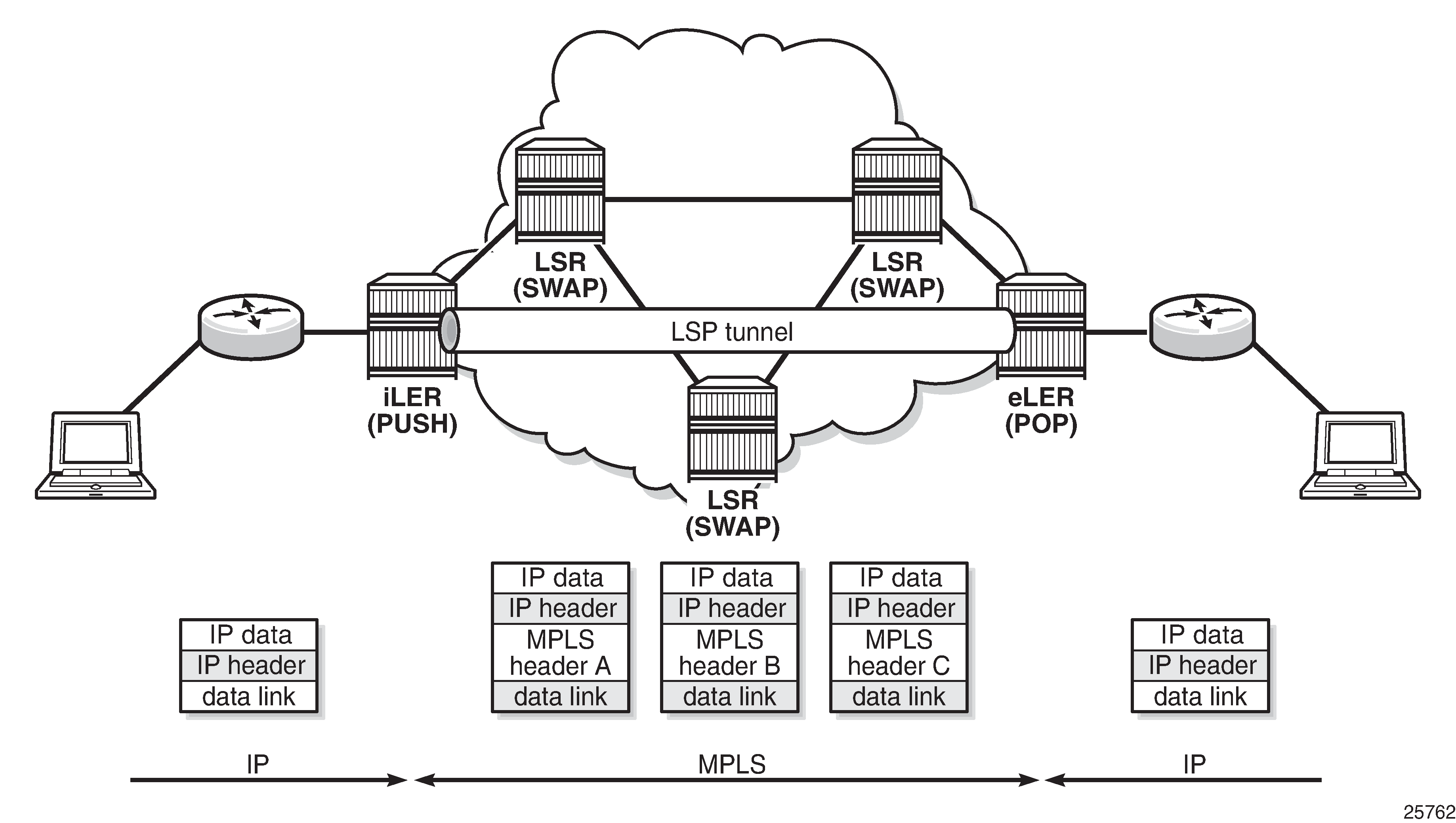
- The MPLS router at the head-end of an LSP is called the ingress Label Edge Router (ILER)
- The MPLS router at the tail-end of an LSP is called the egress Label Edge Router (ELER)
The ILER receives unlabeled packets from outside the MPLS domain, applies MPLS egress labels to the packets, and forwards the labeled packets into the MPLS domain.
The ELER receives labeled packets from the MPLS domain, removes the ingress labels, and forwards unlabeled packets outside the MPLS domain.
A Label Switching Router (LSR) is a device internal to an MPLS network, with all interfaces inside the MPLS domain. These devices switch labeled packets inside the MPLS domain. In the core of the network, LSRs ignore the packet's IP header and simply forward the packet using the MPLS label swapping mechanism. The last LSR before the ELER can be configured with an implicit null label. This informs that LSR to send MPLS packets without an outer egress label. This is known as Penultimate Hop Popping (PHP).
LSP establishment
The LSP must be established before any packets can be forwarded. To set up an LSP, labels need to be distributed for the path. For static LSPs, the label distribution is done manually by the network administrator. Although a high control level of the labels in use is achieved, static LSPs cannot enjoy the resilience and recovery functionality that the dynamic label signaling protocols can offer.
Example topology
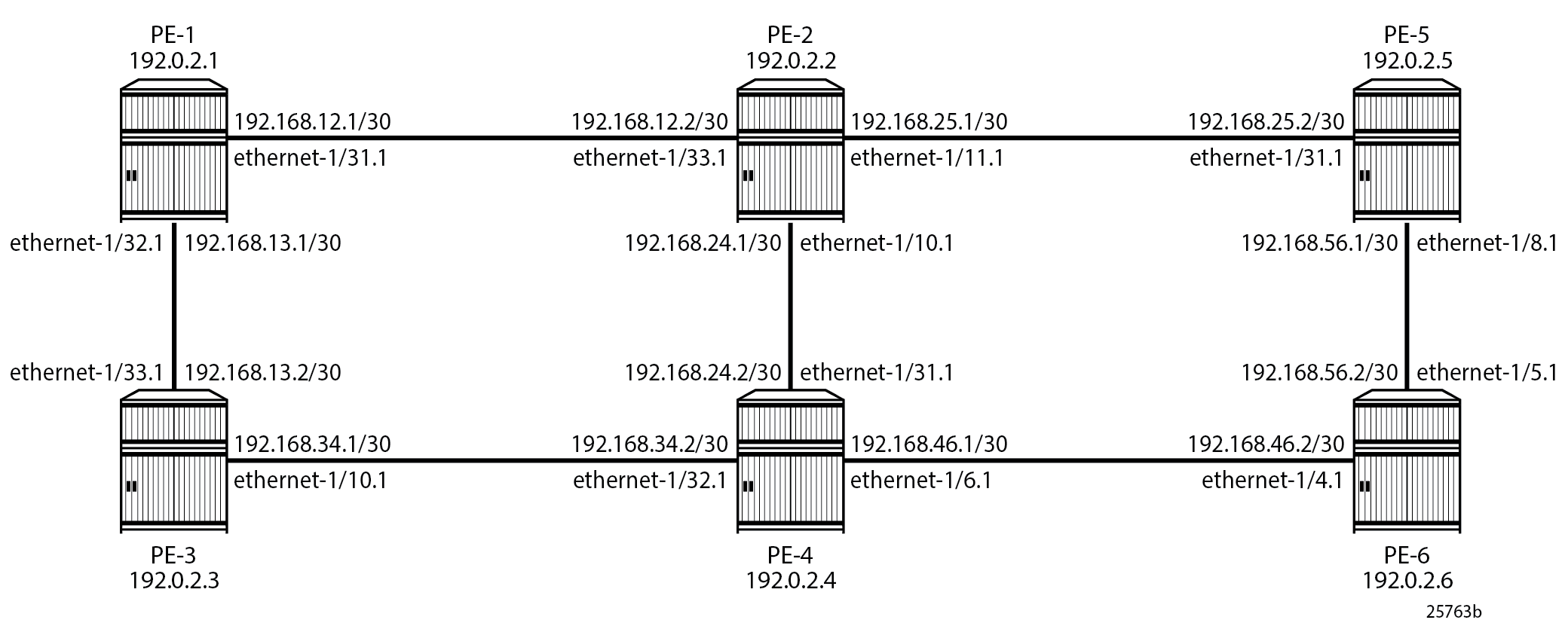
MPLS example topology shows the example topology consisting of six SR Linux nodes located in a single autonomous system.
Configuration
Static LSPs are set up manually. Because they do not use a signaled label distribution protocol, an Interior Gateway Protocol (IGP) is not needed.
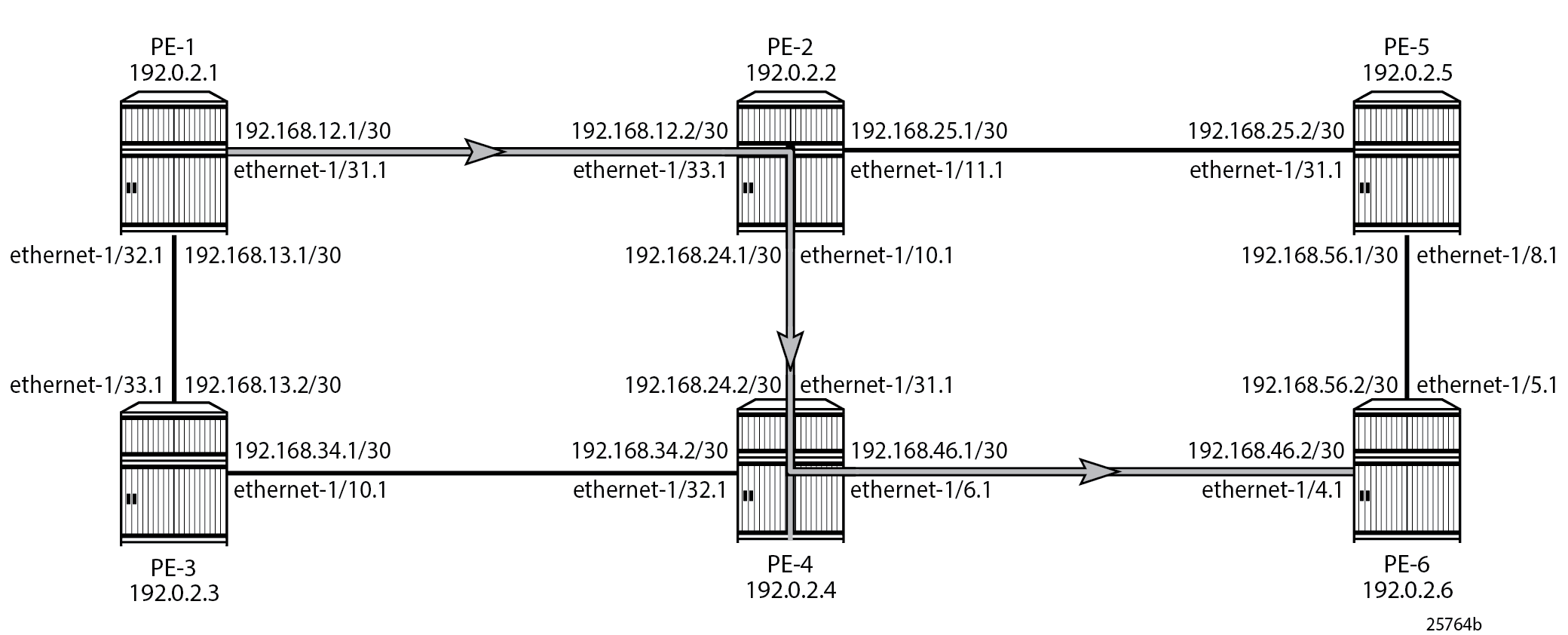
As an example, a static LSP is created starting from PE-1 (ILER; egress label 102), running over PE-2 (LSR; egress label 204) and PE-4 (LSR; egress label 406), and terminating on PE-6 (ELER) as shown in Static LSP running over PE-1, PE-2, PE-4, PE-6. A static LSP is also created for the return traffic, starting from PE-6 (ILER; egress label 604), running over PE-4 (LSR; egress label 402) and PE-2 (LSR; egress label 201), and terminating on PE-1 (ELER). For the return traffic, PE-6 becomes the ILER and PE-1 becomes the ELER. This is not explicitly shown further on.
On each PE along the path, configure a static label range for MPLS that contains the chosen labels, as follows:
# on PE-1, PE-2, PE-4, PE-6:
enter candidate
    system mpls label-ranges static slb-mpls {
                    start-label 100
                    end-label 699
                    shared false
On each PE along the path, configure next hop groups, which define the next hop IP address and egress label that the PE pushes onto egress traffic that belongs to the group. The next hop IP address is the interface address of the next hop along the static path, facing the current node.
For PE-1 (ILER), this results in the following configuration:
# on PE-1:
enter candidate
    network-instance default next-hop-groups {
            group g-from-1-to-2 {
                admin-state enable
                nexthop 0 {
                    ip-address 192.168.12.2
                    admin-state enable
                    resolve false
                    pushed-mpls-label-stack [ 102 ]
                }
            }
For PE-2 (LSR), this results in the following configuration. The configuration for PE-4 (LSR) is similar.
# on PE-2:
enter candidate
    network-instance default next-hop-groups {
            group g-from-2-to-4 {
                admin-state enable
                nexthop 0 {
                    ip-address 192.168.24.2
                    admin-state enable
                    resolve false
                    pushed-mpls-label-stack [ 204 ]
                }
            }
On each PE along the path, configure static MPLS entries, which define the label switching operation on ingress traffic that matches the ingress label. The LSRs perform swap operations on the ingress label and forward the packet to the manually defined next hop. On the LSR on which the incoming packet arrives, the correct ingress label is selected and a swap operation with a new egress label and the new next hop is performed.
# on PE-2:
enter candidate
    network-instance default mpls {
            static-label-block slb-mpls
            static-entry 102 preference 100 {
                operation swap
                next-hop-group g-from-2-to-4
            }
The configuration for PE-4 (LSR) is similar.
The terminating router performs a pop operation on the ingress label and forwards the now unlabeled packets external to the MPLS domain.
For PE-6 (ELER), this results in the following configuration:
# on PE-6:
enter candidate
    network-instance default mpls {
            static-label-block slb-mpls
            static-entry 406 preference 100 {
                operation pop
            }
The configuration of the static LSP from PE-6 (ILER) to PE-1 (ELER) via LSRs PE-4 and PE-2 is similar.
Verify the configuration
Label range
Verify the applicable label range for use with static configurations for each node, with the following info from state command:
--{ running }--[  ]--
A:admin@PE-2# info from state with-context / system mpls label-ranges
    system {
        mpls {
            label-ranges {
                static slb-mpls {
                    shared false
                    start-label 100
                    end-label 699
                    allocated-labels 2
                    free-labels 598
                    status ready
                    user 6 {
                        owner static-mpls
                    }
In the example, the label range for static LSPs extends from the value 100 to 699 and contains 600 labels. The allocated labels correspond with the ingress labels that a PE processes for ingress traffic (swap or pop operation). The ingress labels that a PE processes must belong to this PE's label range. On PE-2 (and on PE-4), two labels are allocated: one for ingress traffic in the LSP from PE-1 to PE-6 and one for ingress traffic in the LSP from PE-6 to PE-1. On PE-1, only 1 label is allocated: for the ingress traffic in the LSP from PE-6 to PE-1. On PE-6, only 1 label is allocated: for the ingress traffic in the LSP from PE-1 to PE-6. The allocated labels do not include the labels that a PE generates for egress traffic (push operation). A PE can push any egress label, even if it does not belong to this PE's label range.
Static LSPs
Verify the configuration of the static LSPs, with show commands, as follows:
PE-2 receives traffic with ingress label 102 (from PE-1) and forwards it to next hop 192.168.24.2 via ethernet-1/10.1, with MPLS encapsulation and egress label 204 (swap operation).
--{ running }--[  ]--
A:admin@PE-2# show / network-instance route-table mpls
+---------+-----------+-------------+-----------------+------------------------+----------------------+------------------+
| Label   | Operation | Type        | Next Net-Inst   | Next-hop IP (Type)     | Next-hop             | Next-hop MPLS    |
|         |           |             |                 |                        | Subinterface         | labels           |
+=========+===========+=============+=================+========================+======================+==================+
| 102     | SWAP      | static-mpls | N/A             | 192.168.24.2 (mpls)    | ethernet-1/10.1      | 204              |
| ---snip---                                                                                                             |
+---------+-----------+-------------+-----------------+------------------------+----------------------+------------------+
PE-6 receives traffic with ingress label 406 (from PE-4) and processes it locally (pop operation).
--{ running }--[  ]--
A:admin@PE-6# show / network-instance route-table mpls
+---------+-----------+-------------+-----------------+------------------------+----------------------+------------------+
| Label   | Operation | Type        | Next Net-Inst   | Next-hop IP (Type)     | Next-hop             | Next-hop MPLS    |
|         |           |             |                 |                        | Subinterface         | labels           |
+=========+===========+=============+=================+========================+======================+==================+
| 406     | POP       | static-mpls | default         |                        |                      |                  |
+---------+-----------+-------------+-----------------+------------------------+----------------------+------------------+
PE-2 uses the next hop with index 122836192 to send the traffic to PE-4.
--{ running }--[  ]--
A:admin@PE-2# show / network-instance route-table next-hop
---------------------------------------------------------------------------------------------------------------------------------------------------------
Next-hop route table of network instance default
---------------------------------------------------------------------------------------------------------------------------------------------------------
Index             : 3
  Type            : broadcast
  Subinterface    : N/A
  Resolving Route : None (None)
Index             : 122836184
  Type            : extract
  Subinterface    : N/A
  Resolving Route : None (None)
Index             : 122836185
  Next-hop        : 192.168.24.1
  Type            : direct
  Subinterface    : ethernet-1/10.1
Index             : 122836186
  Type            : extract
  Subinterface    : N/A
  Resolving Route : None (None)
Index             : 122836187
  Next-hop        : 192.168.25.1
  Type            : direct
  Subinterface    : ethernet-1/11.1
Index             : 122836188
  Type            : extract
  Subinterface    : N/A
  Resolving Route : None (None)
Index             : 122836189
  Next-hop        : 192.168.12.2
  Type            : direct
  Subinterface    : ethernet-1/33.1
Index             : 122836190
  Type            : extract
  Subinterface    : N/A
  Resolving Route : None (None)
Index             : 122836191
  Next-hop        : 192.168.24.2
  Type            : direct
  Subinterface    : ethernet-1/10.1
Index             : 122836192
  Next-hop        : 192.168.24.2
  Type            : mpls
  MPLS label stack: [204]
Index             : 122836193
  Next-hop        : 192.168.12.1
  Type            : direct
  Subinterface    : ethernet-1/33.1
Index             : 122836194
  Next-hop        : 192.168.12.1
  Type            : mpls
  MPLS label stack: [201]
PE-6 has no egress traffic in the MPLS network.
The same information, with more detail, can be obtained, with info from state commands, as follows:
PE-2 forwards traffic with ingress label 102 (from PE-1) using next hop group g-from-2-to-4, which has group-id 122836209.
--{ running }--[  ]--
A:admin@PE-2# info from state with-context / network-instance default mpls
    network-instance default {
        mpls {
            icmp-tunneling false
            static-label-block slb-mpls
            static-label-block-status available
            static-entry 102 preference 100 {
                admin-state enable
                operation swap
                installed true
                next-hop-group g-from-2-to-4
                resolved-next-hop-group-id 122836209
            }
--{ running }--[ ]--
A:admin@PE-2# info from state with-context / network-instance default route-table mpls
network-instance default {
route-table {
mpls {
label-entry 102 {
operation swap
entry-type static-mpls
last-app-update "2025-07-29T15:32:21.080Z (3 minutes ago)"
next-hop-group 122836209
fib-programming {
last-successful-operation-type add
last-successful-operation-timestamp "2025-07-29T15:32:21.080Z (3 minutes ago)"
pending-operation-type none
last-failed-operation-type none
}
}
---snip---
statistics {
active-entries 2
}Next hop group g-from-2-to-4 uses next hop 122836192 to send the egress traffic.
--{ running }--[  ]--
A:admin@PE-2# info from state with-context / network-instance default route-table next-hop-group *
    network-instance default {
        route-table {
            ---snip---
            next-hop-group 122836209 {
                group-name-alias g-from-2-to-4
                backup-next-hop-group 0
                backup-active false
                fib-programming {
                    last-successful-operation-type add
                    last-successful-operation-timestamp "2025-07-29T15:32:20.595Z (3 minutes ago)"
                    pending-operation-type none
                    last-failed-operation-type none
                }
                next-hop 0 {
                    next-hop 122836192
                    resolved not-applicable
                    resource-allocation-failed false
                }
PE-2 encapsulates the egress traffic as MPLS traffic with egress label 204 and sends it via next hop 122836192 to the IP address 192.168.24.2 of PE-4 via subinterface ethernet-1/10.1 on PE-2.
--{ running }--[  ]--
A:admin@PE-2# info from state with-context / network-instance default route-table next-hop *
    network-instance default {
        route-table {
            ---snip---
            next-hop 122836192 {
                resource-allocation-failed false
                type mpls
                ip-address 192.168.24.2
                subinterface ethernet-1/10.1
                mpls-encapsulation {
                    entropy-label-transmit false
                    pushed-mpls-label-stack [
                        204
                    ]
                }
Verify the operation
Verify the operation of the static LSPs with ping or traceroute from PE-1 to PE-6.
On PE-1, configure a static route to PE-6 that makes use of the LSP, as follows:
# on PE-1:
enter candidate
    network-instance default static-routes {
            admin-state enable
            route 192.0.2.6/32 {
                admin-state enable
                next-hop-group g-from-1-to-2
            }
On PE-6, configure a static route to PE-1 that makes use of a return LSP that is needed for the return traffic (not shown).
The IPv4 unicast route table on PE-1 has an additional entry (type static) for prefix 192.0.2.6/32 to PE-6, indicating that traffic to this prefix is sent with MPLS encapsulation to next hop 192.168.12.2 via subinterface ethernet-1/31.1 on PE-1. The IPv4 unicast route table on PE-6 has a similar additional entry for prefix 192.0.2.1 to PE-1.
--{ running }--[  ]--
A:admin@PE-1# show / network-instance default ipv4-unicast prefix
---------------------------------------------------------------------------------------------------------------------------------------------------------
IPv4 unicast route table of network instance default
---------------------------------------------------------------------------------------------------------------------------------------------------------
+-----------------+------+-----------+--------------------+---------+---------+--------+-----------+-----------+-----------+-----------+-----------+
|     Prefix      |  ID  |   Route   |    Route Owner     | Active  | Origin  | Metric |   Pref    | Next-hop  | Next-hop  |  Backup   |  Backup   |
|                 |      |   Type    |                    |         | Network |        |           |  (Type)   | Interface | Next-hop  | Next-hop  |
|                 |      |           |                    |         | Instanc |        |           |           |           |  (Type)   | Interface |
|                 |      |           |                    |         |    e    |        |           |           |           |           |           |
+=================+======+===========+====================+=========+=========+========+===========+===========+===========+===========+===========+
| 192.0.2.1/32    | 18   | host      | net_inst_mgr       | True    | default | 0      | 0         | None      | None      |           |           |
| 192.0.2.6/32    | 0    | static    | static_route_mgr   | True    | default | 1      | 5         | 192.168.1 | ethernet- |           |           |
|                 |      |           |                    |         |         |        |           | 2.2       | 1/31.1    |           |           |
|                 |      |           |                    |         |         |        |           | (mpls)    |           |           |           |
| ---snip---                                                                                                                                       |
+-----------------+------+-----------+--------------------+---------+---------+--------+-----------+-----------+-----------+-----------+-----------+
The ping from PE-1 to PE-6 succeeds:
# on PE-1:
enter running
    ping 192.0.2.6 network-instance default -c 7 -I 192.0.2.1 -4

Using network instance default
PING 192.0.2.6 (192.0.2.6) from 192.0.2.1 : 56(84) bytes of data.
64 bytes from 192.0.2.6: icmp_seq=1 ttl=64 time=3.64 ms
64 bytes from 192.0.2.6: icmp_seq=2 ttl=64 time=3.19 ms
64 bytes from 192.0.2.6: icmp_seq=3 ttl=64 time=4.95 ms
64 bytes from 192.0.2.6: icmp_seq=4 ttl=64 time=4.95 ms
64 bytes from 192.0.2.6: icmp_seq=5 ttl=64 time=3.18 ms
64 bytes from 192.0.2.6: icmp_seq=6 ttl=64 time=4.07 ms
64 bytes from 192.0.2.6: icmp_seq=7 ttl=64 time=3.20 ms

--- 192.0.2.6 ping statistics ---
7 packets transmitted, 7 received, 0% packet loss, time 6008ms
rtt min/avg/max/mdev = 3.180/3.882/4.953/0.738 ms
The output of the traceroute from PE-1 to PE-6 indicates that the traffic reaches the destination via three hops. The intermediate hops are not identified, because they do not have a route to PE-1.
# on PE-1:
enter running
    traceroute 192.0.2.6 network-instance default -s 192.0.2.1 -n

Using network instance default
traceroute to 192.0.2.6 (192.0.2.6), 30 hops max, 60 byte packets
 1  * * *
 2  * * *
 3  192.0.2.6  3.336 ms  4.311 ms  4.297 ms
When static routes are also defined on the LSRs for return traffic to PE-1, the intermediate hops are identified as PE-2 and PE-4.
# on PE-1:
enter running
    traceroute 192.0.2.6 network-instance default -s 192.0.2.1 -n

Using network instance default
traceroute to 192.0.2.6 (192.0.2.6), 30 hops max, 60 byte packets
 1  192.168.12.2  2.687 ms  2.661 ms  2.649 ms
 2  192.168.24.2  2.635 ms  2.621 ms  2.609 ms
 3  192.0.2.6  3.531 ms  3.522 ms  3.509 ms
Penultimate Hop Popping
Penultimate Hop Popping (PHP) can be used with static LSPs. This is achieved by configuring the last LSR (PE-4) before the ELER (PE-6) to swap the ingress label to IMPLICIT_NULL instead of a specific egress label value.
# on PE-4:
enter candidate
    network-instance default next-hop-groups {
            group g-from-4-to-6 {
                nexthop 0 {
                    pushed-mpls-label-stack [ IMPLICIT_NULL ]
                }
            }
The previous configuration causes PE-4 to pop the top label from the incoming labeled frame received from PE-2 and send it to PE-6 without adding another outer label. The IMPLICIT_NULL egress label is not actually pushed onto a frame.
Prior to the configuration of PHP, the egress label on PE-4 is 406.
--{ running }--[  ]--
A:admin@PE-4# show / network-instance route-table mpls
+---------+-----------+-------------+-----------------+------------------------+----------------------+------------------+
| Label   | Operation | Type        | Next Net-Inst   | Next-hop IP (Type)     | Next-hop             | Next-hop MPLS    |
|         |           |             |                 |                        | Subinterface         | labels           |
+=========+===========+=============+=================+========================+======================+==================+
| 204     | SWAP      | static-mpls | N/A             | 192.168.46.2 (mpls)    | ethernet-1/6.1       | 406              |
| ---snip---                                                                                                             |
+---------+-----------+-------------+-----------------+------------------------+----------------------+------------------+
When PHP is configured on PE-4, the egress label on PE-4 is IMPLICIT_NULL.
--{ running }--[  ]--
A:admin@PE-4# show / network-instance route-table mpls
+---------+-----------+-------------+-----------------+------------------------+----------------------+------------------+
| Label   | Operation | Type        | Next Net-Inst   | Next-hop IP (Type)     | Next-hop             | Next-hop MPLS    |
|         |           |             |                 |                        | Subinterface         | labels           |
+=========+===========+=============+=================+========================+======================+==================+
| 204     | SWAP      | static-mpls | N/A             | 192.168.46.2 (mpls)    | ethernet-1/6.1       | IMPLICIT_NULL    |
| ---snip---                                                                                                             |
+---------+-----------+-------------+-----------------+------------------------+----------------------+------------------+
If the traffic arriving at PE-4 was IP with a single label, then it would arrive at PE-6 as unlabeled IP traffic.
If the static LSP spans a single hop, for example from PE-1 to PE-2, the ILER PE-1 pushes the IMPLICIT_NULL instead of a label. The configuration on PE-1 is as follows:
# on PE-1:
enter candidate
    network-instance default {
        next-hop-groups {
            group g-from-1-to-2-php {
                admin-state enable
                nexthop 0 {
                    ip-address 192.168.12.2
                    admin-state enable
                    resolve false
                    pushed-mpls-label-stack [ IMPLICIT_NULL ]
                }
            }
        }
        static-routes {
            admin-state enable
            route 192.0.2.2/32 {
                admin-state enable
                next-hop-group g-from-1-to-2-php
            }
        }
--{ + running }--[ ]--
A:admin@PE-1# show / network-instance default route-table ipv4-unicast prefix 192.0.2.2/32 detail
--------------------------------------------------------------------------------------------------------
IPv4 unicast route table of network instance default
--------------------------------------------------------------------------------------------------------
Destination : 192.0.2.2/32
ID : 0
Route Type : static
Route Owner : static_route_mgr
Origin Network Instance: default
Metric : 1
Preference : 5
Active : true
Last change : 2026-03-04T07:46:30.527Z
Resilient hash : false
--------------------------------------------------------------------------------------------------------
Next hops: 1 entries
192.168.12.2 (mpls) via [ethernet-1/2.1]
pushed MPLS labels : [IMPLICIT_NULL]
Backup Next hops: 0 entries
---snip---
--------------------------------------------------------------------------------------------------------Conclusion
MPLS provides the capability to establish connection-oriented paths over a connectionless network. The static LSP offers a mechanism to engineer network traffic. This chapter describes the configuration of static LSPs and the associated show output which can be used to verify and troubleshoot.