
Segment Routing with IS-IS Control Plane
This chapter provides information about Segment Routing (SR) with Intermediate System to Intermediate System (IS-IS) control plane.
Topics in this chapter include:
Applicability
This configuration in this chapter corresponds to SRL Release 25.10.R1.
Overview
Segment Routing (SR) is a technology for IP/Multi-Protocol Label Switching (MPLS) networks that enables source routing. With source routing, operators can specify a forwarding path, from ingress to egress, that is independent of the shortest path determined by the Interior Gateway Protocol (IGP).
The main benefit of SR compared to other source routing protocols is that, from a control plane perspective, no signaling protocol is required. SR provides a path or tunnel, encoded as a sequential list of sub-paths or segments that are advertised within the SR domain, using extensions to well-known link state routing protocols, such as Intermediate System to Intermediate System (IS-IS) or Open Shortest Path First (OSPF).
Implementation
An SR tunnel can contain a single segment that represents the destination node, or it can contain a list of segments that the tunnel must traverse. The tunnel can be established over an IPv4/IPv6 MPLS or IPv6 data plane, encoded as a stack of MPLS labels or as a number of IPv6 addresses contained in an IPv6 extension header.
Network elements are modeled as segments. For each segment, the IGP advertises an identifier referred to as a segment ID (SID).
The two segment types are:
-
Prefix segment — A prefix segment is the Equal Cost Multi-Path ECMP-aware shortest path IGP route to a related prefix. A typical example of a prefix segment is a node segment. Prefix SIDs are globally unique and allocated from a Segment Routing Global Block (SRGB), typically multi-hop. The IGP signals the prefix SIDs. Within the SRL implementation, a node segment is either the system address or another interface address of type loopback in the Global Routing Table (GRT). IS-IS advertises node SIDs using a prefix SID sub-TLV (Type Length Value).
-
Adjacency segment — An adjacency segment represents a link between two routers. Adjacency SIDs are locally unique and allocated from a Segment Routing Local Block (SRLB), so that other routers in the SR domain can use the same label space. The IGP signals the adjacency SIDs. The SRL implementation allocates (dynamically or statically by configuration) adjacency SIDs and advertises them when the SR context within the IGP instance is enabled. IS-IS advertises adjacency SIDs in an adjacency SID sub-TLV.
To make prefix SIDs globally unique within the SR domain, an indexing mechanism is required, because production networks consist of multiple vendors and multiple products. As a result, it is often difficult to agree on a common SRGB for the prefix SIDs.
All routers within the SR domain are expected to configure and advertise the same prefix SID range for an IGP instance. The label value used by each router to represent a prefix can be local to that router by the use of an offset label, referred to as a start label: Local label (for a prefix) = (local) start label + {prefix SID index}
Within the SRL implementation, prefix Loop-Free Alternate (LFA) is supported for SR to improve the Fast Reroute (FRR) coverage. Remote LFA (RLFA) and topology-independent LFA (TI-LFA) are also supported. With RLFA, SR shortest path tunnels are used as a virtual LFA or repair tunnel toward a PQ node. TI-LFA is beyond the scope of this chapter.
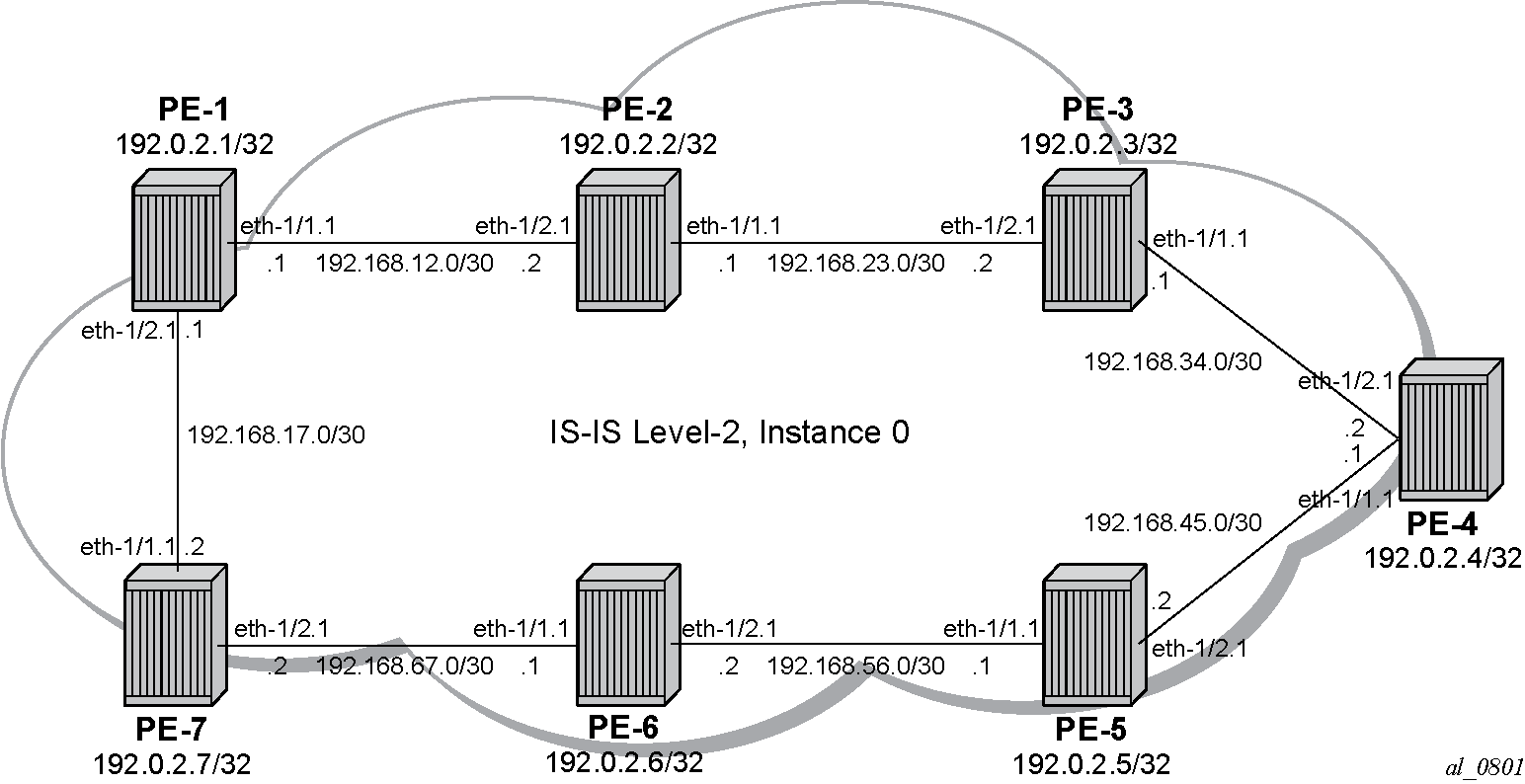
The following example uses IS-IS as an IGP protocol, with an MPLS data plane and a network instance enabled using LFA and RLFA. Example topology shows the example topology with seven PEs.
Configuration
Initial configuration
Configure the interface and the system sub interface IP addresses according to Example topology.
Select IS-IS level 2 as the IGP to distribute routing information between all PEs. All IS-IS interfaces are of type point-to-point to avoid running the Designated Router/Backup Designated Router (DR/BDR) election process.
SR configuration
Define MPLS label ranges for node and adjacency SIDs
Before enabling SR, define a static SRGB. This SRGB is required on each individual router in the SR domain and is used to allocate the prefix SIDs from.
An SRGB is not instantiated by default. For simplicity, configure the same SRGB in this example for all SR domain routers. Within the command, a start value and an end value define the size of the SRGB. The following command configures an SRGB of 100 MPLS labels, from label 20000 to label 20099. Repeat this for all other nodes. The allocated MPLS labels are only for the prefix SIDs.
# on all PEs:
enter candidate
    system mpls label-ranges {
                static srgb-static-nsid {    # for SR node SIDs
                    shared true
                    start-label 20000
                    end-label 20099
                }
Define a dedicated SRLB. This SRLB is required on each individual router in the SR domain and is used to allocate the adjacency SIDs from.
An SRLB is not instantiated by default. When configured by the operator, it is taken from the system dynamic label range (for dynamically allocated adjacency SIDs) or from the system static label range (for statically allocated adjacency SIDs). For simplicity, the same dynamic SRLB is used in this example for all SR domain routers. Within the command, a start value and an end value define the size of the SRLB. The adjacency SIDs, which are only locally unique, are taken from the SRLB.
The following command configures an SRLB of 100 MPLS labels for dynamically allocated adjacency SIDs, from label 30000 to label 30099:
# on all PEs:
enter candidate
    system mpls label-ranges {
                dynamic srlb-dynamic-asid {  # for SR dynamic adjacency SIDs
                    start-label 30000
                    end-label 30099
                }
The following command configures an SRLB of 100 MPLS labels for statically allocated adjacency SIDs, from label 37000 to label 37099:
# on all PEs:
enter candidate
    system mpls label-ranges {
                static srlb-static-asid {  # for SR static adjacency SIDs
                    shared false
                    start-label 37000
                    end-label 37099
                }
Assign the label range for node SIDs
Assign the MPLS label range for the SRGB (srgb-static-nsid) to the SR MPLS global block on the default network instance, as follows:
# on all PEs:
enter candidate
    network-instance default segment-routing mpls {
                global-block {
                    label-range srgb-static-nsid
Enable SR
Enable the SR context within the IS-IS instance, as follows:
# on all PEs:
enter candidate
    network-instance default protocols isis instance 0 {
                    segment-routing {
                        mpls { }
Assign the label range for adjacency SIDs
Assign the MPLS label range for the SRLB for dynamically allocated adjacency SIDs to the dynamic label block in the isis context.
# on all PEs:
enter candidate
    network-instance default protocols isis {
                dynamic-label-block srlb-dynamic-asid
As an example, on PE-7 only, adjacency SIDs are allocated statically. Assign the MPLS label range for the SRLB for statically allocated adjacency SIDs to the static label block in the isis instance 0 segment-routing mpls context.
# on PE-7:
enter candidate
    network-instance default protocols isis {
                instance 0 {
                    segment-routing {
                        mpls {
                            static-label-block srlb-static-asid
Allocate node SIDs
Allocate a prefix SID to the prefix representing a node.
To be able to set up SR shortest path tunnels to all routers of the SR domain, each router needs to be uniquely defined within the SR domain. Therefore, allocate a node SID that is unique within the SR domain to the system address or other loopback interface in the GRT. Both an IPv4 and an IPv6 node SID can be configured, using an index. An IPv4 node SID has a label that is equal to the sum of the start label (20000), which is the first label of the SRGB on all nodes, and the index on the node.
It is possible to configure node SIDs that are protocol independent, or node SIDs that are specific for an IS-IS instance, or both. Protocol independent node SIDs can be used across multiple IGP instances. When both a protocol independent node SID and an IS-IS instance specific node SID are configured on the same node, the IS-IS instance specific node SID takes precedence and IS-IS advertises only the IS-IS instance specific node SID, not the protocol independent node SID.
Allocate a protocol independent node SID to the system address as follows:
# on all PEs:
enter candidate
    network-instance default segment-routing {
            mpls {
                local-prefix-sid 1 {
                    interface system0.0
                    ipv4-label-index x    # index x for PE-x
                    node-sid true
                }
As an example, on PE-7 only, allocate an IS-IS instance specific node SID to the system address as follows:
# on PE-7:
enter candidate
    network-instance default protocols isis instance 0 {
                    interface system0.0 {
                        segment-routing {
                            mpls {
                                ipv4-node-sid {
                                    index 77
                                }
Allocate adjacency SIDs
# on all PEs:
enter candidate
    network-instance default protocols isis instance 0 {
                    segment-routing {
                        mpls {
                            dynamic-adjacency-sids {
                                all-interfaces true
As an example, only on PE-7, manually allocate static adjacency SIDs for all interfaces (labels from srlb-static-asid) as follows:
# on PE-7:
enter candidate
    network-instance default protocols isis instance 0 {
                    interface ethernet-1/1.1 {
                        segment-routing {
                            mpls {
                                ipv4-adjacency-sid {
                                    assignment static
                                    static 37001
                                }
                            }
                        }
                    }
                    interface ethernet-1/2.1 {
                        segment-routing {
                            mpls {
                                ipv4-adjacency-sid {
                                    assignment static
                                    static 37002
                                }
                            }
                        }
                    }
Outcome
A:admin@PE-1# info from state with-context / system mpls label-ranges static * | as table | filter fields *
+----------------------------------------------------------------+--------+-------------+-----------+------------------+-------------+----------------+
|                              Name                              | Shared | Start-label | End-label | Allocated-labels | Free-labels |     Status     |
+================================================================+========+=============+===========+==================+=============+================+
| srgb-static-nsid                                               | true   |       20000 |     20099 |                7 |          93 | ready          |
| srlb-static-asid                                               | false  |       37000 |     37099 |                0 |         100 | ready          |
+----------------------------------------------------------------+--------+-------------+-----------+------------------+-------------+----------------+

A:admin@PE-1# info from state with-context / system mpls label-ranges dynamic * | as table | filter fields *
+-------------------------------------------------------------------------+-------------+-----------+------------------+-------------+----------------+
|                                  Name                                   | Start-label | End-label | Allocated-labels | Free-labels |     Status     |
+=========================================================================+=============+===========+==================+=============+================+
| srlb-dynamic-asid                                                       |       30000 |     30099 |                2 |          98 | ready          |
+-------------------------------------------------------------------------+-------------+-----------+------------------+-------------+----------------+A:admin@PE-7# info from state with-context / system mpls label-ranges static * | as table | filter fields *
+----------------------------------------------------------------+--------+-------------+-----------+------------------+-------------+----------------+
| Name | Shared | Start-label | End-label | Allocated-labels | Free-labels | Status |
+================================================================+========+=============+===========+==================+=============+================+
| srgb-static-nsid | true | 20000 | 20099 | 8 | 92 | ready |
| srlb-static-asid | false | 37000 | 37099 | 2 | 98 | ready |
+----------------------------------------------------------------+--------+-------------+-----------+------------------+-------------+----------------+
A:admin@PE-7# info from state with-context / system mpls label-ranges dynamic * | as table | filter fields *
+-------------------------------------------------------------------------+-------------+-----------+------------------+-------------+----------------+
| Name | Start-label | End-label | Allocated-labels | Free-labels | Status |
+=========================================================================+=============+===========+==================+=============+================+
| srlb-dynamic-asid | 30000 | 30099 | 0 | 100 | ready |
+-------------------------------------------------------------------------+-------------+-----------+------------------+-------------+----------------+On SR enabled PEs, the SR module resolves received prefixes with prefix SID sub TLVs present. As a result, MPLS data plane resources are consumed. The ILM is programmed with a swap operation and the label-to-next-hop-label-forwarding-entry (LTN) with a push operation, both pointing to the primary and/or LFA next-hop label forwarding entry (NHLFE). Also, an SR tunnel is added in the Tunnel Table Manager (TTM). As a result, an SR shortest path tunnel is set up to each other router that is part of the SR domain. Now, SR shortest path tunnels can be used for all users of TTM.
Each SR enabled PE advertises the locally allocated prefix SID. After the advertisement of prefix SIDs, the PE's MPLS data plane Ingress Label Mapping (ILM) is programmed with a pop operation.
Each SR enabled PE also advertises, for each formed adjacency over an IP interface, the locally allocated adjacency SID. From a data plane perspective, one local adjacency SID consumes one ILM entry, programming a pop operation (swap to IMPLICIT_NULL).
Because, in the chosen configuration, the SRGB is the same on all nodes, each node in the network can be reached using the same MPLS label. For example, the node SID for PE-5 has label 20005 on all nodes: a start label (first label of the SRGB (= 20000) + ipv4-label-index value on node PE-5 (= 5)). The node SID for PE-7 has label 20077 on all nodes: a start label (first label of the SRGB (= 20000) + ipv4-node-sid index value on node PE-7 (= 77). The statically allocated adjacency SIDs (label range starting with 37000) are used on PE-7, while the dynamically allocated adjacency SIDs (label range starting with 30000) are used on all other PEs.
A:admin@PE-1# show / network-instance default route-table mpls
+---------+-----------+-------------+-----------------+------------------------+----------------------+------------------+
| Label   | Operation | Type        | Next Net-Inst   | Next-hop IP (Type)     | Next-hop             | Next-hop MPLS    |
|         |           |             |                 |                        | Subinterface         | labels           |
+=========+===========+=============+=================+========================+======================+==================+
| 20001   | POP       | sr-mpls     | default         |                        |                      |                  |
| 20002   | SWAP      | sr-mpls     | N/A             | 192.168.12.2 (mpls)    | ethernet-1/1.1       | 20002            |
| 20003   | SWAP      | sr-mpls     | N/A             | 192.168.12.2 (mpls)    | ethernet-1/1.1       | 20003            |
| 20004   | SWAP      | sr-mpls     | N/A             | 192.168.12.2 (mpls)    | ethernet-1/1.1       | 20004            |
| 20005   | SWAP      | sr-mpls     | N/A             | 192.168.17.2 (mpls)    | ethernet-1/2.1       | 20005            |
| 20006   | SWAP      | sr-mpls     | N/A             | 192.168.17.2 (mpls)    | ethernet-1/2.1       | 20006            |
| 20077   | SWAP      | sr-mpls     | N/A             | 192.168.17.2 (mpls)    | ethernet-1/2.1       | 20077            |
| 30000   | SWAP      | sr-mpls     | N/A             | 192.168.12.2 (mpls)    | ethernet-1/1.1       | IMPLICIT_NULL    |
| 30001   | SWAP      | sr-mpls     | N/A             | 192.168.17.2 (mpls)    | ethernet-1/2.1       | IMPLICIT_NULL    |
+---------+-----------+-------------+-----------------+------------------------+----------------------+------------------+
A:admin@PE-1# info from state with-context / network-instance default route-table next-hop *
| as table | filter fields type ip-address subinterface mpls-encapsulation/pushed-mpls-label-stack
+-------------------------+----------------------+--------------------+-------------------------+-------------------------+-------------------------+
| Network-instance | Index | Type | Ip-address | Subinterface | Mpls-encapsulation |
| | | | | | pushed-mpls-label-stack |
+=========================+======================+====================+=========================+=========================+=========================+
| ---snip--- |
| default | 31593955 | mpls | 192.168.12.2 | ethernet-1/1.1 | 20002 |
| default | 31593956 | mpls | 192.168.12.2 | ethernet-1/1.1 | 20003 |
| default | 31593957 | mpls | 192.168.12.2 | ethernet-1/1.1 | 20004 |
| default | 31593958 | mpls | 192.168.17.2 | ethernet-1/2.1 | 20005 |
| default | 31593959 | mpls | 192.168.17.2 | ethernet-1/2.1 | 20006 |
| default | 31593961 | mpls | 192.168.17.2 | ethernet-1/2.1 | 20077 |
| default | 31593962 | mpls | 192.168.12.2 | ethernet-1/1.1 | IMPLICIT_NULL |
| default | 31593963 | mpls | 192.168.17.2 | ethernet-1/2.1 | IMPLICIT_NULL |
+-------------------------+----------------------+--------------------+-------------------------+-------------------------+-------------------------+A:admin@PE-7# show / network-instance default route-table mpls
+---------+-----------+-------------+-----------------+------------------------+----------------------+------------------+
| Label | Operation | Type | Next Net-Inst | Next-hop IP (Type) | Next-hop | Next-hop MPLS |
| | | | | | Subinterface | labels |
+=========+===========+=============+=================+========================+======================+==================+
| 20001 | SWAP | sr-mpls | N/A | 192.168.17.1 (mpls) | ethernet-1/1.1 | 20001 |
| 20002 | SWAP | sr-mpls | N/A | 192.168.17.1 (mpls) | ethernet-1/1.1 | 20002 |
| 20003 | SWAP | sr-mpls | N/A | 192.168.17.1 (mpls) | ethernet-1/1.1 | 20003 |
| 20004 | SWAP | sr-mpls | N/A | 192.168.67.1 (mpls) | ethernet-1/2.1 | 20004 |
| 20005 | SWAP | sr-mpls | N/A | 192.168.67.1 (mpls) | ethernet-1/2.1 | 20005 |
| 20006 | SWAP | sr-mpls | N/A | 192.168.67.1 (mpls) | ethernet-1/2.1 | 20006 |
| 20007 | POP | sr-mpls | default | | | |
| 20077 | POP | sr-mpls | default | | | |
| 37001 | SWAP | sr-mpls | N/A | 192.168.17.1 (mpls) | ethernet-1/1.1 | IMPLICIT_NULL |
| 37006 | SWAP | sr-mpls | N/A | 192.168.67.1 (mpls) | ethernet-1/2.1 | IMPLICIT_NULL |
+---------+-----------+-------------+-----------------+------------------------+----------------------+------------------+A:admin@PE-7# info from state with-context / network-instance default route-table next-hop *
| as table | filter fields type ip-address subinterface mpls-encapsulation/pushed-mpls-label-stack
+-------------------------+----------------------+--------------------+-------------------------+-------------------------+-------------------------+
| Network-instance | Index | Type | Ip-address | Subinterface | Mpls-encapsulation |
| | | | | | pushed-mpls-label-stack |
+=========================+======================+====================+=========================+=========================+=========================+
| ---snip--- |
| default | 32810855 | mpls | 192.168.17.1 | ethernet-1/1.1 | 20001 |
| default | 32810856 | mpls | 192.168.17.1 | ethernet-1/1.1 | 20002 |
| default | 32810857 | mpls | 192.168.17.1 | ethernet-1/1.1 | 20003 |
| default | 32810858 | mpls | 192.168.67.1 | ethernet-1/2.1 | 20004 |
| default | 32810859 | mpls | 192.168.67.1 | ethernet-1/2.1 | 20005 |
| default | 32810860 | mpls | 192.168.67.1 | ethernet-1/2.1 | 20006 |
| default | 32810861 | mpls | 192.168.17.1 | ethernet-1/1.1 | IMPLICIT_NULL |
| default | 32810862 | mpls | 192.168.67.1 | ethernet-1/2.1 | IMPLICIT_NULL |
+-------------------------+----------------------+--------------------+-------------------------+-------------------------+-------------------------+The tunnel table displays the prefix SIDs and adjacency SIDs, in order, within the SR domain. A tunnel with a label from srgb-static-nsid is used on each PE, to reach remote nodes. A tunnel with a label from srlb-dynamic-asid is used on each PE, except PE-7, to reach remote interfaces on the local network, while a tunnel with a label from srlb-static-asid is used on PE-7 to reach remote interfaces on the local network.
A:admin@PE-1# show / network-instance default tunnel-table all
-------------------------------------------------------------------------------------------------------------------------------------------------------
IPv4 tunnel table of network-instance "default"
-------------------------------------------------------------------------------------------------------------------------------------------------------
+-----------------------+----------------+----------+-----+----------+---------+--------------------------+---------------+---------------+
|      IPv4 Prefix      |  Tunnel Type   |  Tunnel  | FIB |  Metric  | Prefere |       Last Update        |   Next-hop    |   Next-hop    |
|                       |                |    ID    |     |          |   nce   |                          |    (Type)     |               |
+=======================+================+==========+=====+==========+=========+==========================+===============+===============+
| 192.0.2.2/32          | sr-isis        | 20002    | Y   | 10       | 11      | 2025-12-16T16:41:09.867Z | 192.168.12.2  | ethernet-     |
|                       |                |          |     |          |         |                          | (mpls)        | 1/1.1         |
| 192.0.2.3/32          | sr-isis        | 20003    | Y   | 20       | 11      | 2025-12-16T16:41:19.386Z | 192.168.12.2  | ethernet-     |
|                       |                |          |     |          |         |                          | (mpls)        | 1/1.1         |
| 192.0.2.4/32          | sr-isis        | 20004    | Y   | 30       | 11      | 2025-12-16T16:41:28.520Z | 192.168.12.2  | ethernet-     |
|                       |                |          |     |          |         |                          | (mpls)        | 1/1.1         |
| 192.0.2.5/32          | sr-isis        | 20005    | Y   | 30       | 11      | 2025-12-16T16:41:40.688Z | 192.168.17.2  | ethernet-     |
|                       |                |          |     |          |         |                          | (mpls)        | 1/2.1         |
| 192.0.2.6/32          | sr-isis        | 20006    | Y   | 20       | 11      | 2025-12-16T16:41:50.668Z | 192.168.17.2  | ethernet-     |
|                       |                |          |     |          |         |                          | (mpls)        | 1/2.1         |
| 192.0.2.7/32          | sr-isis        | 20077    | Y   | 10       | 11      | 2025-12-16T16:42:27.960Z | 192.168.17.2  | ethernet-     |
|                       |                |          |     |          |         |                          | (mpls)        | 1/2.1         |
| 192.168.12.2/32       | sr-isis        | 30000    | Y   | 0        | 11      | 2025-12-16T16:51:36.258Z | 192.168.12.2  | ethernet-     |
|                       |                |          |     |          |         |                          | (mpls)        | 1/1.1         |
| 192.168.17.2/32       | sr-isis        | 30001    | Y   | 0        | 11      | 2025-12-16T16:51:36.258Z | 192.168.17.2  | ethernet-     |
|                       |                |          |     |          |         |                          | (mpls)        | 1/2.1         |
+-----------------------+----------------+----------+-----+----------+---------+--------------------------+---------------+---------------+
-------------------------------------------------------------------------------------------------------------------------------------------------------
8 SR-ISIS tunnels, 8 active, 0 inactive
-------------------------------------------------------------------------------------------------------------------------------------------------------
-------------------------------------------------------------------------------------------------------------------------------------------------------
IPv6 tunnel table of network-instance "default"
-------------------------------------------------------------------------------------------------------------------------------------------------------
<no_entries>
-------------------------------------------------------------------------------------------------------------------------------------------------------
-------------------------------------------------------------------------------------------------------------------------------------------------------
The tunnel table on PE-1 also indicates that when traffic destined for PE-7 arrives on PE-1, PE-1 pushes the MPLS label 20077 to reach destination PE-7, via the SR IS-IS tunnel with tunnel ID 20077.
PE-1 can reach destination PE-7 (with node SID 20077) via only one SR path: via PE-7.
A:admin@PE-1# show / network-instance default tunnel-table ipv4 192.0.2.7/32 detail
-------------------------------------------------------------------------------------------------------------------------------------------------------
Show report for network instance "default" tunnel table
-------------------------------------------------------------------------------------------------------------------------------------------------------
=======================================================================================================================================================
Destination        : 192.0.2.7/32
Tunnel Type        : sr-isis
Tunnel ID          : 20077
Metric             : 10
Preference         : 11
Last Update        : 2025-12-16T16:42:27.960Z
FIB Status         : active
Next-hops
  192.168.17.2 (mpls) via [ethernet-1/2.1]
      pushed MPLS labels : [20077]
=======================================================================================================================================================A:admin@PE-7# show / network-instance default tunnel-table all
-------------------------------------------------------------------------------------------------------------------------------------------------------
IPv4 tunnel table of network-instance "default"
-------------------------------------------------------------------------------------------------------------------------------------------------------
+-----------------------+----------------+----------+-----+----------+---------+--------------------------+---------------+---------------+
| IPv4 Prefix | Tunnel Type | Tunnel | FIB | Metric | Prefere | Last Update | Next-hop | Next-hop |
| | | ID | | | nce | | (Type) | |
+=======================+================+==========+=====+==========+=========+==========================+===============+===============+
| 192.0.2.1/32 | sr-isis | 20001 | Y | 10 | 11 | 2025-12-16T16:40:58.793Z | 192.168.17.1 | ethernet- |
| | | | | | | | (mpls) | 1/1.1 |
| 192.0.2.2/32 | sr-isis | 20002 | Y | 20 | 11 | 2025-12-16T16:41:09.899Z | 192.168.17.1 | ethernet- |
| | | | | | | | (mpls) | 1/1.1 |
| 192.0.2.3/32 | sr-isis | 20003 | Y | 30 | 11 | 2025-12-16T16:41:19.385Z | 192.168.17.1 | ethernet- |
| | | | | | | | (mpls) | 1/1.1 |
| 192.0.2.4/32 | sr-isis | 20004 | Y | 30 | 11 | 2025-12-16T16:41:28.540Z | 192.168.67.1 | ethernet- |
| | | | | | | | (mpls) | 1/2.1 |
| 192.0.2.5/32 | sr-isis | 20005 | Y | 20 | 11 | 2025-12-16T16:41:40.680Z | 192.168.67.1 | ethernet- |
| | | | | | | | (mpls) | 1/2.1 |
| 192.0.2.6/32 | sr-isis | 20006 | Y | 10 | 11 | 2025-12-16T16:41:50.666Z | 192.168.67.1 | ethernet- |
| | | | | | | | (mpls) | 1/2.1 |
| 192.168.17.1/32 | sr-isis | 37001 | Y | 0 | 11 | 2025-12-16T16:52:18.838Z | 192.168.17.1 | ethernet- |
| | | | | | | | (mpls) | 1/1.1 |
| 192.168.67.1/32 | sr-isis | 37006 | Y | 0 | 11 | 2025-12-16T16:52:18.838Z | 192.168.67.1 | ethernet- |
| | | | | | | | (mpls) | 1/2.1 |
+-----------------------+----------------+----------+-----+----------+---------+--------------------------+---------------+---------------+
-------------------------------------------------------------------------------------------------------------------------------------------------------
8 SR-ISIS tunnels, 8 active, 0 inactive
-------------------------------------------------------------------------------------------------------------------------------------------------------
-------------------------------------------------------------------------------------------------------------------------------------------------------
IPv6 tunnel table of network-instance "default"
-------------------------------------------------------------------------------------------------------------------------------------------------------
<no_entries>
-------------------------------------------------------------------------------------------------------------------------------------------------------
-------------------------------------------------------------------------------------------------------------------------------------------------------The tunnel table on PE-7 also indicates that when traffic destined for PE-1 arrives on PE-7, PE-7 pushes the MPLS label 20001 to reach destination PE-1, via the SR IS-IS tunnel with tunnel ID 20001.
After enabling the SR context within an IS-IS instance, the IS-IS instance advertises SR support among the IS-IS adjacencies. It propagates the router-capability-sr-capability sub TLV of the router-capability TLV, which is used to indicate the index range and the start label. It also propagates the router-capability-sr-algorithm sub TLV of the router-capability TLV, which is used to indicate the algorithm used for path calculations. Only Shortest Path First (SPF) (value 0) is defined.
Verify this as follows:
A:admin@PE-1# info from state with-context / network-instance default protocols isis instance 0 level 2
    network-instance default {
        protocols {
            isis {
                instance 0 {
                    level 2 {
                        --snip---
                        link-state-database {
                            lsp 1920.0000.2001.00-00 {
                                ---snip---
                                tlvs {
                                    ---snip---
                                    tlv router-capability {
                                        router-capabilities {
                                            capability 0 {
                                                router-id 0.0.0.0
                                                subtlvs {
                                                    ---snip---
                                                    subtlv router-capability-sr-algorithm {
                                                        segment-routing-algorithms {
                                                            standard-algorithm [
                                                                spf
                                                            ]
                                                        }
                                                    }
                                                    subtlv router-capability-sr-capability {
                                                        segment-routing-capability {
                                                            flags [
                                                                ipv4-mpls
                                                                ipv6-mpls
                                                            ]
                                                            srgb-descriptors {
                                                                srgb-descriptor 100 {
                                                                    label 20000
                                                                }
                                                            }
                                                        }
                                                    }
                                                }
                                            }
                                        }
                                    }
                                }
                            }
                            lsp 1920.0000.2002.00-00 {
                                ---snip---
                            }
                            lsp 1920.0000.2003.00-00 {
                                ---snip---
                            }
                            lsp 1920.0000.2004.00-00 {
                                ---snip---
                            }
                            lsp 1920.0000.2005.00-00 {
                                ---snip---
                            }
                            lsp 1920.0000.2006.00-00 {
                                ---snip---
                            }
                            lsp 1920.0000.2007.00-00 {
                                ---snip---
                            }
A similar output occurs for each router in the SR domain.
For prefix SIDs, by default, the SRL implementation sets the node flag and the no-php flag inside the ip-reachability-prefix-sid sub TLV of the extended-ipv4-reachability TLV.
A:admin@PE-1# info from state with-context / network-instance default protocols isis instance 0 level 2
    network-instance default {
        protocols {
            isis {
                instance 0 {
                    level 2 {
                        ---snip---
                        link-state-database {
                            lsp 1920.0000.2001.00-00 {
                                ---snip---
                                tlvs {
                                    ---snip---
                                    tlv extended-ipv4-reachability {
                                        extended-ipv4-reachability {
                                            prefixes {
                                                prefix 192.0.2.1/32 {
                                                    ---snip---
                                                    subtlvs {
                                                        ---snip---
                                                        subtlv ip-reachability-prefix-sid {
                                                            prefix-sids {
                                                                prefix-sid 1 {
                                                                    algorithm 0
                                                                    flags [
                                                                        node
                                                                        no-php
                                                                    ]
                                                                }
                                                            }
                                                        }
                                                    }
                                                }
                                                ---snip---
Another useful flag that can be set is the re-advertised flag. This is set when a prefix SID is propagated between levels or areas, or redistribution is in place (from another protocol).
For adjacency SIDs, by default, the SRL implementation sets the value flag in the is-reachability-adj-sid sub TLV of the extended-is-reachability TLV, meaning that the adjacency SID carries a value (as opposed to an index). Also, the local flag is set by default in the is-reachability-adj-sid sub TLV of the extended-is-reachability TLV, meaning that the adjacency SID has only local significance.
A:admin@PE-1# info from state with-context / network-instance default protocols isis instance 0 level 2
    network-instance default {
        protocols {
            isis {
                instance 0 {
                    level 2 {
                        ---snip---
                        link-state-database {
                            lsp 1920.0000.2001.00-00 {
                                ---snip---
                                tlvs {
                                    ---snip---
                                    tlv extended-is-reachability {
                                        extended-is-reachability {
                                            neighbors {
                                                neighbor 1920.0000.2002 {
                                                    instances {
                                                        instance 0 {
                                                            metric 10
                                                            subtlvs {
                                                                subtlv is-reachability-adj-sid {
                                                                    adjacency-sids {
                                                                        adjacency-sid 30000 {
                                                                            weight 0
                                                                            flags [
                                                                                value
                                                                                local
                                                                            ]
                                                                        }
                                                                    }
                                                                }
                                                                subtlv is-reachability-ipv4-interface-address {
                                                                    ipv4-interface-address {
                                                                        address [
                                                                            192.168.12.1
                                                                        ]
                                                                    }
                                                                }
                                                                subtlv is-reachability-ipv4-neighbor-address {
                                                                    ipv4-neighbor-address {
                                                                        address [
                                                                            192.168.12.2
                                                                        ]
                                                                    }
                                                                }
                                                            }
                                                        }
                                                    }
                                                }
                                                neighbor 1920.0000.2007 {
                                                    ---snip---
                                                                subtlv is-reachability-adj-sid {
                                                                    adjacency-sids {
                                                                        adjacency-sid 30001 {
                                                                            weight 0
                                                                            flags [
                                                                                value
                                                                                local
                                                                            ]
                                                                        }
                                                                    }
                                                                }
                                                                ---snip---
                                                }
Configuration of an IP VRF
In the network topology of Example topology, each router of the SR domain has a full mesh of SR shortest path tunnels to the other routers.
Configuration with SR only
Configure BGP on PE-1 and PE-7:
# on PE-1 and PE-7:
enter candidate
    network-instance default protocols {
            bgp {
                admin-state enable
                autonomous-system 64496
                router-id 192.0.2.1    # 192.0.2.7 on PE-7
                afi-safi l3vpn-ipv4-unicast {
                    admin-state enable
                }
                group grp-IP-VRF-peers {
                    admin-state enable
                    peer-as 64496
                }
                neighbor 192.0.2.7 {    # 192.0.2.1 on PE-7
                    admin-state enable
                    peer-group grp-IP-VRF-peers
                }
Configure a loopback interface on PE-1 and PE-7:
# on PE-1 and PE-7:
enter candidate
    interface lo0 {
        admin-state enable
        subinterface 0 {
            admin-state enable
            description "loopback interface in IP-VRF"
            ipv4 {
                admin-state enable
                address 10.10.1.1/32 {    # 10.10.7.1/32 on PE-7
                    primary
                }
            }
        }
Define a dedicated dynamic MPLS label range for VRFs on all PEs that belong to IP-VRF (here PE-1 and PE-7):
# on PE-1 and PE-7:
enter candidate
    system mpls label-ranges {
                dynamic dynamic-vrfs {
                    start-label 40000
                    end-label 40099
                }
Assign the MPLS label range for VRFs to the network instance's dynamic label block:
# on PE-1 and PE-7:
enter candidate
    system mpls {
            services {
                network-instance {
                    dynamic-label-block dynamic-vrfs
Configure network instance IP-VRF on PE-1 and PE-7 that makes use of the loopback interface lo0.0 and SR IS-IS tunnels as next hop:
# on PE-1 and PE-7:
enter candidate
    network-instance IP-VRF {
        type ip-vrf
        admin-state enable
        interface lo0.0 {
            interface-ref {
                interface lo0
                subinterface 0
            }
        }
        protocols {
            bgp-ipvpn {
                bgp-instance 1 {
                    admin-state enable
                    ecmp 2
                    mpls {
                        next-hop-resolution {
                            allowed-tunnel-types [
                                sr-isis
                            ]
                        }
                    }
                }
            }
            bgp-vpn {
                bgp-instance 1 { }
            }
        }
Because, in the example, there is no explicit configuration for bgp-vpn bgp-instance 1, SR Linux automatically derives the necessary parameters (with EVI = 0). These parameters can also be configured manually.
A:admin@PE-1# show / network-instance IP-VRF protocols bgp-vpn bgp-instance 1
=======================================================================================================================================================
Net Instance   : IP-VRF
    bgp Instance 1
-------------------------------------------------------------------------------------------------------------------------------------------------------
        route-distinguisher: 192.0.2.1:0, auto-derived-from-evi    # 192.0.2.7:0 on PE-7
        export-route-target: target:64496:0, auto-derived-from-evi
        import-route-target: target:64496:0, auto-derived-from-evi
=======================================================================================================================================================
A:admin@PE-1# info from state with-context / network-instance IP-VRF protocols bgp-vpn bgp-instance 1 | as table |filter fields *
+------------+------------+------------+------------+------------+------------+------------+------------+------------+------------+------------+
| Network- | Id | Oper-down- | Export- | Import- | Route-dist | Route-dist | Route- | Route- | Route- | Route- |
| instance | | reason | policy | policy | inguisher | inguisher | target | target | target | target |
| | | | | | rd | route-dist | export-rt | export- | import-rt | import- |
| | | | | | | inguisher- | | route- | | route- |
| | | | | | | origin | | target- | | target- |
| | | | | | | | | origin | | origin |
+============+============+============+============+============+============+============+============+============+============+============+
| IP-VRF | 1 | | | | 192.0.2.1: | auto- | target:644 | auto- | target:644 | auto- |
| | | | | | 0 | derived- | 96:0 | derived- | 96:0 | derived- |
| | | | | | | from-evi | | from-evi | | from-evi |
+------------+------------+------------+------------+------------+------------+------------+------------+------------+------------+------------+IP-VRF uses an MPLS label from dynamic-vrfs.
A:admin@PE-1# show / network-instance default route-table mpls
+---------+-----------+-------------+-----------------+------------------------+----------------------+------------------+
| Label   | Operation | Type        | Next Net-Inst   | Next-hop IP (Type)     | Next-hop             | Next-hop MPLS    |
|         |           |             |                 |                        | Subinterface         | labels           |
+=========+===========+=============+=================+========================+======================+==================+
| ---snip---                                                                                                             |
| 40000   |           | network-    | IP-VRF          |                        |                      |                  |
|         |           | instance    |                 |                        |                      |                  |
+---------+-----------+-------------+-----------------+------------------------+----------------------+------------------+
Verify the IP connectivity in IP-VRF as follows:
# on PE-1:
ping 10.10.7.1 -4 -I 10.10.1.1 -c 5 network-instance IP-VRF

Using network instance IP-VRF
PING 10.10.7.1 (10.10.7.1) from 10.10.1.1 : 56(84) bytes of data.
64 bytes from 10.10.7.1: icmp_seq=1 ttl=64 time=87.0 ms
---snip---

--- 10.10.7.1 ping statistics ---
5 packets transmitted, 5 received, 0% packet loss, time 4005ms
rtt min/avg/max/mdev = 3.962/36.385/87.000/30.876 ms
# on PE-1:
traceroute 10.10.7.1 -n -s 10.10.1.1 network-instance IP-VRF
Using network instance IP-VRF
traceroute to 10.10.7.1 (10.10.7.1), 30 hops max, 60 byte packets
1 10.10.7.1 89.527 ms 89.496 ms 89.483 msThe route table in IP-VRF indicates that traffic destined for 10.10.7.1/32 (connected to PE-7) runs via the SR IS-IS tunnel to PE-7.
A:admin@PE-1# show / network-instance IP-VRF route-table all
-------------------------------------------------------------------------------------------------------------------------------------------------------
IPv4 unicast route table of network instance IP-VRF
-------------------------------------------------------------------------------------------------------------------------------------------------------
+-----------------+------+-----------+---------------------+---------+---------+--------+-----------+----------+----------+----------+----------+
|     Prefix      |  ID  |   Route   |     Route Owner     | Active  | Origin  | Metric |   Pref    | Next-hop | Next-hop |  Backup  |  Backup  |
|                 |      |   Type    |                     |         | Network |        |           |  (Type)  | Interfac | Next-hop | Next-hop |
|                 |      |           |                     |         | Instanc |        |           |          |    e     |  (Type)  | Interfac |
|                 |      |           |                     |         |    e    |        |           |          |          |          |    e     |
+=================+======+===========+=====================+=========+=========+========+===========+==========+==========+==========+==========+
| 10.10.1.1/32    | 11   | host      | net_inst_mgr        | True    | IP-VRF  | 0      | 0         | None     | None     |          |          |
| 10.10.7.1/32    | 0    | bgp-ipvpn | bgp_ipvpn_mgr       | True    | IP-VRF  | 10     | 170       | 192.0.2. |          |          |          |
|                 |      |           |                     |         |         |        |           | 7/32 (in |          |          |          |
|                 |      |           |                     |         |         |        |           | direct/s |          |          |          |
|                 |      |           |                     |         |         |        |           | r-isis)  |          |          |          |
+-----------------+------+-----------+---------------------+---------+---------+--------+-----------+----------+----------+----------+----------+
-------------------------------------------------------------------------------------------------------------------------------------------------------
IPv4 routes total                    : 2
IPv4 prefixes with active routes     : 2
IPv4 prefixes with active ECMP routes: 0
-------------------------------------------------------------------------------------------------------------------------------------------------------
The detail of the route table in IP-VRF indicates the tunnel ID.
A:admin@PE-1# show / network-instance IP-VRF route-table ipv4-unicast prefix 10.10.7.1/32 detail
-------------------------------------------------------------------------------------------------------------------------------------------------------
IPv4 unicast route table of network instance IP-VRF
-------------------------------------------------------------------------------------------------------------------------------------------------------
Destination            : 10.10.7.1/32
ID                     : 0
Route Type             : bgp-ipvpn
Route Owner            : bgp_ipvpn_mgr
Origin Network Instance: IP-VRF
Metric                 : 10
Preference             : 170
Active                 : true
Last change            : 2025-12-16T17:05:06.303Z
Resilient hash         : false
-------------------------------------------------------------------------------------------------------------------------------------------------------
Next hops: 1 entries
192.0.2.7 (indirect) resolved by tunnel to 192.0.2.7/32 (sr-isis/tunnel-id: 20077)
Backup Next hops: 0 entries
---snip---
The route in IP-VRF indicates the network instance label.
A:admin@PE-1# show / network-instance IP-VRF ipv4 route all
=======================================================================================================================================================
IPv4-unicast route table for ip-vrf network-instance: IP-VRF
-------------------------------------------------------------------------------------------------------------------------------------------------------
Flags: > (best), * (unviable), ! (failed)
     : L (leaked route from another network-instance)
     : B (backup NHG active and displayed)
     : S (statistics supported)
     : D (dynamic LB), R (resilient LB)
-------------------------------------------------------------------------------------------------------------------------------------------------------
Prefix               Route Type   Metric   Pref    Flags    Next-Hop(s)
-------------------------------------------------------------------------------------------------------------------------------------------------------
10.10.7.1/32         bgp-ipvpn    10       170     >        192.0.2.7(tunnel:sr-isis, label:40000)
Configuration with SR and LFA
Enable prefix LFA within the IS-IS context to enable LFA FRR protection. Extend the remote LFA next-hop resolution path entry to RTM so that the tunnel can be used in SPF decisions.
# on all PEs:
enter candidate
    network-instance default protocols isis instance 0 {
                    loopfree-alternate {
                        admin-state enable
                        augment-route-table true
                    }
On PE-1, next-hop LFA protection is present for node PE-4, node PE-5, and the link between PE-4 and PE-5, as follows. Similar next-hop LFA protection is present on the other PEs (for other nodes or links).
A:admin@PE-1# show / network-instance default route-table all
-------------------------------------------------------------------------------------------------------------------------------------------------------
IPv4 unicast route table of network instance default
-------------------------------------------------------------------------------------------------------------------------------------------------------
+-----------------+------+-----------+---------------------+---------+---------+--------+-----------+----------+----------+----------+----------+
|     Prefix      |  ID  |   Route   |     Route Owner     | Active  | Origin  | Metric |   Pref    | Next-hop | Next-hop |  Backup  |  Backup  |
|                 |      |   Type    |                     |         | Network |        |           |  (Type)  | Interfac | Next-hop | Next-hop |
|                 |      |           |                     |         | Instanc |        |           |          |    e     |  (Type)  | Interfac |
|                 |      |           |                     |         |    e    |        |           |          |          |          |    e     |
+=================+======+===========+=====================+=========+=========+========+===========+==========+==========+==========+==========+
| 192.0.2.1/32    | 10   | host      | net_inst_mgr        | True    | default | 0      | 0         | None     | None     |          |          |
| 192.0.2.2/32    | 0    | isis      | isis_mgr            | True    | default | 10     | 18        | 192.168. | ethernet |          |          |
|                 |      |           |                     |         |         |        |           | 12.2     | -1/1.1   |          |          |
|                 |      |           |                     |         |         |        |           | (direct) |          |          |          |
| 192.0.2.3/32    | 0    | isis      | isis_mgr            | True    | default | 20     | 18        | 192.168. | ethernet |          |          |
|                 |      |           |                     |         |         |        |           | 12.2     | -1/1.1   |          |          |
|                 |      |           |                     |         |         |        |           | (direct) |          |          |          |
| 192.0.2.4/32    | 0    | isis      | isis_mgr            | True    | default | 30     | 18        | 192.168. | ethernet | 192.168. | ethernet |
|                 |      |           |                     |         |         |        |           | 12.2     | -1/1.1   | 17.2     | -1/2.1   |
|                 |      |           |                     |         |         |        |           | (direct) |          | (direct) |          |
| 192.0.2.5/32    | 0    | isis      | isis_mgr            | True    | default | 30     | 18        | 192.168. | ethernet | 192.168. | ethernet |
|                 |      |           |                     |         |         |        |           | 17.2     | -1/2.1   | 12.2     | -1/1.1   |
|                 |      |           |                     |         |         |        |           | (direct) |          | (direct) |          |
| 192.0.2.6/32    | 0    | isis      | isis_mgr            | True    | default | 20     | 18        | 192.168. | ethernet |          |          |
|                 |      |           |                     |         |         |        |           | 17.2     | -1/2.1   |          |          |
|                 |      |           |                     |         |         |        |           | (direct) |          |          |          |
| 192.0.2.7/32    | 0    | isis      | isis_mgr            | True    | default | 10     | 18        | 192.168. | ethernet |          |          |
|                 |      |           |                     |         |         |        |           | 17.2     | -1/2.1   |          |          |
|                 |      |           |                     |         |         |        |           | (direct) |          |          |          |
| 192.168.12.0/30 | 8    | local     | net_inst_mgr        | True    | default | 0      | 0         | 192.168. | ethernet |          |          |
|                 |      |           |                     |         |         |        |           | 12.1     | -1/1.1   |          |          |
|                 |      |           |                     |         |         |        |           | (direct) |          |          |          |
| ---snip---                                                                                                                                    |
| 192.168.23.0/30 | 0    | isis      | isis_mgr            | True    | default | 20     | 18        | 192.168. | ethernet |          |          |
|                 |      |           |                     |         |         |        |           | 12.2     | -1/1.1   |          |          |
|                 |      |           |                     |         |         |        |           | (direct) |          |          |          |
| 192.168.34.0/30 | 0    | isis      | isis_mgr            | True    | default | 30     | 18        | 192.168. | ethernet |          |          |
|                 |      |           |                     |         |         |        |           | 12.2     | -1/1.1   |          |          |
|                 |      |           |                     |         |         |        |           | (direct) |          |          |          |
| 192.168.45.0/30 | 0    | isis      | isis_mgr            | True    | default | 40     | 18        | 192.168. | ethernet | 192.168. | ethernet |
|                 |      |           |                     |         |         |        |           | 12.2     | -1/1.1   | 17.2     | -1/2.1   |
|                 |      |           |                     |         |         |        |           | (direct) |          | (direct) |          |
| 192.168.56.0/30 | 0    | isis      | isis_mgr            | True    | default | 30     | 18        | 192.168. | ethernet |          |          |
|                 |      |           |                     |         |         |        |           | 17.2     | -1/2.1   |          |          |
|                 |      |           |                     |         |         |        |           | (direct) |          |          |          |
| 192.168.67.0/30 | 0    | isis      | isis_mgr            | True    | default | 20     | 18        | 192.168. | ethernet |          |          |
|                 |      |           |                     |         |         |        |           | 17.2     | -1/2.1   |          |          |
|                 |      |           |                     |         |         |        |           | (direct) |          |          |          |
+-----------------+------+-----------+---------------------+---------+---------+--------+-----------+----------+----------+----------+----------+
-------------------------------------------------------------------------------------------------------------------------------------------------------
IPv4 routes total                    : 18
IPv4 prefixes with active routes     : 18
IPv4 prefixes with active ECMP routes: 0
-------------------------------------------------------------------------------------------------------------------------------------------------------
PE-1 can reach destination PE-4 (with node SID 20004) via two different SR paths: one via PE-7 and one via PE-2. Similar for destination PE-5.
A:admin@PE-1# show / network-instance default tunnel-table ipv4 192.0.2.4/32 detail
-------------------------------------------------------------------------------------------------------------------------------------------------------
Show report for network instance "default" tunnel table
-------------------------------------------------------------------------------------------------------------------------------------------------------
=======================================================================================================================================================
Destination        : 192.0.2.4/32
Tunnel Type        : sr-isis
Tunnel ID          : 20004
Metric             : 30
Preference         : 11
Last Update        : 2025-12-16T17:16:53.330Z
FIB Status         : active
Next-hops
  192.168.12.2 (mpls) via [ethernet-1/1.1]
      pushed MPLS labels : [20004]
Backup Next-hops
192.168.17.2 (mpls) via [ethernet-1/2.1]
      pushed MPLS labels : [20004]
=======================================================================================================================================================
A:admin@PE-1# info from state with-context / network-instance default route-table next-hop *
| as table | filter fields type ip-address subinterface mpls-encapsulation/pushed-mpls-label-stack
+-------------------------+----------------------+--------------------+-------------------------+-------------------------+-------------------------+
| Network-instance | Index | Type | Ip-address | Subinterface | Mpls-encapsulation |
| | | | | | pushed-mpls-label-stack |
+=========================+======================+====================+=========================+=========================+=========================+
| ---snip--- |
| default | 31593955 | mpls | 192.168.12.2 | ethernet-1/1.1 | 20002 |
| default | 31593956 | mpls | 192.168.12.2 | ethernet-1/1.1 | 20003 |
| default | 31593959 | mpls | 192.168.17.2 | ethernet-1/2.1 | 20006 |
| default | 31593961 | mpls | 192.168.17.2 | ethernet-1/2.1 | 20077 |
| default | 31593962 | mpls | 192.168.12.2 | ethernet-1/1.1 | IMPLICIT_NULL |
| default | 31593963 | mpls | 192.168.17.2 | ethernet-1/2.1 | IMPLICIT_NULL |
| ---snip--- |
| default | 31593969 | mpls | 192.168.17.2 | ethernet-1/2.1 | 20004 |
| default | 31593970 | mpls | 192.168.12.2 | ethernet-1/1.1 | 20004 |
| default | 31593971 | mpls | 192.168.12.2 | ethernet-1/1.1 | 20005 |
| default | 31593972 | mpls | 192.168.17.2 | ethernet-1/2.1 | 20005 |
+-------------------------+----------------------+--------------------+-------------------------+-------------------------+-------------------------+When a failure occurs on the primary SR path (only applicable for prefix PE-4/PE-5 and the link between PE-4 and PE-5), the traffic takes the LFA backup SR path to the destination using the same MPLS label value.
Configuration with SR, LFA, and RLFA
To extend the LFA FRR coverage, for example, to find an LFA protection for node PE-7, which is one of the IP-VRF endpoints, RLFA can be enabled. RLFA creates a virtual LFA by using a repair tunnel to carry packets to a point in the network from where they are not looped back to the source, but forwarded (SPF-based) toward the destination prefix.
The RLFA implementation uses the PQ algorithm. The node where RLFA is configured (PE-1 in this example) computes an extended P-space and a Q-space. The intersection of both spaces contains the PQ-nodes. This PQ node is the destination node of the repair tunnel using an SR shortest path tunnel. To compute both spaces, SPF is used.
In this example, IS-IS is used as the IGP, using a default metric value of 10 for all links. With the assumption that the link between PE-1 and PE-7 is broken, the calculation of both the extended P-space and the Q-space at PE-1 is as follows:
-
extended P-space — An SPF computed from node PE-1 and rooted at PE-2. It is used to calculate the set of routers that are reachable without any path transiting the protected link between PE-1 and PE-7. The following nodes belong to the extended P-space: PE-2, PE-3, PE-4, and PE-5.
-
Q-space — A reverse SPF computed from PE-1 and rooted from PE-7 (acting as destination proxy). It is used to calculate the set of routers that can reach PE-7 without transiting the protected link between PE-1 and PE-7. The nodes PE-4, PE-5, and PE-6 belong to the Q-space.
Possible PQ-nodes are PE-4 or PE-5, because they are in the intersection of both spaces.
RLFA is configured as follows:
# on all PEs:
enter candidate
    network-instance default protocols isis instance 0 {
                    loopfree-alternate {
                        admin-state enable
                        augment-route-table true
                        remote-lfa {
                            admin-state enable
                            node-protect {
                                admin-state enable
                            }
                        }
                    }
On PE-1, the nodes PE-2, PE-3, PE-6, and PE-7 now have RLFA protection, whereas PE-4 and PE-5 have LFA protection. Similar next-hop LFA or RLFA protection is present on the other PEs (for other nodes or links).
A:admin@PE-1# info from state with-context / network-instance default route-table next-hop *
 | as table | filter fields type ip-address subinterface mpls-encapsulation/pushed-mpls-label-stack
+----------------------+----------------------+--------------------+----------------------+----------------------+----------------------+
|   Network-instance   |        Index         |        Type        |      Ip-address      |     Subinterface     |  Mpls-encapsulation  |
|                      |                      |                    |                      |                      |  pushed-mpls-label-  |
|                      |                      |                    |                      |                      |        stack         |
+======================+======================+====================+======================+======================+======================+
| ---snip---                                                                                                                            |
| default              |             31593969 | mpls               | 192.168.17.2         | ethernet-1/2.1       | 20004                |
| default              |             31593970 | mpls               | 192.168.12.2         | ethernet-1/1.1       | 20004                |
| default              |             31593971 | mpls               | 192.168.12.2         | ethernet-1/1.1       | 20005                |
| default              |             31593972 | mpls               | 192.168.17.2         | ethernet-1/2.1       | 20005                |
| ---snip---                                                                                                                            |
| default              |             31593973 | mpls               | 192.168.17.2         | ethernet-1/2.1       | 20002 20005          |
| default              |             31593974 | mpls               | 192.168.12.2         | ethernet-1/1.1       | 20002                |
| default              |             31593975 | mpls               | 192.168.17.2         | ethernet-1/2.1       | 20003 20005          |
| default              |             31593976 | mpls               | 192.168.12.2         | ethernet-1/1.1       | 20003                |
| default              |             31593977 | mpls               | 192.168.12.2         | ethernet-1/1.1       | 20006 20004          |
| default              |             31593978 | mpls               | 192.168.17.2         | ethernet-1/2.1       | 20006                |
| default              |             31593979 | mpls               | 192.168.12.2         | ethernet-1/1.1       | 20077 20004          |
| default              |             31593980 | mpls               | 192.168.17.2         | ethernet-1/2.1       | 20077                |
| default              |             31593981 | mpls               | 192.168.12.2         | ethernet-1/1.1       | IMPLICIT_NULL        |
| default              |             31593982 | mpls               | 192.168.17.2         | ethernet-1/2.1       | IMPLICIT_NULL        |
+----------------------+----------------------+--------------------+----------------------+----------------------+----------------------+
PE-1 can reach destination PE-7 (with node SID 20077) via two different SR paths: one via PE-7 and one via PE-2, which excludes the link between PE-1 and PE-7. Similar for destination PE-6. PE-1 can reach destination PE-2 (with node SID 20002) via two different SR paths: one via PE-2 and one via PE-7, which excludes the link between PE-1 and PE-2. Similar for destination PE-3.
A:admin@PE-1# show / network-instance default tunnel-table ipv4 192.0.2.7/32 detail
-------------------------------------------------------------------------------------------------------------------------------------------------------
Show report for network instance "default" tunnel table
-------------------------------------------------------------------------------------------------------------------------------------------------------
=======================================================================================================================================================
Destination        : 192.0.2.7/32
Tunnel Type        : sr-isis
Tunnel ID          : 20077
Metric             : 10
Preference         : 11
Last Update        : 2025-12-16T17:25:28.218Z
FIB Status         : active
Next-hops
  192.168.17.2 (mpls) via [ethernet-1/2.1]
      pushed MPLS labels : [20077]
Backup Next-hops
192.168.12.2 (mpls) via [ethernet-1/1.1]
      pushed MPLS labels : [20077, 20004]
=======================================================================================================================================================
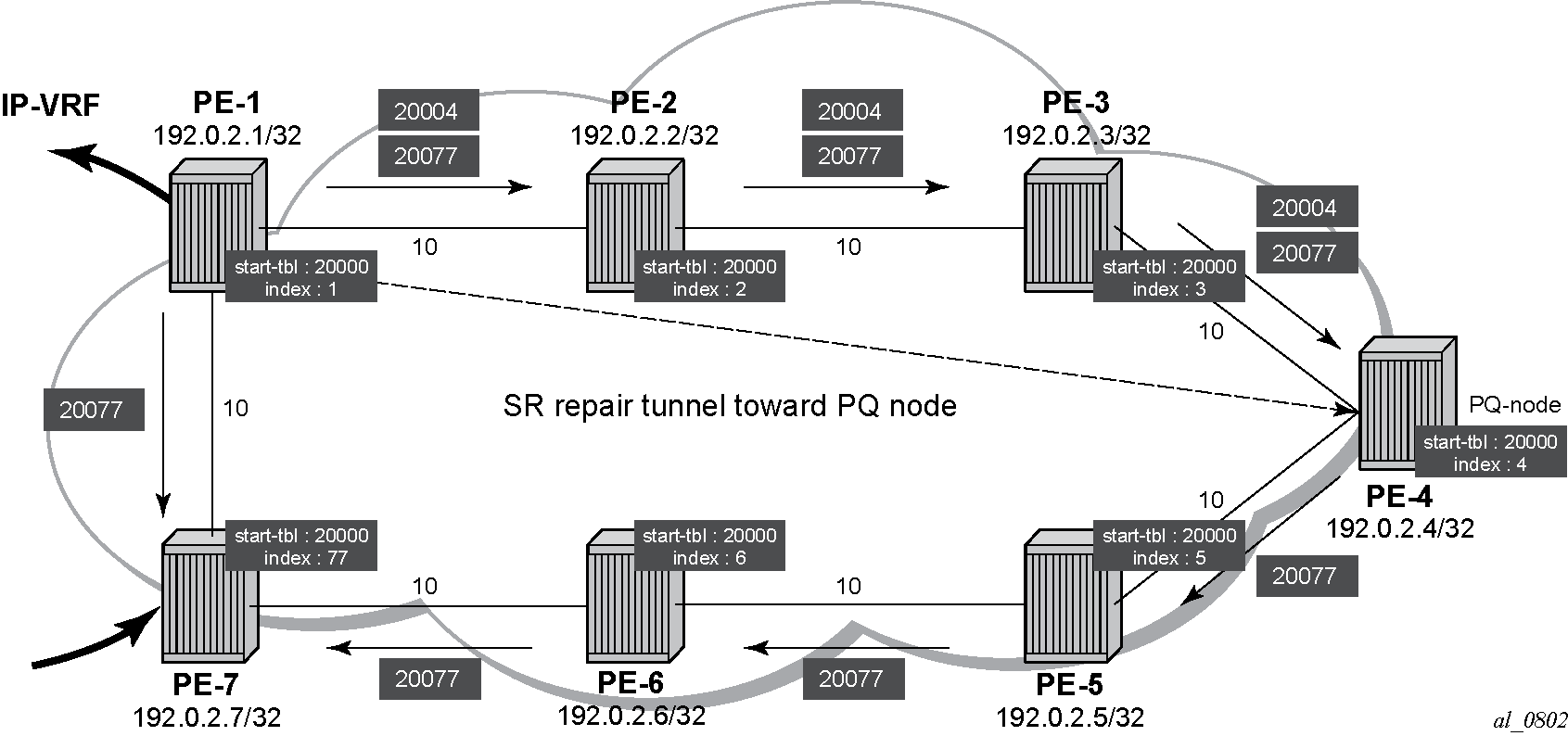
The main difference between normal prefix LFA and RLFA is that for RLFA a two-MPLS label stack is pushed by the head-end node (PE-1). The top label is the SR-label to reach the PQ node (for example, 20004 for the PQ node PE-4) and the bottom label is the SR-label to reach the destination node (for example, 20077 for destination node PE-7). The notation inside the show command output is [ bottom-label, top-label. ].
RLFA traffic path during protection illustrates the RLFA traffic path protecting the link between PE-1 and PE-7 for traffic from PE-1 to PE-7:
Configuration with SR and LDP, without LFA and RLFA
To show the impact of protocol preference within TTM, configure LDP on PE-1 and PE-7, next to SR. This can be useful in case of migration scenarios from a non-SR environment toward a hybrid environment having LDP and SR enabled.
In the following, disable LFA and RLFA (to simplify the scenario):
# on all PEs:
enter candidate
    network-instance default protocols {
            isis {
                instance 0 {
                    loopfree-alternate {
                        remote-lfa {
                            admin-state disable
                            node-protect {
                                admin-state disable
                            }
                        }
                        admin-state disable
                        augment-route-table false
                    }
Define a dedicated dynamic MPLS label range for LDP on all PEs:
# on all PEs:
enter candidate
    system mpls label-ranges {
                dynamic dynamic-ldp {
                    start-label 10000
                    end-label 10099
                }
Assign the MPLS label range for LDP to the LDP dynamic label block and configure LDP discovery of interfaces on all PEs.
# on all PEs:
enter candidate
    network-instance default protocols {
            ldp {
                admin-state enable
                dynamic-label-block dynamic-ldp
                discovery {
                    interfaces {
                        interface ethernet-1/1.1 {
                            ipv4 {
                                admin-state enable
                            }
                        }
                        interface ethernet-1/2.1 {
                            ipv4 {
                                admin-state enable
                            }
                        }
                    }
                }
By enabling LDP, the MPLS label mapping includes entries for LDP, with labels from dynamic-ldp.
A:admin@PE-1# show / network-instance default route-table mpls
+---------+-----------+-------------+-----------------+------------------------+----------------------+------------------+
| Label   | Operation | Type        | Next Net-Inst   | Next-hop IP (Type)     | Next-hop             | Next-hop MPLS    |
|         |           |             |                 |                        | Subinterface         | labels           |
+=========+===========+=============+=================+========================+======================+==================+
| 10000   | POP       | ldp         | default         |                        |                      |                  |
| 10001   | SWAP      | ldp         | N/A             | 192.168.12.2 (mpls)    | ethernet-1/1.1       | 10000            |
| 10002   | SWAP      | ldp         | N/A             | 192.168.12.2 (mpls)    | ethernet-1/1.1       | 10002            |
| 10003   | SWAP      | ldp         | N/A             | 192.168.12.2 (mpls)    | ethernet-1/1.1       | 10003            |
| 10004   | SWAP      | ldp         | N/A             | 192.168.17.2 (mpls)    | ethernet-1/2.1       | 10004            |
| 10005   | SWAP      | ldp         | N/A             | 192.168.17.2 (mpls)    | ethernet-1/2.1       | 10000            |
| 10006   | SWAP      | ldp         | N/A             | 192.168.17.2 (mpls)    | ethernet-1/2.1       | 10001            |
| 20001   | POP       | sr-mpls     | default         |                        |                      |                  |
| 20002   | SWAP      | sr-mpls     | N/A             | 192.168.12.2 (mpls)    | ethernet-1/1.1       | 20002            |
| 20003   | SWAP      | sr-mpls     | N/A             | 192.168.12.2 (mpls)    | ethernet-1/1.1       | 20003            |
| 20004   | SWAP      | sr-mpls     | N/A             | 192.168.12.2 (mpls)    | ethernet-1/1.1       | 20004            |
| 20005   | SWAP      | sr-mpls     | N/A             | 192.168.17.2 (mpls)    | ethernet-1/2.1       | 20005            |
| 20006   | SWAP      | sr-mpls     | N/A             | 192.168.17.2 (mpls)    | ethernet-1/2.1       | 20006            |
| 20077   | SWAP      | sr-mpls     | N/A             | 192.168.17.2 (mpls)    | ethernet-1/2.1       | 20077            |
| 30000   | SWAP      | sr-mpls     | N/A             | 192.168.12.2 (mpls)    | ethernet-1/1.1       | IMPLICIT_NULL    |
| 30001   | SWAP      | sr-mpls     | N/A             | 192.168.17.2 (mpls)    | ethernet-1/2.1       | IMPLICIT_NULL    |
| 40000   |           | network-    | IP-VRF          |                        |                      |                  |
|         |           | instance    |                 |                        |                      |                  |
+---------+-----------+-------------+-----------------+------------------------+----------------------+------------------+
Also the TTM changes. With IP-VRF between PE-1 and PE-7 as an example, only those two specific network instance endpoints are displayed.
An LDP LSP and an SR shortest path tunnel (using IS-IS) are present and active for the same destination.
A:admin@PE-1# show / network-instance default tunnel-table ipv4 192.0.2.7/32
-------------------------------------------------------------------------------------------------------------------------------------------------------
IPv4 tunnel table of network-instance "default"
-------------------------------------------------------------------------------------------------------------------------------------------------------
+--------------+--------------+--------------+--------------+--------------+--------------+--------------+--------------+--------------+--------------+
| IPv4 Prefix  | Tunnel Type  |  Tunnel ID   |     FIB      |    Metric    |  Preference  | Last Update  |    Backup    |   Next-hop   |   Next-hop   |
|              |              |              |              |              |              |              |   Nexthops   |    (Type)    |              |
+==============+==============+==============+==============+==============+==============+==============+==============+==============+==============+
| 192.0.2.7/32 | ldp          | 65540        | Y            | 10           | 9            | 2025-12-     |              | 192.168.17.2 | ethernet-    |
|              |              |              |              |              |              | 16T17:41:02. |              | (mpls)       | 1/2.1        |
|              |              |              |              |              |              | 260Z         |              |              |              |
| 192.0.2.7/32 | sr-isis      | 20077        | Y            | 10           | 11           | 2025-12-     |              | 192.168.17.2 | ethernet-    |
|              |              |              |              |              |              | 16T17:33:28. |              | (mpls)       | 1/2.1        |
|              |              |              |              |              |              | 195Z         |              |              |              |
+--------------+--------------+--------------+--------------+--------------+--------------+--------------+--------------+--------------+--------------+
-------------------------------------------------------------------------------------------------------------------------------------------------------
1 LDP tunnels, 1 active, 0 inactive
1 SR-ISIS tunnels, 1 active, 0 inactive
-------------------------------------------------------------------------------------------------------------------------------------------------------A:admin@PE-7# show / network-instance default tunnel-table ipv4 192.0.2.1/32
-------------------------------------------------------------------------------------------------------------------------------------------------------
IPv4 tunnel table of network-instance "default"
-------------------------------------------------------------------------------------------------------------------------------------------------------
+--------------+--------------+--------------+--------------+--------------+--------------+--------------+--------------+--------------+--------------+
| IPv4 Prefix | Tunnel Type | Tunnel ID | FIB | Metric | Preference | Last Update | Backup | Next-hop | Next-hop |
| | | | | | | | Nexthops | (Type) | |
+==============+==============+==============+==============+==============+==============+==============+==============+==============+==============+
| 192.0.2.1/32 | ldp | 65540 | Y | 10 | 9 | 2025-12- | | 192.168.17.1 | ethernet- |
| | | | | | | 16T17:41:02. | | (mpls) | 1/1.1 |
| | | | | | | 659Z | | | |
| 192.0.2.1/32 | sr-isis | 20001 | Y | 10 | 11 | 2025-12- | | 192.168.17.1 | ethernet- |
| | | | | | | 16T17:33:36. | | (mpls) | 1/1.1 |
| | | | | | | 602Z | | | |
+--------------+--------------+--------------+--------------+--------------+--------------+--------------+--------------+--------------+--------------+
-------------------------------------------------------------------------------------------------------------------------------------------------------
1 LDP tunnels, 1 active, 0 inactive
1 SR-ISIS tunnels, 1 active, 0 inactive
-------------------------------------------------------------------------------------------------------------------------------------------------------The LDP LSP is preferred by default (lower preference value), but as long as the allowed-tunnel-types does not include ldp, it is not chosen.
A:admin@PE-1# show / network-instance IP-VRF route-table ipv4-unicast prefix 10.10.7.1/32 detail
-------------------------------------------------------------------------------------------------------------------------------------------------------
IPv4 unicast route table of network instance IP-VRF
-------------------------------------------------------------------------------------------------------------------------------------------------------
Destination            : 10.10.7.1/32
ID                     : 0
Route Type             : bgp-ipvpn
Route Owner            : bgp_ipvpn_mgr
Origin Network Instance: IP-VRF
Metric                 : 10
Preference             : 170
Active                 : true
Last change            : 2025-12-16T17:05:06.303Z
Resilient hash         : false
-------------------------------------------------------------------------------------------------------------------------------------------------------
Next hops: 1 entries
192.0.2.7 (indirect) resolved by tunnel to 192.0.2.7/32 (sr-isis/tunnel-id: 20077)
Backup Next hops: 0 entries
---snip---A:admin@PE-1# show / network-instance IP-VRF ipv4 route all
=======================================================================================================================================================
IPv4-unicast route table for ip-vrf network-instance: IP-VRF
-------------------------------------------------------------------------------------------------------------------------------------------------------
---snip---
-------------------------------------------------------------------------------------------------------------------------------------------------------
Prefix Route Type Metric Pref Flags Next-Hop(s)
-------------------------------------------------------------------------------------------------------------------------------------------------------
10.10.7.1/32 bgp-ipvpn 10 170 > 192.0.2.7(tunnel:sr-isis, label:40000)A:admin@PE-7# show / network-instance IP-VRF route-table ipv4-unicast prefix 10.10.1.1/32 detail
-------------------------------------------------------------------------------------------------------------------------------------------------------
IPv4 unicast route table of network instance IP-VRF
-------------------------------------------------------------------------------------------------------------------------------------------------------
Destination : 10.10.1.1/32
ID : 0
Route Type : bgp-ipvpn
Route Owner : bgp_ipvpn_mgr
Origin Network Instance: IP-VRF
Metric : 10
Preference : 170
Active : true
Last change : 2025-12-16T17:05:07.395Z
Resilient hash : false
-------------------------------------------------------------------------------------------------------------------------------------------------------
Next hops: 1 entries
192.0.2.1 (indirect) resolved by tunnel to 192.0.2.1/32 (sr-isis/tunnel-id: 20001)
Backup Next hops: 0 entries
---snip---A:admin@PE-7# show / network-instance IP-VRF ipv4 route all
=======================================================================================================================================================
IPv4-unicast route table for ip-vrf network-instance: IP-VRF
-------------------------------------------------------------------------------------------------------------------------------------------------------
---snip---
-------------------------------------------------------------------------------------------------------------------------------------------------------
Prefix Route Type Metric Pref Flags Next-Hop(s)
-------------------------------------------------------------------------------------------------------------------------------------------------------
10.10.1.1/32 bgp-ipvpn 10 170 > 192.0.2.1(tunnel:sr-isis, label:40000)The LDP LSP is chosen, when allowed-tunnel-types also includes ldp. Because this is an IP VRF specific parameter, the operator has the choice to only configure this on one specific IP VRF endpoint. From a migration point of view, a smooth and easy SR migration is possible, not affecting any other deployed network instances on this node.
# only on PE-7:
enter candidate
    network-instance IP-VRF protocols bgp-ipvpn bgp-instance 1 mpls {
                        next-hop-resolution {
                            allowed-tunnel-types [
                                sr-isis
                                ldp
                            ]
Because the change is only configured within IP-VRF on PE-7, only the direction from PE-7 to PE-1 is affected. IP-VRF on node PE-7 now uses the LDP LSP to reach node PE-1. IP-VRF on node PE-1 still uses the SR IS-IS tunnel to reach node PE-7.
A:admin@PE-7# show / network-instance IP-VRF route-table ipv4-unicast prefix 10.10.1.1/32 detail
-------------------------------------------------------------------------------------------------------------------------------------------------------
IPv4 unicast route table of network instance IP-VRF
-------------------------------------------------------------------------------------------------------------------------------------------------------
Destination            : 10.10.1.1/32
ID                     : 0
Route Type             : bgp-ipvpn
Route Owner            : bgp_ipvpn_mgr
Origin Network Instance: IP-VRF
Metric                 : 10
Preference             : 170
Active                 : true
Last change            : 2025-12-16T18:01:06.327Z
Resilient hash         : false
-------------------------------------------------------------------------------------------------------------------------------------------------------
Next hops: 1 entries
192.0.2.1 (indirect) resolved by tunnel to 192.0.2.1/32 (ldp/tunnel-id: 65540)
Backup Next hops: 0 entriesA:admin@PE-7# show / network-instance IP-VRF ipv4 route all
=======================================================================================================================================================
IPv4-unicast route table for ip-vrf network-instance: IP-VRF
-------------------------------------------------------------------------------------------------------------------------------------------------------
---snip---
-------------------------------------------------------------------------------------------------------------------------------------------------------
Prefix Route Type Metric Pref Flags Next-Hop(s)
-------------------------------------------------------------------------------------------------------------------------------------------------------
10.10.1.1/32 bgp-ipvpn 10 170 > 192.0.2.1(tunnel:ldp, label:40000)Conclusion
SR is a technique using extensions of the existing link state protocols, and using existing MPLS or IPv6 infrastructure as the data plane. It is a source routing technique without the need to run an extra signaling protocol. SR also avoids other scaling restrictions, such as midpoint state. SR is simple to control and operate because the intelligence and state are part of the packet, not held by the network. Other benefits are that SR can be introduced in an incremental way using different migration scenarios to assure a smooth transition.